LLMAI parameterstemperatureTop-PTop-Kstop sequencesfrequency penaltypresence penaltyAI engineeringlanguage models
General
The 6 LLM Parameters That Actually Control What Your AI Says
TL;DR Temperature, Top-P, Top-K, Stop Sequences, Frequency Penalty, Presence Penalty — these aren't optional knobs. They're the difference between an AI that rambles and one that performs like a precision instrument. Master them here with real code, real analogies, and an interactive playground.
Read this article as text (accessible version)
LLM Engineering Deep Dive
The 6 LLM Parameters That Actually Control What Your AI Says
📅 June 2025 ⏱ ~20 min read 🎯 3,600+ wordsYou've called the API. You got an output. But it's either too robotic, too random, too repetitive, or it won't stop talking. The fix isn't a better prompt — it's understanding the six parameters that sit between your prompt and the model's output. This guide covers all of them, deeply.
Temperature Top-P Top-K Stop Sequences Frequency Penalty Presence Penalty Post ExcerptTemperature, Top-P, Top-K, Stop Sequences, Frequency Penalty, Presence Penalty — these aren't optional knobs. They're the difference between an AI that rambles and one that performs like a precision instrument. Master them here with real code, real analogies, and an interactive playground.
IntroductionWhy Parameters Matter More Than Prompts
Picture this: you've spent two hours crafting the perfect system prompt. It's detailed, structured, and full of examples. You hit send, and the model spits back something technically correct but completely off — either a one-word answer when you needed three paragraphs, or a creative novella when you asked for a customer service reply. You tweak the prompt again. And again. Sound familiar?
Here's the thing most tutorials miss: prompts tell the model what to do. Parameters control how it thinks. The probability distribution over the model's entire vocabulary gets filtered, weighted, and trimmed by six specific numbers before a single token is chosen. Miss those numbers, and no prompt will save you.
LLMs are, at their core, probability machines. For every position in the output, the model produces a giant vector of probabilities — one per token in its vocabulary (often 50,000+ tokens). Before any token gets selected, these six parameters reshape that probability distribution. Temperature flattens or sharpens it. Top-P and Top-K trim it. Frequency and Presence penalties dent it. Stop sequences abort it entirely. That's the whole game.
Counterintuitive InsightMore temperature ≠ more intelligent. A common mistake: developers crank up temperature thinking it makes the model "think harder." It doesn't. Higher temperature just means the model is more willing to pick lower-probability tokens — which can mean creativity, but also hallucination, incoherence, and factual errors. Intelligence is baked into the weights at training time. Temperature only affects sampling randomness.
TemperatureTemperature — Randomness on a Dial
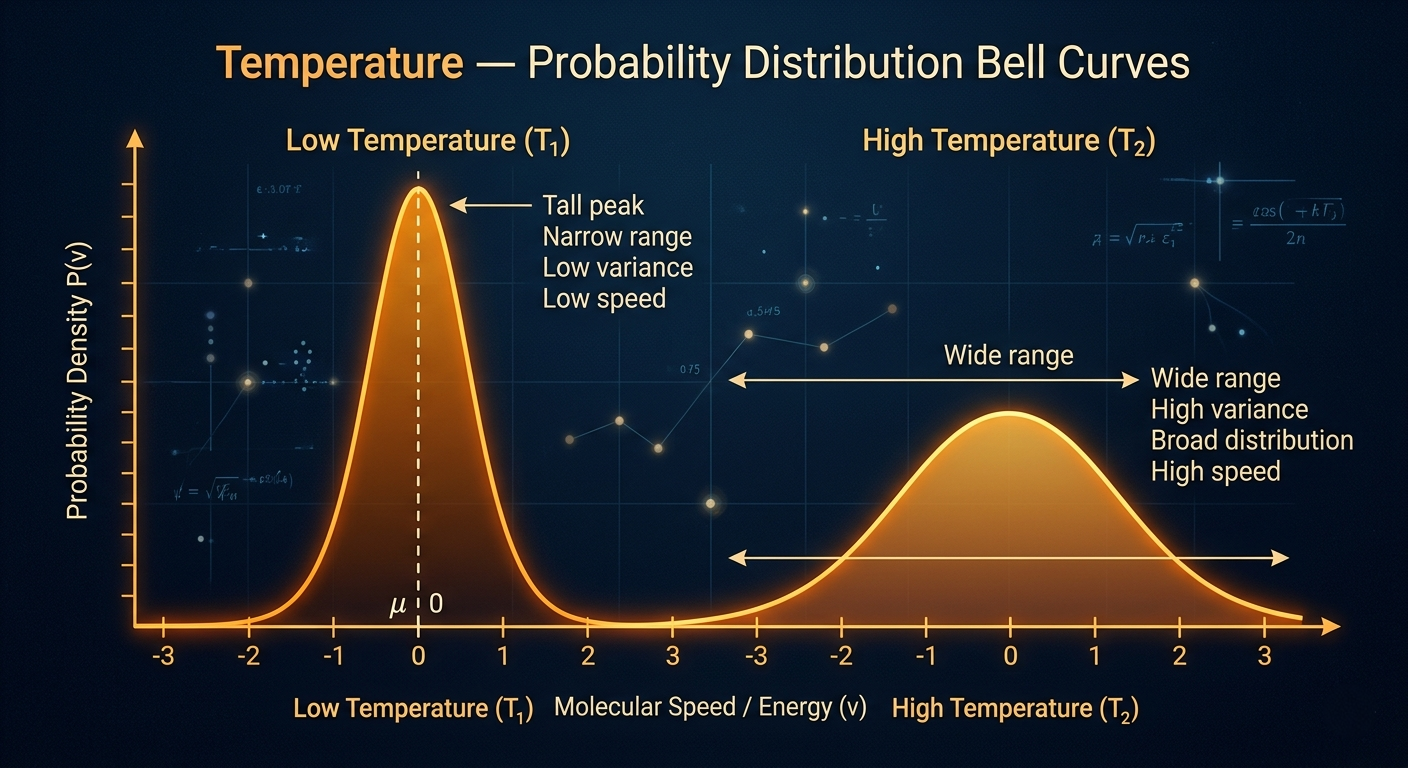
Temperature is the most-discussed LLM parameter for good reason: it's intuitive, powerful, and wildly misunderstood. The parameter typically ranges from 0 to 2, though most production use-cases stay between 0 and 1. At its technical core, temperature is a divisor applied to the model's raw logits (the pre-softmax scores) before the probability distribution is computed. A lower temperature amplifies the differences between scores, making high-probability tokens even more dominant. A higher temperature compresses the differences, giving lower-probability tokens a fighting chance.
At temperature = 0, you're asking the model to always pick the single most probable token — deterministic, predictable, zero creative wiggle room. At temperature = 1, you're sampling directly from the model's raw distribution. Above 1.0, you're actively flattening the distribution to inject randomness beyond what the training data would suggest. For most production agents, the sweet spot is 0.1–0.3 for reliability, 0.7–1.0 for creativity.
Real-World AnalogyImagine a drive-thru ordering agent. "The customer said large fries" should always produce "Added large fries to your order" — not "Certainly! I've joyfully registered your magnificent fry selection." That's temperature near zero. Now imagine a lyric-writing assistant — you want it to surprise you, pick unexpected metaphors, break from cliché. That's temperature near 1. Same model, same weights, completely different behavior.
import anthropic

client = anthropic.Anthropic()

# Low temperature — consistent, predictable (customer service bot)
response_precise = client.messages.create(
 model="claude-opus-4-6",
 max_tokens=256,
 temperature=0.1, # near-deterministic
 messages=[{"role": "user", "content": "What are your store hours?"}]
)

# High temperature — varied, creative (poem generator)
response_creative = client.messages.create(
 model="claude-opus-4-6",
 max_tokens=512,
 temperature=0.9, # embrace variation
 messages=[{"role": "user", "content": "Write a poem about autumn rain"}]
)- Never use temperature = 0 with structured output like JSON — the model may refuse to include optional fields it deems "less likely." Use 0.1–0.2 instead for a tiny bit of flex while staying consistent.
- Temperature interacts with Top-P. If you set both, one will dominate. OpenAI recommends altering only one at a time; Anthropic applies them sequentially (temperature first, then Top-P filters the result).
- For RAG (Retrieval-Augmented Generation) pipelines where the model is reading retrieved documents, keep temperature ≤ 0.3 — you want it to stay faithful to source material, not improvise.
- Temperature above 1.2 usually produces degraded output for most instruction-tuned models. Reserve it for experimental or artistic use cases only.
Top-P — The Probability Pool
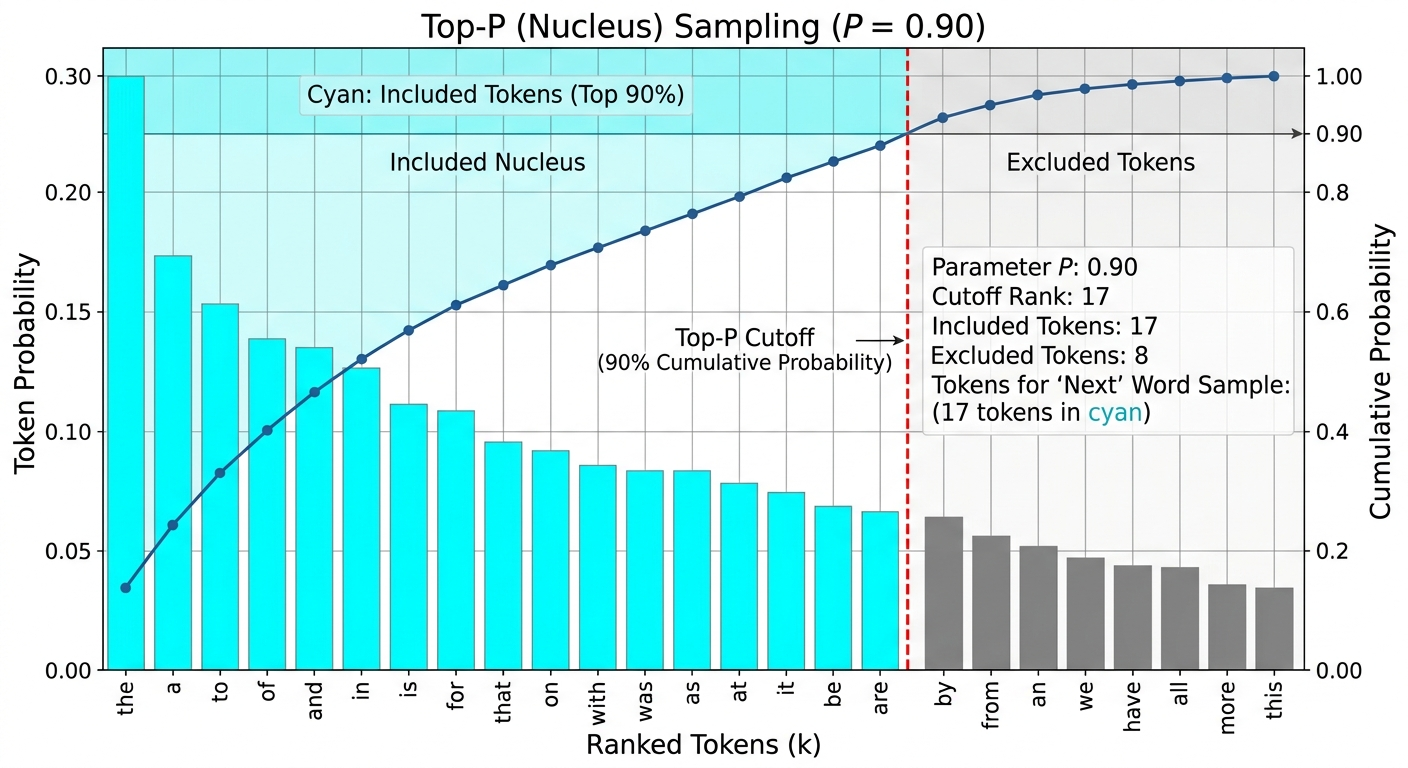
Top-P, also called Nucleus Sampling, takes a more elegant approach than its cousin Top-K. Instead of asking "how many tokens should I consider?", it asks "what's the smallest set of tokens whose combined probability exceeds P?" If P = 0.9, the model builds a shortlist by walking down the ranked token list — most probable first — until the running total hits 90%. It then samples exclusively from that shortlist.
Why is this smarter than Top-K? Because probability distributions are context-dependent. When continuing "The dog sat on the…", maybe only 5 tokens (mat, floor, couch, grass, chair) account for 90% of probability — Top-P naturally constrains to those. But when continuing "She felt a strange sense of…", hundreds of semantically valid continuations exist, and Top-P expands to include them. Top-K would apply the same hard number in both cases, either over-constraining the first scenario or under-constraining the second.
Real-World AnalogyThink of Top-P as a restaurant menu that adjusts based on how many good options exist. If you ask for "a great Italian dish" at a specialized trattoria, the nucleus is small — three or four standout options. If you ask at a global fusion restaurant, the nucleus expands. Same threshold (90% of what's good), different pool size. Top-K would just say "give me 10 options" regardless of whether the 10th option is excellent or garbage.
# Top-P = 0.9 — safe default, good for most tasks
response = client.messages.create(
 model="claude-opus-4-6",
 max_tokens=400,
 temperature=1.0,
 top_p=0.9, # only sample from top 90% probability mass
 messages=[{"role": "user", "content": "Continue this story: The lighthouse keeper"}]
)

# Top-P = 0.5 — conservative, higher quality tokens only
response_tight = client.messages.create(
 model="claude-opus-4-6",
 max_tokens=400,
 top_p=0.5, # very focused nucleus — only highest-confidence tokens
 messages=[{"role": "user", "content": "Summarize this legal document"}]
)- The industry default of Top-P = 1.0 effectively disables nucleus sampling (all tokens are eligible). This is fine when Temperature alone is doing the work, but using both Top-P < 1.0 and Temperature < 1.0 simultaneously creates compounding constraints — usually unnecessary.
- For code generation, try Top-P = 0.95 with Temperature = 0.2. You want correctness (low temp) but still allow syntactically valid alternatives that the model might prefer over your literal intent.
- Top-P is more forgiving than Top-K in adversarial prompts — because the nucleus adjusts to context, it's harder for a prompt to game the sampling into picking unusual tokens.
Top-K — The Hard Token Cutoff
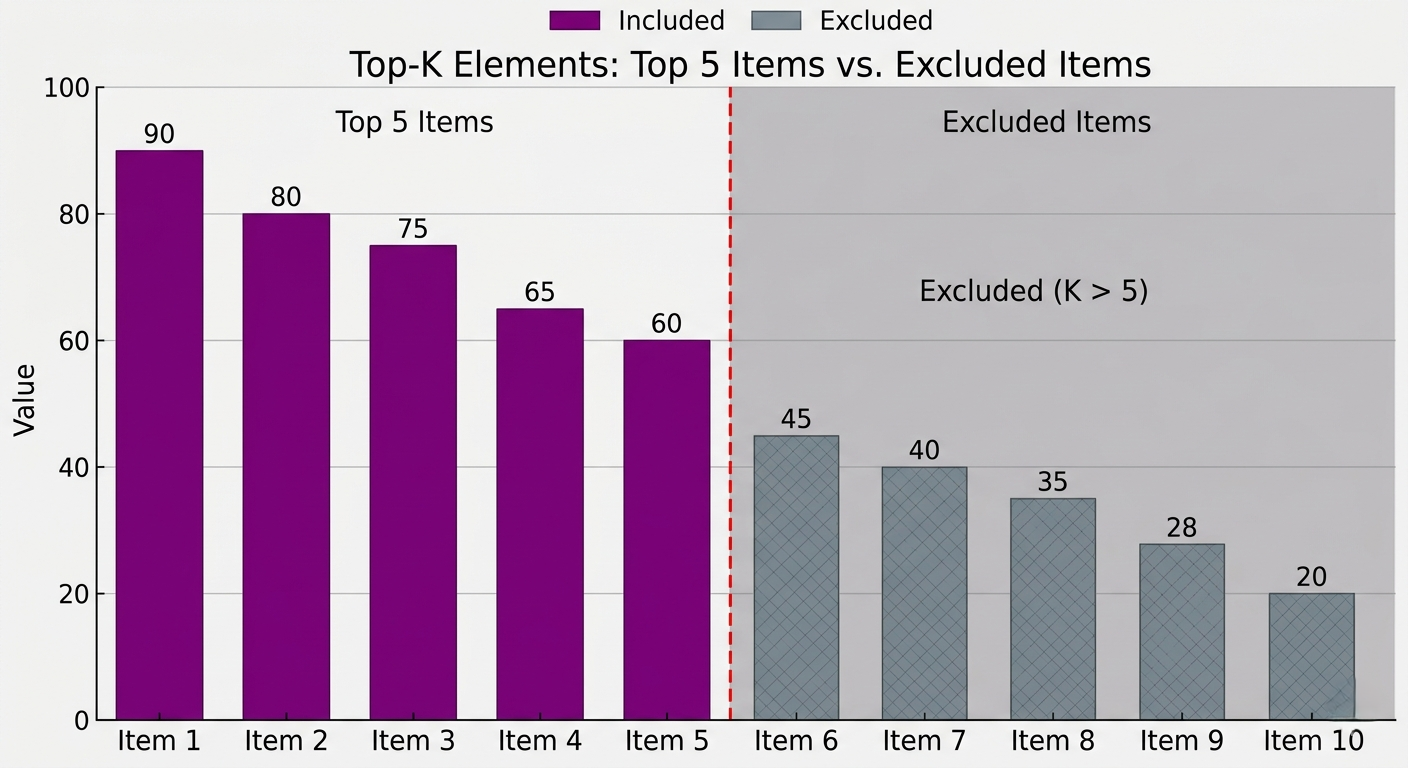
Top-K is the blunter tool of the sampling family. Set Top-K = 40, and the model considers only the 40 most probable tokens at each step — regardless of whether number 40 has a 15% probability or a 0.001% probability. The rest of the vocabulary is zeroed out completely. It's a hard wall, not a soft threshold. This makes it faster to compute and easier to reason about, which is why it remains popular in production environments even as Top-P has largely superseded it for quality.
The counterintuitive failure mode of Top-K: at very low values (K = 5 or 10), you get repetitive and predictable text — not because the model is being careful, but because you've removed the diversity that makes language feel natural. At very high values (K = 500+), Top-K becomes essentially ineffective since you're including tokens with negligible probability. The sweet spot is typically K = 40–80 for general use, though many practitioners find Top-P alone performs better across diverse tasks.
# Top-K with OpenAI-compatible API
import openai

response = openai.chat.completions.create(
 model="gpt-4o",
 messages=[{"role": "user", "content": "Write a product description"}],
 # Note: OpenAI doesn't expose Top-K directly
 # Use Hugging Face / local models for Top-K control
)

# Hugging Face Transformers — full control
from transformers import pipeline

gen = pipeline("text-generation", model="mistralai/Mistral-7B-Instruct-v0.2")
output = gen(
 "The future of AI is",
 max_new_tokens=100,
 do_sample=True,
 top_k=50, # consider only top 50 tokens
 top_p=0.92, # can stack with top_p
 temperature=0.8
)- If you're using a hosted API (OpenAI, Anthropic, Google), Top-K may not be exposed. Don't assume it's configured — the provider usually handles sampling defaults internally.
- When stacking Top-K and Top-P, Top-K acts as a first filter, then Top-P further trims the remaining candidates. The effective sampling pool is intersection of both constraints.
- Top-K = 1 is equivalent to greedy decoding (always pick the highest probability token). Use this for benchmark comparisons — it gives you the most "honest" look at what the model actually believes is most likely.
Stop Sequences — Teaching Your Model When to Stop Talking
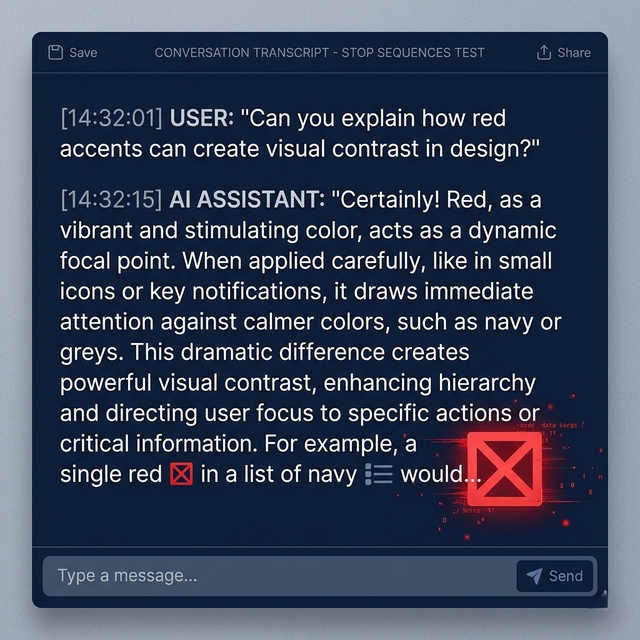
LLMs don't have an inherent sense of "done." Left to their own devices, they'll continue generating tokens until they hit max_tokens, sometimes producing beautifully structured output, sometimes drifting into nonsense, and sometimes — critically for agents — inventing the other side of a conversation. Stop sequences are the circuit breaker. You define one or more string patterns, and generation halts the moment any of them appear.
This is essential for structured output and conversation control. Building a chat agent where the model plays the role of a support rep? You'd set "\nCustomer:" as a stop sequence. The model generates the agent's response and the instant it starts to write what the customer would say next (which it will, given enough rope), generation cuts off cleanly. You're not hoping the model knows to stop — you're enforcing it programmatically.
Think of stop sequences like the director yelling "cut!" on a film set. The actor (the model) knows their lines and could improvise indefinitely. But the director defines exactly where the scene ends. Without a cut, you'd get beautiful improv that runs three hours over schedule and blows your budget. Stop sequences are how you get the exact scene length you need, consistently, every take.
# Stop sequence for a customer service agent
response = client.messages.create(
 model="claude-opus-4-6",
 max_tokens=512,
 stop_sequences=["\nCustomer:", "\nUser:", "###"],
 system="You are a support agent. Respond only as Agent:",
 messages=[{
 "role": "user",
 "content": "Agent: Hello! How can I help you today?\nCustomer: My order is late."
 }]
)

# Stop on JSON completion
response_json = client.messages.create(
 model="claude-opus-4-6",
 max_tokens=1024,
 stop_sequences=["}"], # stop after closing brace (careful — use wisely)
 messages=[{"role": "user", "content": 'Output a JSON object: {"name": ...'}]
)- Stop sequences consume tokens but aren't included in the output. The model generates up to and including the stop token, but the API strips it. Account for this if you're reconstructing conversation history.
- Using a common word as a stop sequence (like "the" or "and") will break your output at unpredictable points. Always use unique boundary markers like
"\n\n###", role labels, or XML-style tags. - For structured data generation (JSON, YAML, XML), stop sequences are significantly more reliable than instructing the model to "stop after the JSON." Instruction-following is probabilistic; stop sequences are deterministic.
- You can stack up to 4 stop sequences in most APIs. Use this to catch multiple valid conversation boundaries without needing multiple API calls.
Frequency Penalty — The Repetition Tax
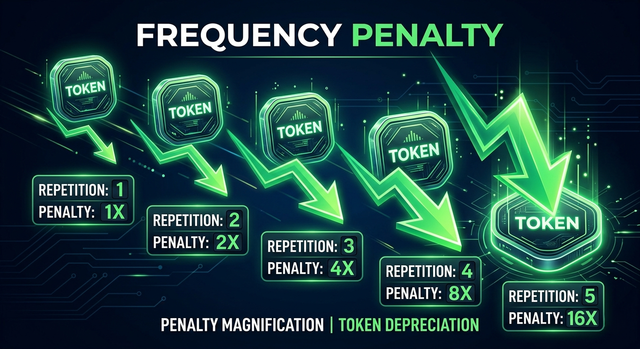
If you've ever asked an LLM to write a long-form article and noticed it using the phrase "it's worth noting" seventeen times, you've encountered the repetition problem. Models trained on human text learn that certain phrases are common — and they overuse them proportionally. The Frequency Penalty is a taxation system: every time a token appears in the output so far, its probability gets reduced by a fixed amount (typically the penalty value × the token's count). The more a token repeats, the more heavily it's penalized on subsequent selections.
This is proportional penalization, which means the first occurrence is free, the second occurrence pays a small tax, the third occurrence pays more. Values typically range from 0 to 2. A value of 0.3–0.6 noticeably reduces repetition without making the output feel artificially varied. Values above 1.0 can cause the model to avoid important domain-specific terms that genuinely need repeating (like a product name in a marketing brief).
# OpenAI — frequency_penalty for long-form content
response = openai.chat.completions.create(
 model="gpt-4o",
 messages=[{"role": "user", "content": "Write a 500-word blog intro about machine learning"}],
 max_tokens=600,
 frequency_penalty=0.4, # reduce phrase repetition
 presence_penalty=0.0 # no presence penalty here
)

# High frequency_penalty use case: diverse vocabulary for marketing copy
response_rich = openai.chat.completions.create(
 model="gpt-4o",
 messages=[{"role": "user", "content": "Write 5 unique taglines for a coffee brand"}],
 max_tokens=200,
 frequency_penalty=0.8 # strongly discourage word reuse
)- Frequency Penalty ≠ Presence Penalty. Frequency scales with count (the more times a word appears, the more it's penalized). Presence is binary (appeared at all = penalized). They solve different problems.
- For technical documentation or code generation, keep frequency_penalty at 0. You want the model to repeat class names, function names, and variable names consistently — that's not a bug, it's correctness.
- Combine frequency_penalty = 0.3 with temperature = 0.7 for newsletter-style content — you get natural variety without incoherence.
Presence Penalty — Forcing Vocabulary Breadth
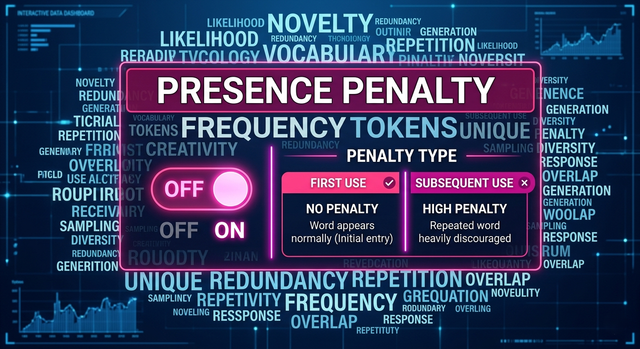
Presence Penalty is the binary twin of Frequency Penalty. While Frequency Penalty scales its punishment based on how many times a token has appeared, Presence Penalty applies a flat tax to any token that has appeared at least once — regardless of whether it appeared one time or twenty. The result is a model that actively explores new vocabulary rather than doubling down on words it's already used.
Think of it as the difference between a tax system and a ban. Frequency Penalty taxes each additional use at an increasing rate. Presence Penalty just says "you used that word — it's now slightly less attractive for the rest of this generation." In practice, Presence Penalty tends to produce outputs with broader topic coverage and more diverse word choices — useful for brainstorming, ideation, or generating content that should feel fresh across multiple sections. Combined with a moderate Frequency Penalty, you get both reduced repetition and increased novelty.
# Presence penalty for brainstorming — maximum topic diversity
response = openai.chat.completions.create(
 model="gpt-4o",
 messages=[{
 "role": "user",
 "content": "List 15 unique business ideas in the health tech space"
 }],
 max_tokens=800,
 frequency_penalty=0.3, # reduce phrase repetition
 presence_penalty=0.6 # push toward new concepts each sentence
)

# Zero both for highly constrained/legal text
response_legal = openai.chat.completions.create(
 model="gpt-4o",
 messages=[{"role": "user", "content": "Draft a Terms of Service clause"}],
 max_tokens=400,
 frequency_penalty=0.0, # legal text needs precise repetition
 presence_penalty=0.0
)- Don't use high Presence Penalty for factual Q&A. If the user asks "what is photosynthesis," the model needs to repeat "chlorophyll" and "light" multiple times for a coherent explanation. Binary discouragement here breaks coherence.
- Presence Penalty is particularly effective for multi-section long-form content — think blog posts, reports, or story outlines — where you want each section to feel distinct from the last.
- Values above 1.0 for Presence Penalty can cause the model to avoid even important pronouns and conjunctions, producing strangely stilted text. Stay in the 0.1–0.8 range for natural output.
How They All Connect — The Parameter Stack
These six parameters don't operate in isolation. Every time the model selects a token, they all fire in sequence: the raw logits come out of the neural network → Frequency and Presence Penalties adjust the logit scores based on what's already been generated → Temperature scales the adjusted logits → Top-K trims the vocabulary to the top K candidates → Top-P further trims to the nucleus → one token is sampled from the remaining distribution → Stop Sequences check if the output should halt.
This sequential application means parameters can amplify or cancel each other. A high Frequency Penalty with a low Temperature = diverse word choices but very predictable sentence structure. A high Top-P with high Temperature = genuinely random-feeling text with a broad vocabulary. Zero everything except a tight Stop Sequence = the model generates its best guess and you control exactly when it stops. There's no universal "best config" — there's only the right config for your task.
The Config Matrix — What to Use WhenFor a customer service chatbot: Temperature 0.2, Top-P 0.9, Frequency Penalty 0.2, Stop Sequences set to role boundaries. For a code assistant: Temperature 0.1, Top-P 0.95, both penalties at 0. For a creative writing tool: Temperature 0.85, Top-P 0.92, Frequency Penalty 0.4, Presence Penalty 0.3. For a data extraction agent: Temperature 0, Stop Sequences on your schema delimiter, penalties at 0. Context is everything.
Getting StartedGetting Started: Config Templates for Real Use Cases
Rather than theory, here are copy-paste starting configurations you can drop into your projects. Each is annotated with the reasoning behind each choice. Treat them as baselines — measure your output quality, then tune from there.
# ── CONFIG TEMPLATES ──────────────────────────────────────────

CONFIGS = {

 # 1. Customer Support / FAQ Bot
 "support_bot": {
 "temperature": 0.2, # consistent, factual responses
 "top_p": 0.9, # some nucleus flexibility
 "frequency_penalty": 0.3, # avoid filler repetition
 "presence_penalty": 0.0,
 "stop_sequences": ["\nCustomer:", "\nUser:"],
 "max_tokens": 300
 },

 # 2. Creative Writing Assistant
 "creative_writer": {
 "temperature": 0.85,
 "top_p": 0.92,
 "frequency_penalty": 0.45, # varied vocabulary
 "presence_penalty": 0.3, # explore new concepts
 "stop_sequences": [],
 "max_tokens": 1024
 },

 # 3. Code Generation
 "code_gen": {
 "temperature": 0.1, # near-deterministic
 "top_p": 0.95,
 "frequency_penalty": 0.0, # code repeats identifiers — that's correct
 "presence_penalty": 0.0,
 "stop_sequences": ["```"], # stop at code block end
 "max_tokens": 2048
 },

 # 4. Data Extraction Agent
 "data_extractor": {
 "temperature": 0.0, # fully deterministic
 "top_p": 1.0, # irrelevant at temp=0
 "frequency_penalty": 0.0,
 "presence_penalty": 0.0,
 "stop_sequences": ["}", ""],
 "max_tokens": 512
 },

 # 5. Brainstorming / Ideation
 "brainstorm": {
 "temperature": 1.0,
 "top_p": 0.95,
 "frequency_penalty": 0.6,
 "presence_penalty": 0.7, # maximum novelty
 "stop_sequences": [],
 "max_tokens": 600
 }
}

# Usage
def call_model(prompt, config_name="support_bot"):
 cfg = CONFIGS[config_name]
 return openai.chat.completions.create(
 model="gpt-4o",
 messages=[{"role": "user", "content": prompt}],
 **cfg
)Frequently Asked Questions
What is temperature in LLM and how does it affect output? Temperature is a scaling factor applied to the model's raw logit scores before token sampling. Low values (0–0.3) produce consistent, predictable output by amplifying high-probability tokens. High values (0.7–1.0) produce varied, creative output by flattening the distribution and giving low-probability tokens a chance to be selected. Should I use Top-P or Top-K for better LLM output quality? Top-P generally produces better results for natural language tasks because it adapts to context — a small nucleus when continuation is obvious, a larger one when many valid options exist. Top-K applies a rigid cutoff regardless of context. Use Top-P as your default and only reach for Top-K when you need explicit control over vocabulary size (e.g., constrained vocabulary tasks). What's the difference between frequency penalty and presence penalty? Frequency penalty scales with token count — the more times a word appears, the more its probability is reduced on each subsequent occurrence. Presence penalty is binary — any token that has appeared at all gets a flat probability reduction, regardless of how many times. Use frequency penalty to reduce repetitive phrases, presence penalty to encourage broader topic coverage. When should I use stop sequences in my LLM application? Use stop sequences whenever you need deterministic output boundaries: chatbots where the model shouldn't generate the user's turn, structured data generation (JSON, YAML), agent pipelines with specific output delimiters, and any scenario where max_tokens alone doesn't give you clean boundaries. Stop sequences are more reliable than instructing the model to stop because they're enforced at the sampling level, not at the instruction-following level. Can I use all six LLM parameters simultaneously? Yes, and they apply sequentially: penalties modify logits first, then temperature scales them, then Top-K trims the vocabulary, then Top-P selects the nucleus, then sampling occurs, then stop sequences check for termination. However, using all six aggressively can produce conflicting constraints. Most production configs only actively tune 2–3 parameters, leaving the rest at their defaults. What temperature should I use for JSON/structured output from an LLM? Use temperature = 0 for strict structured output where the schema must be exact. If you're using a model with native JSON mode (like GPT-4o with response_format: json_object), you can sometimes go to 0.1–0.2 for slight variation in field values while maintaining structure. Frequency and Presence penalties should both be 0 for structured output to prevent schema tokens from being penalized. Does higher temperature cause more hallucinations? Yes, indirectly. High temperature makes the model more willing to sample lower-probability tokens — tokens that the model assigns low confidence to. Hallucinated facts are often low-probability tokens given the actual training data. This is why factual retrieval tasks (RAG, Q&A, data extraction) should always use low temperature: you want the model's highest-confidence answers, not its creative associations. Are LLM parameters the same across OpenAI, Anthropic, and Google? The concepts are the same but the naming and ranges differ slightly. OpenAI uses frequency_penalty and presence_penalty (range -2 to 2). Anthropic Claude uses temperature and top_p but doesn't expose frequency/presence penalties in its API. Google Gemini exposes temperature, topP, and topK. Always check each provider's API documentation for the exact parameter names, ranges, and defaults for the model version you're using.⚗️ LLM Parameter Lab
Adjust all 6 parameters live. See exactly how each one shapes the AI's output — with real token probability visualization and side-by-side comparisons.
Scenario Preset temp: 0.85 top_p: 0.92 top_k: 50 freq_penalty: 0.45 pres_penalty: 0.30 stop: none 🌡 Temperature Controls randomness. Low = consistent, High = creative. 0.85 0 · Deterministic1 · Balanced2 · Wild ◎ Top-P (Nucleus) Probability mass threshold. Smaller = more focused. 0.92 0.01 · Tight0.5 · Moderate1.0 · All tokens NUCLEUS SIZE ▦ Top-K Hard limit on candidate tokens. 0 = disabled. 50 0 · Off50 · Balanced200 · Open ⊠ Stop Sequences Halt generation on these tokens/patterns. ♻ Frequency Penalty Tax on repeated tokens. Scales with frequency. 0.45 0 · None1 · Strong2 · Max ◈ Presence Penalty Binary tax on any token already used once. 0.30 0 · Off1 · Active2 · Aggressive Simulated Output ⚗️Configure parameters and click Generate
Token Probability Visualization Randomness Vocab Diversity Coherence Creativity Side-by-Side: Low vs High Temperature 🌡 Temperature: 0.1 (Deterministic) Click Generate to populate 🔥 Temperature: 1.0 (Creative) Click Generate to populateWhat these settings will produce
Keep reading
Related articles
 General
How Microchips Are Made: The Complete CPU Fabrication Process Step by Step | Zetsapp
Here's the thing most chip articles miss: the "nm" number in modern process node names (TSMC 3nm, Intel 4nm, Samsung 3nm) does not correspond to any physical dimension on the chip. This was true when Intel's 45nm node launched in 2007 and became increasingly disconnected from reality thereafter. TSMC's "3nm" node has a gate pitch (the distance between gates) of approximately 48nm — not 3nm.
 General
How Hard Disk Drives Work: Inside the Spinning Metal That Still Stores Most of the Internet | Zetsapp
Here's the thing most explainers skip: that internal air isn't just "kept clean," it's engineered. Traditional HDDs are filled with filtered, dry air at roughly atmospheric pressure because the read/write head relies on aerodynamic lift from that specific air density to fly at the correct height — too thin an atmosphere and the head flies too low or crashes; too thick and it flies too high to read reliably.
 General
How GPUs Actually Work: The Nvidia GA102 Architecture Decoded Inside the RTX 3090
GPU acceleration is limited by the fraction of your workload that's actually parallel. Amdahl's Law states: if 90% of a program can be parallelized, the maximum speedup from infinite parallel processors is 10× — not infinite. The 10% sequential bottleneck always limits total speedup. In GPU-accelerated ML training, the actual workload split is typically: 85-95% embarrassingly parallel tensor operations