MCPModel Context ProtocolAI agentsLLM toolsAnthropicPython AIagentic AIMCP serverMCP clientAI integration
General
Model Context Protocol (MCP): The Standard That Finally Lets AI Agents Do Things
TL;DR The Model Context Protocol (MCP) is Anthropic's open standard for connecting AI agents to real tools, databases, and APIs. This end-to-end guide covers MCP architecture, Resources, Tools, Prompts, and walks you through building a production-ready MCP server and client in Python — so your AI agents can finally take real actions in the world.
Read this article as text (accessible version)
AI Agent Architecture — New Standard
Model Context Protocol (MCP): The Standard That Finally Lets AI Agents Do Things
📅 June 2025⏱ ~22 min read🎯 3,800+ wordsYour AI assistant can tell you the best flight from New York to Tokyo. But can it actually book it? Without MCP, the answer is no — it can only generate text about booking. The Model Context Protocol changes that equation permanently. This guide explains how, with full Python code to build your own MCP server and client from scratch.
Resources Tools Prompts MCP Server MCP Client Sampling Post ExcerptThe Model Context Protocol (MCP) is Anthropic's open standard for connecting AI agents to real tools, databases, and APIs. This end-to-end guide covers MCP architecture, Resources, Tools, Prompts, and walks you through building a production-ready MCP server and client in Python — so your AI agents can finally take real actions in the world.
The ProblemThe "Text-Only" Problem — Why Your AI Can't Actually Do Anything
Picture this: a travel company deploys a state-of-the-art AI assistant powered by one of the best models available. The assistant can describe flights in beautiful detail. It knows airline codes, layover patterns, baggage policies, and the relative merits of window versus aisle seats. A customer asks it to book a flight from London to Singapore for next Tuesday. The model produces a flawless, detailed response explaining exactly how one would go about booking that flight. But it doesn't book the flight. It cannot. It's a very sophisticated text generator — and that's all.
This isn't a model intelligence problem. It's an integration problem. LLMs live in a bubble of text. They read input, generate output, and have zero native ability to call APIs, query databases, write to filesystems, or interact with external services. Every attempt to bridge this gap before MCP was bespoke: custom function calling schemas hand-crafted for each LLM provider, ad-hoc tool integration code that breaks when either the model API or the tool API updates, and zero portability between different AI applications. You'd build a Slack integration for Claude, then rebuild the same integration differently for GPT-4, then again for Gemini. It was the early days of web APIs all over again — everyone reinventing the same wheel.
The Counterintuitive Truth About AI AgentsThe limiting factor for most AI agents isn't intelligence — it's plumbing. Given a capable LLM, the hard part isn't making it reason about what to do. The hard part is securely connecting it to the systems where the action actually needs to happen. MCP is essentially a standardized plumbing protocol — like HTTP is for web communication, MCP is for AI-to-tool communication. The intelligence was always there. The standard pipe was missing.
Why MCP ExistsWhy MCP Exists — The USB-C Moment for AI Agents
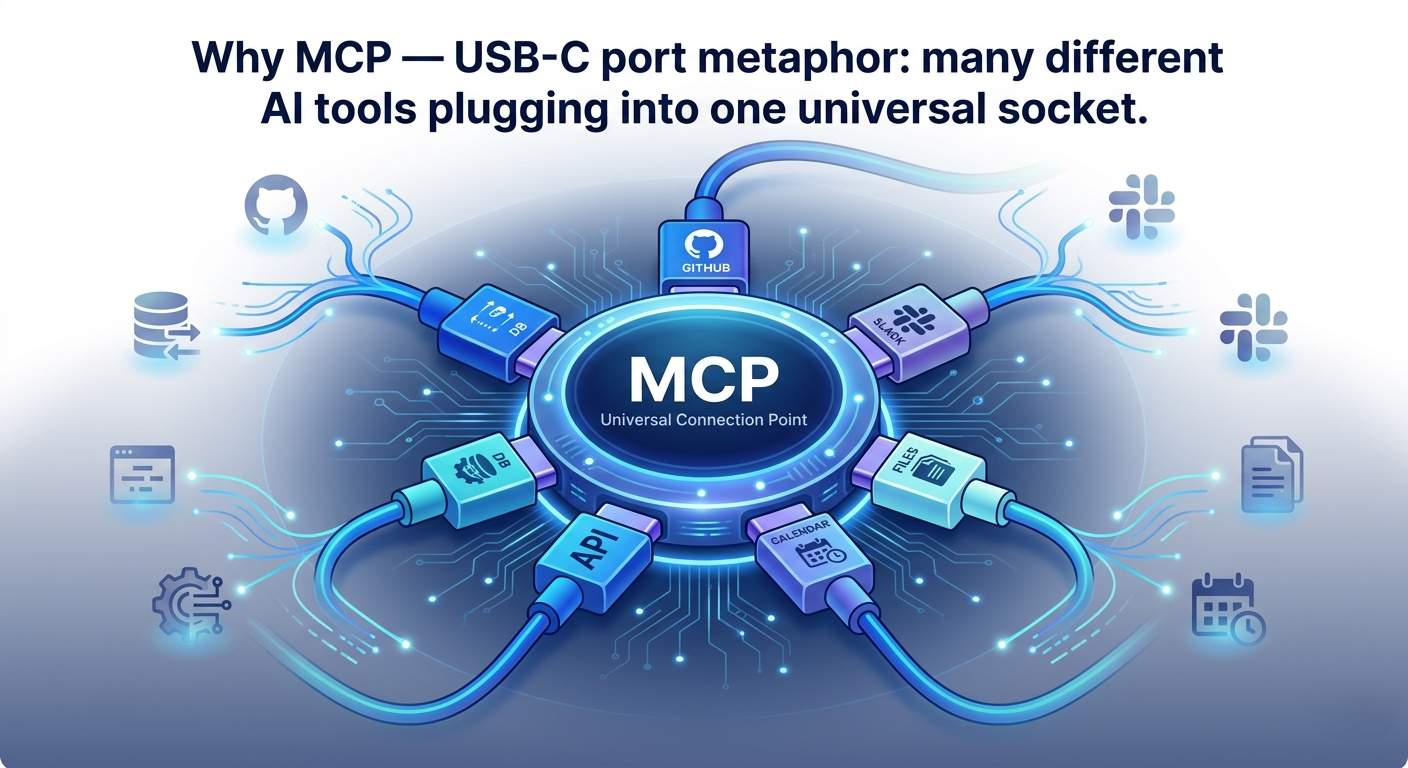
The Model Context Protocol was introduced by Anthropic in late 2024 as an open standard — not a proprietary Anthropic feature, but a protocol any AI application can adopt. The core insight: if you define a universal interface between AI agents and the tools they need to use, both sides only have to implement the interface once. Tool providers build MCP servers that expose their capabilities. AI applications build MCP clients that consume them. Any client works with any server. This is exactly how USB-C standardized device charging — one port, infinite devices.
The business case is compelling. Before MCP, an enterprise building an internal AI assistant had to write custom integrations for every tool: Salesforce, Jira, Slack, their internal databases, their ERP system. Each integration required understanding the specific API of each tool, the specific function-calling format of each LLM, and maintaining all of it as both evolved. MCP collapses this into a single integration effort per tool and a single integration effort per AI application — what was an N×M problem becomes N+M.
Real-World AnalogyThink of MCP as the electrical outlet standard. Before standardized outlets, every appliance manufacturer used a different plug. Your British kettle didn't work in a French outlet. Each new appliance required a custom adapter. The moment countries standardized outlet shapes, appliances became portable and the adapter problem effectively disappeared. MCP is standardizing the "outlet" between AI agents and the tools they need to plug into — so a flight booking tool built once works with Claude, GPT, Gemini, or any future LLM that adopts the standard.
# Install the MCP Python SDK
pip install mcp

# For HTTP transport support
pip install mcp[http]

# Check version
python -c "import mcp; print(mcp.__version__)"- MCP is transport-agnostic. It can run over Standard I/O (great for local tools and IDEs), HTTP with Server-Sent Events (great for remote tools), or any other transport layer. Don't confuse the protocol with its transport.
- MCP is not an agent framework. It doesn't decide what to do or in what order. That's still the LLM's job. MCP just provides the secure, standardized channel through which the LLM's decisions get executed as real actions.
- The ecosystem is growing rapidly. As of mid-2025, MCP servers exist for GitHub, Google Drive, PostgreSQL, Slack, Brave Search, and dozens more. Check the official MCP server registry before building a custom integration — someone may have already built it.
MCP Architecture — How the Pieces Fit Together
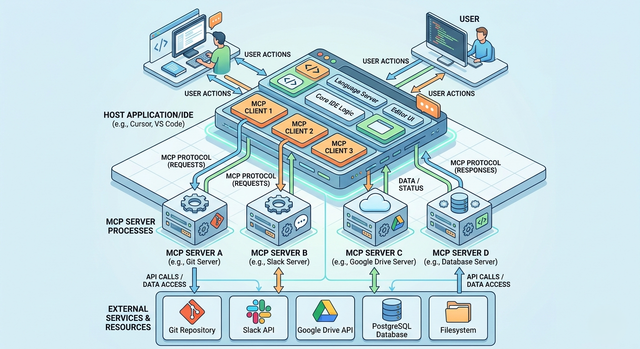
MCP defines a clear three-party architecture. At the center is the MCP Host — this is the AI application or IDE that an end user interacts with. Claude Desktop, Cursor, VS Code with an AI extension, or your custom AI application are all examples of hosts. The host contains an LLM and orchestrates the entire interaction. Below the host are MCP Clients — lightweight protocol handlers embedded within the host that manage connections to individual servers and translate between the host's internal representation and the MCP wire format. And on the other side of each client connection sits an MCP Server — a process that exposes specific capabilities (data access, tools, prompts) through the MCP protocol.
The key architectural constraint that makes MCP safe: each MCP Client maintains exactly one connection to exactly one MCP Server. There's no many-to-many free-for-all. The host decides which servers to connect to, the clients manage those connections, and the LLM can only access capabilities that are explicitly exposed through the connected servers. This creates a clean security boundary — you can audit exactly what your AI application can access by auditing its MCP server connections.
Two transport mechanisms are commonly used. Standard I/O (stdio) runs the MCP server as a subprocess of the host, communicating via standard input and output streams. This is the default for local tools, IDE integrations, and development setups — zero network overhead, simple process management. HTTP with Server-Sent Events (SSE) runs the server as a standalone HTTP service, allowing remote deployment, multiple concurrent clients, and the ability to expose capabilities as a web service. Most production enterprise deployments use HTTP transport for scalability.
# MCP server configuration in your IDE or host config (JSON format)
{
 "mcpServers": {
 "flight-booking": {
 "command": "python",
 "args": ["/path/to/flight_server.py"],
 "transport": "stdio" # local subprocess via stdin/stdout
 },
 "company-database": {
 "url": "https://api.company.com/mcp",
 "transport": "sse" # remote HTTP + Server-Sent Events
 }
 }
}- Here's the thing most tutorials miss: the MCP Client lives inside the Host application, not as a separate process. When you build a custom AI app, you're building both the Host logic and the embedded Client. The Server is separate. This distinction matters for understanding where authorization and security decisions live.
- For development, always start with stdio transport. It's simpler to debug (you can run the server manually in a terminal and inspect the JSON-RPC messages), requires no network setup, and the MCP SDK handles the subprocess lifecycle automatically.
- MCP uses JSON-RPC 2.0 as its wire protocol. You don't need to implement this manually — the SDK handles it — but understanding that all communication is JSON-RPC helps when debugging protocol-level issues.
Resources, Tools & Prompts — The Three MCP Primitives
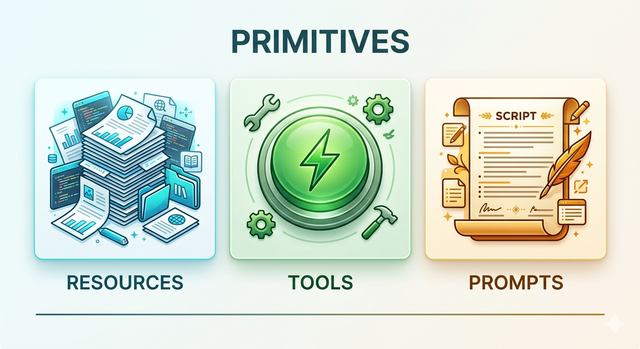
MCP defines exactly three types of capabilities that a server can expose, and understanding the distinction between them is fundamental to building well-designed MCP servers. The three primitives map roughly to: data the AI can read, actions the AI can execute, and instruction templates the AI can use. Get this classification right and your server will be both powerful and easy to use. Misclassify your capabilities and you'll create security vulnerabilities and confuse the AI about when it's allowed to do what.
Resources are data objects — structured or unstructured content that the AI can read to inform its responses. A resource has a URI (like a file path or URL), a MIME type, and content that can be text or binary. Flight schedules, customer records, documentation pages, database query results — these are all resources. Critically, reading a resource should be side-effect-free. Resources are how you give the AI knowledge without giving it power. An AI that can only access resources can inform but not act — useful for controlled read-only scenarios.
Tools are functions the AI can call to take actions with side effects. Booking a flight, sending an email, writing to a database, calling a third-party API — these are tools. Tools have a name, a JSON Schema description of their input parameters, and a handler function that executes the action and returns a result. The LLM decides which tool to call and what arguments to pass. The MCP server validates those arguments and executes the function. This is where MCP transitions from being an information protocol to an action protocol.
Prompts are predefined instruction templates that users or applications can inject into the AI conversation. They're reusable, parameterizable workflows — think of them as keyboard shortcuts for complex AI instructions. A "write a bug report" prompt might take a description and automatically format it in your company's bug reporting format. Prompts reduce the burden on users to write effective instructions from scratch and ensure consistency in how the AI approaches common tasks.
Real-World AnalogyThink of a physical travel agency. Resources are the brochures, fare schedules, and availability charts on the wall — information the agent can look up and read. Tools are the systems the agent can operate: the booking terminal, the ticketing printer, the email client to confirm reservations. Prompts are the agency's standard scripts — "for a honeymoon booking, always ask these five questions in this order." Resources inform. Tools act. Prompts guide.
from mcp.server import Server
from mcp.types import Resource, Tool, Prompt, TextContent

app = Server("flight-booking-server")

# ── RESOURCE: read-only flight schedule data ──────────────────
@app.list_resources()
async def list_resources():
 return [Resource(
 uri="flights://schedule/today",
 name="Today's Flight Schedule",
 mimeType="application/json",
 description="All available flights for today"
 )]

@app.read_resource()
async def read_resource(uri: str):
 return [{"flight":"BA117","from":"LHR","to":"SIN","dep":"22:30","seats":14}]

# ── TOOL: action with side effects ───────────────────────────
@app.list_tools()
async def list_tools():
 return [Tool(
 name="book_flight",
 description="Book a flight for a passenger",
 inputSchema={
 "type": "object",
 "properties": {
 "flight_number": {"type":"string"},
 "passenger_name": {"type":"string"},
 "seat_class": {"type":"string","enum":["economy","business"]}
 },
 "required": ["flight_number","passenger_name"]
 }
)]- The most common MCP design mistake: wrapping everything as a Tool. Resist this. If it's read-only data, it belongs as a Resource. Resources can be cached, pre-fetched, and subscribed to for changes. Tools trigger execution and logging. Using the right primitive improves both performance and auditability.
- Write Tool descriptions as if you're writing them for the LLM, not for a human developer. The AI uses the
descriptionfield to decide when and how to call the tool. Be specific: "Books a confirmed flight ticket and charges the customer's credit card on file" is far more useful to the AI than "Books a flight." - JSON Schema in Tool input schemas should be strict — use
additionalProperties: falseand mark fields as required explicitly. This prevents the LLM from hallucinating extra parameters that your tool doesn't expect.
Using Existing MCP Servers — Connecting Your IDE in Five Minutes
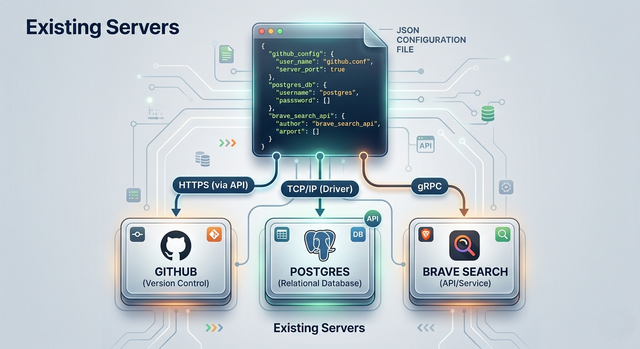
Before building your own MCP server, it's worth understanding the growing ecosystem of ready-made ones. Anthropic and the community have published MCP servers for GitHub (read repos, create PRs), Google Drive (list and read documents), Brave Search (web search without API key), PostgreSQL (query databases), Slack (send messages), and dozens more. Consuming these in a compatible IDE like Claude Desktop, Cursor, or any MCP-compatible tool is genuinely a five-minute configuration exercise.
The configuration mechanism is simple: your host application reads a JSON configuration file that lists which MCP servers to connect to and how. For stdio-based servers, you specify the command to run (usually python server.py or an npx command for Node-based servers). For SSE-based servers, you specify the URL. The host starts the servers, establishes connections through its embedded MCP clients, and the LLM immediately gains access to all the capabilities those servers expose — no code changes required on your part.
Claude Desktop MCP configuration (~/.config/claude/claude_desktop_config.json)
{
 "mcpServers": {
 "github": {
 "command": "npx",
 "args": ["-y", "@modelcontextprotocol/server-github"],
 "env": {
 "GITHUB_PERSONAL_ACCESS_TOKEN": "ghp_your_token_here"
 }
 },
 "postgres": {
 "command": "npx",
 "args": ["-y", "@modelcontextprotocol/server-postgres",
 "postgresql://localhost/mydb"]
 },
 "brave-search": {
 "command": "npx",
 "args": ["-y", "@modelcontextprotocol/server-brave-search"],
 "env": {"BRAVE_API_KEY": "your_brave_api_key"}
 }
 }
}- Never put API keys directly in the MCP configuration file if it will be committed to version control. Use environment variables or a secrets manager and reference them in the
envblock. The configuration file is often world-readable on shared systems. - Test each MCP server independently before combining multiple servers in one configuration. When debugging multi-server setups, it's nearly impossible to tell which server caused a problem if all fail simultaneously.
- Inspect what a server exposes before connecting it to your production AI. Use the MCP Inspector tool (
npx @modelcontextprotocol/inspector) to browse a server's resources, tools, and prompts interactively before your LLM starts calling them.
Building an MCP Server — From Zero to Flight Booking Agent
Building an MCP server with the Python SDK is refreshingly straightforward. The entire server is a Python file that imports the SDK, defines its capabilities (resources, tools, prompts) using decorator-based registration, and runs a transport loop. If you've ever written a Flask or FastAPI application, the pattern will feel immediately familiar — decorate a function, the framework handles the routing.
The flight booking scenario is a perfect teaching case because it requires all three primitive types: Resources for flight schedule data (read-only), Tools for the booking action (side effects, needs confirmation), and a Prompt for a standardized booking workflow. Let's build the complete server. The key discipline to maintain while building: think carefully about which handler needs to be async. Any handler that calls an external service, database, or API must be async — the MCP server is an async event loop and blocking calls will freeze it.
# flight_server.py — Complete MCP server for flight booking
from mcp.server import Server
from mcp.server.stdio import stdio_server
from mcp.types import (
 Resource, Tool, Prompt, TextContent,
 CallToolResult, GetPromptResult, PromptMessage
)
import asyncio, json

app = Server("flight-booking")

# Simulated database
FLIGHTS = [
 {"id":"BA117","from":"LHR","to":"SIN","dep":"22:30","price":850,"seats":14},
 {"id":"SQ316","from":"LHR","to":"SIN","dep":"09:15","price":920,"seats":8},
]
BOOKINGS = []

@app.list_resources()
async def list_resources():
 return [Resource(
 uri="flights://available",
 name="Available Flights",
 mimeType="application/json",
 description="Current available flights with pricing and seat availability"
 )]

@app.read_resource()
async def read_resource(uri: str):
 if uri == "flights://available":
 return json.dumps(FLIGHTS, indent=2)
 raise ValueError(f"Unknown resource: {uri}")

@app.list_tools()
async def list_tools():
 return [Tool(
 name="book_flight",
 description="Book a flight. Charges the account and issues a ticket.",
 inputSchema={
 "type":"object",
 "properties":{
 "flight_id":{"type":"string","description":"Flight ID from the available flights list"},
 "passenger_name":{"type":"string"},
 "seat_class":{"type":"string","enum":["economy","business"]}
 },
 "required":["flight_id","passenger_name","seat_class"],
 "additionalProperties":false
 }
 )]

@app.call_tool()
async def call_tool(name: str, arguments: dict):
 if name == "book_flight":
 flight = next((f for f in FLIGHTS if f["id"] == arguments["flight_id"]), None)
 if not flight:
 return [TextContent(type="text", text="Error: Flight not found")]
 booking_ref = f"BK{len(BOOKINGS)+1001}"
 BOOKINGS.append({"ref": booking_ref, **arguments})
 return [TextContent(type="text",
 text=f"✅ Booking confirmed! Ref: {booking_ref}\n"
 f"Flight: {flight['id']} LHR→SIN {flight['dep']}\n"
 f"Passenger: {arguments['passenger_name']} ({arguments['seat_class']})")]

@app.list_prompts()
async def list_prompts():
 return [Prompt(name="booking-workflow",
 description="Standard flight booking assistant workflow",
 arguments=[{"name":"destination","required":true}])]

@app.get_prompt()
async def get_prompt(name: str, arguments: dict):
 dest = arguments.get("destination", "your destination")
 return GetPromptResult(messages=[
 PromptMessage(role="user", content=TextContent(type="text",
 text=f"Help me book a flight to {dest}. First check available flights, "
 f"then present options clearly, confirm my preference, then book it."))
 ])

if __name__ == "__main__":
asyncio.run(stdio_server(app))- Always validate tool arguments in your
call_toolhandler even though JSON Schema provides client-side validation. The JSON Schema describes the interface; your handler is the last line of defense before the action executes. Never assume the input is well-formed. - Return meaningful error messages from tools rather than raising exceptions. The LLM will use your error message to decide how to recover or report to the user. "Error: Flight BA999 not found in today's schedule" is far more useful than a generic exception traceback.
- For tools with irreversible side effects (charging a card, sending an email, deleting a record), add a
dry_runparameter that simulates the action without executing it. This allows the LLM to confirm the intent before committing — especially important in high-stakes business workflows.
Building an MCP Client — Orchestrating the AI-Tool Conversation
The MCP client is the orchestration layer — it's the code that connects your LLM to one or more MCP servers and manages the conversation loop where the LLM decides which tools to call, the client executes those calls through the appropriate servers, and the results feed back into the LLM for the next reasoning step. Building a client requires handling three responsibilities: establishing server connections, discovering available capabilities, and executing the request-response cycle between LLM and server.
The Python MCP SDK provides ClientSession for managing server connections and stdio_client for creating subprocess-based server connections. Once connected, you call session.list_tools() and session.list_resources() to discover what the server exposes, then pass those tool definitions to your LLM so it knows what it can call. When the LLM returns a tool_use response, you extract the tool name and arguments and pass them to session.call_tool(). The result comes back and you add it to the conversation as a tool_result message.
# flight_client.py — Complete MCP client with LLM orchestration
from mcp import ClientSession
from mcp.client.stdio import stdio_client, StdioServerParameters
import anthropic, asyncio, json

async def run_booking_agent(user_request: str):
 llm = anthropic.Anthropic()

 # Connect to our MCP server
 server_params = StdioServerParameters(
 command="python", args=["flight_server.py"]
 )
 async with stdio_client(server_params) as (read, write):
 async with ClientSession(read, write) as session:
 await session.initialize()

 # Discover available tools
 tools_response = await session.list_tools()
 tools = [{
 "name": t.name,
 "description": t.description,
 "input_schema": t.inputSchema
 } for t in tools_response.tools]

 # Agentic loop
 messages = [{"role": "user", "content": user_request}]

 while True:
 response = llm.messages.create(
 model="claude-opus-4-6",
 max_tokens=4096,
 tools=tools,
 messages=messages
 )

 if response.stop_reason == "end_turn":
 break # LLM is done reasoning

 # Process tool calls
 tool_results = []
 for block in response.content:
 if block.type == "tool_use":
 result = await session.call_tool(block.name, block.input)
 tool_results.append({
 "type": "tool_result",
 "tool_use_id": block.id,
 "content": result.content[0].text
 })

 messages.append({"role": "assistant", "content": response.content})
 messages.append({"role": "user", "content": tool_results})

 # Return final answer
 return next(b.text for b in response.content if b.type == "text")

if __name__ == "__main__":
 result = asyncio.run(run_booking_agent(
 "Book me a business class flight LHR to SIN for Alice Johnson"
 ))
print(result)- Always implement a maximum iteration count in your agentic loop. A loop that runs until
stop_reason == "end_turn"can run indefinitely if the LLM keeps calling tools without converging. Set a hard ceiling (10–20 iterations) and fail gracefully when hit. - Log every tool call with its arguments and result at the INFO level. This is your audit trail. In production systems where AI agents are taking real-world actions, you need to know exactly what was called, with what parameters, and what happened — both for debugging and compliance.
- Handle tool call errors explicitly. If
session.call_tool()returns an error, add that error to the conversation as a tool_result so the LLM can decide how to recover. Don't silently discard errors — the LLM needs to know the action failed to reason correctly about next steps.
Security — Allowed Roots and Sampling Explained
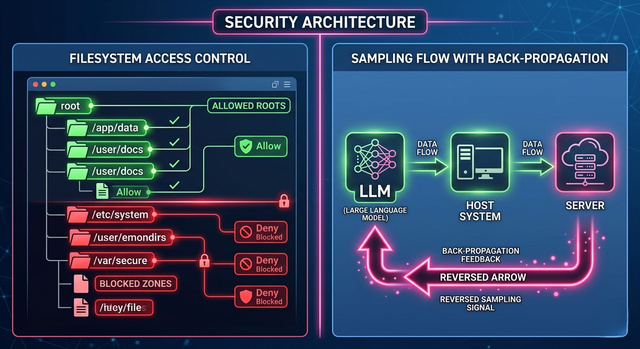
MCP includes two security mechanisms that deserve more attention than they typically get in introductory tutorials. The first is Allowed Roots — a declaration from the client to the server specifying which file system paths or URI namespaces the server is permitted to access. When your MCP client initializes a server connection, it can pass a list of roots: ["file:///home/user/project", "https://api.company.com"]. Well-behaved servers respect these roots and refuse to access resources outside them. This prevents a compromised or malicious MCP server from accessing arbitrary files on the user's system.
Sampling is the more architecturally interesting mechanism. Normally, the client calls the server (resource reads, tool calls). Sampling inverts this — it allows the MCP Server to request that the Host's LLM generate a completion. This is how you build genuinely intelligent MCP servers that can use AI reasoning as part of their tool execution. An MCP server handling a complex data analysis task could use sampling to ask the LLM to interpret intermediate results, rather than just running mechanical code. The security implication: sampling requests pass through the Host, which can review, modify, or reject them. The LLM the server accesses is the same LLM the user is already interacting with — there's no hidden AI call the user doesn't know about.
from mcp import ClientSession
from mcp.types import Root

# Client passing Allowed Roots to server on initialization
async with ClientSession(read, write) as session:
 await session.initialize(
 roots=[
 Root(uri="file:///home/user/project", name="Project Root"),
 Root(uri="file:///home/user/documents", name="Documents")
 # Server CANNOT access /etc, /home/other_user, etc.
 ]
 )

# Server-side sampling (server requests LLM completion via host)
# In your MCP server tool handler:
@app.call_tool()
async def call_tool(name: str, arguments: dict):
 if name == "analyze_data":
 raw_data = fetch_raw_data(arguments["query"])

 # Request LLM interpretation through the host
 sampling_result = await app.request_sampling({
 "messages": [{
 "role": "user",
 "content": f"Interpret this data: {raw_data}"
 }],
 "maxTokens": 500
 })
return [TextContent(type="text", text=sampling_result.content)]- Always configure Allowed Roots in production. The default behavior (no roots configured) means the server can technically request any path. Explicit roots are your defense against path traversal attacks from malicious or compromised servers.
- Treat sampling requests from servers with the same scrutiny as user messages. A sampling request is the server injecting a message into the LLM's context. Review what's in those requests — a compromised server could attempt prompt injection through sampling.
- For enterprise deployments, implement a middleware layer between the client and server that logs all tool calls, validates against an allowed-actions policy, and requires explicit human approval for high-impact operations (financial transactions, data deletion, external communications).
How It All Connects — The MCP Mental Model
Let's trace the complete flow of our flight booking scenario to see every MCP concept working in concert. A user opens Claude Desktop (the Host) and types: "Book me a business class seat on a flight from London to Singapore for Alice Johnson tonight." The Host, having loaded our flight booking MCP server from its configuration file, has already started the server as a subprocess and established an MCP Client connection. The LLM knows about our three capabilities: the flight schedule resource, the booking tool, and the booking workflow prompt.
The LLM decides to first read the resource to see what flights are available. The Client sends a resources/read request to the Server, which returns the JSON flight list. The LLM processes the data and decides flight BA117 at 22:30 is the best match. It then decides to call the book_flight tool with arguments {"flight_id": "BA117", "passenger_name": "Alice Johnson", "seat_class": "business"}. The Client sends a tools/call request. The Server validates the arguments, executes the booking, and returns the confirmation. The result feeds back to the LLM, which generates a final natural language response: "I've booked you business class on BA117 departing 22:30 tonight. Your booking reference is BK1001."
Every piece of this flow — the clean separation between Host, Client, and Server; the typed primitives distinguishing read-only data from side-effecting actions; the Allowed Roots preventing unauthorized access; the transport layer abstraction — exists to make this entire sequence reliable, auditable, and safe at scale. MCP isn't just making AI agents more capable. It's making them trustworthy enough to deploy in production.
Getting StartedGetting Started — Build and Run Your First MCP Server in 15 Minutes
# Step 1: Create a project directory and install dependencies
mkdir my-mcp-server && cd my-mcp-server
python -m venv venv && source venv/bin/activate
pip install mcp anthropic

# Step 2: Create the server file
# (copy flight_server.py code from the Building a Server section above)

# Step 3: Test the server with MCP Inspector
npx @modelcontextprotocol/inspector python flight_server.py
# Opens a browser UI to browse and test all resources/tools/prompts

# Step 4: Set your Anthropic API key
export ANTHROPIC_API_KEY="your-key-here"

# Step 5: Create the client file
# (copy flight_client.py code from the Building a Client section above)

# Step 6: Run the complete booking agent
python flight_client.py
# Expected: "I've booked you business class on BA117, ref BK1001"
# Optional: Add to Claude Desktop config for full IDE integration
# Edit: ~/.config/claude/claude_desktop_config.json
{
"mcpServers": {
"flight-booking": {
"command": "python",
"args": ["/absolute/path/to/flight_server.py"],
"transport": "stdio"
}
}
}
# Restart Claude Desktop — your flight booking tool is now available in the chat!Frequently Asked Questions
What is the Model Context Protocol (MCP)? MCP is an open standard introduced by Anthropic that defines how AI agents communicate with external tools, data sources, and services. It provides a universal interface — like USB-C for AI — so any MCP-compatible AI application can connect to any MCP server without custom integration code. It covers three primitive types: Resources (data), Tools (actions), and Prompts (instruction templates). What's the difference between MCP and OpenAI's function calling? Function calling is a feature of a specific LLM API — it defines how one AI model calls tools, but the implementation is different for OpenAI, Anthropic, and Google. MCP is a transport and protocol layer that sits above function calling — it standardizes how tools are discovered, described, and invoked regardless of which LLM is doing the calling. MCP servers work with any LLM that has an MCP-compatible client, not just one provider's function calling format. Is MCP only for Anthropic Claude? No. MCP is an open standard — the specification, SDK, and server implementations are all open source. While Anthropic introduced it, any LLM application can implement MCP clients or servers. As of 2025, several IDEs, AI frameworks, and LLM providers have adopted or are adopting MCP compatibility. The goal is a universal standard, not a proprietary Anthropic feature. What transport protocols does MCP support? MCP currently supports two primary transports: Standard I/O (stdio), where the server runs as a subprocess communicating via stdin/stdout — ideal for local tools and IDE integrations; and HTTP with Server-Sent Events (SSE), where the server runs as a standalone HTTP service — ideal for remote deployment and multiple concurrent clients. The protocol itself is transport-agnostic, so additional transports can be defined as the ecosystem matures. How does MCP handle security? MCP provides security through two mechanisms: Allowed Roots constrain which filesystem paths and URI namespaces a server can access, preventing unauthorized file system access. Sampling requires server-initiated LLM calls to route through the Host, giving the application control over what the AI processes. For production deployments, additional security layers (authorization middleware, action approval workflows, audit logging) should be implemented at the client level. What is MCP Sampling? Sampling is an MCP mechanism that allows an MCP Server to request that the Host's LLM generate a text completion. Normally data flows from client to server. Sampling inverts this — the server asks the AI for help. This enables intelligent MCP servers that can use AI reasoning mid-execution, like asking the LLM to interpret raw data before returning a final result. All sampling requests pass through the Host for review and can be intercepted or rejected by the application. How do I debug an MCP server? Use the official MCP Inspector (npx @modelcontextprotocol/inspector python your_server.py) — it opens a browser-based UI that lets you browse available resources, tools, and prompts, call them interactively, and inspect the raw JSON-RPC messages. For production debugging, enable JSON-RPC message logging in your server by setting the MCP_DEBUG=1 environment variable, which prints all protocol messages to stderr.
Can one MCP client connect to multiple servers?
Yes — and this is a key design strength. A Host application can maintain multiple parallel MCP Client connections, each pointed at a different server. The LLM sees all the tools from all connected servers simultaneously and can choose which to call. For example, a single AI assistant could have simultaneous connections to a GitHub MCP server, a database MCP server, and a custom internal tools server — using capabilities from all three in a single conversation.
🔬 MCP Interactive Lab
Explore MCP architecture visually, test all three primitives, watch a server build step-by-step, and simulate the full client-server-LLM conversation.
MCP Three-Party Architecture
Click on any component to highlight it and learn its role. Then use the transport toggle to see how stdio vs HTTP changes the setup.
Live Architecture View 👤 User Types request in chat message 🖥️ Host / IDE Claude Desktop, Cursor stdio 🔌 MCP Client Protocol handler inside Host JSON-RPC ⚙️ MCP Server Resources · Tools · Prompts calls 🛠️ Real World APIs · DBs · Files Click any component above to learn its role in the MCP architecture.MCP Primitives — Click to Explore
Select a primitive to see its definition, use case, and example code from our flight booking server.
Three MCP Primitives 📄 Resources Read-only data objects. URIs, content, no side effects. Inform the AI. ⚡ Tools Callable functions with side effects. Actions the AI can execute. 📋 Prompts Predefined instruction templates. Reusable workflow starters.Build an MCP Server — Step by Step
Watch the flight booking MCP server assemble itself, one component at a time.
Server Builder Idle 1 Initialize Server Import MCP SDK, create Server instance with name waiting 2 Register Resource Define flight schedule resource at flights://available URI waiting 3 Register Tool Define book_flight tool with JSON Schema input validation waiting 4 Register Prompt Add booking-workflow prompt template with destination param waiting 5 Start Transport Launch stdio transport, begin accepting JSON-RPC connections waiting Generated Code Code will appear here as each step runs… Build LogClient-Server-LLM Conversation Simulator
Watch the MCP client orchestrate a full booking: LLM reads resources → calls tool → gets confirmation.
Agent Execution Idle 🤖 LLM / Client Side Run the agent to see the conversation ⚙️ MCP Server Side Server responses will appear here Protocol Log (JSON-RPC)MCP Security — Roots & Sampling
Test how Allowed Roots block unauthorized file access, and see how Sampling routes server-side AI calls through the Host.
Allowed Roots Demo Configured Roots Test File Access Sampling FlowSampling inverts the normal flow — the Server asks the Host's LLM for a completion. This allows intelligent server-side reasoning.
Knowledge Check — Test Your MCP Understanding
8 questions covering MCP architecture, primitives, server/client building, and security.
Keep reading
Related articles
 General
How Microchips Are Made: The Complete CPU Fabrication Process Step by Step | Zetsapp
Here's the thing most chip articles miss: the "nm" number in modern process node names (TSMC 3nm, Intel 4nm, Samsung 3nm) does not correspond to any physical dimension on the chip. This was true when Intel's 45nm node launched in 2007 and became increasingly disconnected from reality thereafter. TSMC's "3nm" node has a gate pitch (the distance between gates) of approximately 48nm — not 3nm.
 General
How Hard Disk Drives Work: Inside the Spinning Metal That Still Stores Most of the Internet | Zetsapp
Here's the thing most explainers skip: that internal air isn't just "kept clean," it's engineered. Traditional HDDs are filled with filtered, dry air at roughly atmospheric pressure because the read/write head relies on aerodynamic lift from that specific air density to fly at the correct height — too thin an atmosphere and the head flies too low or crashes; too thick and it flies too high to read reliably.
 General
How GPUs Actually Work: The Nvidia GA102 Architecture Decoded Inside the RTX 3090
GPU acceleration is limited by the fraction of your workload that's actually parallel. Amdahl's Law states: if 90% of a program can be parallelized, the maximum speedup from infinite parallel processors is 10× — not infinite. The 10% sequential bottleneck always limits total speedup. In GPU-accelerated ML training, the actual workload split is typically: 85-95% embarrassingly parallel tensor operations