SSLTLSHTTPSman-in-the-middleencryptionCertificate-AuthorityLet's-Encryptpublic-keyasymmetric-encryptionweb-security
General
SSL Certificates Explained: How HTTPS Stops Man-in-the-Middle Attacks Cold
TL;DR HTTP (HyperText Transfer Protocol) was invented in 1991 by Tim Berners-Lee for sharing documents between academics. Security wasn't the priority. Packets travel through dozens of routers and switches between your laptop and a web server, and any one of those hops could be controlled by an attacker
Read this article as text (accessible version)
// SSL Certificates Deep Dive
·
3,600 words · 4 interactive labs · April 2026
SSL Certificates Explained:
SSL Certificates Explained:
How HTTPS Stops Man-in-the-Middle Attacks Cold
Every time you log in, pay for something, or send a message online, SSL certificates are silently protecting you. But how? And what happens when they don't? Here's the full story — with interactive labs showing attacks in real time.
Read the Deep Dive ↓ Open Security Lab 🔐 Table of Contents- The Vulnerability of Plain HTTP
- Symmetric Encryption: One Key Problem
- Asymmetric Encryption: The Key Pair Solution
- SSL Certificates: The Trusted Third Party
- The Verification Handshake
- How It All Connects
- Getting Started: HTTPS in Practice
- FAQ
01The Vulnerability of Plain HTTP: Your Data Is a Postcard
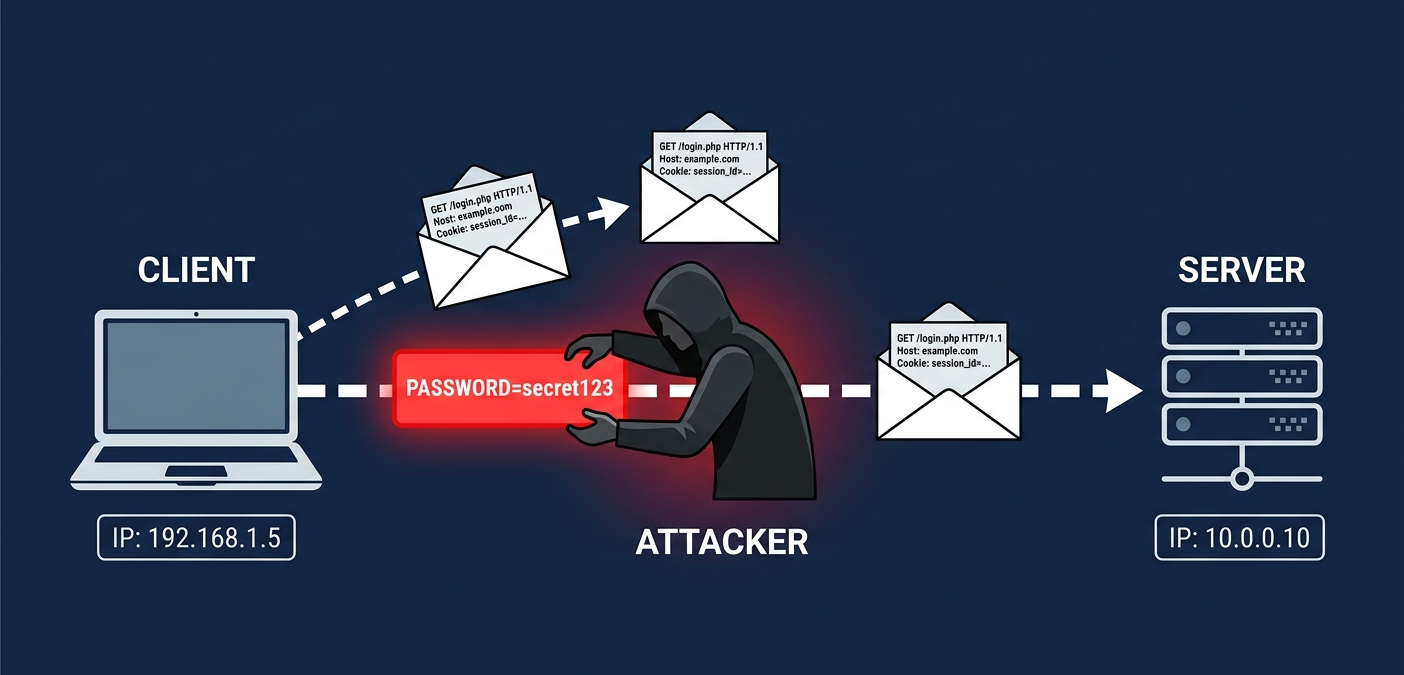
Imagine you're at a coffee shop, laptop open, logging into your bank. You type your password and hit Enter. What you might not realize is that on a plain HTTP connection, that password is flying across the network as readable text — visible to anyone with a packet sniffer running on the same Wi-Fi. It's not encrypted. It's not protected. It's the digital equivalent of writing your PIN on a postcard and mailing it to the bank.
HTTP (HyperText Transfer Protocol) was invented in 1991 by Tim Berners-Lee for sharing documents between academics. Security wasn't the priority. Packets travel through dozens of routers and switches between your laptop and a web server, and any one of those hops could be controlled by an attacker. A Man-in-the-Middle (MITM) attack is exactly what it sounds like: someone positions themselves between you and the server, intercepting every packet. They can read your data, modify it, or impersonate either party. On HTTP, they can do all of this and you'd never know.
Here's the thing most tutorials miss: MITM attacks don't require physical access to your router. They can happen at a compromised public hotspot, through DNS poisoning, ARP spoofing on a local network, or even BGP route hijacking at the ISP level. The threat model is real, widespread, and quietly ongoing. HTTPS was invented specifically to make the intercepted traffic useless — even if an attacker captures every single packet, they get encrypted gibberish without the right keys.
🚨 Real Attack ScenarioIn 2010, a Firefox extension called Firesheep made MITM attacks on public Wi-Fi trivially easy — anyone could click a button to hijack Facebook, Twitter, and Gmail sessions over HTTP. It worked by stealing session cookies sent in plaintext. Within weeks, major sites accelerated their HTTPS migrations. The lesson: plaintext HTTP on a shared network is not theoretical risk — it's active exploitation waiting to happen.
02Symmetric Encryption: One Key to Lock and Unlock Everything
The first instinct for solving the eavesdropping problem is encryption: scramble the data before sending it so that only someone with the right "key" can unscramble it. Symmetric encryption uses a single shared secret key for both encryption and decryption. It's fast, computationally efficient, and forms the backbone of most bulk data encryption today. AES (Advanced Encryption Standard) is the dominant symmetric algorithm, and it's genuinely excellent at what it does.
The analogy that works: symmetric encryption is like a combination lock on a briefcase. You and the recipient both need to know the combination. If you both know it already, great — messages can flow securely in both directions. But here's the fundamental problem: how do you securely share that combination in the first place? If you're communicating over the internet with a server you've never interacted with before, you can't use an encrypted channel to share the key — you don't have an encrypted channel yet! And sending the key over an unencrypted channel means an attacker can steal it. This is the key distribution problem, and it has no clean solution with symmetric encryption alone.
AES-256 with a pre-shared key is essentially unbreakable by brute force. The problem isn't the algorithm; it's the logistics of getting both parties to share the same key securely before any communication begins. For two people who've met in person, this is solvable. For a browser connecting to a web server for the first time, over an untrusted network, it's the core challenge that asymmetric encryption was designed to solve.
⚠️ Common Mistake: Conflating Key Length with SecurityA 256-bit AES key is computationally unbreakable — but a 256-bit key that's been stolen from a plaintext transmission is worthless. Key management and distribution is where most real-world encryption failures happen, not algorithm weaknesses. When you read about "encryption being compromised," it's almost always a key management failure, implementation bug, or side-channel attack — not a mathematical break of AES or RSA.
symmetric_demo.pyfrom cryptography.hazmat.primitives.ciphers import Cipher, algorithms, modes
from cryptography.hazmat.backends import default_backend
import os
# AES-256-CBC symmetric encryption demo
# Problem: how do client + server share this key securely?
key = os.urandom(32) # 256-bit random key
iv = os.urandom(16) # initialization vector
cipher = Cipher(algorithms.AES(key), modes.CBC(iv), backend=default_backend())
# Encrypt
encryptor = cipher.encryptor()
plaintext = b"password=secret123" # 18 bytes → pad to 32
padded = plaintext + b"\x00" * (32 - len(plaintext))
ciphertext = encryptor.update(padded) + encryptor.finalize()
print("Encrypted:", ciphertext.hex())
# ⚠️ If an attacker intercepts 'key' during transfer, ALL is compromised
# This is the key distribution problem symmetric encryption cannot solve alone
03Asymmetric Encryption: The Brilliant Key Pair That Solves Everything
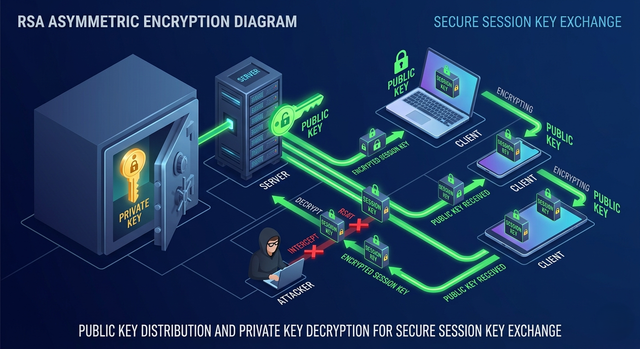
Asymmetric encryption solves the key distribution problem with an elegant mathematical insight: use two mathematically linked keys instead of one. A public key (freely shared with anyone) encrypts data. A private key (kept secret on the server) decrypts it. Data encrypted with the public key can only be decrypted by the corresponding private key. Critically, knowing the public key doesn't let you figure out the private key — the math involves operations that are easy in one direction but computationally infeasible to reverse (like multiplying large prime numbers together versus factoring the result).
Picture this: imagine the server has published a special padlock (the public key) that anyone can use to lock a box. Anyone can lock a box with it, but only the server — who holds the unique key to that padlock design — can unlock it. You want to communicate securely? Lock your message with the server's published padlock. Only the server can open it. The padlock itself can be shared publicly because possessing the padlock doesn't help you open the locked box.
In practice, asymmetric encryption (typically RSA or elliptic curve cryptography) is computationally expensive — about 1,000× slower than AES. So modern TLS uses a hybrid approach: asymmetric encryption is used to securely exchange a temporary symmetric session key, and then all actual data is encrypted with fast symmetric AES using that session key. The asymmetric step solves the key distribution problem; the symmetric step handles the bulk encryption efficiently. This is exactly what happens during the TLS handshake every time you load an HTTPS page.
💡 The Hybrid Approach Is Why HTTPS Is FastRSA key exchange adds roughly 1-3 milliseconds to your connection setup — a one-time cost. After that, everything uses AES which runs at near wire-speed. Modern TLS 1.3 has further optimized this by pre-computing Diffie-Hellman parameters and reducing the handshake to a single round-trip, making the overhead negligible even on mobile connections.
asymmetric_demo.pyfrom cryptography.hazmat.primitives.asymmetric import rsa, padding from cryptography.hazmat.primitives import hashes from cryptography.hazmat.backends import default_backend # Generate RSA key pair (server does this once) private_key = rsa.generate_private_key( public_exponent=65537, key_size=2048, # 2048-bit RSA (minimum recommended) backend=default_backend() ) public_key = private_key.public_key() # shared openly with everyone # Client encrypts session key with server's PUBLIC key session_key = os.urandom(32) # random AES-256 session key encrypted_sk = public_key.encrypt( session_key, padding.OAEP(mgf=padding.MGF1(algorithm=hashes.SHA256()), algorithm=hashes.SHA256(), label=None) ) # Only the server with the PRIVATE key can decrypt this decrypted_sk = private_key.decrypt(encrypted_sk, padding.OAEP(...)) # Now both parties share the same session_key → switch to fast AES
04SSL Certificates: The Trusted Third Party That Proves Identity
Here's where asymmetric encryption has its own subtle vulnerability. The scheme works beautifully — unless an attacker intercepts the connection before the server sends its public key, replaces the server's public key with their own, and starts impersonating the server. The client would unknowingly encrypt their session key with the attacker's public key, the attacker decrypts it, reads everything, and re-encrypts it with the real server's public key to forward along. This is a MITM attack targeting the public key exchange itself — and without SSL certificates, it would work perfectly.
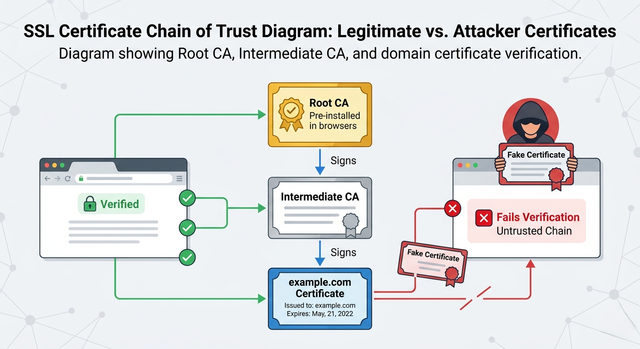
SSL certificates solve this with a trusted third party: the Certificate Authority (CA). A CA is an organization (like Let's Encrypt, DigiCert, or Comodo) that has been pre-trusted by all major browsers and operating systems. When a server wants an SSL certificate, it proves ownership of its domain to a CA, and the CA digitally signs the server's public key. This signature says: "I, the CA, verify that this public key truly belongs to example.com." The certificate contains the domain name, the server's public key, the CA's signature, and an expiry date.
The counterintuitive insight: you don't need to trust every website directly. You only need to trust the CAs — and your browser already does, via a pre-installed list called the "trust store." When your browser connects to example.com, it receives the certificate, checks that the CA's signature is valid (using the CA's own public key, which is pre-installed), and confirms the domain matches. If everything checks out, you know you're talking to the real example.com — not an impersonator. The certificate is the proof of identity, not just the key.
⚠️ Not All CAs Are Equal — And Some Have Failed CatastrophicallyIn 2011, the Dutch CA DigiNotar was compromised. Attackers issued fraudulent certificates for Google, Yahoo, Mossad, and 500+ other domains. Iranian users were subjected to government MITM attacks for months before the breach was discovered. DigiNotar was removed from all trust stores and went bankrupt within weeks. The CA system is only as strong as its weakest CA — which is why Certificate Transparency (CT) logs were introduced to detect fraudulent certificate issuance.
inspect_certificate.sh# Inspect a live SSL certificate with OpenSSL openssl s_client -connect example.com:443 -servername example.com 2>/dev/null \ | openssl x509 -noout -text | grep -A3 "Subject:" # See certificate expiry date openssl s_client -connect example.com:443 2>/dev/null \ | openssl x509 -noout -dates # View the full certificate chain openssl s_client -connect example.com:443 -showcerts 2>/dev/null \ | openssl x509 -noout -text # Output includes: # Subject: CN=example.com # Issuer: CN=DigiCert TLS RSA SHA256 2020 CA1, O=DigiCert Inc # Validity: Not Before: Nov 28 2024 / Not After: Jan 10 2026 # Signature Algorithm: sha256WithRSAEncryption
05The Verification Handshake: What Happens in the First 300ms
When you type "https://bank.com" and hit Enter, a TLS handshake happens before a single byte of your actual request is sent. It's a choreographed exchange of messages that accomplishes three things simultaneously: proving the server's identity, agreeing on an encryption algorithm, and establishing a shared session key. The whole thing typically completes in one to two network round-trips, taking 50-300ms depending on network latency.
Here's how the verification works step by step. The client sends a "ClientHello" with the TLS version and cipher suites it supports. The server responds with a "ServerHello," its chosen cipher suite, and — critically — its SSL certificate. The client then performs the critical verification: it extracts the CA's digital signature from the certificate and verifies it using the CA's public key (which is pre-installed in the browser's trust store). If the signature is valid, the domain matches, and the certificate isn't expired, the client knows: this is genuinely bank.com's public key, not a fake. The client then generates a random session key, encrypts it with the server's verified public key, and sends it. From this point, all communication uses fast AES encryption with that session key.
Digital signatures work in the reverse of encryption: the CA signs the certificate by encrypting the certificate's hash with its own private key. Anyone can verify this signature using the CA's public key — if decrypting the signature with the CA's public key produces the same hash as the certificate's actual contents, the signature is valid. An attacker can't forge this signature without the CA's private key, which they don't have. This is why the CA's private key security is so critical — it's the root of the entire trust hierarchy.
💡 TLS 1.3 Is Significantly Faster Than TLS 1.2TLS 1.2 required 2 round-trips for the handshake. TLS 1.3 (2018) reduced this to 1 round-trip by pre-computing Diffie-Hellman key shares. Even better, TLS 1.3 supports "0-RTT resumption" for reconnections — the browser can send the first encrypted request alongside the handshake itself. Check your server: if it's still negotiating TLS 1.2, you're leaving both performance and security on the table (TLS 1.0 and 1.1 are now officially deprecated).
tls_handshake.pyimport ssl, socket
# Inspect TLS handshake details programmatically
def inspect_tls(hostname: str, port: int = 443):
ctx = ssl.create_default_context() # uses system trust store
with socket.create_connection((hostname, port)) as sock:
with ctx.wrap_socket(sock, server_hostname=hostname) as ssock:
cert = ssock.getpeercert()
cipher = ssock.cipher()
ver = ssock.version()
print(f"TLS Version: {ver}") # TLSv1.3
print(f"Cipher Suite: {cipher[0]}") # TLS_AES_256_GCM_SHA384
print(f"Subject: {cert['subject']}")
print(f"Issuer: {cert['issuer']}")
print(f"Valid Until: {cert['notAfter']}")
inspect_tls("github.com")
# TLS Version: TLSv1.3
# Cipher Suite: TLS_AES_128_GCM_SHA256
# Subject: (('commonName', 'github.com'),)
# Issuer: DigiCert TLS Hybrid ECC SHA384 2020 CA1
synthesisHow It All Connects: The Complete Security Story
Let's trace the full journey of a secure HTTPS connection, combining everything we've covered. You visit https://bank.com. Your browser initiates a TLS handshake and the server sends its SSL certificate — a digitally signed bundle containing the server's public key, the domain name, and the CA's guarantee of authenticity. Your browser verifies this certificate against its trust store, confirming the public key genuinely belongs to bank.com.
With the server's identity verified, your browser generates a random symmetric session key and encrypts it with the server's verified public key. Only the server — with its private key — can decrypt this. Both parties now share the same session key, and all subsequent communication is encrypted with fast AES. Even if an attacker captures every packet, they see only encrypted data and lack the session key to decrypt it. Even if they try to replace the server's public key, the certificate's CA signature won't match — the browser will show a security warning.
The SSL certificate is the linchpin: it converts a raw public key (which could belong to anyone) into a verified identity (which your browser is willing to trust). Without it, asymmetric encryption would solve the interception problem but not the impersonation problem. With it, both are solved simultaneously. The entire HTTPS system — trusted by billions of users for every sensitive transaction on the internet — rests on this elegant three-party trust model.
07Getting Started: Set Up HTTPS for Your Own Site in Minutes
Let's Encrypt has made free SSL certificates accessible to everyone. Here's the complete workflow for getting HTTPS running on an Nginx server, from zero to a green padlock.
setup_https.sh# Step 1: Install Certbot (Let's Encrypt client)
sudo apt update && sudo apt install -y certbot python3-certbot-nginx
# Step 2: Obtain certificate for your domain
sudo certbot --nginx -d yourdomain.com -d www.yourdomain.com
# Certbot will:
# - Prove domain ownership (HTTP-01 challenge)
# - Generate RSA/ECDSA key pair
# - Get CA signature from Let's Encrypt
# - Configure Nginx automatically
# Step 3: Verify certificate was installed
sudo certbot certificates
# Certificate Name: yourdomain.com
# Domains: yourdomain.com www.yourdomain.com
# Expiry Date: 2025-07-15 (VALID: 89 days)
# Certificate Path: /etc/letsencrypt/live/yourdomain.com/fullchain.pem
# Step 4: Test TLS configuration quality (A+ rating)
# Visit: https://www.ssllabs.com/ssltest/
# Step 5: Auto-renewal (certificates expire in 90 days)
sudo crontab -e
# Add: 0 0 1 * * certbot renew --quiet
# Step 6: Force HTTPS redirect in Nginx config
# /etc/nginx/sites-available/yourdomain.com:
# server {
# listen 80; return 301 https://$host$request_uri;
# }
# server {
# listen 443 ssl;
# ssl_certificate /etc/letsencrypt/live/yourdomain.com/fullchain.pem;
# ssl_certificate_key /etc/letsencrypt/live/yourdomain.com/privkey.pem;
# ssl_protocols TLSv1.2 TLSv1.3;
# }
FAQFrequently Asked Questions
What's the difference between SSL and TLS? + SSL (Secure Sockets Layer) is the original protocol, developed by Netscape in the mid-1990s. TLS (Transport Layer Security) is its successor, with TLS 1.0 replacing SSL 3.0 in 1999. All versions of SSL are now deprecated and considered insecure. When people say "SSL certificate," they technically mean a "TLS certificate" — the terminology stuck from marketing. Modern browsers negotiate TLS 1.2 or 1.3. If a server only supports SSL 2.0 or 3.0, browsers will refuse to connect. "SSL certificate" is just the common name for the X.509 certificate that authenticates server identity in TLS. Is HTTPS completely secure? Can it still be hacked? + HTTPS protects the transport layer — the communication between your browser and the server. It doesn't protect you if: (1) the website itself is compromised and serves malicious code, (2) your device has malware that intercepts before encryption, (3) you accept a self-signed or fraudulent certificate warning, (4) the CA is compromised (DigiNotar incident), or (5) you're on a corporate network where IT has installed a custom root certificate for inspection. HTTPS with a valid CA certificate is extremely strong for its intended purpose, but it's one layer of a defense-in-depth security model. What is a self-signed certificate and when should I use one? + A self-signed certificate is one where the server signs its own certificate instead of using a CA. It provides the same encryption, but no identity verification — browsers show a security warning because they can't verify who the certificate belongs to. Use self-signed certificates for: internal development environments, private network services where you control all clients, and testing TLS configuration. Never use them for public-facing sites that handle any sensitive data. For public sites, always use a CA-signed certificate — Let's Encrypt is free and takes minutes to set up. What happens when an SSL certificate expires? + The site becomes inaccessible to most users — browsers show a hard error "Your connection is not private" with no easy way to proceed. This is intentional: expired certificates can no longer be verified against their validity window, so they can't be trusted. Let's Encrypt certificates expire every 90 days to minimize the window of certificate abuse if a private key is compromised. Critically, you need to automate renewal — the second most common cause of certificate-related outages (after forgetting to renew) is renewal scripts that fail silently. Monitor your expiry dates with alerting. What is Certificate Pinning and should I use it? + Certificate pinning is when a client (usually a mobile app) hardcodes the expected certificate or public key and refuses to connect if the certificate doesn't match exactly — even if it's CA-signed. This provides extra protection against compromised CAs. The problem: it's operationally painful. If you rotate your certificate (which you should), all old app versions stop working until users update. Apple and Google have largely moved away from static pinning toward more dynamic approaches. For web browsers, HPKP (HTTP Public Key Pinning) was deprecated in Chrome in 2018 after it caused several major sites to accidentally lock out their own users. Use pinning sparingly and only with robust update mechanisms. What's the difference between DV, OV, and EV certificates? + All three provide the same encryption, but differ in identity verification. DV (Domain Validation): CA verifies you control the domain. Fast (minutes), cheap/free, used by Let's Encrypt. OV (Organization Validation): CA also verifies the legal organization behind the domain. Takes days, costs money, shows org name in cert details. EV (Extended Validation): most rigorous verification, previously showed the company name in the browser's address bar (the "green bar"). Chrome and Firefox removed the visual green bar distinction in 2019, arguing it wasn't helping users make better security decisions. Today, DV certificates are sufficient for most use cases. How does HSTS prevent downgrade attacks? + HSTS (HTTP Strict Transport Security) is a response header (Strict-Transport-Security: max-age=31536000; includeSubDomains) that tells browsers: "For the next 365 days, only connect to this domain over HTTPS — never downgrade to HTTP, even if asked." Once a browser receives this header, it will refuse HTTP connections and automatically upgrade all requests. This prevents SSL stripping attacks, where an attacker downgrades your HTTPS connection to HTTP before it reaches the server. HSTS preload goes further: major browsers ship with a hardcoded list of HSTS domains that are protected before you've ever visited the site. Submit your domain at hstspreload.org.
What is Certificate Transparency (CT) and why does it matter? +
Certificate Transparency is a system where all publicly-trusted CAs are required to log every certificate they issue to public, append-only CT logs. Anyone can monitor these logs to detect if a CA issued a fraudulent certificate for your domain. Google, Cloudflare, and others run CT logs. Chrome requires CT compliance — any certificate not logged will be rejected. This solved the DigiNotar problem class: even if a CA is compromised, you'll know within hours that fraudulent certificates were issued, and can push a revocation. You can monitor CT logs for your domains at crt.sh.
🔐 Security Lab
Four hands-on experiments: simulate attacks, encrypt messages, verify certificates, and test your security configuration.
Live packet flow simulation — watch what the attacker can see with HTTP vs HTTPS
MITM Attack Simulator Message to Send Protocol Attacker Position Attacker's View Waiting for traffic... 0 Intercepted 0 Readable 0 Blocked by TLS Idle Status 🔑 Asymmetric Encryption Demo Key Size 2048 bits Your Message (plaintext) Public Key (share openly) Click "Generate Key Pair" to start Encrypted (attacker sees this) — Decrypted (server reads this) — — Key Size RSA Algorithm 🔒 Symmetric Session Key Simulated AES-256 Session Key — Plaintext (before AES) AES Ciphertext — Decrypted Output —Certificate chain visualization — Root CA → Intermediate → Domain
Certificate Inspector Enter Domain to Inspect Certificate Details Enter a domain and click Load. Security Assessment — Security Grade — TLS Version — Days Remaining — HSTSTLS 1.3 handshake animation — click Step or Run All to animate
TLS Handshake Visualizer TLS Version Network Latency 50ms Current Step Click "Step" to begin the TLS handshake... 0 Step — Round Trips — Total Time No Secure?Keep reading
Related articles
 General
How Microchips Are Made: The Complete CPU Fabrication Process Step by Step | Zetsapp
Here's the thing most chip articles miss: the "nm" number in modern process node names (TSMC 3nm, Intel 4nm, Samsung 3nm) does not correspond to any physical dimension on the chip. This was true when Intel's 45nm node launched in 2007 and became increasingly disconnected from reality thereafter. TSMC's "3nm" node has a gate pitch (the distance between gates) of approximately 48nm — not 3nm.
 General
How Hard Disk Drives Work: Inside the Spinning Metal That Still Stores Most of the Internet | Zetsapp
Here's the thing most explainers skip: that internal air isn't just "kept clean," it's engineered. Traditional HDDs are filled with filtered, dry air at roughly atmospheric pressure because the read/write head relies on aerodynamic lift from that specific air density to fly at the correct height — too thin an atmosphere and the head flies too low or crashes; too thick and it flies too high to read reliably.
 General
How GPUs Actually Work: The Nvidia GA102 Architecture Decoded Inside the RTX 3090
GPU acceleration is limited by the fraction of your workload that's actually parallel. Amdahl's Law states: if 90% of a program can be parallelized, the maximum speedup from infinite parallel processors is 10× — not infinite. The 10% sequential bottleneck always limits total speedup. In GPU-accelerated ML training, the actual workload split is typically: 85-95% embarrassingly parallel tensor operations