reverse-proxyforward-proxyNginxload-balancingSSL-terminationCDNCloudflaretransparent-proxyDDoS-protectionX-Forwarded-For
General
Reverse Proxy vs Forward Proxy: Complete Expert Guide
TL;DR Engineers often confuse forward proxies and VPNs — both hide your real IP and route traffic through a third party. The key differences: VPNs operate at the network layer (Layer 3), encrypting all traffic from your device; forward proxies operate at the application layer (Layer 7) and typically require per-application configuration. VPNs are harder to detect and bypass;
Read this article as text (accessible version)
Proxy Architecture · Load Balancing · CDN
·
3,800 words · 4 interactive labs · April 2026
Reverse Proxy vs
Reverse Proxy vs
Forward Proxy:
Complete Expert
Guide 2026
Someone on your team calls Nginx a "reverse proxy" and you nodded confidently. But do you actually know what the "reverse" means — and why it matters for DDoS protection, SSL termination, and how Cloudflare puts your origin server behind 300 edge nodes? Every senior engineer needs this mental model cold.
Read the Deep Dive ↓ Open Traffic Lab 🌐 Forward Proxy — client anonymity Reverse Proxy — server protection SSL termination · Load balancing · CDN layers Table of Contents- Forward Proxy: Acting for the Client
- Transparent Proxy: Invisible Interception
- Reverse Proxy: Guarding the Server
- Load Balancing & High Availability
- SSL Termination: Offloading Crypto
- Caching Static Content at the Edge
- Layers of Reverse Proxy in Production
01Forward Proxy: The Middleman Working for You
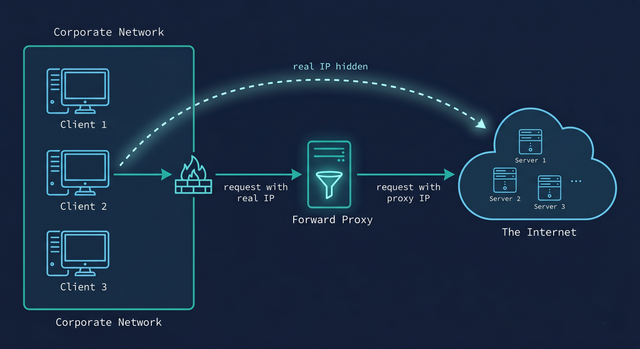
Imagine you're a researcher at a company that blocks access to certain external sites. You need to reach a resource that your corporate firewall has blacklisted. You route your traffic through a server outside the firewall — the server fetches the content on your behalf and returns it to you. Your corporate network sees a request going to a known proxy IP. The destination website sees a request coming from the proxy IP. Neither sees the full picture. That's a forward proxy in a sentence.
A forward proxy sits between a group of client machines and the internet. When those clients make requests, the proxy intercepts them, impersonates the client toward the destination server, and returns the response. The destination server never communicates directly with the original client — it only ever sees the proxy. From the server's perspective, all traffic from a whole department looks like it's coming from one IP address.
The three major use cases are privacy, access bypass, and content filtering — and here's where most explanations stop. What they miss is the fourth use case: egress monitoring and data exfiltration prevention. Large enterprises route all outbound traffic through forward proxies not just to block social media, but to log, inspect, and alert on every byte leaving the network. A developer accidentally committing credentials to an external service becomes visible. Malware phoning home gets caught. The forward proxy as a security posture tool is often more valuable than all the other use cases combined.
💡 Forward Proxy vs VPN: Know the DifferenceEngineers often confuse forward proxies and VPNs — both hide your real IP and route traffic through a third party. The key differences: VPNs operate at the network layer (Layer 3), encrypting all traffic from your device; forward proxies operate at the application layer (Layer 7) and typically require per-application configuration. VPNs are harder to detect and bypass; proxies are often visible to deep packet inspection. A forward proxy typically caches and inspects traffic; a VPN is usually a transparent tunnel. For corporate security policies, forward proxies with SSL inspection (MITM TLS) give complete visibility; VPNs do not.
squid_forward_proxy.conf — basic forward proxy config# Squid — most common enterprise forward proxy http_port 3128 # Access control: only allow internal clients acl internal_net src 10.0.0.0/8 http_access allow internal_net http_access deny all # Block social media (content filtering) acl social_media dstdomain .facebook.com .twitter.com .tiktok.com http_access deny social_media # Cache frequently requested content cache_mem 256 MB cache_dir ufs /var/spool/squid 10000 16 256 # Log all requests for security monitoring access_log /var/log/squid/access.log squid # Client config: point browser HTTP proxy to 10.0.0.1:3128 # Or use WPAD for automatic proxy discovery on the network
02Transparent Proxy: When the Network Intercepts Without Asking
A standard forward proxy has a critical weakness: it requires configuration. Every device on the network has to be manually pointed at the proxy's IP and port. For a corporation with 10,000 devices, managing that configuration across browsers, operating systems, and applications is an operational nightmare. What if you could apply proxy policies to every device without touching any of them?
A transparent proxy (also called an intercepting proxy) solves this by operating at Layer 4 using network switches rather than Layer 7 application configuration. The Layer 4 switch (typically part of the firewall or core switch infrastructure) redirects certain traffic types — usually HTTP on port 80 and HTTPS on port 443 — to the proxy server without the client's knowledge or explicit configuration. From the client's perspective, it sent a request directly to the destination. From the network's perspective, the traffic was silently rerouted.
Here's the thing most tutorials miss about transparent proxies: HTTPS makes them much harder to implement correctly. Since TLS encrypts the payload between client and server, a transparent proxy can see the destination IP but not the HTTP headers or URL. To do deep content inspection on HTTPS traffic, organizations deploy SSL inspection (a form of MITM) where the proxy presents a corporate CA certificate to the client, decrypts the traffic, inspects it, re-encrypts it, and forwards to the destination. This requires deploying a trusted root certificate to every company device — which is why this only works on managed corporate devices, not personal phones.
⚡ Why Transparent Proxies Are Hard to Bypass — and Why You'd Want ToWhen you're inside an institution's network, a transparent proxy is very difficult to bypass — your traffic is physically rerouted at the switch level before it leaves the network. The only reliable bypass is to use a protocol that isn't intercepted (often UDP-based VPNs or QUIC/HTTP/3 traffic, which many corporate proxies don't yet intercept). From the security team's perspective: any traffic bypassing the proxy is a data exfiltration or policy-violation risk worth monitoring. From an engineering perspective: understanding that transparent proxies exist is why testing applications in corporate networks sometimes produces unexpected behavior — your app may be talking to a proxy without knowing it.
03Reverse Proxy: The Gatekeeper in Front of Your Servers
Here's the conceptual flip that confuses most engineers when they first encounter the term. A forward proxy acts on behalf of clients — it hides clients from servers. A reverse proxy acts on behalf of servers — it hides servers from clients. The "reverse" isn't about traffic direction (both types sit in the middle); it's about whose identity is being protected and who configured the proxy. With a forward proxy, clients know they're using a proxy and configure it themselves. With a reverse proxy, clients have no idea — they think they're talking directly to the website.
When you visit api.example.com, you're almost certainly talking to a reverse proxy, not the application server. The proxy receives your request, decides which backend server should handle it, forwards the request, receives the response, and sends it back to you. The IP address of the actual web servers is never revealed. You only ever see the reverse proxy's IP address. This origin IP protection is the simplest but most powerful security property of reverse proxies — a DDoS attack against a website that sits behind a well-resourced reverse proxy (like Cloudflare) is attacking the proxy's infrastructure, not the origin servers. The origin servers remain invisible and unreachable.
The counterintuitive insight: Nginx is most commonly used as a reverse proxy, not as a web server. The architectural pattern in production isn't "Nginx serves your application" — it's "Nginx proxies requests to your application server (Gunicorn, Node.js, Spring Boot, etc.)." Nginx is excellent at handling thousands of simultaneous connections, managing SSL, routing requests to the right backend, and serving static files directly — all the jobs where a dedicated proxy excels and a general-purpose application server doesn't.
✅ Always Hide Origin IPs When Using Cloudflare or Any CDNOne of the most common Cloudflare misconfigurations: exposing your origin server's real IP. If attackers can discover your origin IP (through DNS history lookup services like SecurityTrails, old MX records, SPF records, subdomains that bypass Cloudflare), they can bypass the reverse proxy entirely and DDoS your origin directly. Mitigation: only allow inbound traffic from Cloudflare's published IP ranges on your firewall, use Cloudflare Tunnel (Argo Tunnel) to ensure outbound-only connections from origin to Cloudflare, and audit all DNS records to ensure no subdomain leaks the real IP.
nginx_reverse_proxy.conf — production configupstream api_backends {
# Least-connections load balancing across 3 backend servers
least_conn;
server 10.0.1.10:8080 weight=1;
server 10.0.1.11:8080 weight=1;
server 10.0.1.12:8080 weight=1 backup; # failover only
}
server {
listen 443 ssl http2;
server_name api.example.com;
# SSL termination: certificate lives here, not on backends
ssl_certificate /etc/ssl/certs/example.com.crt;
ssl_certificate_key /etc/ssl/private/example.com.key;
ssl_protocols TLSv1.2 TLSv1.3;
location / {
proxy_pass http://api_backends;
proxy_set_header Host $host;
proxy_set_header X-Real-IP $remote_addr; # pass real client IP
proxy_set_header X-Forwarded-For $proxy_add_x_forwarded_for;
proxy_set_header X-Forwarded-Proto $scheme;
# Timeouts — don't let slow backends hold connections
proxy_connect_timeout 5s;
proxy_read_timeout 30s;
proxy_send_timeout 30s;
}
# Serve static assets directly from nginx (no backend call)
location /static/ {
root /var/www;
expires 30d;
add_header Cache-Control "public, immutable";
}
}
04Load Balancing: Distributing Traffic Across a Server Farm
A single web server has a ceiling. Regardless of how powerful the machine is, there's a maximum number of concurrent connections, threads, and memory-resident sessions it can handle before response times degrade or the server falls over. Horizontal scaling — adding more servers to handle traffic — is the industry-standard solution. But adding more servers only helps if traffic is distributed across them evenly. That's what a reverse proxy doing load balancing provides.
The four main load balancing algorithms each suit different workloads. Round-robin sends requests to each server in sequence — simple and effective when requests are roughly equal in cost. Weighted round-robin skews distribution toward more powerful servers — if server A has 3× the CPU of server B, it should handle 3× the requests. Least connections sends each new request to the backend with the fewest active connections — better for requests with highly variable processing times (some requests take 5ms, others take 5 seconds; least-conn prevents one slow request from causing queue buildup). IP hash routes requests from the same client IP to the same backend — providing "sticky sessions" when your application stores session state on the backend (though the better solution is to move session state to Redis or a shared store).
The production reality is more complex than any single algorithm. Modern load balancers combine algorithms with health checks (probing backends to detect failures), circuit breakers (removing unhealthy backends from rotation automatically), slow start (gradually increasing traffic to a new backend), and connection draining (allowing a backend being removed to finish existing requests before being taken offline). Services like Cloudflare distribute their reverse proxies across hundreds of global locations, meaning the load balancer itself never becomes a single bottleneck — a design that also puts the proxy physically close to users for minimum latency.
⚠️ The Sticky Sessions TrapTeams new to load balancing often resort to sticky sessions (IP hash) to make their session-state-on-server applications work behind a load balancer. This is a short-term fix that creates long-term pain: uneven traffic distribution (one client with many requests overloads one server), failed sessions when a server restarts (all that user's state is gone), and inability to freely scale backends. The right solution: externalize session state to Redis or a distributed cache, then use round-robin or least-conn. Stateless backends are the only backends you can safely scale horizontally.
05SSL Termination: Why the Reverse Proxy Owns the Certificate
TLS/SSL handshakes are computationally expensive. Establishing a TLS connection requires several round trips: the client and server negotiate cipher suites, exchange certificates, verify trust, perform key exchange — all before a single byte of application data moves. On a server handling 10,000 requests per second, this cryptographic overhead is significant. It also means every backend server needs a certificate, needs to be updated when the certificate renews, and needs to handle the TLS complexity.
SSL termination at the reverse proxy solves both problems. The reverse proxy handles the TLS handshake with the client — it owns the certificate, manages renewals, and absorbs all the crypto overhead. The connection between the reverse proxy and your backend servers is unencrypted (or separately encrypted with a simpler internal certificate) on a private network where encryption overhead is traded for speed. Instead of 10 backends each handling TLS for 1,000 connections, one reverse proxy handles TLS for 10,000 connections with purpose-optimized crypto hardware, then proxies over fast plaintext HTTP to the backends.
The architecture simplifies certificate management dramatically. Instead of rotating certificates on 50 backend servers, you rotate on one (or a small cluster of) reverse proxies. Tools like Certbot + Let's Encrypt or Cloudflare's certificate management become much simpler when there's a single point of certificate authority. The security tradeoff: traffic between the reverse proxy and backends is unencrypted, so the internal network must be trusted. For highly regulated industries (healthcare, finance), you may want TLS all the way to the backend — many reverse proxies support "SSL pass-through" or end-to-end encryption modes for this.
💡 Always Forward the Real Client IP with X-Forwarded-ForWhen a reverse proxy terminates SSL and proxies requests, the backend server sees the proxy's IP as the client IP, not the real client's IP. This breaks rate limiting, geolocation, audit logging, and fraud detection that depend on real client IPs. The standard fix: configure the reverse proxy to add the X-Forwarded-For header with the real client IP, and configure your application to trust and read that header. BUT: only trust X-Forwarded-For from known proxy IP ranges — otherwise clients can spoof their IP by crafting the header. Nginx: set_real_ip_from + real_ip_header X-Forwarded-For. AWS: configure your Load Balancer stickiness and trust settings.
06Caching at the Edge: Why Your Origin Should Barely Get Hit
A reverse proxy positioned close to users can cache responses — storing a copy of a resource for a period of time and serving it directly from the proxy without touching the origin server. For static content (CSS, JavaScript bundles, images, fonts, video), this is transformative: a file that would require a round trip to your US-East origin server can be served in 5ms from a London edge node to a user in Europe. The origin server's load drops dramatically. Your API costs drop (fewer database queries). Your latency drops dramatically for the majority of users.
The caching hierarchy that powers modern web delivery looks like this: the browser has its own cache (L1), the CDN edge node has a regional cache (L2), the CDN's regional PoP has a mid-tier cache (L3), and only cache misses at all levels reach the origin server. For a well-optimized content delivery strategy, the origin might only handle 2-5% of total requests — the rest are served from various cache layers. The Cache-Control header is the contract between your application and these caching layers: max-age=31536000, immutable for versioned assets, no-store for sensitive data, s-maxage=60 for CDN-specific cache duration different from browser cache duration.
The two hardest problems in computer science are cache invalidation and naming things. CDN caching makes this concrete. You've deployed a bug fix in your JavaScript bundle, pushed it to the origin, but users are still hitting the cached version. The solution: use content-addressed filenames (hash-based: app.a3f9b21c.js) so every build generates a new filename, making the old cache entry naturally expire and the new file be fetched immediately. For API responses and HTML pages that aren't content-addressed, use cache-busting via CDN API calls (Cloudflare Cache Purge, CloudFront invalidations) as part of your deployment pipeline. Never rely on cache TTL alone for critical bug fixes.
07Layers of Reverse Proxy in Production: The Full Stack
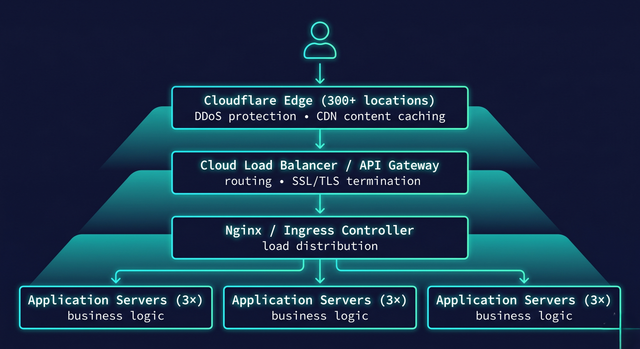
Production traffic for a major website doesn't pass through one proxy — it passes through a layered stack of proxies, each doing a specialized job. Understanding this layered architecture is what separates engineers who can design resilient, globally-distributed systems from those who think of Nginx as the end of the story.
The outermost layer is typically an edge service like Cloudflare, Fastly, or AWS CloudFront. These run reverse proxies at hundreds of locations worldwide, with anycast routing directing each user to the nearest edge node. The edge layer handles DDoS mitigation (absorbing attack traffic at the network edge before it reaches your infrastructure), global CDN caching, WAF (Web Application Firewall) rules, and bot detection. Your application never sees the overwhelming majority of attack traffic — it never leaves Cloudflare's network.
Inside the cloud provider, the second layer is typically an API gateway or load balancer — AWS ALB, GCP Load Balancer, or a dedicated API gateway like Kong or AWS API Gateway. This layer handles SSL termination (if not done at the edge), routing to different backend services by URL path or hostname, rate limiting, authentication header injection, and request/response transformation. In modern Kubernetes deployments, an Ingress controller (Nginx Ingress, Traefik, or the cloud provider's native ingress) serves this function. The user enters your cloud at the edge close to their geography, travels over the provider's high-speed fiber backbone to the appropriate region, hits the load balancer, and is routed to one of your application pods. The origin server — your actual application code — sees less than 5% of the traffic that entered the edge.
✅ Use the Right Layer for the Right JobA common architecture mistake: trying to do everything at one proxy layer. Each layer has optimal capabilities: Edge CDN (Cloudflare/Fastly) = DDoS mitigation + global caching + WAF + TLS. API Gateway/ALB = path-based routing + rate limiting + auth + protocol translation. Nginx/Ingress = local load balancing + service mesh integration + health checks. Service mesh (Istio/Linkerd) = mTLS + circuit breaking + distributed tracing between microservices. Don't configure rate limiting at Nginx when you have an API gateway that does it better. Don't try to do WAF at your load balancer when Cloudflare does it with better threat intelligence at the edge.
synthesisHow the Full Proxy Picture Connects
Forward and reverse proxies are two sides of the same intermediary coin, differentiated by whose identity they protect and who deploys them. Forward proxies protect clients from servers — deployed by client-side organizations (enterprises, schools) to control and monitor egress. Reverse proxies protect servers from clients — deployed by server-side organizations (websites, APIs) to scale, secure, and accelerate their infrastructure.
The practical architecture knowledge is this: every request you make to a major website passes through three to five layers of proxies before hitting application code. Each layer is specialized: the edge absorbs attacks and serves cache. The gateway routes and authenticates. The load balancer distributes across healthy backends. The service mesh handles microservice-to-microservice communication. Understanding what each layer does — and what it should and shouldn't do — is the foundation of designing systems that stay up under load, remain secure under attack, and serve users at speed regardless of geography.
FAQFrequently Asked Questions
What is the difference between forward proxy and reverse proxy? + A forward proxy sits between client machines and the internet, acting on behalf of clients. Clients know they're using it (usually). It hides the client's identity from destination servers. Use cases: corporate browsing controls, privacy, accessing geo-restricted content. A reverse proxy sits between the internet and web servers, acting on behalf of servers. Clients don't know it exists — they think they're talking directly to the website. It hides the server's identity from clients. Use cases: load balancing, DDoS protection, SSL termination, caching. The "reverse" in reverse proxy refers to the fact that it's protecting the server side rather than the client side, and it's deployed by server operators rather than client operators. Why is Nginx called a reverse proxy? + Nginx is called a reverse proxy because its most common production deployment pattern is to sit in front of application servers (Node.js, Python, Java, Ruby) and proxy client requests to them, rather than serving application content directly. Nginx excels at handling thousands of concurrent connections, doing SSL termination, routing requests by URL path or hostname, load balancing across multiple backends, and serving static files directly — all the things that specialized reverse proxies do well. In a typical production deployment, Nginx handles the internet-facing connection and proxies to Gunicorn, uwsgi, Express, Tomcat, or similar application servers running on the same machine or local network. The application server only handles the application logic; Nginx handles everything else. What is SSL termination at a reverse proxy? + SSL termination means the reverse proxy handles the TLS encryption/decryption — the SSL "handshake" and all cryptographic operations — rather than the backend application servers. The client connects to the reverse proxy over HTTPS (encrypted). The proxy decrypts the traffic, then forwards the unencrypted request to the backend over HTTP on a private internal network. The backend sees plain HTTP and doesn't need to manage certificates. Benefits: centralized certificate management (update certs in one place, not on every backend), reduced compute load on backends (TLS crypto is offloaded to the proxy, which may have dedicated crypto hardware), simpler backend configuration. The tradeoff: traffic between proxy and backend is unencrypted, so the internal network must be trusted or separately secured. What are the different types of load balancing algorithms? + The four main load balancing algorithms: Round-robin — requests distributed sequentially across servers (1→2→3→1→2→3). Simple and effective when requests have roughly equal cost. Weighted round-robin — like round-robin but servers with more capacity receive proportionally more requests. Least connections — new requests go to the server with fewest active connections. Best for requests with highly variable response times. IP hash (sticky sessions) — the same client IP always routes to the same backend. Useful for stateful applications but causes uneven distribution and is fragile when backends restart. Modern load balancers also add: health checking (remove unhealthy backends automatically), slow start (gradually ramp new backends), and connection draining (allow in-flight requests to complete before removing a backend). What is a transparent proxy and how is it different from a regular proxy? + A standard forward proxy requires explicit client configuration — the browser or application is configured to send traffic to the proxy. A transparent proxy intercepts traffic at the network level (Layer 4) using switches and routing rules, without any client configuration. Clients don't know the proxy exists. The network infrastructure automatically redirects certain traffic types (usually HTTP/HTTPS ports) to the proxy server. Transparent proxies are used in corporate environments to apply filtering and logging policies to all devices without managing client configs. They're hard to bypass when the client is on the corporate network because the interception happens at the physical network layer. The challenge: HTTPS requires SSL inspection (MITM) to see content, which requires deploying a corporate root certificate to all managed devices. How does a reverse proxy protect against DDoS attacks? + A reverse proxy like Cloudflare protects against DDoS by sitting in front of your origin servers and absorbing attack traffic before it reaches you. The origin server's real IP address is hidden — clients only see Cloudflare's IP. A volumetric DDoS attack (flooding with traffic) hits Cloudflare's network, which has massive capacity (hundreds of Tbps) to absorb it. The origin only receives legitimate forwarded traffic. Application-layer DDoS (many requests that look legitimate) is mitigated by Cloudflare's WAF, rate limiting, bot detection, and challenge pages. The key configuration: ensure your origin firewall only accepts connections from Cloudflare's published IP ranges, preventing attackers from bypassing Cloudflare by directly targeting your origin IP. What is the difference between a CDN and a reverse proxy? + A CDN (Content Delivery Network) is a geographically distributed network of reverse proxies. Cloudflare, Fastly, AWS CloudFront, and Akamai are CDNs. A reverse proxy is the underlying technology. Every CDN edge node is a reverse proxy — it receives requests, may serve cached responses, and proxies cache misses to the origin. The distinguishing feature of a CDN is the geographic distribution: requests are automatically routed to the nearest edge location (using anycast routing), minimizing latency for users worldwide. A single reverse proxy (like Nginx on one server) doesn't provide geographic distribution. CDNs add: global caching, anycast routing, DDoS mitigation at network scale, WAF, and edge computing capabilities. For production web applications serving global users, a CDN is essential; a local reverse proxy alone is insufficient. What does X-Forwarded-For do and why does it matter? + When a reverse proxy forwards a request to a backend server, the backend sees the proxy's IP as the originating client IP — it loses the real client IP. X-Forwarded-For (XFF) is an HTTP header that the reverse proxy adds to preserve the real client IP: X-Forwarded-For: 203.0.113.45, 10.0.0.1 (real client IP, then proxy IPs in order). The backend reads this header to get the real client IP for rate limiting, geolocation, audit logging, and fraud detection. Critical security note: never trust X-Forwarded-For unconditionally. An attacker can set this header to any value in their request, spoofing any IP. Only trust XFF from known, trusted proxy IP ranges. Configure Nginx with set_real_ip_from to only accept real IP headers from your Cloudflare or load balancer IP ranges.🌐 Proxy Traffic Lab
Four experiments: proxy traffic flow, load balancer visualizer, SSL flow, and CDN coverage simulator.
Click "Forward" or "Reverse" to animate traffic routing — watch where the IP is hidden
Proxy Traffic SimulatorVisualize the difference: in a forward proxy, the server sees the proxy IP. In a reverse proxy, the client sees the proxy IP.
— Proxy type — IP hidden fromRequest distribution across backend servers — watch how algorithm affects balance
Load Balancer Simulator Algorithm Round Robin Requests to simulate 30 Backend servers 3 0 Max requests 0 Min requests — Balance quality 0 Total servedTLS handshake animation — orange = encrypted, green = plaintext internal
SSL Termination VisualizerWatch the TLS handshake happen at the proxy, and see plaintext forwarded internally.
— Handshakes (per server) — CPU saving est.Request journey through CDN layers — each hop reduces origin load
CDN Layer Coverage CDN edge nodes 50 Cache hit rate (%) 85 Requests per second 10,000 — Origin RPS (actual) — Edge served RPS — Origin load reduction — Avg latency (edge)Keep reading
Related articles
 General
How Microchips Are Made: The Complete CPU Fabrication Process Step by Step | Zetsapp
Here's the thing most chip articles miss: the "nm" number in modern process node names (TSMC 3nm, Intel 4nm, Samsung 3nm) does not correspond to any physical dimension on the chip. This was true when Intel's 45nm node launched in 2007 and became increasingly disconnected from reality thereafter. TSMC's "3nm" node has a gate pitch (the distance between gates) of approximately 48nm — not 3nm.
 General
How Hard Disk Drives Work: Inside the Spinning Metal That Still Stores Most of the Internet | Zetsapp
Here's the thing most explainers skip: that internal air isn't just "kept clean," it's engineered. Traditional HDDs are filled with filtered, dry air at roughly atmospheric pressure because the read/write head relies on aerodynamic lift from that specific air density to fly at the correct height — too thin an atmosphere and the head flies too low or crashes; too thick and it flies too high to read reliably.
 General
How GPUs Actually Work: The Nvidia GA102 Architecture Decoded Inside the RTX 3090
GPU acceleration is limited by the fraction of your workload that's actually parallel. Amdahl's Law states: if 90% of a program can be parallelized, the maximum speedup from infinite parallel processors is 10× — not infinite. The 10% sequential bottleneck always limits total speedup. In GPU-accelerated ML training, the actual workload split is typically: 85-95% embarrassingly parallel tensor operations