General
Kubernetes Explained: Architecture, Pods & When to Actually Use It
TL;DR Kubernetes inherits a decade of hard-won lessons from Borg, which ran virtually everything at Google scale. Understanding Borg's design explains many K8s decisions that seem strange in isolation. Borg treated machines as a pool of compute resources, not individual servers — which is exactly why Kubernetes uses the "cluster" abstraction rather than "server list."
Read this article as text (accessible version)
Container Orchestration · Production Guide
·
3,800 words · 4 interactive labs · April 2026
Kubernetes
Kubernetes
Explained:
Architecture,
Pods & When
to Actually Use It
Kubernetes promises to solve all your scaling and deployment problems. And it will — right after it introduces thirty new ones. The engineers who thrive with K8s aren't the ones who learned every kubectl command; they're the ones who understand the architecture deeply enough to know when Kubernetes is the right answer and when it's massive overkill.
Read the Deep Dive ↓ Open the K8s Lab ⎈ ⎈ kubernetes → k + 8 letters + s = k8s · Originally Borg @ Google (2003) → Open-sourced 2014 → CNCF graduated 2016 Table of Contents- What is Kubernetes & Why K8s?
- Cluster Architecture Overview
- Control Plane: The Brain
- Worker Nodes: The Muscle
- Honest Tradeoffs: When to Use K8s
- Managed Kubernetes: EKS, GKE, AKS
01What Is Kubernetes and Why Is It Called K8s?
It's 2008 and you're at Google. You're responsible for running thousands of microservices across data centers on multiple continents. Your team's job: make sure every service gets the compute resources it needs, restarts automatically when it crashes, scales up when traffic spikes, scales back down to save money when traffic drops, and rolls out updates without dropping a single user request. You do this manually right now. It takes an army. Then someone suggests automating all of it. That automated orchestration system became Borg — and Kubernetes is the open-source descendant Google released to the world in 2014.
Kubernetes is an open-source container orchestration platform. In plain terms: you tell it what your application should look like (how many instances, how much memory, what version), and Kubernetes makes it so — and keeps it so, continuously, across a cluster of machines. It automates deployment, scaling, and lifecycle management of containerized applications. The "container" part matters: Kubernetes doesn't care whether your app is written in Go, Python, Java, or Rust. As long as it runs in a container, Kubernetes can orchestrate it.
The name k8s comes from a tech convention of abbreviating long words by collapsing the middle letters into their count. "Kubernetes" has 8 letters between the "k" and the "s" — hence k8s. The same convention gives us i18n for "internationalization" and l10n for "localization." It's a small nerdy signal that you're in the right tribe when you say "kates" (the common pronunciation) in a conversation.
Kubernetes inherits a decade of hard-won lessons from Borg, which ran virtually everything at Google scale. Understanding Borg's design explains many K8s decisions that seem strange in isolation. Borg treated machines as a pool of compute resources, not individual servers — which is exactly why Kubernetes uses the "cluster" abstraction rather than "server list." Borg's job/task hierarchy directly maps to K8s Deployments/Pods. If you want to understand why Kubernetes works the way it does, reading Google's 2015 Borg paper (available on research.google.com) is the single best investment of 45 minutes you can make.
02Kubernetes Cluster Architecture: The Big Picture
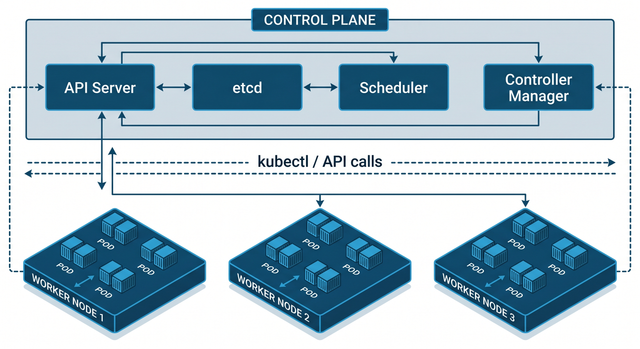
A Kubernetes cluster is a set of machines — called nodes — that work together to run containerized workloads. Picture a shipping company. The control plane is the dispatch office: it knows the state of all shipments, decides which truck carries which package, and responds when something goes wrong. The worker nodes are the trucks: they do the actual delivery work, carrying containers from A to B. Neither half works without the other.
Every cluster has two essential types of nodes: control plane nodes (one or more, running the orchestration logic) and worker nodes (many, running your actual application containers). In production, the control plane runs on multiple nodes spread across availability zones for high availability — you don't want your entire orchestration system to go down because one datacenter loses power. Worker nodes can range from three to thousands, depending on your workload.
The fundamental unit of work in Kubernetes is the Pod — not the container. A Pod is a group of one or more containers that share the same network namespace (same IP address) and storage volumes, and are always scheduled together on the same node. The most common pattern is one container per Pod, but sidecar containers (for logging, monitoring, or proxying) are co-located in the same Pod so they can communicate over localhost with zero network overhead. Every Pod gets an IP address in the cluster's internal network, but that IP is ephemeral — it changes when the Pod is rescheduled. Services (another K8s abstraction) provide stable DNS names and load balancing in front of groups of Pods.
💡 The Pod Is the Unit of Scheduling, Not the ContainerHere's the thing most Kubernetes tutorials miss: Kubernetes doesn't schedule containers — it schedules Pods. This distinction matters for sidecar patterns, resource allocation (CPU/memory limits are set per container but the Pod is the scheduling unit), and networking (all containers in a Pod share the same localhost). It also means you can't independently reschedule one container in a multi-container Pod — they move together. Design your Pod topology carefully, because the relationship between containers in a Pod is fundamentally different from the relationship between containers in separate Pods.
03The Control Plane: The Brain of the Cluster
The control plane is Kubernetes' nervous system. It maintains the desired state of the cluster — watching what's actually running, comparing it to what should be running, and taking corrective action whenever there's a gap. Four core components run in the control plane: the API server, etcd, the scheduler, and the controller manager. Understanding each one isn't just academic — it's what lets you diagnose production outages quickly.
The API server (kube-apiserver) is the single entry point for all cluster communication. Every kubectl command you run hits the API server's RESTful API. Every component in the cluster communicates through the API server — nothing talks directly to etcd or directly to the scheduler. This centralized design makes security auditing straightforward (all cluster operations flow through one point) and enables role-based access control (RBAC) to be applied consistently. The API server is stateless — all state lives in etcd.
etcd is a distributed key-value store that holds the cluster's entire persistent state: what Pods exist, what their desired state is, what Nodes are in the cluster, all configuration and secrets. It's the source of truth for everything. etcd uses the Raft consensus algorithm to ensure consistency across multiple etcd instances — in production you run three or five etcd nodes for quorum-based fault tolerance. The operational implication: backing up etcd is backing up your entire cluster. A corrupted or lost etcd without a backup means starting over. This is non-negotiable.
The scheduler watches for newly created Pods with no assigned node and selects the best worker node for each based on resource requirements (CPU/memory requests), node capacity, affinity/anti-affinity rules, taints and tolerations, and topology constraints. It doesn't place Pods directly — it just updates the Pod's spec with the assigned node, and the kubelet on that node picks up the assignment. The controller manager runs a collection of control loops (controllers) that watch the cluster state and take action to move it toward the desired state. The Deployment controller ensures the right number of Pod replicas are running. The Node controller handles what happens when a node goes offline. The Job controller manages batch workloads. Each controller is a reconciliation loop: observe current state, compare to desired state, take action to close the gap.
✅ etcd Backup Is Not Optional in Productionetcd holds everything — Deployments, Services, ConfigMaps, Secrets, RBAC rules, every cluster resource. Losing etcd without a backup means rebuilding the entire cluster from scratch. Configure automated etcd snapshots (etcdctl snapshot save) on a schedule (hourly for active clusters) and store snapshots in separate storage from the cluster itself. If you're using a managed K8s service (EKS, GKE, AKS), the provider handles etcd backups automatically — this is one significant advantage of managed services. Self-hosted clusters that skip etcd backups are one bad disk failure away from a catastrophic recovery incident.
control_plane_inspection.sh# Check control plane component health
$ kubectl get componentstatus
# NAME STATUS MESSAGE
# controller-manager Healthy ok
# scheduler Healthy ok
# etcd-0 Healthy {"health":"true"}
# View all cluster events (great for debugging)
$ kubectl get events --sort-by=.metadata.creationTimestamp -A
# Inspect the API server's current resource version (etcd marker)
$ kubectl get --raw /version
# Check etcd cluster health directly
$ etcdctl --endpoints=https://127.0.0.1:2379 \
--cacert=/etc/kubernetes/pki/etcd/ca.crt \
--cert=/etc/kubernetes/pki/etcd/healthcheck-client.crt \
--key=/etc/kubernetes/pki/etcd/healthcheck-client.key \
endpoint health
# Take an etcd snapshot (critical for disaster recovery)
$ ETCDCTL_API=3 etcdctl snapshot save /backup/etcd-snapshot-$(date +%Y%m%d).db
# View scheduler decisions for a specific pod
$ kubectl describe pod my-pod | grep -A5 "Events:"
04Worker Nodes: Where Your Applications Actually Live
Worker nodes are the compute workhorses. They do the actual work: running container workloads, handling network traffic, and reporting their status back to the control plane. Three components run on every worker node: the kubelet, the container runtime, and kube-proxy.
The kubelet is the most important component on a worker node. It's a daemon that runs continuously, watches for Pod assignments from the control plane, and ensures that every Pod assigned to its node is running and healthy. The kubelet talks to the container runtime to start/stop containers, monitors container health using the liveness and readiness probes you define in your Pod specs, and reports node and Pod status back to the API server. If you're debugging why a container keeps restarting, the kubelet logs are your first stop.
The container runtime is the software that actually runs containers — typically containerd (the default in modern K8s) or CRI-O. The container runtime implements the Container Runtime Interface (CRI) and is responsible for pulling container images from registries, creating and managing container processes, and managing container storage and network namespaces. Docker used to be the container runtime of choice, but K8s removed dockershim in v1.24, making containerd the standard. The conceptual layer still works the same way — K8s talks to the CRI, and the CRI manages the underlying containers.
kube-proxy maintains network routing rules on each node — specifically iptables or IPVS rules that enable the Kubernetes Service abstraction to work. When you create a Service in Kubernetes, kube-proxy ensures that traffic destined for the Service's ClusterIP gets load-balanced across the healthy backing Pods. It watches the API server for Service and Endpoint changes and updates the node's routing rules accordingly. Without kube-proxy, Service-level load balancing wouldn't function.
⚠️ Liveness vs Readiness Probes: Get This Wrong and You'll Have OutagesLiveness probes tell Kubernetes when to restart a container (it's alive? no → kill and restart). Readiness probes tell Kubernetes when a container is ready to receive traffic (it's ready? no → remove from Service load balancing). A common mistake: using liveness probes for things that take a while during startup (like waiting for database connection pools). If the liveness probe fails before the app has finished initializing, Kubernetes restarts the container in an endless loop. Use startupProbe to give containers time to initialize, then hand off to liveness/readiness. Incorrect probes cause cascading restarts, CrashLoopBackOff loops, and deployment failures that are maddening to debug.
apiVersion: apps/v1
kind: Deployment
metadata:
 name: api-server
spec:
 replicas: 3
 selector:
 matchLabels: {app: api-server}
 strategy:
 type: RollingUpdate
 rollingUpdate: {maxSurge: 1, maxUnavailable: 0} # zero-downtime rollout
 template:
 metadata:
 labels: {app: api-server}
 spec:
 containers:
 - name: api
 image: myregistry/api:v1.2.3
 ports: [{containerPort: 8080}]
 resources:
 requests: {cpu: "250m", memory: "256Mi"} # scheduler uses this
 limits: {cpu: "500m", memory: "512Mi"} # cgroup enforces this
 startupProbe: # give app time to start before liveness kicks in
 httpGet: {path: /health, port: 8080}
 failureThreshold: 30
 periodSeconds: 5 # 30 × 5s = 150s max startup time
 livenessProbe: # restart if unhealthy
 httpGet: {path: /health, port: 8080}
 periodSeconds: 10
 readinessProbe: # remove from Service if not ready
 httpGet: {path: /ready, port: 8080}
 periodSeconds: 5
05The Honest Tradeoffs: When Should You Actually Use K8s?
Here's the counterintuitive truth that K8s advocates rarely say out loud: Kubernetes is overkill for the majority of software projects. Not because it doesn't work — it works spectacularly. But because the benefits it provides (high availability, auto-scaling, rolling deployments, service mesh, fine-grained resource management) only pay off if you actually need them at a scale that justifies the operational complexity. A startup with one backend service and three engineers running K8s is spending 40% of engineering time maintaining infrastructure instead of building product.
The upsides are real and significant. Kubernetes provides self-healing (automatically restarts crashed containers, reschedules Pods from failed nodes), automatic rollbacks (if a new deployment's Pods fail health checks, K8s can automatically roll back to the previous version), and horizontal scaling (add or remove replicas with a single command or automatically via the Horizontal Pod Autoscaler based on CPU/memory metrics). Its portability is genuine — the same Kubernetes YAML that runs on your laptop's minikube runs on EKS on AWS, GKE on Google Cloud, or on-premises bare metal. You write your deployment manifest once and it works everywhere that runs Kubernetes.
The downsides are equally real. Complexity is the number one cost. A production-grade Kubernetes setup requires expertise in networking (CNI plugins, Service meshes like Istio/Linkerd), storage (persistent volumes, storage classes), security (RBAC, Pod Security Admissions, network policies, secrets management), observability (Prometheus, Grafana, distributed tracing), and the K8s API itself. The minimum viable production cluster for a medium-sized organization requires 3 control plane nodes, 3+ worker nodes, a load balancer, a container registry, monitoring infrastructure, and log aggregation. That's the starting point, not the ceiling.
🚨 K8s Is Often the Wrong ToolAsk these questions before committing to Kubernetes: Do you have more than 5 microservices? Do you need zero-downtime deployments and auto-scaling? Do you have or plan to hire engineers who understand container orchestration? If two or more answers are "no," consider simpler alternatives first: Docker Compose on a single server handles most startup-scale needs. AWS App Runner, Google Cloud Run, or Azure Container Apps give you container deployment with zero infrastructure management at a fraction of the complexity. Fly.io and Railway deploy containers globally with simple configs. K8s should be a deliberate choice for a known scaling problem, not a default for anyone using containers.
06Managed Kubernetes: EKS, GKE, and AKS
Managed Kubernetes services are the pragmatic middle ground for organizations that need K8s capabilities without a dedicated platform engineering team. Amazon EKS (Elastic Kubernetes Service), Google GKE (Google Kubernetes Engine), and Azure AKS (Azure Kubernetes Service) all offload the hardest parts of running Kubernetes: provisioning and upgrading the control plane, etcd management and backup, control plane HA across availability zones, and certificate rotation.
What you get with managed K8s: the control plane is provisioned, scaled, and maintained by the cloud provider. You pay a flat fee (EKS charges $0.10/hour per cluster as of 2026) plus the cost of worker node compute. The provider handles the deep expertise tasks: etcd clustering, API server upgrades, control plane node replacement when hardware fails, and security patches for control plane components. What you're still responsible for: configuring worker nodes, managing node groups, setting up networking (VPC, subnets, security groups), configuring RBAC, managing secrets, setting up monitoring, and operating your actual applications.
The choice between managed providers comes down to your existing cloud footprint and team expertise. GKE is widely regarded as the most polished managed K8s experience — which makes sense, since Google invented Kubernetes. GKE Autopilot mode further abstracts away node management, making it the closest to a truly serverless K8s experience. EKS integrates deeply with AWS services (IAM, VPC, ELB, ECR, RDS) and is the natural choice if your infrastructure is AWS-native. AKS is the choice for Azure-native shops. The operational patterns are nearly identical across all three; the differences are in cloud-specific integrations and pricing details.
💡 GKE Autopilot vs Standard ModeGKE Autopilot eliminates node management entirely — you don't provision nodes, don't manage node pools, and don't pay for idle capacity. Google provisions just enough compute for your actual running Pods and charges per Pod resource request. For most organizations starting with managed K8s, Autopilot is the right default: lower operational overhead, lower cost for variable workloads, and fully managed upgrades. Standard mode gives you more control over node configuration, network policies, and hardware selection — use it when you have specific hardware requirements (GPUs, high-memory instances) or need deep networking customization. Start with Autopilot and migrate to Standard only if you hit its limitations.
managed_k8s_quickstart.sh# ── Google GKE (fastest to production) ────────────────────── $ gcloud container clusters create-auto my-cluster \ --region=us-central1 \ --release-channel=stable $ gcloud container clusters get-credentials my-cluster --region=us-central1 # ── AWS EKS (with eksctl) ──────────────────────────────────── $ eksctl create cluster \ --name=my-cluster \ --region=us-east-1 \ --nodegroup-name=workers \ --node-type=t3.medium \ --nodes=3 --nodes-min=2 --nodes-max=10 # ── Azure AKS ──────────────────────────────────────────────── $ az aks create \ --resource-group myRG \ --name my-cluster \ --node-count 3 \ --enable-addons monitoring \ --generate-ssh-keys # ── Deploy your first app (works on any managed cluster) ───── $ kubectl apply -f deployment.yaml $ kubectl get pods -w # watch pods come online $ kubectl get services # find the LoadBalancer external IP $ kubectl rollout status deployment/api-server # verify rollout
synthesisHow It All Connects: The K8s Mental Model
Kubernetes becomes coherent once you internalize the control loop: you declare desired state, the control plane continuously reconciles actual state toward desired state. You say "I want 3 replicas of this Pod, with these resource limits, rolling out this new image with no downtime." The control plane — through the scheduler, controller manager, and kubelet — makes it so and keeps it so. When a node fails, the controller manager detects the deviation and schedules replacement Pods. When traffic spikes and HPA triggers, the deployment controller creates more replicas. When you push a bad deployment, the rollout controller detects failing health checks and rolls back. You describe outcomes; Kubernetes executes them.
The abstraction layers matter: containers run inside Pods, Pods are managed by higher-level controllers (Deployments, StatefulSets, DaemonSets), and traffic reaches Pods via Services. Understanding which layer to interact with for which purpose — and why — eliminates most of the confusion that makes K8s feel impenetrable to newcomers.
getting startedYour First Kubernetes Application
first_k8s_app.sh — from zero to running# Step 1: Install local K8s (choose one) $ brew install minikube && minikube start # macOS $ curl -LO https://storage.googleapis.com/minikube/releases/latest/minikube-linux-amd64 $ # OR use Kind (Kubernetes IN Docker) — faster CI cycles $ kind create cluster --name my-cluster # Step 2: Deploy a sample application $ kubectl create deployment hello-k8s \ --image=gcr.io/google-samples/hello-app:1.0 \ --replicas=3 # Step 3: Expose it via a Service $ kubectl expose deployment hello-k8s \ --type=LoadBalancer --port=80 --target-port=8080 # Step 4: Inspect what Kubernetes created $ kubectl get pods -o wide # see which nodes pods landed on $ kubectl describe deployment hello-k8s # full deployment details $ kubectl logs -l app=hello-k8s --tail=20 # stream logs from all 3 pods # Step 5: Scale and watch the magic $ kubectl scale deployment hello-k8s --replicas=10 $ kubectl get pods -w # watch 7 new pods spin up # Step 6: Simulate a node failure (on minikube) $ kubectl drain minikube-m03 --ignore-daemonsets --delete-emptydir-data $ kubectl get pods -w # watch pods reschedule to healthy nodes # Step 7: Rolling update with zero downtime $ kubectl set image deployment/hello-k8s hello-app=gcr.io/google-samples/hello-app:2.0 $ kubectl rollout status deployment/hello-k8s $ kubectl rollout undo deployment/hello-k8s # rollback if needed
FAQFrequently Asked Questions
What is the difference between a Pod and a container in Kubernetes? + A container is a runtime instance of a container image — a process running in an isolated environment. A Pod is Kubernetes' fundamental scheduling unit, which wraps one or more containers. All containers in a Pod share the same network namespace (same IP address and port space), the same hostname, and can share storage volumes. The key distinction: Kubernetes schedules Pods, not containers. When the scheduler places a workload on a node, it places the entire Pod as a unit — all containers in the Pod land on the same node. The most common pattern is one container per Pod, but sidecar containers (logging agents, proxies, monitoring sidecars) that must co-locate with the main container belong in the same Pod. What does etcd do in Kubernetes and why is it important? + etcd is the distributed key-value store that holds the entire state of a Kubernetes cluster — every Deployment, Service, Pod spec, ConfigMap, Secret, RBAC rule, and node record. It's the single source of truth that all other control plane components read from and write to. etcd uses the Raft consensus algorithm, which requires a quorum (majority of nodes) to accept writes, ensuring consistency across replicas. Why it's critical: without etcd, the cluster has no memory. If etcd data is lost without a backup, the cluster must be rebuilt from scratch. In production, run etcd on at least three nodes (tolerates one failure) and take regular snapshots. Managed K8s services (EKS, GKE, AKS) handle etcd management and backup automatically. What is the difference between the Kubernetes scheduler and the controller manager? + The scheduler and controller manager have distinct, non-overlapping responsibilities. The scheduler's only job is deciding which node a newly created Pod should run on — it evaluates resource requirements, node capacity, affinity rules, taints/tolerations, and topology constraints to select the best fit. It then writes the node assignment to etcd; it does not actually start the Pod. The controller manager runs a collection of control loops (controllers) that watch cluster state and take corrective action. The Deployment controller ensures the right number of replicas exist. The ReplicaSet controller manages groups of identical Pods. The Node controller handles what happens when a node goes offline. The Job controller manages batch workloads. Schedulers and controllers are designed to be swappable — you can replace the default scheduler with a custom one for specialized workloads like GPU scheduling. When should I use Kubernetes vs Docker Compose? + Docker Compose is the right tool for: single-host deployments, local development environments, small applications with < 5 services, teams without Kubernetes expertise, and projects that need fast iteration over infrastructure management. Kubernetes is right for: multi-host deployments requiring HA, applications that need auto-scaling based on traffic, workloads requiring zero-downtime rolling deployments, complex microservice architectures (10+ services), organizations with dedicated platform engineering capability, and any scenario where containers need to run across multiple cloud regions. The cost of Kubernetes in engineering time and operational complexity is real — justify it with a concrete scaling or reliability requirement, not just "containers need orchestration." What is kubelet and what does it do? + kubelet is a daemon that runs on every worker node. It's the agent that bridges the control plane and the actual container runtime on each node. kubelet watches the API server for Pod assignments to its node, then instructs the container runtime (containerd/CRI-O) to start the required containers. It monitors container health using the liveness, readiness, and startup probes you define in Pod specs, and reports container and node status back to the API server. kubelet also manages volume mounting, secret/configmap injection into containers, and resource accounting. When a container fails its liveness probe, kubelet is what restarts it. When a node reports "NotReady," it often means kubelet is not functioning correctly on that node — check kubelet logs first. What is the difference between EKS, GKE, and AKS? + All three are managed Kubernetes services that handle control plane management (provisioning, scaling, upgrades, etcd backup). The differences are primarily in ecosystem integration and operational experience. GKE (Google): generally considered the most mature managed K8s experience since Google invented Kubernetes. GKE Autopilot mode removes node management entirely. Best choice if you value simplicity and polish. EKS (AWS): deepest integration with AWS services (IAM for service accounts, VPC networking, ELB, ECR). Best choice if your infrastructure is heavily AWS-native. AKS (Azure): similar managed service with tight Azure AD integration. Best for Azure-native shops. Cost structure: all charge for worker node compute; control plane fees vary (EKS charges per cluster, GKE standard has no control plane fee below certain sizes, GKE Autopilot charges per Pod resource). For a new project with no existing cloud commitment, GKE is the easiest onboarding experience. How does Kubernetes achieve zero-downtime rolling deployments? + Kubernetes rolling deployments work by gradually replacing old Pods with new ones while ensuring a minimum number of healthy Pods are always serving traffic. The process: (1) Create a new Pod with the updated image. (2) Wait for its readiness probe to pass. (3) Remove one old Pod from the Service's load balancer. (4) Terminate the old Pod. (5) Repeat until all Pods are updated. The Deployment's rolling update configuration controls the speed: maxSurge defines how many extra Pods can exist above the desired replica count during the update, and maxUnavailable defines how many Pods can be unavailable. Setting maxSurge=1 and maxUnavailable=0 (the safest config) means: create one new Pod before removing any old one, ensuring you always have at least your desired number of healthy Pods. The readiness probe is the critical safety gate — if new Pods never become ready, the rollout pauses rather than continuing to remove healthy old Pods. What is kube-proxy and how does Service load balancing work? + kube-proxy runs on every worker node and maintains the network routing rules that implement Kubernetes Services. When you create a Service in K8s, it gets a stable ClusterIP (a virtual IP address that doesn't change). kube-proxy watches for Service and Endpoint (the list of healthy Pod IPs) changes via the API server and updates iptables or IPVS rules on each node to route traffic destined for the ClusterIP to one of the backing Pod IPs via load balancing. For external access, LoadBalancer type Services trigger the cloud provider's load balancer provisioning, and NodePort Services open a specific port on every worker node that routes to the Service. kube-proxy doesn't proxy the actual traffic in most modern configurations — it just sets up the routing rules that let the kernel handle load balancing efficiently at the network level.⎈ Kubernetes Lab
Four experiments: cluster visualizer, scheduler simulation, Pod lifecycle, and HPA scaling.
Click a worker node to simulate node failure — watch pods reschedule
Cluster VisualizerA live K8s cluster with control plane + worker nodes. Click a worker node to simulate failure and watch Kubernetes reschedule pods to healthy nodes.
3 Worker nodes 0 Running pods 0 Failed nodes 100% Cluster healthScheduler placement decisions: resource requests vs available capacity
Scheduler SimulatorConfigure a Pod's resource requests and watch the scheduler find the best-fit node. See how CPU/memory requests affect scheduling decisions.
Pod CPU request (m) 250m Pod memory request (Mi) 256Mi — Selected node — Decision reason Pod Lifecycle SimulatorWalk through a Pod's lifecycle from Pending to Running to Terminated. Configure probes and see how they affect the Pod's state.
Probe configuration startupProbe (failureThreshold: 30) livenessProbe (/health) readinessProbe (/ready) Pod Status Log — Phase 0 Restarts Not ready Ready for traffic? 0s AgeHorizontal Pod Autoscaler: replicas respond to CPU utilization
HPA Scaling Simulator Current CPU % 40% Target CPU % 60% Min replicas 2 Max replicas 10 2 Current replicas 2 Desired replicas — CPU per pod Stable HPA actionKeep reading
Related articles
 General
How Microchips Are Made: The Complete CPU Fabrication Process Step by Step | Zetsapp
Here's the thing most chip articles miss: the "nm" number in modern process node names (TSMC 3nm, Intel 4nm, Samsung 3nm) does not correspond to any physical dimension on the chip. This was true when Intel's 45nm node launched in 2007 and became increasingly disconnected from reality thereafter. TSMC's "3nm" node has a gate pitch (the distance between gates) of approximately 48nm — not 3nm.
 General
How Hard Disk Drives Work: Inside the Spinning Metal That Still Stores Most of the Internet | Zetsapp
Here's the thing most explainers skip: that internal air isn't just "kept clean," it's engineered. Traditional HDDs are filled with filtered, dry air at roughly atmospheric pressure because the read/write head relies on aerodynamic lift from that specific air density to fly at the correct height — too thin an atmosphere and the head flies too low or crashes; too thick and it flies too high to read reliably.
 General
How GPUs Actually Work: The Nvidia GA102 Architecture Decoded Inside the RTX 3090
GPU acceleration is limited by the fraction of your workload that's actually parallel. Amdahl's Law states: if 90% of a program can be parallelized, the maximum speedup from infinite parallel processors is 10× — not infinite. The 10% sequential bottleneck always limits total speedup. In GPU-accelerated ML training, the actual workload split is typically: 85-95% embarrassingly parallel tensor operations