data-lakehouseApache-IcebergDelta-Lakedata-lakedata-warehouseopen-table-formatApache-SparkTrinodata-governancedata-engineering
General
DATA LAKEHOUSE EXPLAINED
TL;DR Data warehouses are built around compute-storage coupling: the storage format is optimized for the query engine, and the engine knows exactly what's in storage. This tight coupling delivers performance but makes scaling expensive and creates vendor lock-in. Data lakes decouple storage from compute entirely — any engine can read the files — but sacrifice the database properties (ACID, consistency) that make warehouses trustworthy for analytics.
Read this article as text (accessible version)
Data Architecture · Lakehouse Deep Dive
·
3,900 words · 4 interactive labs · April 2026
DATA
DATA
LAKEHOUSE
EXPLAINED
Your data engineers are spending 60% of their time keeping two systems in sync instead of building data products. That's the warehouse-and-lake duplication trap — and data lakehouse architecture is the principled way out. Here's how it actually works, layer by layer.
Read the Deep Dive ↓ Open the Lab 🧊 Object Storage Open Table Format (Iceberg) Unified Catalog Governance Layer Table of Contents- Data Warehouse vs Data Lake
- Why the Two-System Architecture Breaks
- The Storage Foundation
- Open Table Formats: Iceberg, Delta, Hudi
- The Unified Catalog
- Governance at Team Scale
- The Operational Reality
- Which Architecture Should You Build?
01Data Warehouse vs Data Lake: Two Systems, Two Very Different Contracts
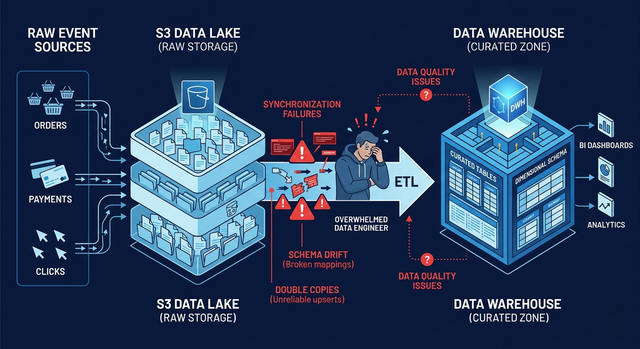
Picture this: it's Monday morning at a large e-commerce company, and two separate teams are about to start their week with data. The finance team opens their BI dashboard and runs a SQL query to pull weekend revenue by region. The answer comes back in seconds, perfectly formatted, every decimal precise. Meanwhile, the data science team is spinning up a Spark cluster to process 200GB of raw clickstream logs that landed in S3 overnight. They'll spend the next three hours cleaning, transforming, and feature-engineering before their model can even start training.
These two teams are working with the same underlying business events — orders, clicks, payments — but they're using two completely different systems designed for two completely different guarantees. The finance team uses a data warehouse: a system that stores curated, schema-enforced, analytics-ready data, optimized for fast SQL queries and ACID transactions. Redshift, BigQuery, and Snowflake are canonical examples. The data science team uses a data lake: a system that stores raw, semi-structured, and unstructured data at massive scale on cheap object storage like S3 or GCS. No schema requirements, no transaction guarantees, just files.
The warehouse offers speed, reliability, and governance at the cost of schema rigidity and price per terabyte. The data lake offers scale and flexibility at the cost of data quality, consistency, and operational complexity. Neither system was designed to be the other. This isn't a bug — it's a reflection of genuinely different workload requirements. But it creates a problem the moment both teams need to work with the same data.
💡 The Fundamental Design DifferenceData warehouses are built around compute-storage coupling: the storage format is optimized for the query engine, and the engine knows exactly what's in storage. This tight coupling delivers performance but makes scaling expensive and creates vendor lock-in. Data lakes decouple storage from compute entirely — any engine can read the files — but sacrifice the database properties (ACID, consistency) that make warehouses trustworthy for analytics. The lakehouse architecture's core idea is: can we get database properties on top of decoupled object storage?
02Why the Two-System Architecture Eventually Breaks
The warehouse-plus-lake setup works fine when you're small. You build an ETL pipeline that takes raw events from the lake, cleans and transforms them, and loads the results into the warehouse. Finance gets their SQL-ready tables, data science gets raw files. Everyone is happy, briefly.
Then your platform grows. You add a new payment processor, which changes the schema of payment events. Now you have to update the ETL pipeline that transforms raw lake data into warehouse tables. You have to update the quality checks on the raw lake side. You have to update the quality checks on the warehouse side. You have to update the access controls on both systems. You have to coordinate the deployment so the pipeline isn't left in an inconsistent state between the two schema versions. This synchronization tax compounds with every schema change, every new data source, every new business requirement.
Here's the thing most architecture tutorials miss: the problem isn't just engineering overhead — it's data inconsistency risk. When you maintain two copies of the same data in two different systems with two different ingestion pipelines, the opportunity for divergence is constant. A failed ETL job leaves the warehouse behind. A backfill job fills the lake but misses the warehouse. A transformation bug affects one system but not the other. And when the finance team's revenue number disagrees with the data science team's revenue feature, you have a trust crisis that takes days to debug and damages confidence in the entire data platform.
🔮 Myth: Just Build Better ETLThe common response to two-system synchronization pain is to invest in better ETL tooling, more robust pipelines, and more thorough monitoring. This helps — but it doesn't address the root cause. You're still maintaining two copies of truth. Every improvement to the synchronization machinery is complexity added to a fundamentally duplicative architecture. The lakehouse approach doesn't fix ETL; it eliminates the need for cross-system synchronization by having one shared storage layer that both analytics and ML workloads can read directly.
03The Storage Foundation: Why Object Storage + Parquet Isn't Enough
The lakehouse starts with a simple premise: put everything — raw events and curated analytics tables alike — in a single object storage layer. S3, GCS, Azure Data Lake Storage. Object storage is highly available, durable by design (S3 offers 99.999999999% durability), infinitely scalable, and costs a fraction of managed warehouse storage. Process raw data, write the polished results back as optimized columnar files (Parquet, ORC), and you've eliminated the separate warehouse storage tier.
But here's where the simple story breaks down. Object storage doesn't know what a database table is. It stores bytes in files under keys. It has no concept of transactions, schema, or consistency. When a Spark job writes data to S3, it creates files. If the job crashes halfway through, readers may see a mix of old and new files — an inconsistent partial state. If two jobs write to the same table simultaneously, they can overwrite each other's files in ways that corrupt the table. If you delete a row by rewriting a Parquet file, the old version persists on disk until you explicitly clean it up.
These aren't edge cases — they're everyday events in production data platforms. A Spark job fails halfway through a multi-hour write. Two daily pipelines happen to overlap. A backfill job runs alongside normal ingestion. Without transactional guarantees, every one of these creates potential data corruption. And the truly insidious problem is that the corruption is often silent: readers get data, it just happens to be wrong in ways that are difficult to detect without knowing what the correct state should be.
🚨 The Small File ProblemStreaming ingestion creates a new file with every micro-batch — potentially thousands of tiny files per hour. Each file has the same overhead for the query engine's metadata operations, but contains far less data than an optimally-sized Parquet file (typically 128MB–1GB for column scans). A table with 100,000 tiny files can be orders of magnitude slower to query than the same data in 100 properly-sized files. In a managed warehouse, this is handled automatically. In a lakehouse, your team must schedule compaction jobs that periodically merge small files into larger ones. This is real operational work that should be planned for from the start.
iceberg_compaction.py — Spark compaction jobfrom pyspark.sql import SparkSession
spark = SparkSession.builder \
.appName("IcebergCompaction") \
.config("spark.sql.extensions",
"org.apache.iceberg.spark.extensions.IcebergSparkSessionExtensions") \
.getOrCreate()
# Rewrite data files to eliminate small file problem
# This is NECESSARY in production — not optional
spark.sql("""
CALL catalog.system.rewrite_data_files(
table => 'ecommerce.orders',
options => map(
'target-file-size-bytes', '134217728', -- 128MB target
'min-input-files', '5', -- only compact if 5+ small files
'max-concurrent-file-group-rewrites', '10'
)
)
""")
# Also expire old snapshots to reclaim S3 storage
# Without this, old Parquet files accumulate forever
spark.sql("""
CALL catalog.system.expire_snapshots(
table => 'ecommerce.orders',
older_than => TIMESTAMP '2026-01-01 00:00:00',
retain_last => 5
)
""")
04Open Table Formats: How Iceberg, Delta Lake & Hudi Give You Database Guarantees
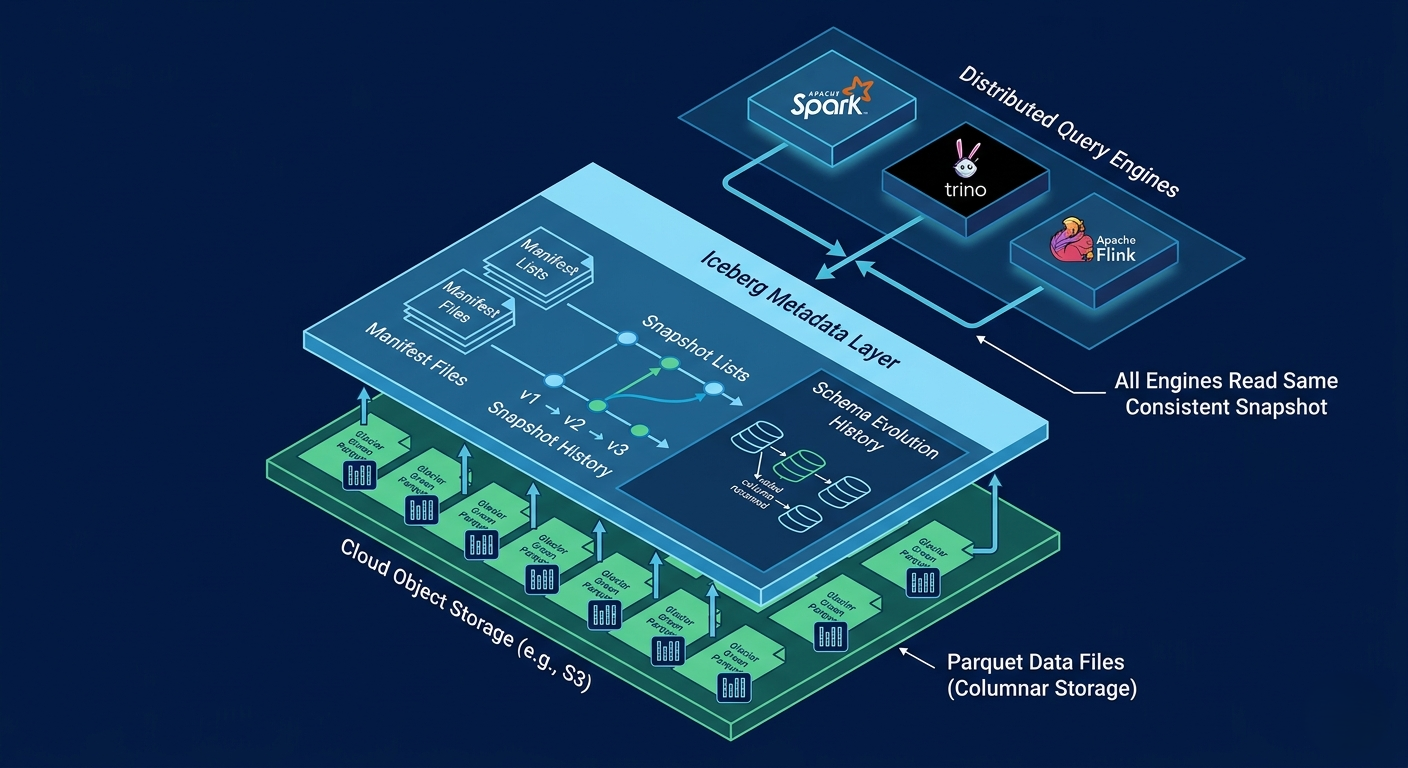
An open table format is the magic layer between raw object storage files and the database properties you need. Instead of exposing raw Parquet files directly, formats like Apache Iceberg, Delta Lake, and Apache Hudi maintain a metadata layer — table definitions, file manifests, schema history, and a commit log — stored alongside the data files in object storage. This metadata layer is what transforms a directory of Parquet files into something that behaves like a reliable database table.
The most important property these formats provide is snapshot isolation. Every write operation creates a new snapshot — an immutable, consistent view of the table at a point in time. Readers always see a fully committed snapshot, never a partial write. Writers don't block readers. Two writers can't corrupt each other's data without explicit conflict detection. This is ACID compliance on object storage, achieved entirely through metadata management rather than a traditional database engine.
Schema evolution becomes dramatically simpler. In traditional data lakes, adding a column means rewriting every Parquet file in the table — potentially petabytes of data. With Iceberg's metadata-driven schema evolution, adding a column is a metadata update that completes in milliseconds regardless of how much data is stored. Renaming a column, changing a type, reordering columns — these are all operations on the schema metadata, not the data files. The data itself can stay exactly as it is. This transforms what used to be a dangerous, expensive migration into a routine, reversible operation.
✅ Time Travel: A Killer FeatureBecause every write creates a new snapshot, Iceberg (and Delta Lake, and Hudi) enable time travel queries: you can query your table as it existed at any point in its history. Made a bad schema change that broke a downstream pipeline? Query the table as it was before the change. Need to audit what data existed at quarter-close? Query the table as it was on December 31. Want to reprocess last week's data with a corrected pipeline? The old snapshot is still there. This single capability transforms data incident response from "restore from backup" (hours) to "query the snapshot" (seconds).
iceberg_operations.sql — Core Iceberg capabilities-- Create an Iceberg table (metadata stored in catalog) CREATE TABLE catalog.ecommerce.orders ( order_id BIGINT, customer_id BIGINT, amount DECIMAL(12,2), status VARCHAR(20), created_at TIMESTAMP ) USING iceberg PARTITIONED BY (days(created_at)) LOCATION 's3://my-lakehouse/ecommerce/orders'; -- Schema evolution: add column (metadata-only, milliseconds) ALTER TABLE catalog.ecommerce.orders ADD COLUMN shipping_country VARCHAR(2); -- Time travel: query yesterday's snapshot SELECT * FROM catalog.ecommerce.orders FOR SYSTEM_TIME AS OF '2026-04-21 00:00:00' WHERE status = 'completed'; -- MERGE for upserts (ACID-compliant on object storage!) MERGE INTO catalog.ecommerce.orders t USING staging_orders s ON t.order_id = s.order_id WHEN MATCHED THEN UPDATE SET status = s.status WHEN NOT MATCHED THEN INSERT *;
05The Unified Catalog: One Source of Truth for All Your Tables
With reliable tables provided by an open table format, the next problem is discoverability. How does Spark know where the Iceberg table ecommerce.orders actually lives in S3? How does Trino find the current schema version? How do you ensure that when Spark writes a batch of new orders and Trino powers a real-time dashboard, they're both looking at the same, up-to-date table definition?
The answer is a catalog — a centralized registry that maps table names to their metadata location in object storage. The catalog maintains the current table definition: its schema, partition spec, the location of the Iceberg metadata pointer, and the access control policies. When any engine wants to read or write a table, it first consults the catalog: "Where is the latest version of ecommerce.orders?" The catalog responds with the metadata location, the engine reads the Iceberg metadata to find the data files, and the query proceeds.
This creates a true single source of truth. When Spark commits a batch of new orders, it updates the Iceberg snapshot pointer in the catalog. Any subsequent query from any engine — Trino, DuckDB, Pandas — will see those new records because they all consult the same catalog before reading. Without a unified catalog, you have a chaos of hardcoded S3 paths, engine-specific metadata stores, and no guarantee that two engines are reading the same version of the same table. Common catalog implementations include Apache Hive Metastore (the legacy choice), AWS Glue (managed, integrates with S3), Nessie (Git-like branching for data), and the Databricks Unity Catalog (full governance + catalog in one).
💡 Nessie: Git Branches for Your DataProject Nessie (from Dremio) takes the catalog concept to an interesting extreme: it applies Git-style branching and versioning to your data tables. You can create a branch of your catalog, run a risky schema migration or a data transformation experiment on the branch, verify the results, and then merge it back to main — or discard it if something went wrong. This is particularly valuable for teams that want to test new ML feature pipelines against production data without risking the production table. It's not for everyone, but for teams with complex data pipelines, it's a genuinely powerful capability.
06Governance at Team Scale: Who Can Read the Payment Fields?
Reliable tables and a unified catalog solve the technical problems of data storage and discovery. But as the platform grows beyond a handful of engineers, a new class of problems emerges: operational and regulatory questions. What data exists in this platform? Where did this dataset come from? Who modified this table last week? Which teams are allowed to query customer PII? Can the ML team read the raw payment amounts, or only bucketed ranges?
These aren't engineering preferences — they're compliance requirements. GDPR mandates that you know exactly where personal data lives and can delete it on request. SOC 2 requires access controls and audit trails. PCI DSS restricts who can see payment card data. Without a governance layer, answering "who has access to this payment table" requires auditing IAM policies, S3 bucket policies, Spark configurations, and Trino catalogs separately — a process that takes days and produces unreliable answers.
A dedicated governance layer like AWS Lake Formation or Databricks Unity Catalog provides a central place to define and enforce access policies at the column level. You can grant the ML team read access to orders but deny access to orders.payment_instrument — and that restriction is enforced consistently regardless of which query engine the ML team uses. The governance layer also maintains a data catalog (not the table catalog — this is the human-facing catalog of what data exists and what it means), lineage tracking (this table was derived from these upstream tables via this pipeline), and audit logs (who queried this table at what time).
Here's the pattern that happens without a governance layer: individual teams set up their own S3 bucket policies, their own IAM roles, their own Spark configurations for who can access what. Over time, these per-system policies accumulate and drift. An engineer leaves and their personal access is forgotten. A new data source gets broad read permissions "temporarily" and stays that way. A new compliance requirement needs to be propagated to 15 different access configurations maintained by 8 different teams. A governance catalog centralizes this so changes are made once and enforced everywhere. This isn't just good practice — it's a prerequisite for any regulated industry deployment.
07The Operational Reality: What You're Actually Signing Up For
Everything described so far makes a lakehouse sound like a straightforward upgrade: more scale, more flexibility, database properties, unified access. But a lakehouse is not a managed service with a support button. It's a platform architecture that your team owns and operates. Understanding the operational responsibilities before you commit is the difference between a successful deployment and a multi-month fire drill.
The most immediate operational responsibility is file management. As new orders stream in via Kafka and land in object storage, you're generating thousands of small files per hour. Without regular compaction, query performance degrades steadily. You need to schedule background Spark jobs that rewrite small files into larger optimal files — a process that must be coordinated with ongoing reads and writes to avoid disrupting queries. You also need to expire old snapshots to reclaim storage (Iceberg retains all historical snapshots by default, and historical Parquet files don't disappear when you overwrite data).
The second major operational risk is the deeply shared nature of the platform. In a two-system architecture, a bad schema change in the warehouse only breaks warehouse queries. In a lakehouse, a poorly coordinated schema change can simultaneously break the finance team's BI dashboards, the ML team's feature pipelines, and the streaming ingestion job. The shared layer amplifies both the benefits (one copy of truth) and the risks (one point of failure). This requires strict data contracts between teams, CI/CD testing of schema changes against all known consumers, and clear ownership of every table in the catalog.
🚨 Type Inconsistency Across EnginesDifferent query engines can interpret the same Parquet data types differently. Spark might treat a timestamp as UTC; Trino might interpret it as local time. A DECIMAL(18,4) might be read differently between engines in edge cases. These discrepancies are subtle, intermittent, and devastating to discover in production when the finance team's revenue number disagrees with the ML team's by 0.01% across timezone boundaries. Before you let any team build production workloads on your lakehouse, establish a type compatibility matrix: what types are safe to use across all engines in your stack, how are they tested, and who is responsible for enforcing the standards.
lakehouse_health_check.pyfrom pyiceberg.catalog import load_catalog
import datetime
catalog = load_catalog("glue", **{"region": "us-east-1"})
table = catalog.load_table("ecommerce.orders")
# ── Check snapshot count (too many = need expiry job) ─────────
snapshots = list(table.snapshots())
print(ff"Snapshots: {len(snapshots)}")
if len(snapshots) > 100:
print("⚠️ Too many snapshots — schedule expire_snapshots job")
# ── Check file sizes (too small = compaction needed) ──────────
files = [f for f in table.scan().plan_files()]
small_files = [f for f in files if f.file.file_size_in_bytes < 10 * 1024 * 1024]
print(ff"Small files (<10MB): {len(small_files)} /{len(files)}")
if len(small_files) / max(len(files), 1) > 0.3:
print("⚠️ >30% small files — schedule rewrite_data_files")
# ── Check freshness (last commit time) ────────────────────────
latest = table.current_snapshot()
age_h = (datetime.datetime.now() - datetime.datetime.fromtimestamp(
latest.timestamp_ms / 1000)).total_seconds() / 3600
print(ff"Last commit: {age_h:.1f}h ago")
if age_h > 26:
print("🚨 Table stale — ingestion pipeline may have failed")
08Which Architecture Should You Actually Build?
Three architectures, three different tradeoffs — and the wrong choice is significantly more expensive than making no choice at all. The decision should be driven by your team's actual workloads and size, not by what sounds most sophisticated.
Choose a data warehouse if your primary workload is analytics SQL, your team is primarily business analysts and BI developers, and you want a fully managed system where infrastructure complexity is someone else's problem. You'll pay a premium in storage and compute costs, but your team focuses entirely on data modeling and SQL rather than platform engineering. Snowflake, BigQuery, and Redshift are excellent choices here. They're not going away and aren't inferior — they're the right tool for analytics-first teams.
Choose a data lake if you're primarily storing raw data for ML training, you have no strict analytics SLA requirements, and you want maximum storage economics without caring about ACID consistency or SQL query performance. Raw feature stores for ML training often fit this model well.
Choose a data lakehouse if you need both: massive scale for raw data and reliable, queryable tables for analytics; streaming ingestion alongside batch and ML workloads; the flexibility to evolve schemas without expensive migrations; and multiple teams with divergent query patterns using different engines. But go in clear-eyed about what you're taking on: you're becoming a platform team. You'll need dedicated data engineers who understand distributed systems, file formats, and platform operations. The payoff is significant — one copy of truth, no synchronization tax, no vendor lock-in on storage — but it compounds slowly and the upfront cost is real.
✅ The Lakehouse Readiness ChecklistBefore committing to a lakehouse architecture, verify: you have at least 2 dedicated data engineers willing to own platform operations; you have documented evidence of N+1 storage copy pain (not just theoretical); you have multiple teams with genuinely different workload types (streaming + batch + ML + analytics); your team understands open table format internals well enough to debug incidents; and you have a plan for the governance layer from day one. If any of these are missing, start with a managed warehouse and revisit in 6–12 months.
synthesisHow It All Connects: The Complete Lakehouse Stack
The lakehouse is four layers stacked in a specific order, where each layer depends on the one below it. Object storage is the foundation: cheap, durable, infinitely scalable, but file-only. The open table format (Iceberg, Delta, Hudi) adds the database properties the foundation lacks: ACID transactions, schema evolution, snapshot isolation, and time travel. The unified catalog turns a distributed collection of table metadata into a single named namespace that any engine can discover and query consistently. The governance layer enforces access control, data lineage, and audit trails at the column level across all engines.
Remove any layer and the architecture degrades toward the problems it was designed to solve. No table format and you're back to raw files with eventual consistency nightmares. No catalog and engines can't find each other's tables, defeating the "unified" in unified data platform. No governance and the platform is a compliance liability the moment you store PII. The stack is only as strong as its weakest layer.
FAQFrequently Asked Questions
What is the difference between a data lake and a data lakehouse? + A data lake stores raw, unstructured, and semi-structured data in object storage with no schema enforcement, no transaction guarantees, and no native support for SQL analytics. It's great for ML training data and cheap storage but unreliable for analytics. A data lakehouse adds a metadata layer (via open table formats like Apache Iceberg) on top of that same object storage to provide ACID transactions, schema enforcement, SQL query support, and data governance — essentially giving you database properties on top of data lake economics. The key distinction: a data lake is just files; a data lakehouse is managed, queryable tables that happen to be stored as files. What is Apache Iceberg and why is it important for the lakehouse? + Apache Iceberg is an open table format specification that defines how to store table metadata (schema, partition information, snapshot history, file manifests) alongside data files in object storage. It's "open" in that it's not tied to any specific vendor or query engine — Spark, Trino, Flink, DuckDB, and Snowflake can all read and write Iceberg tables using the same specification. Iceberg provides ACID transactions, schema evolution, hidden partitioning, time travel, and snapshot isolation on top of standard object storage. It's important because it's vendor-neutral: storing data in Iceberg format means you can change query engines, cloud providers, or compute platforms without migrating your data. It prevents vendor lock-in at the storage layer. Should I choose Apache Iceberg, Delta Lake, or Apache Hudi? + All three provide similar core capabilities (ACID transactions, schema evolution, time travel), so the choice is often driven by ecosystem and use case. Apache Iceberg has the broadest multi-engine support and is becoming the industry default for open, vendor-neutral deployments — it's the natural choice if you want maximum engine flexibility. Delta Lake has deep Databricks integration and is the best choice if your team is primarily on Databricks. Apache Hudi was designed specifically for CDC (Change Data Capture) and upsert-heavy workloads, making it popular for near-real-time ingestion pipelines that need efficient record-level updates. For most new deployments without existing vendor commitments, Iceberg is the recommended starting point. How does a data lakehouse handle streaming and batch workloads together? + A lakehouse handles mixed workloads by having all engines write to and read from the same Iceberg (or Delta) tables in object storage, coordinated through the shared catalog. A Flink streaming job can continuously append new orders to the ecommerce.orders table in micro-batches. Simultaneously, a Spark batch job can run a daily aggregation over the same table. A Trino query can power a BI dashboard. Because all three consult the same catalog and use Iceberg's snapshot isolation, each sees a consistent view of the data — the dashboard never sees a partial micro-batch, and the batch job sees a stable snapshot that doesn't change mid-query. The key operational challenge is that streaming creates small files rapidly, requiring regular compaction to maintain query performance. What is the small file problem in a data lakehouse? + Every time a streaming job writes data, it creates one or more new Parquet files. A job running every 30 seconds creates 2,880 files per day for a single table. Each file requires metadata operations when a query engine plans a scan, and small files mean most of the storage I/O is reading file headers rather than actual data. A table with 100,000 small (1KB) files can be 100× slower to query than the same data in 1,000 optimally-sized (100MB) files. The fix is compaction: periodic background jobs that read many small files and rewrite them as fewer, larger files. Apache Iceberg's rewrite_data_files procedure handles this. In production, you should run compaction at least daily on streaming tables, with frequency tuned to your write rate and query latency requirements. Can a data lakehouse replace a data warehouse entirely? + Technically possible, practically depends on your workload. A well-tuned lakehouse with Trino or Spark SQL can serve BI analytics, but latency and consistency guarantees for high-concurrency dashboards are generally worse than managed warehouses like Snowflake or BigQuery. Managed warehouses handle concurrency, automatic optimization, and query acceleration through proprietary techniques that are hard to replicate in a self-managed lakehouse. Many production architectures are hybrid: a lakehouse as the primary storage and processing layer, with a materialized "serving layer" — either a small data warehouse or a query-optimized layer like Apache Pinot — for high-QPS dashboard queries that need sub-second response times. The lakehouse replaces the warehouse's role as the canonical data store but not always as the serving layer for latency-sensitive queries. What is a data catalog in the context of a lakehouse? + The term "catalog" in lakehouse context is overloaded to mean two related but distinct things. A technical catalog (like AWS Glue, Hive Metastore, or Nessie) is a service that maps table names to their metadata location — it's how query engines find tables. A data catalog (like Apache Atlas, DataHub, or Collibra) is a human-facing registry that describes what data exists, what it means, where it came from, and who owns it — it serves data discovery and governance purposes. A mature lakehouse platform needs both: the technical catalog for engine integration and the data catalog for organizational data management. Many modern solutions (like Databricks Unity Catalog or Snowflake Horizon) aim to combine both functions, but the concepts remain distinct. How long does it take to build a production-ready data lakehouse? + A minimal working lakehouse (object storage + Iceberg + one catalog + one query engine) can be stood up in days to weeks. A production-ready lakehouse with governance, monitoring, automated compaction, schema evolution processes, and reliable ingestion pipelines for multiple teams typically takes 3–6 months of dedicated platform engineering. The time is dominated not by setting up the technology but by establishing data contracts between teams, building operational runbooks, creating CI/CD pipelines for schema changes, setting up observability, and migrating existing data products. Teams that rush past these operational foundations typically encounter significant incidents within 3–6 months of production use that require months to remediate.🧊 LAKEHOUSE LAB
Four interactive experiments exploring the data lakehouse stack from storage to governance.
Architecture comparison across key dimensions — drag sliders to adjust workload profile
Architecture Decision Tool Analytics SQL workload 70% ML / raw data workload 40% Streaming ingestion 30% Team size (data engineers) 3 Data volume (TB) 10 TB Warehouse Recommendation — Lakehouse fit scoreThe radar chart scores each architecture across 6 dimensions based on your workload profile. Green = lakehouse sweet spot.
Iceberg snapshot timeline — each write creates an immutable snapshot · time travel to any point
Iceberg Snapshot Simulator Operations Time travel to snapshot Latest 0 Total Snapshots 0 Current Row Count 0 Data Files 0 MB Storage UsedNote: Each operation creates a new snapshot. Old snapshots are retained until explicitly expired — enabling time travel but consuming storage.
Query scan time vs file count and size
Before vs after compaction
Small File Problem Simulator Streaming interval (sec) 30s Hours running 24h Records per batch 100 0 File count 0 KB Avg file size — Query scan time Idle HealthAccess matrix: teams vs table columns · green=granted, red=denied, yellow=masked
Column-Level Governance Select Table Grant / Revoke Access Audit Log 0 Total grants 0 Access denialsKeep reading
Related articles
 General
How Microchips Are Made: The Complete CPU Fabrication Process Step by Step | Zetsapp
Here's the thing most chip articles miss: the "nm" number in modern process node names (TSMC 3nm, Intel 4nm, Samsung 3nm) does not correspond to any physical dimension on the chip. This was true when Intel's 45nm node launched in 2007 and became increasingly disconnected from reality thereafter. TSMC's "3nm" node has a gate pitch (the distance between gates) of approximately 48nm — not 3nm.
 General
How Hard Disk Drives Work: Inside the Spinning Metal That Still Stores Most of the Internet | Zetsapp
Here's the thing most explainers skip: that internal air isn't just "kept clean," it's engineered. Traditional HDDs are filled with filtered, dry air at roughly atmospheric pressure because the read/write head relies on aerodynamic lift from that specific air density to fly at the correct height — too thin an atmosphere and the head flies too low or crashes; too thick and it flies too high to read reliably.
 General
How GPUs Actually Work: The Nvidia GA102 Architecture Decoded Inside the RTX 3090
GPU acceleration is limited by the fraction of your workload that's actually parallel. Amdahl's Law states: if 90% of a program can be parallelized, the maximum speedup from infinite parallel processors is 10× — not infinite. The 10% sequential bottleneck always limits total speedup. In GPU-accelerated ML training, the actual workload split is typically: 85-95% embarrassingly parallel tensor operations