Claude-vs-GPT4oConstitutional-AIClaude-ArtifactsComputer-Useprompt-cachingextended-thinkingRLHFAI-model-comparisonAnthropicLLM-architecture
AI
What Makes Claude Architecturally Different From GPT-4o & Gemini
TL;DR The CAI difference is most measurable in production RAG deployments. When enterprise teams track "faithful answers to provided context" metrics, Claude consistently outperforms GPT-4o by significant margins on refusing to hallucinate beyond the source material. This isn't about Claude being more cautious generally — it's about the specific trained behavior of staying grounded when explicitly instructed to do so.
Read this article as text (accessible version)
AI Model Comparison
April 2026 · 3,800 words
What Makes Claude
Constitutional AI: Alignment by Architecture,
 02
02
Artifacts: From Text Chatbot to
Advanced Reasoning: Self-Correction Before
Computer Use: Agents That Operate
Token-Efficient Context: How Claude Avoids
How the Five Pillars Connect:
What Makes Claude
Architecturally Different
From GPT-4o & Gemini
Every week, your team debates which AI to use. GPT-4o is familiar, Gemini has the context window, and Claude keeps winning on the tasks that matter most. Here's the technical explanation for why — five architectural decisions Anthropic made that produce fundamentally different behavior.
Read the Analysis ↓ Interactive Comparison → Claude Sonnet 4.6 vs GPT-4o vs Gemini 2.0 vs Mistral Large Contents- Constitutional AI vs. Post-Hoc Filtering
- Artifacts: The Collaborative Workspace
- Advanced Reasoning & Self-Correction
- Computer Use & Desktop Autonomy
- Token-Efficient Context Management
- How It All Connects
You're debugging a gnarly authentication issue at 11pm. You paste 800 lines of TypeScript into your AI of choice and ask it to find the bug. GPT-4o gives you a confident answer — one that's subtly wrong. Gemini gives you a 2,000-word essay about authentication patterns in general. Claude tells you it found the issue in the middleware chain, shows you exactly why it's wrong with a chain of reasoning, and presents a corrected version. Then, unprompted, it flags a related security issue it noticed along the way.
This difference isn't a fluke, and it's not just about which model is "smarter" on a benchmark. It's the result of five deliberate architectural decisions Anthropic made that produce qualitatively different behavior. Understanding these decisions makes you a better user of all these tools — not just Claude — because you understand why each system behaves the way it does, and what you can actually rely on.
01Constitutional AI: Alignment by Architecture,
Not by Filter
Here's the thing most AI explainers get wrong: they describe GPT-4o and Claude as essentially doing the same thing with different safety layers. They don't. The alignment approaches are architecturally different, and this produces behavioral differences that show up in ordinary use — not just in adversarial red-teaming scenarios.
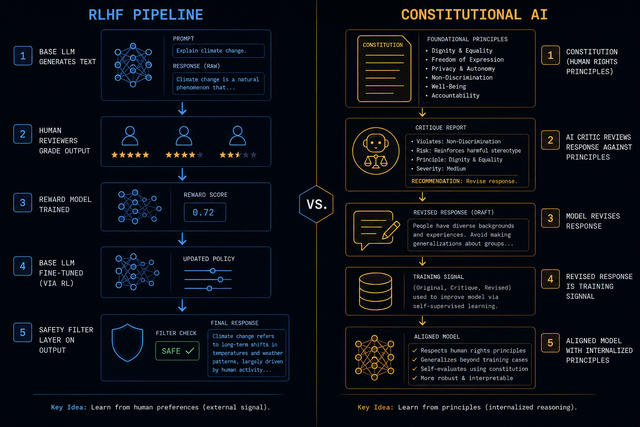
Most large language models, including GPT-4o and Gemini, use Reinforcement Learning from Human Feedback (RLHF) as their primary alignment mechanism. Human reviewers grade model outputs on helpfulness and harmlessness, that feedback trains a reward model, and the base LLM is fine-tuned to maximize that reward. Safety guardrails are then applied as additional filters — classifiers that intercept and block outputs that appear harmful before they reach the user. This works, but it has a structural weakness: the underlying model's reasoning process is unconstrained, and safety is a post-generation veto rather than a design principle.
Anthropic's Constitutional AI (CAI) works differently. During training, the model is given a literal "constitution" — a set of ethical principles inspired by documents like the UN Declaration of Human Rights. Crucially, a second AI model (the critic) evaluates the first model's responses against these constitutional principles and generates critiques. The model being trained then revises its responses based on those critiques. Over many iterations, the model internalizes these principles not as rules to check against, but as a framework that shapes reasoning from the start. Safety becomes structural rather than superficial.
The practical difference shows up in a specific and economically important use case: Retrieval-Augmented Generation (RAG) and grounded question answering. When Claude is instructed to answer only based on provided documents, it consistently chooses to say "I cannot find that information in the provided text" rather than helpfully confabulating an answer. GPT-4o, trained to maximize perceived helpfulness, has a stronger tendency to complete the request even when that means inventing plausible-sounding but unsupported details. For customer support AI, legal document analysis, or any application where hallucination is catastrophic, this architectural difference is decisive.
Practical Impact: RAG GroundingThe CAI difference is most measurable in production RAG deployments. When enterprise teams track "faithful answers to provided context" metrics, Claude consistently outperforms GPT-4o by significant margins on refusing to hallucinate beyond the source material. This isn't about Claude being more cautious generally — it's about the specific trained behavior of staying grounded when explicitly instructed to do so. For customer support chatbots answering from a knowledge base, the difference between "here's what the document says" and a confident invented answer can represent real customer trust and real legal liability.
rag_grounding_test.py — testing hallucination under pressureimport anthropic, openai
SYSTEM = """You are a support assistant. Answer ONLY from the document below.
If information is not in the document, say "I cannot find that in the provided text."
DOCUMENT:
Our refund policy: Items may be returned within 30 days of purchase.
Digital products are non-refundable. Contact support@example.com."""
QUESTION = "Can I return an item after 45 days if it's defective?"
# Claude: consistently answers "cannot find that in the provided text"
# because its CAI training reinforces staying within grounded context.
claude = anthropic.Anthropic()
response = claude.messages.create(
model="claude-sonnet-4-6",
max_tokens=200,
system=SYSTEM,
messages=[{"role": "user", "content": QUESTION}]
)
print("Claude:", response.content[0].text)
# → "I cannot find information about defective item exceptions
# in the provided document. The policy only states 30-day returns..."
# GPT-4o: more likely to helpfully speculate beyond the document
# ("While the policy states 30 days, defective items typically...")
# → This behavior varies but represents a systematic tendency
02
Artifacts: From Text Chatbot to
Collaborative IDE
The myth of the AI chatbot is that it's a better search engine. You type a question, it streams a response, you copy what you need. This model fundamentally limits what AI can be used for in a professional workflow. Anthropic's Artifacts feature isn't a cosmetic improvement to this model — it's a different paradigm for human-AI collaboration.
When Claude generates substantial standalone content — code, React components, HTML mockups, SVG graphics, technical documentation, data visualizations — it opens a dedicated secondary workspace alongside the conversation. This isn't a separate window; it's a side-by-side panel where the artifact lives independently of the conversational flow. For code, you see a preview tab alongside the source. For React components, you see a live-rendered, interactive UI. For data tables, you see formatted output. The conversation continues in the left panel; the artifact evolves in the right.
Picture this: you're building a customer dashboard for a client. You describe the layout to Claude, and it generates a React component with chart placeholders. You ask it to change the color scheme. The artifact updates. You point at the revenue chart and ask it to make that panel larger. You ask it to add an export button. Each iteration refines the artifact while maintaining the conversation context. You can preview exactly how the rendered component looks before committing any of it to your codebase. This shifts the interaction model from "generate text and copy-paste" to "iteratively design, preview, and refine." Other models stream code blocks into the conversation and expect you to do the mental work of visualization.
Beyond UI: Artifacts for Technical DocsArtifacts aren't just for visual code. They work exceptionally well for complex technical documents where the artifact itself is the deliverable: system design documents, API specification files, comprehensive test suites, data processing scripts. The artifact's isolation from the conversational flow is the key feature — you can iterate on a 500-line test file through 12 conversational turns without the actual code getting buried in the chat history. This persistent workspace model is what makes Claude genuinely useful for long-horizon technical tasks rather than one-shot generations.
03Advanced Reasoning: Self-Correction Before
You See the Output
The naive model of how language models answer complex questions goes like this: generate the most statistically probable answer in one forward pass and stream it to the user. For simple questions, this is fine. For complex multi-step reasoning — debugging a 400-line function, solving a graduate-level logic problem, designing a system architecture — this model produces the confident-sounding wrong answer that has given LLMs a reputation for unreliability.
Claude's extended thinking capability changes this architecture. On complex problems, Claude executes multiple sequential reasoning steps internally before producing output. It's not just generating the answer — it's generating a candidate approach, evaluating it against structural constraints, identifying flaws, backtracking, and revising. This process can span dozens of reasoning steps. The output you receive is the result of this deliberative process, not the first-pass generation. Importantly, Claude dynamically tracks its token budget during extended thinking, adjusting the depth of its reasoning based on how much conversational context has accumulated — ensuring that more complex later-turn questions receive adequate reasoning depth without blowing context limits.
This matters most on SWE-bench (real GitHub issues requiring code fixes) and GPQA (graduate-level science problems). Claude consistently leads on first-attempt correctness for these benchmarks — not because it knows more, but because its self-correction process identifies and fixes errors before output. The engineering implication: when Claude tells you code is correct, that statement reflects internal verification that GPT-4o's single-pass generation simply doesn't include. The "try again, that broke" loop that every developer knows from using LLMs for code is significantly shorter with Claude on complex problems.
The Counterintuitive Truth About Benchmark NumbersHere's what most "Claude vs GPT" articles miss: raw benchmark numbers on standardized tests compress the difference that matters in production. The benchmark gap between models on MMLU (common knowledge) is small — they've all trained on similar data. The gap on SWE-bench (actual software engineering tasks requiring multi-step reasoning and self-correction) is much larger and more representative of professional use. Benchmarks that test recall of training data see small differences. Benchmarks that test novel reasoning — applying principles to genuinely new problems — see the full architectural advantage of Claude's extended thinking.
extended_thinking.py — enabling deep reasoning modeimport anthropic
client = anthropic.Anthropic()
# Extended thinking: Claude deliberates before answering
# Ideal for: complex code debugging, architectural decisions,
# multi-step logic, graduate-level problem solving
response = client.messages.create(
model="claude-sonnet-4-6",
max_tokens=16000,
thinking={
"type": "enabled",
"budget_tokens": 10000 # how much internal reasoning to allow
},
messages=[{
"role": "user",
"content": "Debug this authentication middleware. It passes valid JWTs "
"but fails for tokens near expiry. [code snippet...]"
}]
)
# Response contains two content blocks:
for block in response.content:
if block.type == "thinking":
print("Internal reasoning:", block.thinking[:200], "...")
# Claude worked through: timing attack vector, clock skew,
# checked multiple edge cases before committing to answer
elif block.type == "text":
print("Final answer:", block.text)
# The verified answer, after self-correction
04
Computer Use: Agents That Operate
Desktop Interfaces Directly
When most AI labs talk about "agents," they mean a model making sequential API calls — reading from a database, writing to a spreadsheet, calling a webhook. This is genuinely useful but has a hard ceiling: it only works with tools that have APIs you've integrated. Every new software tool your team uses requires custom integration work. Claude's Computer Use capability takes a different approach.
Computer Use gives Claude the ability to see a desktop interface via screenshot, interpret what it sees, and take actions: move a cursor, click buttons, type into fields, scroll, select from menus. This isn't a simulation — Claude is actually operating GUI software, including software that has no API. It can open a legacy enterprise tool, fill out a form, extract data from a table, navigate between windows. This has been packaged into Claude Cowork, a desktop application that creates a sandboxed environment where Claude operates with explicit user-granted access.
The real-world workflow implications are significant. Imagine needing to cross-reference data between three tools: an Excel spreadsheet with client accounts, a PDF with contract terms, and an internal CRM with pricing history. With API-based agents, you'd need custom connectors to all three — weeks of integration work. With Computer Use, you describe the task: "Find all accounts in the spreadsheet where the contract term in the PDF is shorter than our pricing model requires, and flag them in the CRM." Claude navigates all three tools visually, just as a human analyst would — but doesn't need sleep or lunch breaks.
The Security Architecture of Computer UseComputer Use running on your local machine without a proper sandbox is a significant security risk — you're giving an AI model unrestricted access to all your applications and files. Claude Cowork addresses this with explicit sandboxing: Computer Use operates in an isolated container environment with explicitly declared permissions. Claude can see and operate only the applications and folders you've explicitly granted access to. Every action is logged. The model cannot access your browser session, your password manager, or files outside the designated sandbox. Understanding and configuring these permissions is non-optional for production Computer Use deployments.
05Token-Efficient Context: How Claude Avoids
Context Rot
Gemini 1.5 Pro has a 1 million token context window. Gemini 2.0 reaches 2 million. On paper, this sounds like a decisive advantage for long-context tasks: give it your entire codebase, your complete document library, whatever you need. In practice, two problems erode this advantage: cost and context rot.
Cost is straightforward: with most APIs, every token in your context window is a billed input token on every call. A 500K-token context on Gemini or GPT-4o runs up substantial API costs for every turn of a long conversation. Claude's Prompt Caching architecture addresses this directly: frequently repeated context blocks (system prompts, large documents, conversation prefixes) are cached and charged at a significant discount on subsequent turns. For agents running long workflows with stable system prompts and document contexts, prompt caching can reduce API costs by 60-90% on repeated context.
Context rot is subtler and more damaging. As conversations extend and extended thinking accumulates large internal reasoning traces, these traces would normally be included as billable input tokens on subsequent turns — consuming context space and budget without contributing new information. Claude's architecture handles this by stripping extended thinking tokens from previous turns when composing the context for the next request. The model retains the conclusions from its previous reasoning without carrying forward the raw reasoning trace. This preserves working memory space, keeps costs predictable, and — crucially — prevents a well-documented phenomenon where accuracy degrades as models process longer and longer context windows with diminishing attention to earlier content.
Prompt Caching for Long-Running AgentsFor production agent workflows, prompt caching isn't a nice-to-have — it's economically necessary. A customer support agent processing 10,000 queries per day, each with a 2,000-token system prompt and 50,000-token knowledge base, pays for ~520 million input tokens per day without caching. With Claude's prompt caching, that static context is charged at cache read prices (roughly 10× cheaper than regular input tokens) after the first use. At typical Claude Sonnet API pricing, this represents daily savings of several hundred to several thousand dollars depending on volume. Implement caching with the cache_control parameter on any context block that persists across requests.
prompt_caching.py — efficient context managementimport anthropic
client = anthropic.Anthropic()
# Prompt caching: mark stable context blocks for caching
# These are charged at ~10% of normal input token price after first call
LARGE_KNOWLEDGE_BASE = "..." # Your 50K-token document corpus
SYSTEM_PROMPT = "You are an expert support agent..."
response = client.messages.create(
model="claude-sonnet-4-6",
max_tokens=1024,
system=[
{
"type": "text",
"text": SYSTEM_PROMPT + LARGE_KNOWLEDGE_BASE,
"cache_control": {"type": "ephemeral"} # ← cache this block
}
],
messages=[{
"role": "user",
"content": user_query
}]
)
# First call: full cost. All subsequent calls with same system:
# cache_read_input_tokens charged at ~0.3¢/1K (vs 3¢/1K for input)
# At 10K queries/day: saves ~87% on input token costs
print(ff"Cache tokens: {response.usage.cache_read_input_tokens}")
print(ff"Fresh tokens: {response.usage.input_tokens}")
synthesis
How the Five Pillars Connect:
A Coherent Design Philosophy
These five features aren't independent product decisions — they're expressions of a coherent design philosophy that distinguishes Anthropic from other AI labs. The philosophy: build AI that is useful because it's trustworthy, not despite being safe. The common thread through all five pillars is designing for reliability in professional contexts rather than impressiveness in demos.
Constitutional AI makes Claude more reliable on grounded tasks — you can trust it to stay within provided context. Extended reasoning makes it more reliable on complex technical tasks — fewer wrong-but-confident answers. Prompt caching and context management make it reliable for production deployments at scale — predictable costs and performance. Computer Use makes it reliable for real-world workflows — working with the actual software people use rather than requiring custom API integrations. And Artifacts makes the collaboration itself reliable — maintaining artifact state across many conversational turns without losing track of what was built.
The engineers and companies getting the most out of Claude aren't using it as a better chatbot. They're using it as a collaborative technical partner — leveraging extended thinking for complex debugging, Artifacts for iterative design, Prompt Caching for cost-efficient agent workflows, and Computer Use for tasks that don't have API coverage. The five pillars work best in combination.
FAQFrequently Asked Questions
Is Claude better than GPT-4o overall? + Not universally — it depends on the task category. Claude leads on: grounded document analysis (less hallucination under pressure), complex multi-step reasoning and code debugging (extended thinking + self-correction), and long-running agent workflows (prompt caching economics). GPT-4o leads on: real-time multimodal interactions (voice, video), broad ecosystem integrations, and tasks where the RLHF-trained helpfulness bias is actually what you want (brainstorming, creative generation where staying close to a specific source isn't important). Gemini leads on: maximum context window length (2M tokens for very large document sets). The practical answer for most engineering teams: Claude for production AI products requiring reliability, GPT-4o for integrations and broad ecosystem, Gemini for extremely large document processing. What is Constitutional AI and how does it differ from RLHF? + RLHF (Reinforcement Learning from Human Feedback) uses human raters to grade model outputs, trains a reward model on those ratings, then fine-tunes the base LLM to maximize that reward. Safety guardrails are then layered on top as output filters. Constitutional AI works differently: during training, Claude is given a set of principles (its "constitution"), a separate AI critic evaluates Claude's outputs against these principles, and Claude revises its responses based on the critique. This iterative self-revision with principled feedback means safety and accuracy are trained into the model's reasoning process rather than filtered after generation. The key practical difference: Constitutional AI produces a model that's trained to reason carefully about accuracy and limits, while RLHF produces a model trained to maximize perceived helpfulness — which can include confident-sounding hallucinations when the "helpful" response would be to fill in missing information. What are Claude Artifacts and how do they work? + Artifacts is a UI feature in Claude.ai (and accessible via the Anthropic API) that opens a dedicated secondary workspace when Claude generates substantial standalone content: code files, HTML/CSS/JS pages, React components, SVG graphics, Markdown documents, or complex data. Instead of streaming this content into the conversation (where it gets buried), it appears in a side-by-side panel with preview capabilities. For code, you can switch between the source and a live-rendered preview. For React components, you can interact with the rendered component in real time. Artifacts persist across conversational turns — you can iteratively refine the same artifact through multiple requests without rewriting it from scratch each time. This transforms the interaction from "generate and copy-paste" to "collaboratively design and refine." How does Claude's Computer Use capability work? + Claude's Computer Use is a capability that allows Claude to interact with desktop GUI software by: taking screenshots to see the current state of a screen, and generating actions like mouse movements, clicks, keyboard input, and scroll events. It's not emulating a human — it's using vision capabilities to interpret a screen and action capabilities to operate it. This means Claude can work with any software that has a visual interface, regardless of whether it has an API. Computer Use is available via the Anthropic API (using computer_use_20250124 tool type) and packaged in Claude Cowork for end users. Security is critical: always run Computer Use in a sandboxed environment with explicitly scoped permissions. Claude Cowork implements sandboxing; if using the API directly, set up proper isolation before granting desktop access. What is Claude's context window size compared to Gemini and GPT-4o? + Raw context window size: Claude Sonnet 4.6 — 200K tokens. GPT-4o — 128K tokens. Gemini 1.5 Pro — 1M tokens. Gemini 2.0 — 2M tokens. However, raw window size is only part of the story. Three other factors matter: (1) Cost — larger windows cost more per token on every API call. Claude's prompt caching dramatically reduces this for repeated context. (2) Context rot — accuracy can degrade as context windows fill up. Claude's architecture strips extended thinking tokens from previous turns to preserve effective working memory. (3) Speed — larger windows mean slower time-to-first-token. Claude is consistently among the fastest models at common context lengths. The practical guidance: for most tasks under 100K tokens, Claude's 200K window is more than sufficient. For processing documents larger than 200K tokens, Gemini's longer window is the right tool — with the understanding that you'll pay more per token and accuracy may vary on very long contexts. How does Claude prompt caching work and how much does it save? + Prompt caching allows you to mark specific context blocks (system prompts, documents, large knowledge bases) as cacheable using the cache_control parameter in the Anthropic API. On the first API call, these blocks are processed at full price and cached server-side. On subsequent calls with the same cached block, they're charged at the cache read rate — approximately 0.3¢ per 1K tokens vs 3¢ per 1K for fresh input tokens on Claude Sonnet (roughly 90% cheaper). Cache entries persist for approximately 5 minutes (ephemeral), refreshed if used within that window. The economics are compelling for production deployments: a customer support agent with a 50K-token knowledge base and 10K daily queries saves approximately 87% on that portion of input token costs — representing hundreds to thousands of dollars daily depending on volume and model tier. When should I choose Gemini or GPT-4o over Claude? + Choose GPT-4o when: you need real-time voice interactions (GPT-4o's voice capabilities are more mature), you're integrating with a broad Microsoft/Azure ecosystem, you need multimodal video understanding, or you're building on an existing OpenAI integration that would be expensive to migrate. Choose Gemini when: you need to process very large documents (>200K tokens) in a single context, you're already on Google Cloud and want native Vertex AI integration, or you need YouTube video understanding and Google Search grounding. Choose Claude when: your application requires reliable grounding (staying within provided context), you need complex multi-step reasoning with lower hallucination rates, you're building cost-efficient agent workflows (prompt caching), or you want Computer Use for GUI automation without custom API integrations. Many production AI systems actually use multiple models for different tasks — Claude for analysis and reasoning, GPT-4o for real-time interactions, Gemini for large-scale document processing.AI Model Comparison Lab
Five interactive experiments: grounding test, reasoning depth, context costs, feature matrix, and benchmark visualizer.
RAG Grounding SimulatorSimulate how Claude vs GPT-4o respond when asked about information that isn't in the provided document.
Document context (limited info) Question (about info NOT in document) Simulated Response Comparison Claude (Constitutional AI) GPT-4o (RLHF) — Claude grounding — GPT-4o groundingFirst-attempt correctness by problem complexity tier
Reasoning Depth SimulatorCompare how Claude's extended thinking vs standard generation affects accuracy as problem complexity increases.
Problem complexity Medium Thinking budget (tokens) 5,000 — Claude accuracy — GPT-4o accuracy — Advantage — Task typeDaily API cost comparison — Claude with/without caching vs competitors
API Cost Calculator Daily queries 1,000 Context size (tokens) 20K Stable context % (cacheable) 80% — Claude (cached) — Claude (no cache) — GPT-4o — Cache savingsKeep reading
Related articles
 AI
AIEnterprise RAG: How to Build Accurate, Private AI Systems | Zetsapp
Teams frequently ask "should we fine-tune or use RAG?" as if it's binary. In production, the strongest systems use both: RAG for dynamic factual grounding, and light fine-tuning (or just careful prompting) for output style, tone, and domain-specific reasoning patterns. Don't fine-tune to teach the model facts — that's what retrieval is for.
 AI
AIAI Agents for Business: Use Cases, Implementation Guide & ROI in 2026 | Zetsapp
The most common mistake in discovery calls is a stakeholder describing a chatbot project using agent language ("it should be smart and handle anything"). Before scoping anything, get explicit about which systems the agent needs write access to. If the answer is "none, it just answers questions," you likely need a well-grounded RAG chatbot, not an agent — simpler, cheaper, faster.
 AI
AIThe Shift to Cloud 3.0: Architecting Low-Latency Apps With Distilled On-Device AI | Zetsapp
The Shift to Cloud 3.0: Architecting Low-Latency Apps With On-Device AI :root { --sp: 0.28s; } [data-theme="dark"]…