LangGraphLangChainStateGraphAI agentsagentic AILLM orchestrationPython AIresearch assistantworkflow automationgraph-based AI
AI
LangChain vs LangGraph: The Real Difference Nobody Explains Clearly
TL;DR LangChain handles simple, deterministic chains. LangGraph handles everything else — stateful workflows, conditional branching, loops, and multi-agent orchestration. This guide explains when to make the switch, how StateGraph actually works, and walks you through building a production-ready research assistant from scratch.
Read this article as text (accessible version)
AI Agent Architecture Deep Dive

LangChain vs LangGraph: The Real Difference Nobody Explains Clearly
📅 June 2025 ⏱ ~22 min read 🎯 3,800+ wordsYour chatbot works fine. But now the business wants a research assistant that browses the web, evaluates 50 sources, scores their credibility, loops back for more if the quality isn't good enough, and delivers a report. LangChain won't cut it. Here's why — and exactly what to do instead.
LangChain vs LangGraph Post ExcerptLangChain handles simple, deterministic chains. LangGraph handles everything else — stateful workflows, conditional branching, loops, and multi-agent orchestration. This guide explains when to make the switch, how StateGraph actually works, and walks you through building a production-ready research assistant from scratch.
IntroductionThe Chatbot That Couldn't
Imagine you're a senior engineer at a fintech company. Six months ago you shipped a LangChain-powered support bot — it reads the company FAQ, answers customer queries, and escalates when needed. Everyone's happy. Then your product manager walks in on a Tuesday with a new requirement: build a deep research assistant. It needs to search the web, read blog posts, academic papers, Reddit threads, and earnings calls, score each source for credibility, loop back to search again if the quality is too low, and produce a structured report with citations. "Can't you just use the same chatbot framework?" she asks.
You smile politely and start mentally calculating how long this conversation is going to take. Because no — you can't. Not comfortably. LangChain is a brilliantly designed toolkit for linear, deterministic tasks. But this requirement isn't linear. It loops. It branches. It needs to remember what it scraped three steps ago. It needs to decide mid-workflow whether to continue or pivot. That's a completely different category of problem — and that's exactly the problem LangGraph was built to solve.
The Most Common MisconceptionLangGraph is not a replacement for LangChain. It's an extension built on top of it. LangGraph imports LangChain primitives and builds the graph orchestration layer on top. You don't choose between them — you choose when to graduate from simple chains to stateful graphs. The threshold is almost always the moment you need loops, conditional branching, or shared persistent state across multiple computation steps.
Why LangGraph ExistsWhy LangGraph Exists — The Orchestration Problem
Let's understand what LangChain actually does well. When you build a LangChain pipeline, you're constructing a directed acyclic chain: input flows through a series of transforms and LLM calls, each step feeds cleanly into the next, and you get an output. For a customer service bot that retrieves relevant FAQs and generates a polite response, this architecture is perfect. It's simple, testable, debuggable, and fast to build.
But "simple" isn't a permanent state for ambitious applications. The moment a workflow requires iteration — "keep searching until the quality score exceeds 75%" — a chain breaks down. Chains don't loop natively. They don't branch based on runtime conditions. They don't accumulate state across multiple passes. And when you try to force that behavior into a chain, you end up writing the orchestration logic yourself: custom Python control flow wrapping your LangChain calls, state stored in local variables, loops managed with while loops outside the framework. At that point, you're not using LangChain — you're just using Python and occasionally calling LangChain functions inside it.
LangGraph formalizes that orchestration. Instead of fighting the framework, you describe your workflow as a graph — explicitly, visually, and in a way that the framework can manage, resume, inspect, and debug. The graph becomes a first-class citizen of your application architecture, not an afterthought bolted on top.
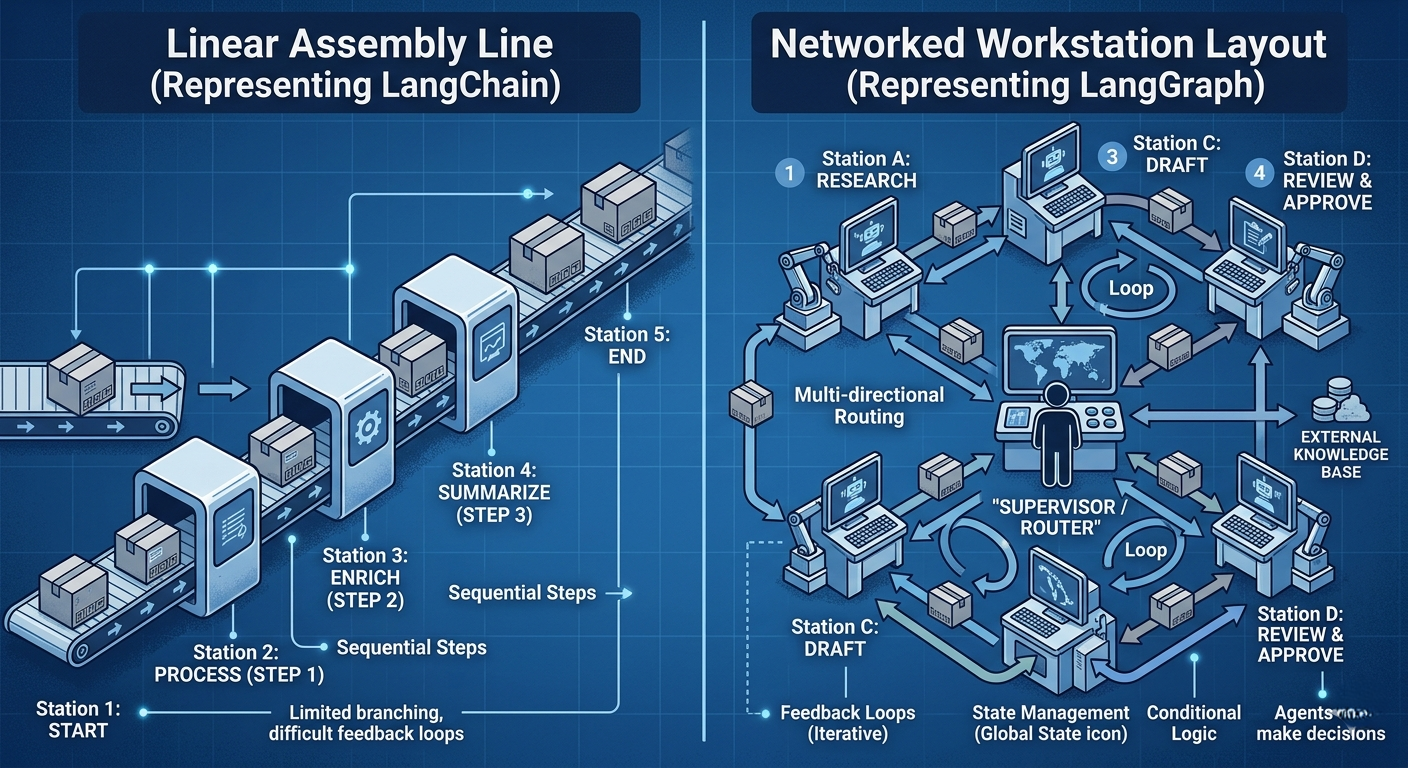
Real-World AnalogyLangChain is an assembly line: raw materials go in one end, a finished product comes out the other, and every station does exactly one job in a fixed order. LangGraph is a factory floor: there are specialized workstations, but a supervisor (the graph engine) decides in real time which station each item goes to next, based on what happened at the last station. The assembly line is faster and simpler for known products. The factory floor handles everything else.
# Install the complete LangGraph stack
pip install langgraph langchain langchain-openai \
 langchain-community beautifulsoup4 \
 duckduckgo-search

# Optional: Streamlit for visual workflow interface
pip install streamlit- If your workflow is a straight line with no branches and no loops, use LangChain chains. They're simpler, faster, and easier to debug. Don't introduce LangGraph complexity you don't need.
- The clearest signal that you need LangGraph: you've started writing
whileloops around your LangChain calls, or you're passing results between chains using external variables that need to persist across steps. - LangGraph is not just for research assistants. Multi-agent customer support systems, code review pipelines, document classification workflows, and approval systems with human-in-the-loop checkpoints are all strong LangGraph use cases.
- Don't try to convert an existing LangChain app to LangGraph all at once. Identify the specific step where state needs to persist or routing needs to happen, and introduce LangGraph there first.
StateGraph — Persistent Memory for Your Workflow
Everything in LangGraph revolves around one concept: the StateGraph. It's not just an architectural choice — it's the mechanism that makes everything else possible. When you create a StateGraph, you're defining two things simultaneously: the structure of your workflow (as a graph of nodes and edges) and the shape of the shared memory that all nodes in that workflow can read from and write to. That shared memory is called state, and it's the reason LangGraph can do things that chains fundamentally cannot.
Here's the thing most tutorials miss: state in LangGraph isn't just a dictionary you pass around. It's a typed schema with accumulation semantics. You define the state as a TypedDict (or using Pydantic models), and you specify for each field whether updates should replace the previous value or append to it. This distinction matters enormously. A field like current_url should be replaced with each new URL. A field like facts should accumulate — each node adds to the list rather than overwriting it. LangGraph handles this through what are called "reducers," and getting this right is what separates a fragile prototype from a robust production workflow.
Picture a surgical team in an operating room. Each specialist — the anesthesiologist, the surgeon, the scrub nurse — has their own role. But they all reference the same patient chart. When the anesthesiologist updates vitals, the surgeon sees those updates. When the surgeon notes a complication, the whole team knows. The patient chart is the state. No one has their own private copy. Everyone's reading and writing the same source of truth, and every action they take is informed by the entire history of what's happened so far.
from langgraph.graph import StateGraph, END
from typing import TypedDict, List, Optional
from typing_extensions import Annotated
import operator

# Define state schema with accumulation semantics
class ResearchState(TypedDict):
 topic: str # replaced each time
 remaining_urls: List[str] # replaced with new batch
 current_url: Optional[str] # replaced each iteration
 content: Optional[str] # replaced each iteration
 current_score: Optional[int] # replaced each evaluation
 facts: Annotated[List[str], operator.add] # ACCUMULATES — key difference
 final_report: Optional[str]

# Initialize the graph with our state schema
workflow = StateGraph(ResearchState)- The most common bug in new LangGraph projects: a node returns a full list when it should return only the new items to append. If your state field uses
operator.addas a reducer, your node should return just the new items — the framework handles concatenation. - Always type your state schema explicitly. Untyped state leads to subtle bugs where a node writes a string to a field expecting a list, and the error only surfaces five nodes later in the workflow.
- State is serializable by design. This means you can checkpoint it, resume interrupted workflows, and implement human-in-the-loop review at any node by saving state to a database and restoring it later. This is one of LangGraph's most powerful production features.
Nodes & Edges — The Building Blocks of Intelligence
If StateGraph is the memory, nodes are the workers and edges are the job assignments. A node in LangGraph is simply a Python function that takes the current state as input and returns a dictionary of state updates. That's it. The function can be a simple data transformation, an LLM call, a web scraper, a database query, or a function that calls five external APIs — LangGraph doesn't care. From the graph's perspective, every node has the same signature: state in, state updates out.
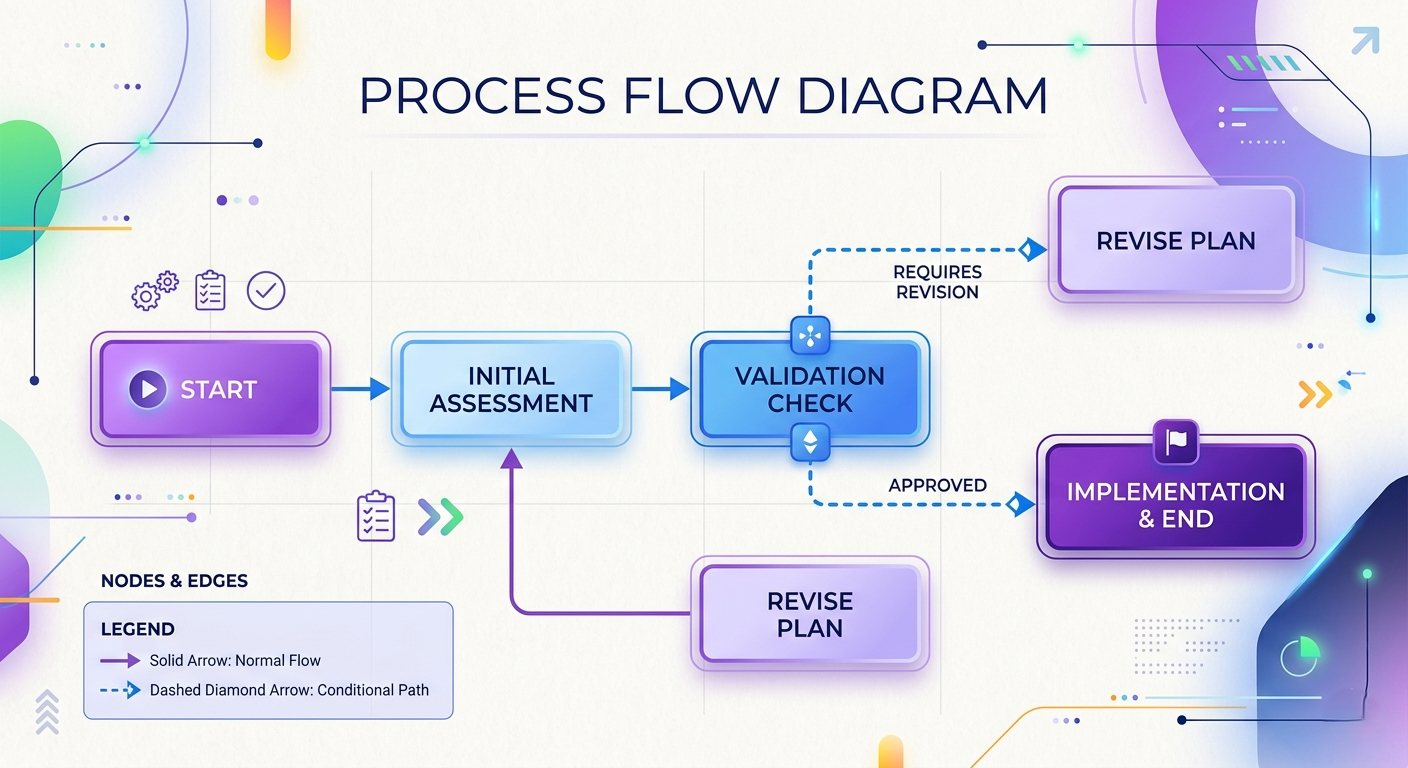
Edges are where routing intelligence lives. A normal edge is a guarantee: after node A completes, always run node B. A conditional edge is a decision: after node A completes, call a router function that examines the current state and returns the name of the next node to run. This is how you implement branching logic — "if the score is above 75, go to the extract_facts node; otherwise, go back to scrape_next_url." The router function is pure Python. You can make it as simple or as complex as your business logic requires, and the graph executes exactly what the router returns.
Real-World AnalogyThink of nodes as specialized team members: a researcher who finds sources, an analyst who reads and scores them, a writer who synthesizes the final report. Each person receives the shared team brief (state), does their specific job, and updates the brief with their findings. Edges are the project manager's instructions: "After the analyst finishes, check the score. If it's good enough, send it to the writer. If not, send it back to the researcher for another pass."
from langchain_openai import ChatOpenAI
from duckduckgo_search import DDGS

llm = ChatOpenAI(model="gpt-4o-mini", temperature=0.1)

# Node 1: Search and gather source URLs
def gather_sources(state: ResearchState) -> dict:
 topic = state["topic"]
 with DDGS() as ddgs:
 results = list(ddgs.text(topic, max_results=8))
 urls = [r["href"] for r in results if r.get("href")]
 return {"remaining_urls": urls} # only return what changed

# Node 2: Evaluate trustworthiness with LLM scoring
def evaluate_trust(state: ResearchState) -> dict:
 content = state.get("content", "")
 prompt = f"Rate the factual reliability of this content 0-100.\nContent: {content[:2000]}\nRespond with just a number."
 score = int(llm.invoke(prompt).content.strip())
 return {"current_score": score}

# Conditional router function
def route_after_eval(state: ResearchState) -> str:
 score = state.get("current_score", 0)
 remaining = state.get("remaining_urls", [])
 if score >= 75:
 return "extract_facts" # high quality — extract facts
 elif remaining:
 return "scrape_content" # try next URL
 else:
 return "generate_report" # no more URLs — generate report

# Wire it all together
workflow.add_node("gather_sources", gather_sources)
workflow.add_node("evaluate_trust", evaluate_trust)
workflow.add_conditional_edges("evaluate_trust", route_after_eval)- Keep nodes small and focused on one responsibility. A node that searches the web, scores content, AND extracts facts is hard to test, hard to debug, and impossible to reuse. The graph structure is free — use as many nodes as you need.
- Router functions should be deterministic and fast. Don't call an LLM in your router — call it in a node and store the routing decision in state, then have the router read from state. This keeps routing logic cheap and testable.
- Always define an explicit END node path. A graph without a clear termination condition will either run forever (if you have loops without exit conditions) or raise an error (if a conditional edge returns a node name that doesn't exist).
The Deep Research Assistant — Seeing It All Together
Let's make this concrete. Your PM's dream: a research assistant that takes a topic like "Tesla's Q1 earnings call," searches the web for relevant sources, reads each one, scores its credibility on a 0–100 scale, accepts only sources scoring above 75, extracts factual statements from the accepted sources, and produces a comprehensive report. In traditional Python, you'd write a multi-hundred-line script with nested loops, try-catch blocks for scraping failures, manual state management between phases, and zero visibility into what happened when it inevitably breaks at 3 AM.
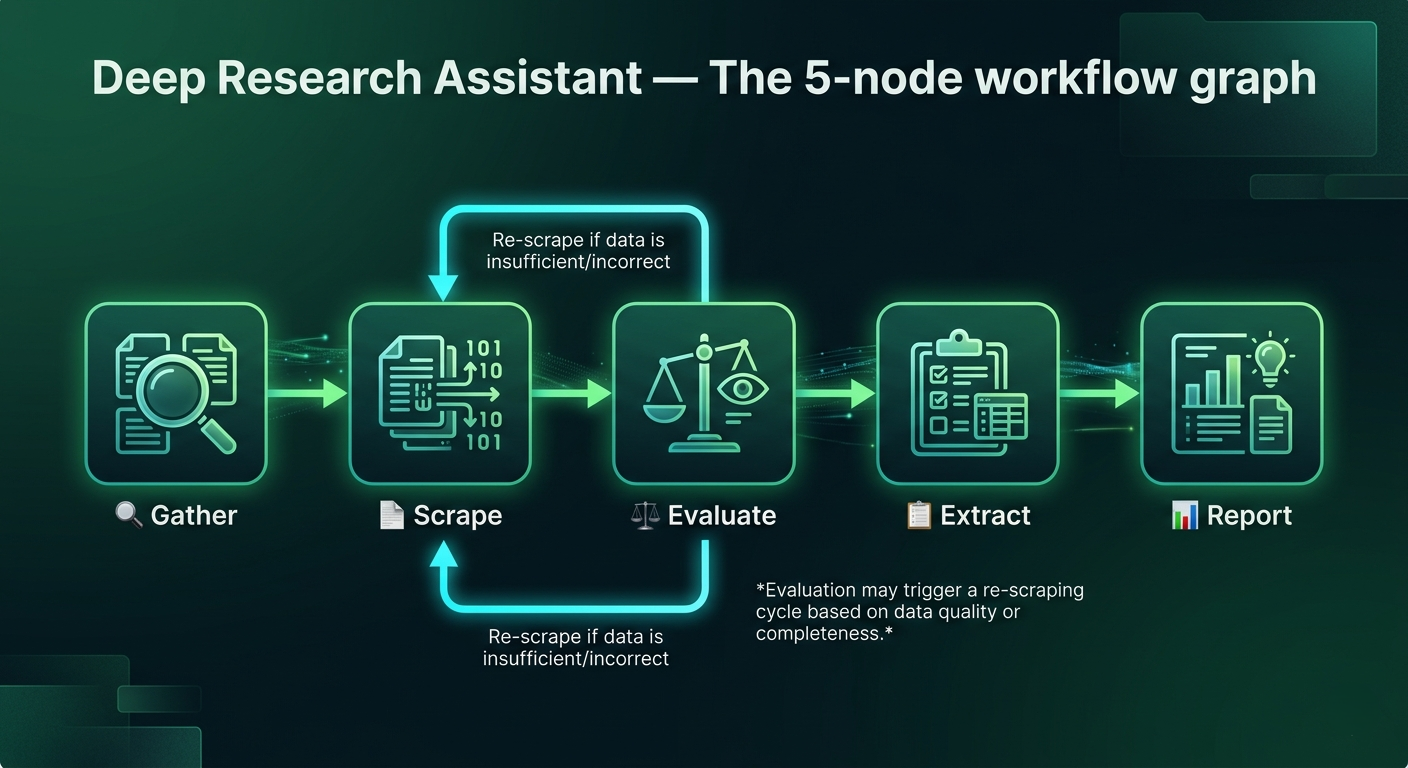
With LangGraph, you decompose this into five focused nodes: gather_sources (search the web), scrape_content (fetch and clean each URL), evaluate_trust (score with an LLM), extract_facts (pull structured facts from trusted content), and generate_report (synthesize everything). The graph orchestrates their execution. The state carries the information between them. Conditional edges implement your 75% threshold automatically. And every step is observable, resumable, and independently testable.
# Complete research assistant graph assembly
from langgraph.graph import StateGraph, END

def build_research_graph():
 graph = StateGraph(ResearchState)

 # Register all nodes
 graph.add_node("gather_sources", gather_sources)
 graph.add_node("scrape_content", scrape_content)
 graph.add_node("evaluate_trust", evaluate_trust)
 graph.add_node("extract_facts", extract_facts)
 graph.add_node("generate_report", generate_report)

 # Set entry point
 graph.set_entry_point("gather_sources")

 # Normal edges (always proceed)
 graph.add_edge("gather_sources", "scrape_content")
 graph.add_edge("scrape_content", "evaluate_trust")
 graph.add_edge("extract_facts", "scrape_content") # loop back
 graph.add_edge("generate_report", END)

 # Conditional edge — the intelligence layer
 graph.add_conditional_edges(
 "evaluate_trust",
 route_after_eval,
 {
 "extract_facts": "extract_facts",
 "scrape_content": "scrape_content",
 "generate_report": "generate_report"
 }
 )

 return graph.compile()

# Run it
app = build_research_graph()
result = app.invoke({"topic": "Tesla Q1 2025 earnings call"})
print(result["final_report"])- Web scraping inside a LangGraph node will occasionally fail — pages time out, return 403s, or contain no extractable text. Always wrap scraping nodes in try-except and return the state unchanged (plus an error flag in state) on failure. Let the graph decide whether to skip or retry.
- Limit the number of URLs in your initial search to a practical maximum (8–12). An unbounded list means unbounded cost. Add a
max_sources_processedcounter to state and check it in your router to cap execution. - Use DuckDuckGo (
duckduckgo-search) for free web search without API keys during development. Switch to a paid provider like Tavily or Serper for production where you need rate limits and reliability guarantees.
Loops & Conditional Routing — Where LangGraph Pulls Ahead
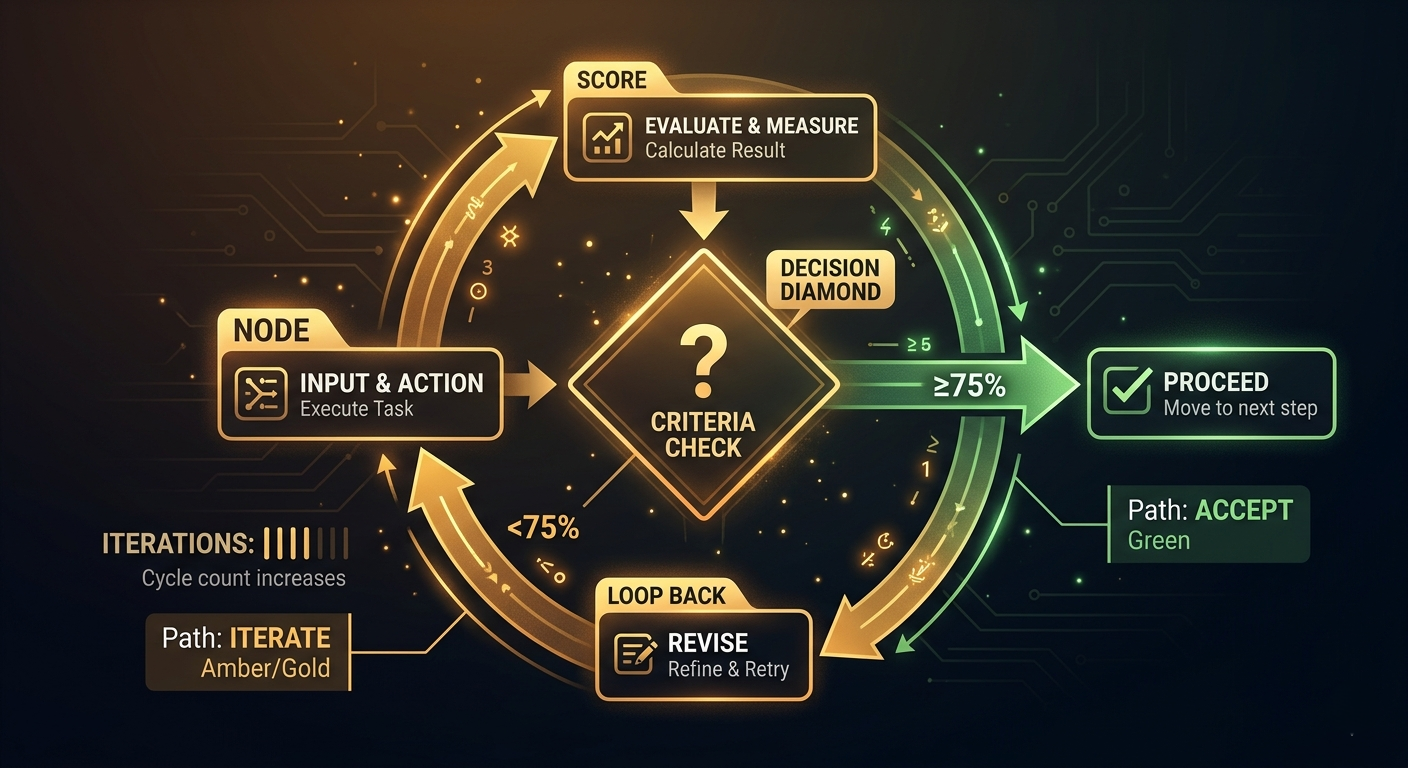
Here's what makes LangGraph genuinely exciting to work with: loops are first-class citizens. When your router function returns the name of a node that already ran earlier in the workflow, LangGraph executes it again — with the updated state. This is how iterative refinement works. A research quality score came back at 62%? Route back to the search node, this time with refined keywords based on what you learned from the first pass. Quality still not good enough? Loop again, up to your maximum iteration count. Each loop can be different because the state carries forward everything that was learned.
The critical discipline here is defining exit conditions before you define loops. Every loop in LangGraph needs at least one exit path that doesn't loop back. In practice, this means checking an iteration counter in state alongside your quality condition: "loop back if quality < 75 AND iterations < 3." The iteration counter ensures you never get trapped in an infinite loop from a source that consistently scores 74 no matter how many times you try.
Real-World AnalogyThis is exactly how you do your own research. You search for something, skim the results, decide they're not deep enough, refine your search query using terms you picked up from those initial results, search again with the new terms, find something great, and stop. You don't commit to a fixed number of searches upfront. You iterate until the quality bar is met — or until you've run out of time. LangGraph lets your AI agent work the same way.
# Loop with controlled iteration and quality exit
class ResearchState(TypedDict):
 topic: str
 iteration_count: int # loop guard
 quality_score: float
 search_queries: Annotated[List[str], operator.add] # accumulates
 findings: Annotated[List[str], operator.add]

def should_continue_searching(state: ResearchState) -> str:
 quality = state.get("quality_score", 0.0)
 iterations = state.get("iteration_count", 0)
 max_iter = 3 # hard ceiling — always define this

 if quality >= 0.75:
 return "synthesize" # quality met — proceed
 elif iterations < max_iter:
 return "refine_and_search" # try again with better query
 else:
 return "synthesize" # hit ceiling — proceed anyway

def refine_and_search(state: ResearchState) -> dict:
 # Use findings so far to generate a better query
 existing_findings = "\n".join(state.get("findings", [])[:3])
 refined_query = llm.invoke(
 f"Given these findings: {existing_findings}\n"
 f"Generate a better search query for: {state['topic']}"
 ).content
 return {
 "search_queries": [refined_query], # adds to accumulated list
 "iteration_count": state["iteration_count"] + 1
}- Always persist iteration count in state. If you store it in a Python variable inside the node, it resets on each invocation. State is the only memory that survives across graph steps.
- Loops can make costs explode. If each iteration calls an LLM for evaluation and your max iterations is 5 with 10 URLs, that's 50 potential LLM calls. Add cost tracking to your state and gate loops on both quality AND estimated cost.
- For debugging loops, use
app.stream()instead ofapp.invoke(). Stream yields the state after each node execution, so you can see exactly which nodes ran and in what order without adding print statements everywhere.
Tool Integration — Connecting Workflows to the Real World
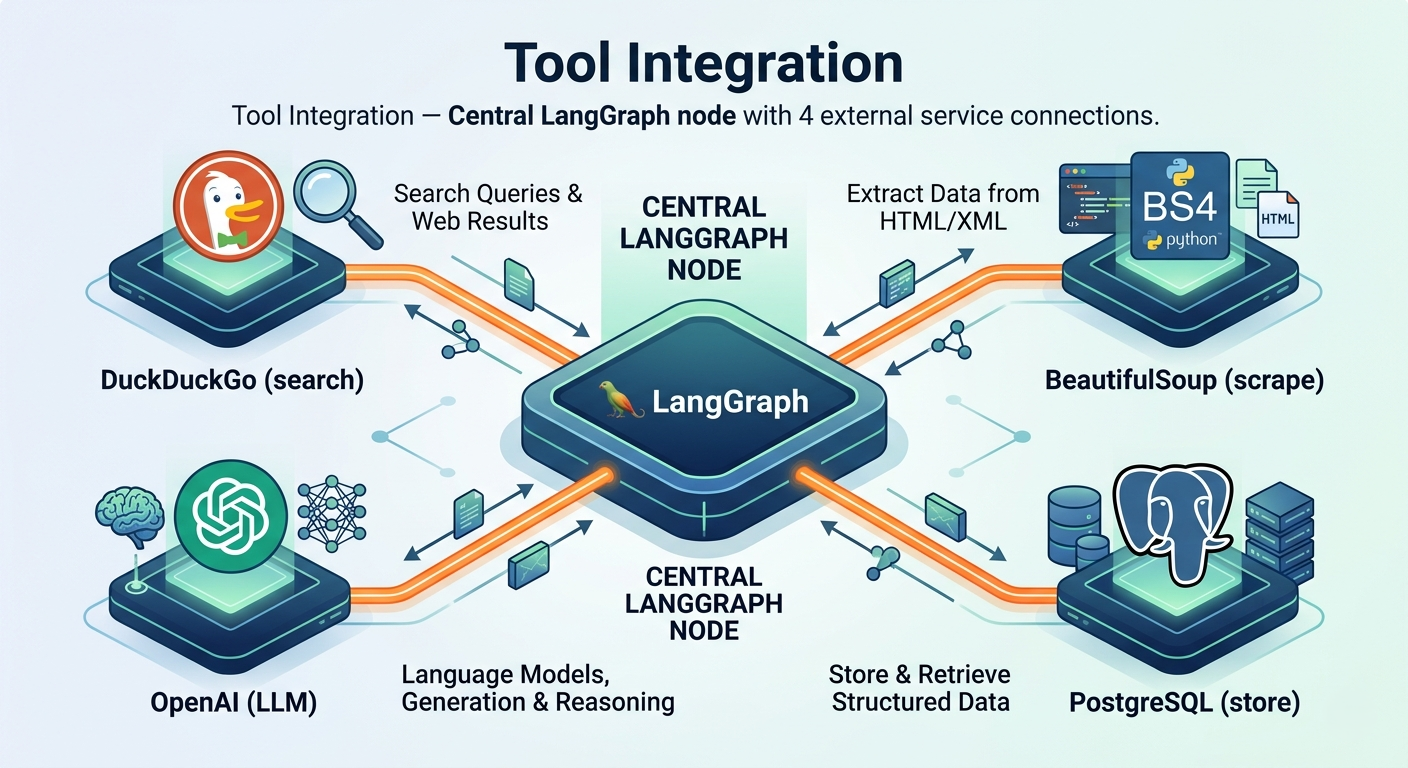
A workflow that only talks to itself isn't very useful. The real power of LangGraph emerges when nodes integrate with external systems — search engines, databases, APIs, file systems, and browser automation. What makes this elegant is LangGraph's design philosophy: from the graph's perspective, a tool-using node looks identical to any other node. It receives state, does something with the external world, and returns state updates. The fact that "something" involved firing off an HTTP request to DuckDuckGo or writing to a PostgreSQL database is irrelevant to the graph structure.
The duckduckgo-search library deserves special mention for development workflows: it provides free, API-key-free web search that slots directly into any search node. For production systems, you'd replace it with Tavily or Serper (both have LangChain integrations), but during prototyping and testing, DuckDuckGo lets you iterate quickly without worrying about quota limits or API key management.
import requests
from bs4 import BeautifulSoup
from duckduckgo_search import DDGS

# Tool node: web search via DuckDuckGo (no API key needed)
def search_tool_node(state: ResearchState) -> dict:
 query = state.get("search_queries", [state["topic"]])[-1]
 try:
 with DDGS() as ddgs:
 results = list(ddgs.text(query, max_results=8))
 urls = [r["href"] for r in results]
 return {"remaining_urls": urls}
 except Exception as e:
 return {"remaining_urls": [], "error": str(e)}

# Tool node: scrape and clean web content
def scrape_tool_node(state: ResearchState) -> dict:
 urls = state.get("remaining_urls", [])
 if not urls:
 return {"content": None, "current_url": None}

 url = urls[0] # process one at a time
 try:
 resp = requests.get(url, timeout=8, headers={"User-Agent": "Mozilla/5.0"})
 soup = BeautifulSoup(resp.text, "html.parser")
 text = " ".join(p.get_text() for p in soup.find_all("p"))[:4000]
 return {
 "current_url": url,
 "content": text,
 "remaining_urls": urls[1:] # remove processed URL
 }
 except:
return {"current_url": url, "content": None, "remaining_urls": urls[1:]}- Tool nodes should always handle errors gracefully and return partial state updates rather than raising exceptions. An unhandled exception in a node terminates the entire graph execution.
- For LLM-as-tool-caller patterns (using OpenAI's function calling or Anthropic's tool use), LangGraph has native
ToolNodesupport that automatically handles the request-response cycle with tool schemas. - Rate-limit awareness is your responsibility. LangGraph doesn't throttle tool calls. If your graph scrapes 50 pages in a loop, add
time.sleep(1)inside your scraping node to avoid getting IP-blocked.
Memory & State Accumulation — Knowledge That Builds Over Time
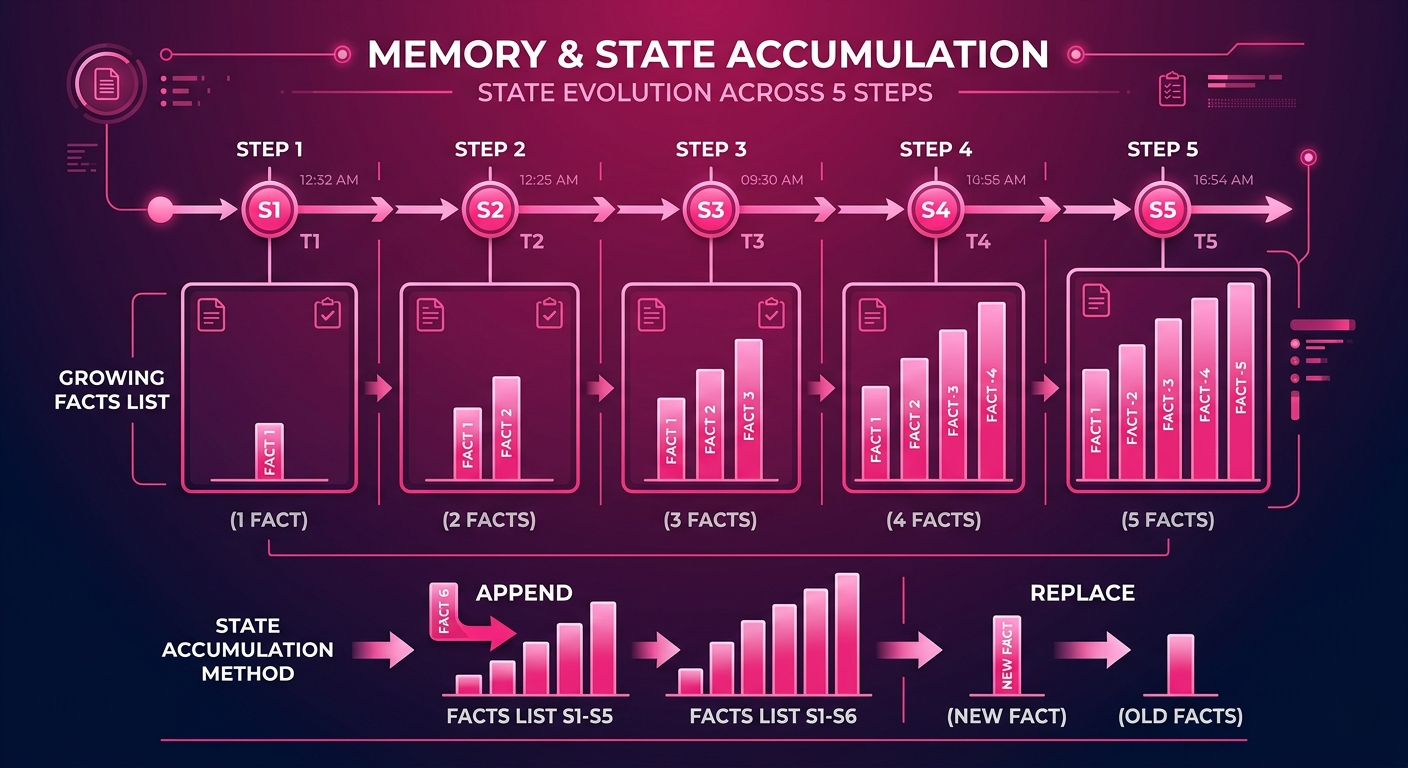
One of the most underappreciated features of LangGraph's state model is the accumulator pattern. When you define a state field with Annotated[List[str], operator.add], you're telling the framework: "when a node returns an update for this field, don't replace the existing list — add the new items to it." This means every node that processes a source can contribute its extracted facts to a shared, growing list that represents the collective knowledge gathered across the entire workflow.
This accumulation pattern is what makes the difference between a workflow that processes sources sequentially and forgets each one after moving to the next, versus a workflow that builds comprehensive knowledge over time. By the time your generate_report node runs, the facts field in state contains every relevant fact extracted from every credible source, in order of discovery, ready to be synthesized. No database needed. No intermediate storage. The state IS the memory.
# Memory accumulation demo — how state builds knowledge
class MemoryState(TypedDict):
 topic: str
 questions: Annotated[List[str], operator.add] # accumulates
 search_results: Annotated[List[str], operator.add] # accumulates
 key_points: Annotated[List[str], operator.add] # accumulates
 final_report: Optional[str]

def generate_questions(state: MemoryState) -> dict:
 response = llm.invoke(
 f"Generate 3 research questions about: {state['topic']}"
 )
 questions = response.content.split("\n")
 return {"questions": questions} # adds to existing list

def synthesize_report(state: MemoryState) -> dict:
 # All accumulated knowledge available here
 context = "\n".join([
 "QUESTIONS INVESTIGATED:",
 *state["questions"],
 "\nKEY POINTS FOUND:",
 *state["key_points"]
 ])
 report = llm.invoke(f"Write a comprehensive report based on:\n{context}")
 return {"final_report": report.content}

# After the workflow:
# result["questions"] → all generated questions
# result["search_results"] → all raw search results
# result["key_points"] → all extracted facts
# result["final_report"] → synthesized output- Context window limits are real. If your accumulator lists grow to thousands of items, your report-generation node may exceed the model's context limit. Add a summarization node that periodically compresses
key_pointsinto a shorter summary to keep context manageable. - LangGraph's checkpointing feature lets you save state to an external store (SQLite, Redis, Postgres) and resume interrupted workflows. For long-running research workflows, this is essential — you don't want a network timeout at step 47 of 50 to throw away all accumulated knowledge.
- Intermediate state is valuable for debugging. Don't throw it away after the workflow completes. Log the full final state object — it's a complete audit trail of everything the workflow discovered and decided.
How It All Connects — The Full Picture
Let's zoom out. LangGraph's architecture is built on four interlocking concepts that only make sense together. StateGraph provides the container and the schema — it defines what the workflow knows at any point in time and how that knowledge accumulates or gets replaced. Nodes are the computation units — pure functions that transform state, call tools, invoke LLMs, or do any other work the workflow requires. Edges are the routing rules — normal edges for guaranteed transitions, conditional edges for runtime decisions based on state. And loops emerge naturally from the edge system when a router function returns a previously-executed node's name.
None of these concepts requires the others in isolation, but they only reach their potential together. A StateGraph without accumulation reducers is just passing a dictionary around. Nodes without conditional edges can't make decisions. Conditional edges without well-designed state have nothing meaningful to route on. When these four concepts combine — and when you add external tool integration on top — you get a system that can tackle genuinely complex, adaptive, real-world workflows that would require thousands of lines of custom orchestration code to implement any other way.
The analogy that captures it best: LangGraph is to agentic AI what React is to web UIs. React didn't make web development possible — HTML and JavaScript did that. But React gave developers a disciplined, composable model for managing state and rendering UI that made complex applications far more tractable. LangGraph does the same for AI workflows: it gives you a disciplined model for managing state and routing execution that makes complex agents far more tractable — and far more maintainable at production scale.
Getting StartedGetting Started — Build Your First LangGraph Agent
Here's a step-by-step path from zero to a working stateful research agent. Follow these in order — each step builds on the last and introduces exactly one new concept.
# Step 1: Install dependencies
pip install langgraph langchain-openai langchain-community \
 duckduckgo-search beautifulsoup4 requests

# Step 2: Set your API key
export OPENAI_API_KEY="your-key-here"
# Step 3: Define your state
from typing import TypedDict, List, Optional
from typing_extensions import Annotated
import operator
class SimpleResearchState(TypedDict):
topic: str
sources: List[str]
facts: Annotated[List[str], operator.add] # accumulates!
report: Optional[str]
iteration: int
# Step 4: Write your nodes
from langchain_openai import ChatOpenAI
from duckduckgo_search import DDGS
llm = ChatOpenAI(model="gpt-4o-mini", temperature=0.1)
def search_node(state):
with DDGS() as ddgs:
results = list(ddgs.text(state["topic"], max_results=5))
urls = [r["href"] for r in results]
return {"sources": urls, "iteration": state["iteration"] + 1}
def extract_node(state):
sources_text = "\n".join(state["sources"][:3])
result = llm.invoke(
f"Extract 3 key facts about {state['topic']} from these URLs:\n{sources_text}"
)
new_facts = [l.strip() for l in result.content.split("\n") if l.strip()]
return {"facts": new_facts} # gets ADDED to existing facts
def report_node(state):
facts_text = "\n".join(state["facts"])
report = llm.invoke(f"Write a research report using these facts:\n{facts_text}")
return {"report": report.content}
def router(state) -> str:
return "report" if state["iteration"] >= 2 else "search"
# Step 5: Assemble and compile the graph
from langgraph.graph import StateGraph, END
g = StateGraph(SimpleResearchState)
g.add_node("search", search_node)
g.add_node("extract", extract_node)
g.add_node("report", report_node)
g.set_entry_point("search")
g.add_edge("search", "extract")
g.add_conditional_edges("extract", router, {"search": "search", "report": "report"})
g.add_edge("report", END)
app = g.compile()
# Step 6: Run it
result = app.invoke({
"topic": "Tesla Q1 2025 earnings",
"sources": [],
"facts": [],
"report": None,
"iteration": 0
})
print(result["report"])Frequently Asked Questions
What is the main difference between LangChain and LangGraph? LangChain is designed for linear, deterministic chains — input flows through a fixed sequence of steps and produces output. LangGraph extends LangChain with a stateful graph model that supports loops, conditional branching, and persistent shared memory across workflow steps. LangGraph is built on LangChain, so you're using LangChain primitives within the graph — they're complementary, not competing. When should I use LangGraph instead of LangChain? Use LangGraph when your workflow requires: (1) loops or iterative refinement, (2) conditional branching based on runtime state, (3) shared persistent memory across multiple processing steps, (4) multi-agent coordination, or (5) human-in-the-loop checkpoints. If your workflow is a straight line with no branches, LangChain chains are simpler and sufficient. What is StateGraph in LangGraph? StateGraph is the core LangGraph primitive that combines workflow structure (nodes and edges) with shared persistent state. You define a typed state schema, add nodes (functions that read/write state) and edges (routing rules between nodes), then compile and execute it. State persists across all nodes in the workflow, enabling information to flow naturally through complex multi-step processes. How does LangGraph handle loops without running forever? Loops in LangGraph are created by conditional edge routers that return the name of a previously-executed node. To prevent infinite loops, you store an iteration counter in state and check it in your router function: "loop back if quality < threshold AND iterations < max_iterations." The iteration counter must be stored in state (not in a Python variable) because it needs to persist across graph steps. Can LangGraph be used with other LLMs besides OpenAI? Yes. LangGraph works with any LLM provider that has a LangChain integration — Anthropic Claude, Google Gemini, Mistral, Cohere, local models via Ollama, and more. Since nodes are just Python functions, you can even mix different providers within the same graph: use a fast cheap model for initial filtering nodes and a powerful model for final synthesis nodes. What's the difference between nodes and tools in LangGraph? In LangGraph, a node is any Python function that takes state and returns state updates — it's the fundamental unit of computation in the graph. A "tool" typically refers to an external capability (web search, database query, calculator) that a node can call. A tool-using node is just a regular node that happens to call an external service. LangGraph also has a built-in ToolNode that simplifies handling LLM tool-calling responses. How does LangGraph compare to Crew AI or AutoGen? LangGraph gives you explicit, fine-grained control over workflow structure — you define exactly which node runs when and why. CrewAI and AutoGen take more opinionated approaches to multi-agent coordination with higher-level abstractions. LangGraph is better for production systems where you need predictability, debuggability, and custom routing logic. CrewAI/AutoGen can be faster for prototyping role-based agent teams. Does LangGraph support human-in-the-loop workflows? Yes — this is one of LangGraph's standout production features. By using checkpointing (saving state to an external store like SQLite or Redis), you can pause a graph mid-execution, surface the current state to a human reviewer, accept edits or approval, and then resume execution from the checkpoint. This pattern is essential for high-stakes workflows where automated decisions need human oversight.🔬 LangGraph Interactive Lab
Walk through each core concept — watch state build up, see conditional routing in action, compare sequential vs stateful workflows, and test your knowledge with quizzes.
LangChain Sequential vs LangGraph Stateful
The fundamental difference in one side-by-side comparison. Notice how the stateful version can access the name in the farewell step — because state persists.
| Feature | 🔵 LangChain Chain | 🟢 LangGraph StateGraph |
|---|---|---|
| State persistence | ❌ None — each step is independent | ✅ Shared state across all nodes |
| Loops | ❌ Not natively supported | ✅ First-class via conditional edges |
| Conditional routing | ⚠️ Workarounds required | ✅ Built-in router functions |
| Best for | Simple Q&A, FAQ bots, linear pipelines | Research assistants, multi-agent systems, iterative workflows |
| Complexity | Low — fast to build | Medium — more setup, more power |
| Memory | ❌ Must manage externally | ✅ Built into state schema |
| Debugging | Linear trace | Full state visibility at each node |
Code Comparison: Sequential vs Stateful
🔵 LangChain — Sequential (no memory) from langchain_openai import ChatOpenAI from langchain_core.prompts import PromptTemplate llm = ChatOpenAI(model="gpt-4o-mini") # Each step runs independently greet = (PromptTemplate.from_template( "Greet {name}") | llm) farewell = (PromptTemplate.from_template( "Say goodbye") | llm) # ↑ no name here — it's forgotten! r1 = greet.invoke({"name": "Alice"}) r2 = farewell.invoke({}) # r2 output: "Goodbye, traveler!" # (doesn't know Alice's name) 🟢 LangGraph — Stateful (memory persists) from langgraph.graph import StateGraph, END from typing import TypedDict class State(TypedDict): name: str greeting: str farewell: str def greet_node(state): return {"greeting": f"Hello {state['name']}!"} def farewell_node(state): # state["name"] is still here! return {"farewell": f"Goodbye {state['name']}!"} # Output: "Goodbye Alice!" ✓StateGraph — Watch State Accumulate
A shopping cart example. Run the workflow step by step and watch the state grow at each node.
Shopping Cart Workflow Current State Workflow not started Step Description Press "Step Forward" to begin Execution Log Active Node Completed Node Pending NodeConditional Routing — Control the Flow
Adjust the trust score and see which path the router chooses. The router examines state and returns the next node name.
Trust Score 60 0 · Untrusted75 · Threshold100 · Trusted Remaining URLs 5 remaining Router Decision evaluating…Loops & Iterations — Iterative Refinement
Set the quality threshold and max iterations. Watch the loop execute — it searches, evaluates, and either refinates or terminates.
Quality Threshold 75% Max Iterations 3 Loop Execution Idle Iteration LogResearch Assistant — Full Workflow Simulation
Watch the complete 5-node research assistant execute. Track state at every step.
Research Workflow Idle Research State Not started Output Report will appear here Node Execution LogKnowledge Check — Test Your Understanding
8 questions covering the core LangGraph concepts from this guide.
Keep reading
Related articles
 AI
AIEnterprise RAG: How to Build Accurate, Private AI Systems | Zetsapp
Teams frequently ask "should we fine-tune or use RAG?" as if it's binary. In production, the strongest systems use both: RAG for dynamic factual grounding, and light fine-tuning (or just careful prompting) for output style, tone, and domain-specific reasoning patterns. Don't fine-tune to teach the model facts — that's what retrieval is for.
 AI
AIAI Agents for Business: Use Cases, Implementation Guide & ROI in 2026 | Zetsapp
The most common mistake in discovery calls is a stakeholder describing a chatbot project using agent language ("it should be smart and handle anything"). Before scoping anything, get explicit about which systems the agent needs write access to. If the answer is "none, it just answers questions," you likely need a well-grounded RAG chatbot, not an agent — simpler, cheaper, faster.
 AI
AIThe Shift to Cloud 3.0: Architecting Low-Latency Apps With Distilled On-Device AI | Zetsapp
The Shift to Cloud 3.0: Architecting Low-Latency Apps With On-Device AI :root { --sp: 0.28s; } [data-theme="dark"]…