Short answer: the best school management software for an Indian school is the one that runs admissions, fees (with UPI), attendance, exams and report cards, certificates and parent communication from one database, matches your board (CBSE, ICSE or State), has a parent app parents actually open, and is priced per student so it stays affordable as you grow. Everything else is a nice-to-have.
What is school management software?
School management software (also called a school ERP or school management system) replaces registers, spreadsheets and WhatsApp groups with one platform for the office, accounts team, teachers, parents and students. Each role logs in to its own dashboard and sees only what it should.
Must-have modules for Indian schools
| Module | What to check |
|---|---|
| Admissions & enquiries | Public online form, enquiry follow-up, one-click convert to student, auto admission numbers |
| Fees | Class-wise structures, concessions, UPI/card/bank collection, instant receipts, defaulter list, 80C statement |
| Attendance | Daily and period-wise marking, QR/RFID/biometric option, automatic absent alerts to parents |
| Exams & results | Fast mark entry, co-scholastic grades, CBSE/ICSE/State report card formats, result analysis |
| Certificates | TC, Bonafide, Character, Migration, ID cards on your letterhead, with QR verification |
| Communication | Circulars, PTM booking, WhatsApp/SMS/email, Hindi and regional languages |
| HR & payroll | Staff records, salary structures with PF/ESI/TDS, payslips, leave |
| Library, inventory, health | Issue/return, stock alerts, infirmary and vaccination records |
Board-specific needs: CBSE, ICSE and State
Report cards are where most generic tools fail. Ask the vendor to show your board's report card with co-scholastic areas, grading scale and term structure before you sign. Also check that subject codes, streams for classes 11 and 12, and promotion/detention rules are configurable rather than hard-coded.
Role dashboards: what each user should see
- Admin / principal: strength, attendance today, fee collection trend, paid / due / overdue, admissions
- Teacher: classes, attendance to mark, mark entry, homework, class weak topics
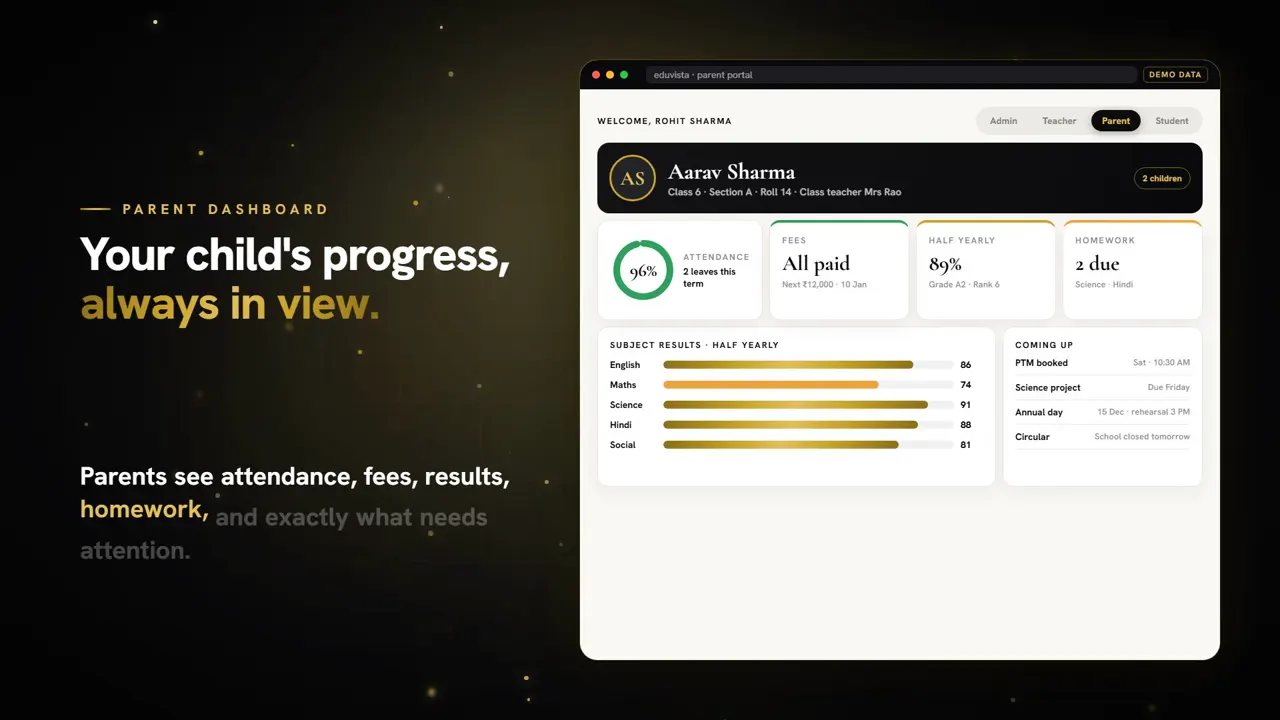
- Parent: each child's attendance, fees and next due date, latest results, homework, upcoming PTM and events
- Student: today's timetable, homework checklist, score trend, exam countdown
Where AI genuinely helps in a school ERP
AI is useful where it saves teacher time and stays under teacher control: lesson plans, worksheets with answer keys, question papers built to a marks blueprint, report card remarks, absence pattern alerts and a weekly progress note to parents. Insist that teachers approve AI output and that student data is never used to train models.
Pricing models you will see
| Model | How it works | Watch out for |
|---|---|---|
| Per student per year | Most common in India; one rate covers modules and apps | Per-module add-ons hidden in the quote |
| Per module | Pay only for what you switch on | Costs rise quickly as you add fees, exams, transport |
| One-time licence + AMC | Install on your own server | Upgrades, hosting and backups become your job |
20-point checklist before you sign
- Shows your board's report card format live
- UPI and online fee payment with instant receipts
- Automatic fee reminders and late-fee rules
- Parent app on Android and iOS, included in the price
- Absent alerts sent the same morning
- One-click TC, Bonafide and ID cards
- QR verification of certificates
- Bulk import from Excel with error checks
- Role-based permissions and audit log
- Multi-branch support if you plan to grow
- Hindi or regional language messages
- Payroll with PF/ESI/TDS
- Data export at any time, in standard formats
- Daily backups and encryption
- DPDP-aligned consent records
- Training for office staff and teachers
- Go-live plan that avoids exam weeks
- Named support contact
- Price per student in writing, all modules listed
- A live demo with your own sample data
How EduVista AI fits
EduVista AI School Suite is ZetsApp's school ERP: role dashboards for admin, teachers, parents and students, fees with UPI, QR-verified certificates, fast mark entry and AI 360 learning tools for teachers and parents. If you need something more custom, our education software development team builds on the same platform.
Common mistakes schools make when buying a school ERP
- Buying on the demo dashboard alone. Dashboards look similar everywhere. The difference shows in fee concessions, TC formats, report cards and how many clicks a teacher needs to mark attendance for 45 students.
- Paying separately for the parent app. If parents do not use the app, fee reminders and absence alerts do not reach them. Make the app part of the base price.
- Migrating everything on day one. Import current students, staff and fee balances first. Old years can follow.
- Going live during exams or admissions. Choose a quiet window and run a short parallel period.
- Ignoring data ownership. Confirm in writing that you can export all records in standard formats at any time.
Questions to ask in the demo
- Show me a fee concession for a sibling and a scholarship on the same student.
- Generate a transfer certificate for this student and verify it with the QR code.
- Enter marks for one class and show the class average and toppers.
- Send an absence alert to parents and show what the parent sees on the phone.
- Change a teacher's permissions so they can see only their own classes.
- Export the student list and fee ledger to Excel.
Implementation timeline for a single school
Week 1: classes, sections, subjects, fee heads and roles are configured, and current students, guardians and staff are imported from Excel. Week 2: office staff and teachers are trained; fees and attendance run in parallel with the old process. Week 3: the parent app is rolled out with a WhatsApp invite and the old registers are retired. Multi-branch groups repeat the same steps branch by branch.
Glossary
- SIS (student information system): the core student record: profile, guardians, documents, academic history.
- Co-scholastic areas: non-academic grades such as arts, sports and discipline on CBSE and ICSE report cards.
- TC: transfer certificate issued when a student leaves.
- DPDP Act: India's Digital Personal Data Protection Act, which requires consent and safeguards for personal data.
Frequently asked questions
What is the best school management software in India?
The best fit covers admissions, fees with UPI, attendance, exams and report cards in your board's format, certificates and a parent app in one system, priced per student. Compare vendors with a live demo using your own data.
How much does school management software cost in India?
Most vendors charge per student per year, with apps and hosting included. Ask for a written quote that lists every module so there are no add-ons later.
Does school ERP software work for CBSE and ICSE?
Good systems let you configure grading, co-scholastic areas and term structure for CBSE, ICSE and State boards. Always ask to see your exact report card format before buying.
How long does it take to implement a school ERP?
A single-branch school can usually go live in two to four weeks: configuration and data import first, then staff training, then the parent app rollout. Avoid going live during exams.
Is student data safe in cloud school software?
It should be encrypted in transit and at rest, backed up daily, protected by role-based access and an audit log, with consent recorded for India's DPDP Act.