Short answer: a logistics management platform gives freight forwarders and 3PLs one place where customers quote, book and track shipments and staff manage every booking and exception. It sits on top of your transport management system (TMS), so milestones flow to customers automatically instead of being re-typed into emails.
Why forwarders add a platform on top of the TMS
- Customers email "where is my shipment?" because status lives only inside the TMS.
- Quotes are spread across email and spreadsheets, so approvals get lost.
- Buyers book purchase-order lines by hand; suppliers confirm cargo-ready dates on chat.
- Delays are noticed by the customer before your own team sees them.
Core features of a logistics management platform
| Feature | What good looks like |
|---|---|
| Public quote form | Multi-step request with no account needed, routed to the sales desk |
| Customer portal | Shipments, milestones, documents and invoices, with company-level roles |
| PO management | Book PO lines, including partial quantities, with consolidation suggestions |
| Supplier portal | Suppliers confirm open POs with quantities and cargo-ready dates |
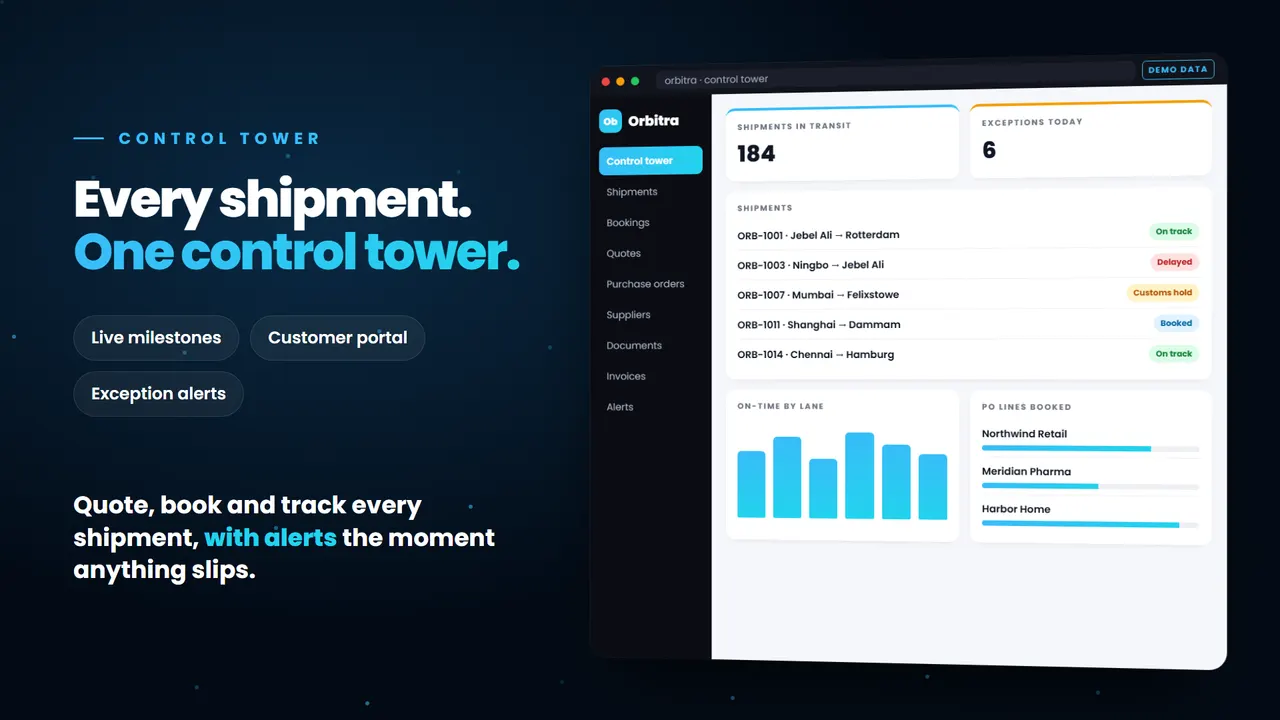
| Control tower | Every booking and shipment in one staff view; delays and customs holds flagged |
| Alerts | Milestones and exceptions pushed to portal, email and mobile in real time |
| Mobile app | Shipments, documents and push notifications for customers on the move |
| Security | Two-step sign-in for staff, role-based access, full audit log |
Customer portal vs giving customers a TMS login
A TMS is built for operators: it exposes internal fields, costs and codes customers should not see. A customer portal shows the same live data in customer language, with permissions per company and per role (for example finance sees invoices but not POs).
How to choose: 12 questions to ask
- Which TMS and ERP systems does it integrate with, and how?
- Can customers book without emailing your team?
- Does PO booking handle partial quantities?
- Can suppliers confirm cargo-ready dates themselves?
- How are delays and customs holds surfaced to staff and customers?
- Which channels carry alerts (portal, email, push)?
- Can each customer company manage its own users and roles?
- Is there a native mobile app?
- Is the website and FAQ content managed in the same system?
- How is staff access secured?
- Can documents be shared by department on an intranet?
- What does a phased rollout look like?
Rollout plan that works
Start with the customer portal and tracking (fastest value), then add quotes and bookings, then PO management and the supplier portal, and finally the mobile app. Each phase reuses the same data, so nothing is rebuilt.
How Orbitra fits
Orbitra Logistics Platform is ZetsApp's logistics platform: website with quotes and tracking, customer and supplier portals, PO booking with partial quantities, a staff control tower, alerts and a customer mobile app. For custom requirements see our logistics software development service.
Data you need from your TMS
Before choosing a platform, list what your transport management system can share and how: shipments and references, milestones with timestamps, containers and packages, documents (bills of lading, invoices, packing lists), and exceptions. Most TMSs offer an API, a database view or scheduled files. The platform should read these automatically and push confirmed bookings back as TMS jobs, so nobody re-keys data.
Common mistakes
- Launching a portal with stale data. If milestones update once a day, customers will keep emailing. Aim for near real-time sync.
- One login per customer company. Buyers, finance and management need different views; plan roles from day one.
- No exception workflow. Alerts without an owner become noise. Every delay or hold needs a person and a next step.
- Ignoring suppliers. Cargo-ready dates from suppliers are the earliest warning you get; give them a simple portal.
How a control tower changes daily work
Instead of opening each shipment, the operations team starts the day with a list of bookings to confirm, shipments that missed a milestone, and customs holds. Each item can be acted on in place: confirm a booking into a TMS job, record a delay with a reason, or notify the customer. Customers see the same event in their portal and app within moments.
Glossary
- TMS: transport management system used by operations to run jobs and shipments.
- 3PL: third-party logistics provider handling warehousing and distribution for clients.
- Milestone: a tracked event such as pickup, departure, arrival or delivery.
- PO line: one item on a purchase order; buyers often ship lines separately or in part.
Frequently asked questions
What is a logistics management platform?
Software that connects the customer side of a freight or 3PL business (quotes, bookings, tracking, documents, invoices) with operations (TMS jobs, milestones, exceptions), so both work from the same live data.
Does a logistics platform replace a TMS?
Usually not. It sits on top of the TMS, reads shipments and milestones from it, and opens TMS jobs when bookings are confirmed.
What is a logistics control tower?
A staff view of every booking and shipment that highlights delays, customs holds and other exceptions so the team can act before customers notice.
Can suppliers use the same platform?
Yes. A supplier portal lets suppliers confirm open purchase orders with quantities and cargo-ready dates.