PostgreSQLdatabase scalingread replicasPgBouncerconnection poolingcache lockingAzure Cosmos DBOpenAIsystem designbackend engineering
AI
How OpenAI Runs 800 Million Users on a Single PostgreSQL Database
TL;DR OpenAI scaled ChatGPT to 800 million users without abandoning PostgreSQL. Their secret? Read replicas for global read distribution, cache locking to prevent thundering herd, Azure Cosmos DB for polyglot persistence, and PgBouncer for connection pooling. This deep-dive reveals every strategy with production-grade code you can use today.
Read this article as text (accessible version)
Database Engineering at Extreme Scale
How OpenAI Runs 800 Million Users on a Single PostgreSQL Database
📅 June 2025⏱ ~21 min read🎯 3,700+ wordsEvery database engineer's nightmare: your system goes from zero to 800 million users in two years and you're still running PostgreSQL. OpenAI didn't abandon their primary database for a distributed system — they mastered the disciplined art of scaling what they had. This is exactly how they did it, and what you can copy.
50 Read Replicas Cache Locking Azure Cosmos DB PgBouncer PostgreSQL Primary Post ExcerptOpenAI scaled ChatGPT to 800 million users without abandoning PostgreSQL. Their secret? Read replicas for global read distribution, cache locking to prevent thundering herd, Azure Cosmos DB for polyglot persistence, and PgBouncer for connection pooling. This deep-dive reveals every strategy with production-grade code you can use today.
The ProblemThe "One Database" Bet — Why OpenAI Didn't Do What Everyone Expected
Picture this: November 2022. ChatGPT launches. In five days, it hits one million users. In two months, one hundred million — the fastest-growing consumer application in history. The engineering team is staring at a single PostgreSQL primary database and making a choice that most architects would call reckless: they're going to scale it, not replace it. No rush to Cassandra. No panic migration to DynamoDB. No week-one rewrite into microservices with separate data stores. Just disciplined, methodical PostgreSQL scaling under conditions no database team had faced before.
Today, ChatGPT serves over 800 million users. Somewhere between "that's impressive" and "that should be impossible" lies the answer to one of the most instructive database engineering stories of the decade. OpenAI's approach wasn't magic — it was a deliberate sequence of four tactical decisions, each addressing a specific bottleneck without introducing unnecessary complexity. They resisted the urge to over-engineer. They made the right move at the right scale, not the "enterprise" move that looks good in architecture diagrams.
The Myth This Story Busts"You need a distributed database to serve hundreds of millions of users." This is the most expensive misconception in database engineering. Distributed systems introduce consistency complexity, operational overhead, cross-shard query nightmares, and dramatically higher engineering costs. PostgreSQL, properly configured and surrounded by the right infrastructure layer, can scale far beyond what most engineers believe — if you have the discipline to address bottlenecks one at a time rather than preemptively rewriting everything.
Read Replicas50 Read Replicas Across Global Regions — Solving the Read Bottleneck
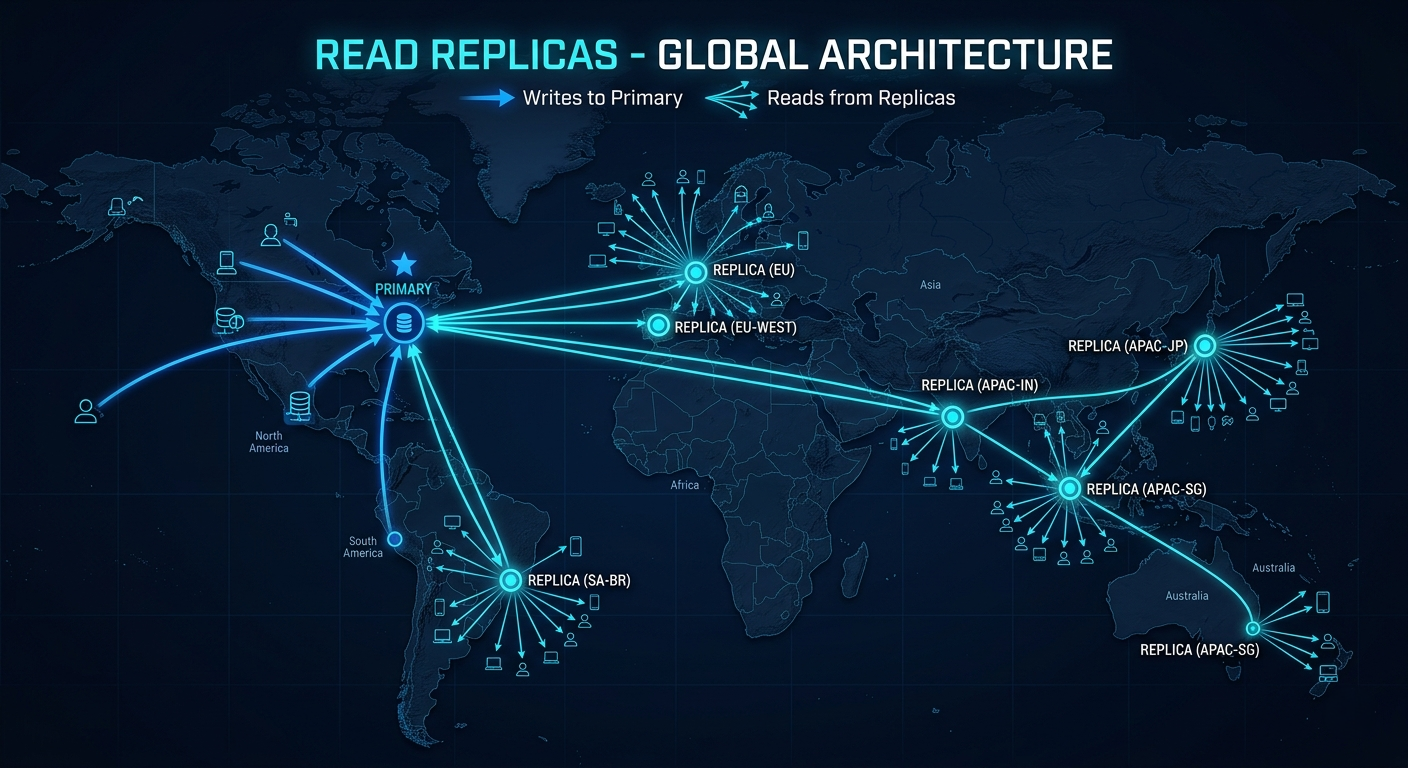
The first and most impactful decision OpenAI made was straightforward in principle and powerful in execution: route all read traffic away from the primary database. In a chat application like ChatGPT, the overwhelming majority of database operations are reads — users loading their conversation history, browsing past exchanges, reviewing previous outputs. Writes are comparatively rare: new messages, user settings updates, authentication tokens. This asymmetry creates the perfect case for read replicas.
PostgreSQL's streaming replication allows you to maintain synchronized copies of the primary database — replicas that apply the same write-ahead log (WAL) stream and stay within milliseconds of the primary's state. OpenAI deployed 50 of these replicas across multiple global regions, using them as the target for all user-facing read queries. The primary database became dedicated almost exclusively to writes: new messages, conversation creation, settings changes. This single architectural decision gave them roughly 50× the read capacity compared to a single database setup, while keeping the primary database load-free for the writes that absolutely had to land there.
The regional distribution matters as much as the count. A user in Tokyo hitting a read replica hosted in US-East introduces 150–200ms of network latency on every chat history load — perceptible, frustrating, cumulative. By distributing replicas across Azure regions (reflecting their cloud partnership), OpenAI ensured that read traffic was served from geographically proximate infrastructure. A Tokyo user reads from an Asia-Pacific replica; a Berlin user reads from a European one. The primary in US-East processes writes, replicates to all 50 replicas, and stays completely shielded from direct user read traffic.
Real-World AnalogyThink of the primary database as a master author's original manuscript. Only the author (writes) can edit it. But you can print 50 copies of it across the world — one in each major city's library. Readers can visit their local library to access the content without bothering the author or disrupting the editing process. The content might be a few minutes behind the author's latest revisions, but for reading last week's chapter, that's perfectly fine. That's read replicas.
# Django / SQLAlchemy read replica routing — production pattern
# Route reads to replicas, writes to primary

import random
from sqlalchemy import create_engine
from sqlalchemy.orm import sessionmaker

REPLICAS = [
 "postgresql://user:pass@replica-us-east.db/chatgpt",
 "postgresql://user:pass@replica-eu-west.db/chatgpt",
 "postgresql://user:pass@replica-ap-tokyo.db/chatgpt",
 # ... 47 more regional replicas
]

PRIMARY = "postgresql://user:pass@primary.db/chatgpt"

class DatabaseRouter:
 def __init__(self):
 self.primary = create_engine(PRIMARY, pool_size=20, max_overflow=40)
 self.replicas = [create_engine(url, pool_size=20) for url in REPLICAS]

 def get_read_session(self, region: str = None):
 # Route to nearest regional replica if specified
 replica = random.choice(self.replicas) # or geo-route
 return sessionmaker(bind=replica)()

 def get_write_session(self):
 # All writes go to primary only
 return sessionmaker(bind=self.primary)()

# Usage
router = DatabaseRouter()

# Reading chat history (replica)
with router.get_read_session(region="ap-tokyo") as session:
 history = session.query(Conversation).filter_by(user_id=user_id).all()

# Writing new message (primary)
with router.get_write_session() as session:
 session.add(Message(content=new_message))
session.commit()- Replication lag is your enemy in disguise. A replica might be 50–200ms behind the primary. If a user writes a new message and immediately reads their history from a replica that hasn't applied that write yet, they see stale data — their own message is "missing." Implement read-your-writes consistency: route a user's reads to the primary for a brief window (1–2 seconds) after they write, then fall back to replicas.
- Monitor replication lag actively. Set alerts at 500ms lag — sustained lag above 1 second means your replica is falling behind writes and may serve increasingly stale data. Use PostgreSQL's
pg_stat_replicationview to monitor lag in production. - Don't use read replicas for analytics queries. A long-running OLAP query on a replica can exhaust its connection pool and block real user-facing reads. Run analytics against a dedicated replica or an OLAP system like BigQuery/Snowflake.
Cache Locking — Killing the Thundering Herd Before It Kills Your Database
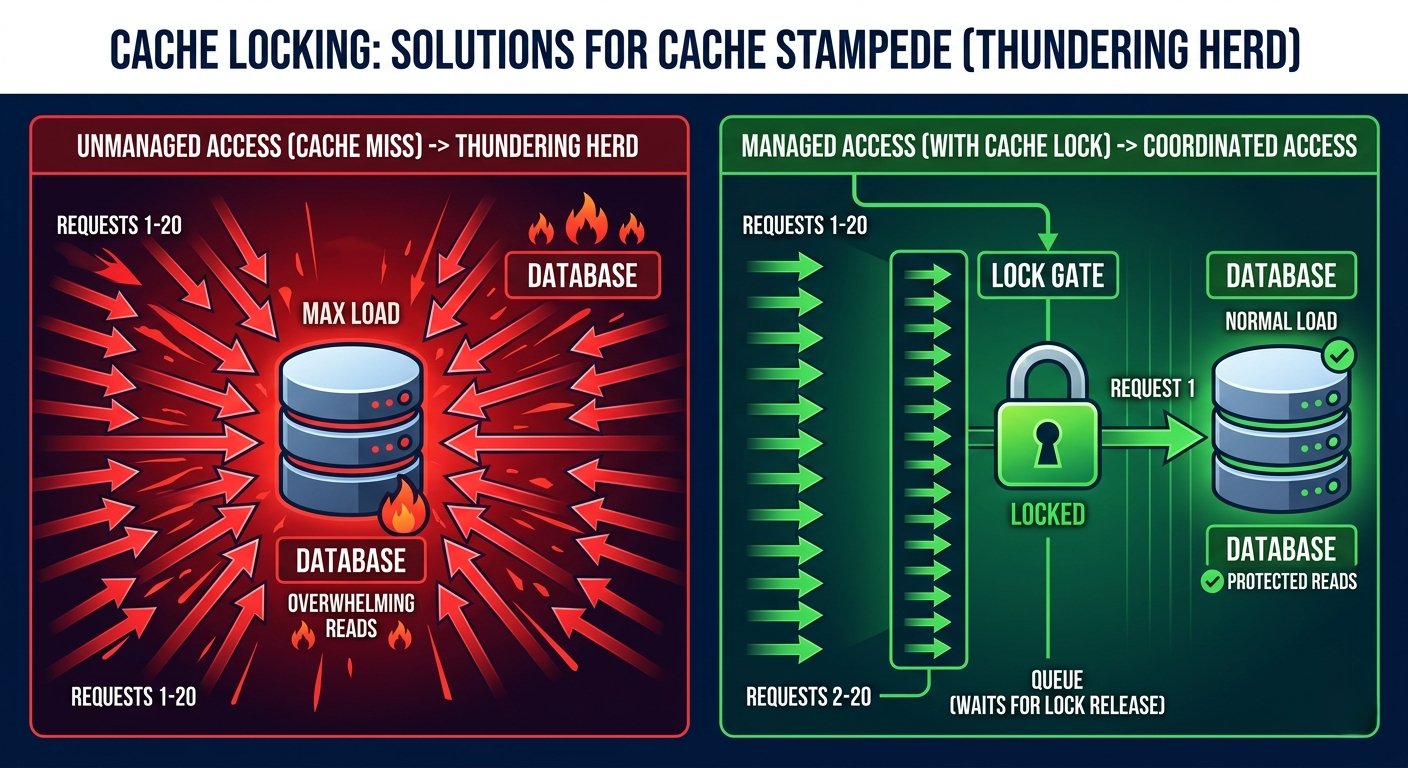
Read replicas solve the steady-state read problem beautifully. But they introduce a failure mode that catches most engineers off-guard: cache invalidation stampedes, better known as the thundering herd problem. Here's how it plays out. You cache a user's conversation list in Redis with a 10-minute TTL. Everything works great. Then the TTL expires for 10,000 users simultaneously (say, all users who signed up during a viral growth spike at the same hour). Every one of those cache misses causes the application to reach past the read replicas and directly query the primary database to reload the data. In milliseconds, you've fired 10,000 simultaneous queries at the one database you've been so carefully protecting. This is how companies take down their primary database when they think they're being careful.
OpenAI solved this with cache locking: a distributed lock mechanism that ensures only one thread or process reloads a given cache key from the database when it expires. All other concurrent requests that hit the same expired cache key see the lock, recognize that a reload is in progress, and either wait for the result or return the stale cached value temporarily. The lock holder queries the database, populates the cache, releases the lock, and all waiting requests get the freshly cached result. Net database queries for a mass expiration event: one per unique cache key, not one per user.
Here's the thing most tutorials miss: the locking mechanism itself must be implemented carefully. A naive implementation using Redis SETNX can deadlock if the lock holder crashes before releasing the lock. Production implementations use lock TTLs (the lock expires after a maximum time regardless of whether it was explicitly released) and, for resilience, a fallback strategy that serves the stale cached value when the lock can't be acquired within a timeout threshold. Stale data for 50ms is infinitely better than no data for 30 seconds while your database recovers from a thundering herd.
Imagine a restaurant that posts a "Today's Menu" board. When the menu runs out (cache expiry), 500 waiting customers all simultaneously rush the kitchen asking "What's on today?" The kitchen collapses. Cache locking is like appointing one customer as the spokesperson — they go to the kitchen, everyone else waits in line, the spokesperson returns with the new menu and announces it to the whole queue. One kitchen trip. Five hundred customers served.
import redis
import json
import time

r = redis.Redis(host="redis-primary", decode_responses=True)

def get_with_lock(cache_key: str, db_fetch_fn, ttl: int = 600, lock_timeout: int = 5):
 """
 Get from cache with distributed lock on cache miss.
 Prevents thundering herd: only ONE process reloads from DB.
 """
 # Happy path: cache hit
 cached = r.get(cache_key)
 if cached:
 return json.loads(cached)

 lock_key = f"lock:{cache_key}"
 lock_acquired = r.set(lock_key, "1", nx=True, ex=lock_timeout)

 if lock_acquired:
 try:
 # We hold the lock — reload from database
 data = db_fetch_fn()
 r.setex(cache_key, ttl, json.dumps(data))
 return data
 finally:
 r.delete(lock_key) # always release
 else:
 # Another process is reloading — wait and retry
 deadline = time.time() + lock_timeout
 while time.time() < deadline:
 time.sleep(0.05) # 50ms polling
 cached = r.get(cache_key)
 if cached:
 return json.loads(cached)

 # Fallback: fetch from DB directly (lock holder may have crashed)
 return db_fetch_fn()

# Usage
def get_user_conversations(user_id: str):
 cache_key = f"conversations:{user_id}"
 return get_with_lock(
 cache_key=cache_key,
 db_fetch_fn=lambda: db.query_conversations(user_id),
 ttl=300 # 5 minutes
)- Use stale-while-revalidate as an alternative to hard lock-and-wait. Return the stale cached value immediately to all requesters while asynchronously reloading the cache in a background task. Users get a response instantly; the cache refreshes without any thundering herd. This is simpler to implement and often produces better user experience than waiting for a lock.
- Cache keys must be granular. Caching an entire user's data as one large blob means any data change invalidates and reloads everything. Cache at the resource level:
conversations:{user_id},conversation:{conv_id},user_settings:{user_id}separately. - Add jitter to TTLs. If you set TTL to exactly 600 seconds for all cache entries created during a viral growth spike, they all expire simultaneously. Add ±10% random jitter:
ttl = 600 + random.randint(-60, 60). This spreads cache misses over time and prevents synchronized expiration waves.
Azure Cosmos DB — When PostgreSQL Is the Wrong Tool for the Job
Here's a subtle but critical point that separates good database architecture from great database architecture: the goal isn't to force every feature into the same database. It's to use the right database for each data access pattern. OpenAI's team was disciplined enough to recognize when a new feature's data model genuinely required different capabilities than PostgreSQL's relational model could provide efficiently — and to use a different database for that specific use case rather than retrofitting their existing schema.
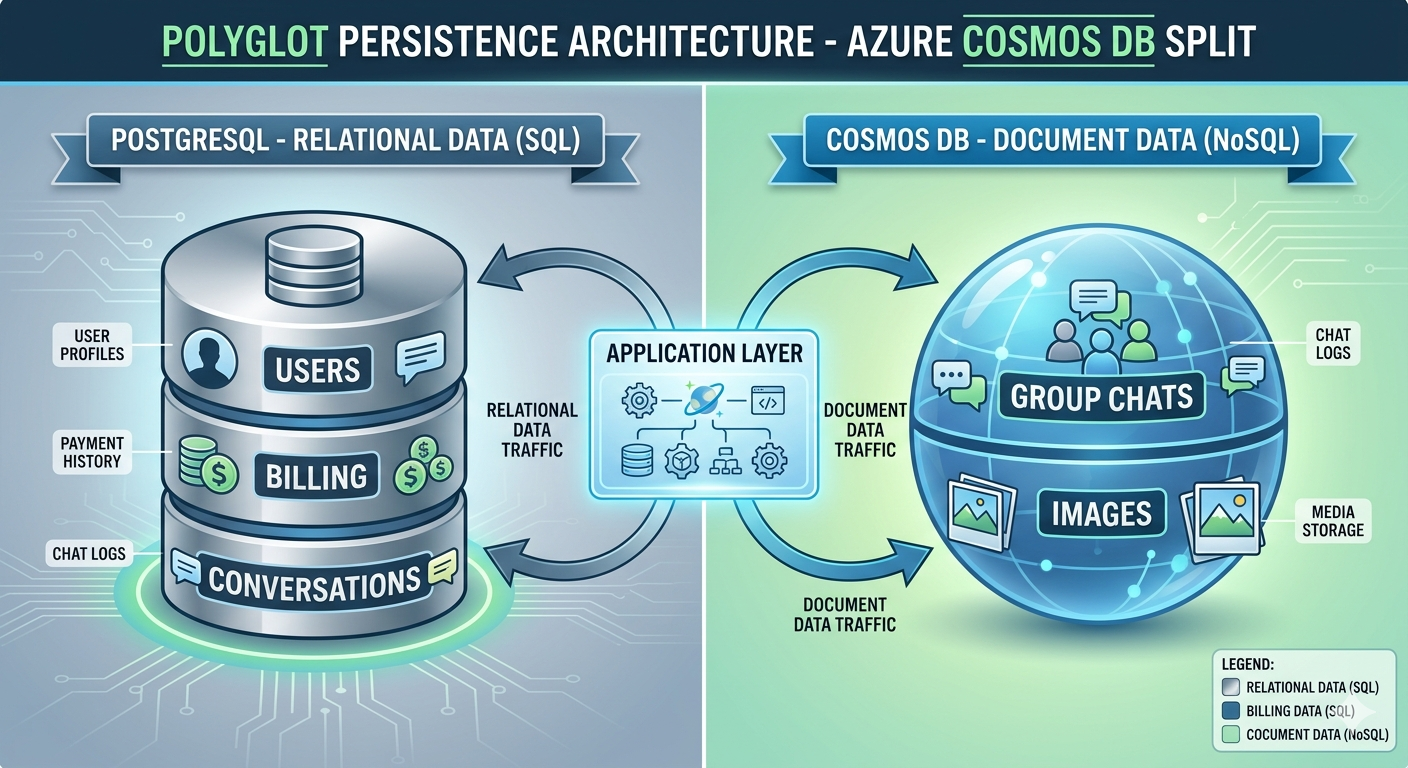
The clearest examples are ChatGPT's newer features: group chats and image storage. Group chat data has a fundamentally different access pattern than two-party conversations. It involves multiple simultaneous participants, real-time message fan-out, presence tracking, and participant roster management — operations that relational databases handle awkwardly and document databases handle naturally. Image storage involves binary data at potentially large sizes (uploaded screenshots, generated images) with metadata — a pattern better suited for blob storage with document-style metadata, not relational rows with byte arrays. For both, Azure Cosmos DB provided a natural fit: a multi-model NoSQL database with native support for document storage, flexible sharding (partitioning), and horizontal scalability built in from the start.
The architectural principle OpenAI was applying is called polyglot persistence: using multiple, specialized databases within one application, each handling the data it's best suited for. The critical discipline is keeping the boundary clean. PostgreSQL owns conversational metadata, user accounts, billing, and authentication. Cosmos DB owns group chat messages and media metadata. The application layer knows which store to query for which resource type. This isn't microservices for the sake of complexity — it's choosing the right tool for each job, implemented cleanly at the service layer.
Real-World AnalogyA law firm doesn't keep client contracts, physical evidence samples, and audio deposition recordings all in the same filing cabinet. Contracts go in fireproof legal files, physical evidence in locked storage, recordings in a digital archive. Each storage type is optimized for what it holds. Your application data deserves the same thoughtfulness — not everything belongs in one relational database just because that's where you started.
from azure.cosmos import CosmosClient, PartitionKey
import psycopg2

# Polyglot persistence: two databases, clean routing

class DataLayer:
 def __init__(self):
 # PostgreSQL: user accounts, billing, conversation metadata
 self.pg = psycopg2.connect("host=primary dbname=chatgpt")

 # Cosmos DB: group chats, images, flexible schema data
 cosmos = CosmosClient("https://chatgpt.documents.azure.com",
 credential="your_key")
 db = cosmos.get_database_client("chatgpt")
 self.group_chats = db.get_container_client("group_chats")
 self.media = db.get_container_client("media_metadata")

 def get_user(self, user_id: str):
 # User accounts → PostgreSQL (ACID, relational)
 cursor = self.pg.cursor()
 cursor.execute("SELECT * FROM users WHERE id = %s", (user_id,))
 return cursor.fetchone()

 def get_group_chat(self, chat_id: str):
 # Group chats → Cosmos DB (flexible, sharded by chat_id)
 return self.group_chats.read_item(item=chat_id, partition_key=chat_id)

 def store_image_metadata(self, image_data: dict):
 # Image metadata → Cosmos DB (schema-flexible, large blobs)
 return self.media.create_item(body=image_data)

 def create_conversation(self, user_id: str, title: str):
 # Conversation metadata → PostgreSQL (ACID guarantees)
 cursor = self.pg.cursor()
 cursor.execute(
 "INSERT INTO conversations (user_id, title) VALUES (%s, %s) RETURNING id",
 (user_id, title)
 )
 self.pg.commit()
return cursor.fetchone()[0]- Never make cross-database joins. If you find yourself fetching an ID from PostgreSQL and then querying Cosmos DB with it in the same request path, something is wrong with your data model boundary. Related data that's frequently queried together should live in the same database.
- Choose Cosmos DB partition keys very carefully. The partition key determines how data is sharded across nodes. For group chats,
chat_idis natural — all messages for a chat are co-located on the same partition, making conversation reads a single-partition operation. A bad partition key (like a timestamp) creates hot partitions under high write load. - Keep your data model migration story simple. PostgreSQL schema changes go through
ALTER TABLEmigrations with tools like Alembic or Flyway. Cosmos DB schema changes are schema-less by nature but need application-layer backward compatibility. Document your data models carefully when mixing databases — the implicit schema lives in your application code, not in the database.
PgBouncer — Why Your Database Has a Hard Connection Ceiling
Here's a problem that surprises most engineers the first time they hit it: PostgreSQL has a hard connection limit, and it's surprisingly low relative to the number of users you might want to serve. Each PostgreSQL connection is a heavyweight OS process — it allocates memory (5–10MB per connection in a typical workload), spawns a backend process, and maintains a dedicated socket. Configuring PostgreSQL to accept 10,000 simultaneous connections would require ~100GB of RAM just for connection overhead, leaving little for actual query execution. In practice, production PostgreSQL instances run with connection limits in the hundreds — often 200–500 for a single node.
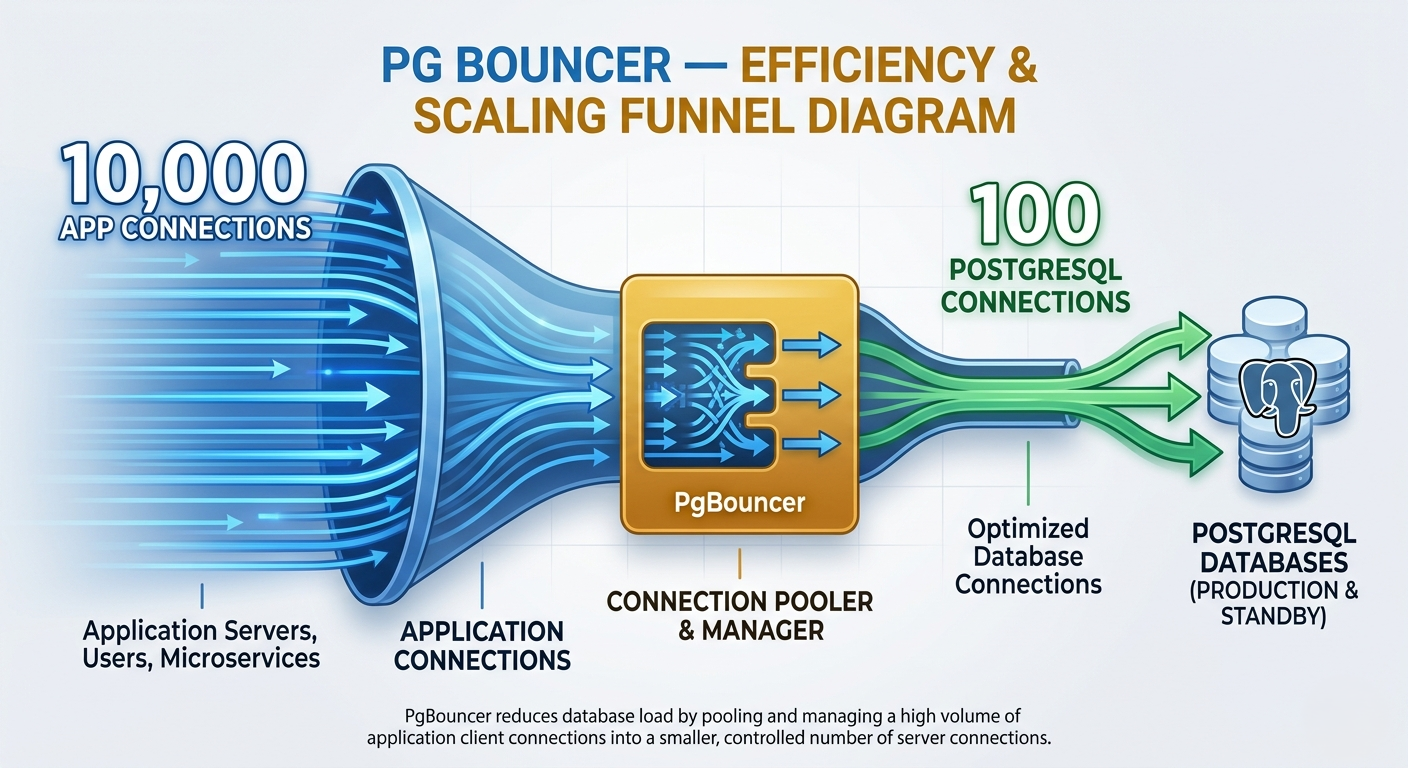
But OpenAI's application tier might have thousands of web server processes, each wanting a database connection. And millions of simultaneous active users. The naive solution — give every application server process its own persistent PostgreSQL connection — immediately hits the connection ceiling and crashes the database with "FATAL: sorry, too many clients already." The elegant solution is PgBouncer: a lightweight PostgreSQL connection pooler that sits between the application servers and the database. Application servers connect to PgBouncer (which can handle thousands of simultaneous incoming connections), and PgBouncer maintains a small, fixed pool of actual PostgreSQL connections that it multiplexes across all incoming requests.
PgBouncer operates in three modes with very different semantics. Session mode: an application server gets a PostgreSQL connection for its entire session duration. Transaction mode: a connection is assigned only for the duration of a transaction, then returned to the pool — the most efficient mode for typical web applications. Statement mode: a connection is assigned only for the duration of a single SQL statement. OpenAI almost certainly runs in transaction mode, which allows a pool of 100 PostgreSQL connections to service thousands of simultaneous application requests, since each only holds the connection during an active transaction (typically milliseconds).
Real-World AnalogyThink of PostgreSQL connections like checkout lanes in a supermarket — each one requires a dedicated cashier. You have 50 cashiers (connections). Ten thousand customers want to check out simultaneously. Without pooling: 9,950 customers can't get a lane and crash the store. PgBouncer is the store manager who says: "Most of you are done in 30 seconds. I'll give you a lane the moment one becomes free and free it the moment you're done." Same 50 cashiers, dramatically higher throughput.
# PgBouncer configuration — pgbouncer.ini
[databases]
chatgpt = host=primary-postgres.internal port=5432 dbname=chatgpt

[pgbouncer]
listen_port = 6432
listen_addr = 0.0.0.0

# Pool mode: transaction (most efficient for web apps)
pool_mode = transaction

# Connection pool to PostgreSQL (the actual DB connections)
default_pool_size = 100 # 100 real PostgreSQL connections
max_client_conn = 10000 # up to 10k app connections to PgBouncer
reserve_pool_size = 10 # emergency reserve connections

# Timeouts
server_connect_timeout = 3 # seconds to get a DB connection
client_idle_timeout = 60 # disconnect idle clients after 60s
server_idle_timeout = 300 # reclaim idle DB connections after 5min

# Auth
auth_type = md5
auth_file = /etc/pgbouncer/userlist.txt

# Monitoring
stats_period = 60 # emit stats every 60 seconds
# Run PgBouncer with Docker
docker run -d \
--name pgbouncer \
-p 6432:6432 \
-v $(pwd)/pgbouncer.ini:/etc/pgbouncer/pgbouncer.ini \
-v $(pwd)/userlist.txt:/etc/pgbouncer/userlist.txt \
edoburu/pgbouncer
# Monitor pool stats (connect to PgBouncer admin console)
psql -h 127.0.0.1 -p 6432 -U pgbouncer pgbouncer
# SHOW POOLS; — see connection pool utilization
# SHOW STATS; — see request rates and latency
# SHOW CLIENTS; — see active client connections- Transaction mode breaks session-level features:
SET LOCAL, advisory locks,LISTEN/NOTIFY, and prepared statements. If your application uses any of these, you need to either use session mode (lower efficiency) or handle these cases outside the pool (e.g., use a separate direct connection for advisory locks). - Set
default_pool_sizebased on your PostgreSQLmax_connectionssetting, leaving headroom. If PostgreSQL allows 200 connections, set PgBouncer's pool to 180 — reserve 20 for monitoring, admin queries, and emergency access. Running the pool at 100% capacity means any spike overflows to the wait queue. - Deploy PgBouncer as a sidecar per application node rather than as a single shared instance. A single PgBouncer can become a bottleneck and single point of failure. Multiple instances each maintaining smaller pools to the same PostgreSQL provides both horizontal scalability and resilience.
How It All Connects — The Complete OpenAI Database Architecture
Let's trace the complete journey of a ChatGPT request through OpenAI's database architecture to see every component working in concert. A user in Singapore opens ChatGPT and asks to see their conversation history. The request hits an application server. Before touching any database, the application checks Redis for the cached conversation list using the cache-lock pattern — if the cache is warm, the response returns in under 10ms without any database involvement.
If the cache is cold (miss), the cache lock is acquired and a read query is dispatched — not to the primary PostgreSQL, but to the nearest Asia-Pacific read replica. The replica, synchronized within milliseconds of the primary, returns the conversation list. The result is cached with a TTL plus jitter. If 500 other Singapore users hit the same miss simultaneously, 499 of them wait for the lock holder, then receive the cached result from that single database query. The primary database saw zero traffic from this entire scenario.
Now the user sends a new message. The write goes through PgBouncer, which pulls a connection from its transaction pool, executes the INSERT against the primary PostgreSQL, commits in milliseconds, and returns the connection to the pool. The WAL stream asynchronously replicates this write to all 50 replicas within milliseconds. The next time any user reads this conversation from any regional replica, the new message is already there. The user then uploads an image — this routes entirely to Cosmos DB's media container, completely bypassing PostgreSQL. PgBouncer, the replicas, and the cache layer are never involved.
Four independent strategies, each solving one specific problem, composing into a system that serves 800 million users without a distributed primary database. The lesson isn't "copy OpenAI's exact stack." The lesson is: understand your bottlenecks before you build solutions for them. Reads outpace writes → replicas. Cache stampedes kill the primary → locking. New data models don't fit relational → polyglot. Too many connections → pool them. One bottleneck at a time. One tool at a time.
Getting StartedGetting Started — Apply the OpenAI Playbook to Your Own Database
# Step 1: Set up PostgreSQL with streaming replication
# On primary - enable WAL streaming
# Edit postgresql.conf:
wal_level = replica
max_wal_senders = 10
wal_keep_size = 512MB

# Create replication user
psql -c "CREATE USER replicator REPLICATION LOGIN PASSWORD 'secret'"

# Step 2: Create a read replica
# On replica server:
pg_basebackup -h primary-host -U replicator -D /var/lib/postgresql/data \
 -P -Xs -R
# -R flag creates standby.signal and recovery config automatically
pg_ctl start -D /var/lib/postgresql/data

# Step 3: Install and configure PgBouncer
apt install pgbouncer
# Edit /etc/pgbouncer/pgbouncer.ini with your configuration (see above)
systemctl start pgbouncer
systemctl enable pgbouncer

# Step 4: Deploy Redis for caching
docker run -d --name redis -p 6379:6379 redis:7-alpine \
 redis-server --maxmemory 2gb --maxmemory-policy allkeys-lru

# Step 5: Verify everything
# Check replication status on primary:
psql -c "SELECT client_addr, state, sent_lsn, write_lag FROM pg_stat_replication;"
# Check PgBouncer pool:
psql -p 6432 -U pgbouncer pgbouncer -c "SHOW POOLS;"
# Check Redis:
redis-cli ping # should return PONG
# Step 6: Application setup — complete database layer
import redis
from sqlalchemy import create_engine
# Connect through PgBouncer (port 6432, not 5432)
PRIMARY = create_engine("postgresql://app:pass@pgbouncer:6432/mydb",
pool_pre_ping=True) # health-check connections
REPLICA = create_engine("postgresql://app:pass@replica:5432/mydb",
pool_pre_ping=True)
cache = redis.Redis(host="redis", decode_responses=True)
# Monitor replication lag in your health check endpoint
def check_replication_lag():
with REPLICA.connect() as conn:
result = conn.execute("SELECT EXTRACT(EPOCH FROM (now() - pg_last_xact_replay_timestamp()))")
lag_seconds = result.scalar()
if lag_seconds > 5:
# Alert: replica is falling behind
alert(f"Replica lag: {lag_seconds}s")
return lag_secondsFrequently Asked Questions
How does OpenAI scale PostgreSQL to 800 million users? OpenAI uses four complementary strategies: 50 read replicas across global regions to distribute read traffic, cache locking to prevent thundering herd database overload during cache expiry events, Azure Cosmos DB for features requiring non-relational data structures (group chats, media), and PgBouncer connection pooling to handle millions of simultaneous connections without overwhelming PostgreSQL's connection limit. What is the thundering herd problem in caching? When many cached items expire simultaneously, all client requests that miss the cache rush to reload data from the database at the same moment — potentially firing thousands of identical queries in milliseconds. This "thundering herd" can crash even a well-provisioned database. Cache locking solves this by allowing only one process to reload a given cache key from the database; all other concurrent cache misses wait for the result of that single reload. Why use PgBouncer with PostgreSQL? Each PostgreSQL connection is a heavyweight OS process consuming 5–10MB RAM. PostgreSQL's practical connection limit is typically 200–500. PgBouncer sits between applications and PostgreSQL, accepting thousands of application connections while maintaining a small pool of real PostgreSQL connections that it multiplexes across requests. In transaction mode, it returns a connection to the pool after each transaction commit, allowing 100 PostgreSQL connections to service tens of thousands of concurrent application requests. What is polyglot persistence and when should I use it? Polyglot persistence means using multiple database types within one application, each optimized for its specific data access pattern. Use it when a feature's data model genuinely doesn't fit your primary database well — document data in a relational schema, or relational data in a key-value store. Avoid it as premature complexity: start with one database, add a second only when you've proven the primary can't serve the new use case efficiently. How many read replicas do I need for my application? Start with 1–2. A single read replica doubles your read capacity and provides a hot standby for failover. Add replicas when you measure read replica CPU or I/O saturation above 70% sustained. For global applications, prioritize geographic distribution over raw count — 3 regional replicas serving local users outperforms 10 replicas all in the same region. What PgBouncer mode should I use — session, transaction, or statement? Transaction mode for most web applications — it provides the best connection efficiency and works with standard SQL patterns. Session mode if you use session-level PostgreSQL features (advisory locks, LISTEN/NOTIFY, prepared statements). Statement mode only for trivially simple, single-statement workloads — it's incompatible with transactions and rarely used in practice. Is PostgreSQL suitable for production at very large scale? Yes — OpenAI's architecture is compelling evidence. PostgreSQL handles billions of rows, terabytes of data, and with proper configuration (read replicas, connection pooling, caching), millions of queries per minute. The right answer is almost never "abandon PostgreSQL" — it's "add the infrastructure layer that complements it." Distributed databases like Cassandra introduce consistency complexity that you should pay for only when you've exhausted PostgreSQL's scaling headroom. How does Azure Cosmos DB differ from PostgreSQL for sharding? PostgreSQL requires application-level or manual sharding (or an extension like Citus) for horizontal scaling — the default single-node model doesn't distribute writes. Cosmos DB is horizontally sharded by design: you choose a partition key and data is automatically distributed across nodes based on that key. For new features where write volume will exceed a single PostgreSQL node's capacity and the data is document-structured, Cosmos DB provides instant horizontal write scalability without manual sharding infrastructure.🔬 Database Scaling Interactive Lab
Simulate read replicas under load, watch cache locking prevent database overload, configure PgBouncer pools, and test your knowledge — all in your browser.
Read Replica Load Distribution
Simulate traffic across the primary and 6 regional replicas. Watch the primary stay near-zero while replicas handle all reads.
Traffic Distribution — 50k req/s 0 req/s routed Routing LogCache Locking — Preventing the Thundering Herd
Simulate 20 concurrent requests hitting an expired cache key. Compare what happens with and without locking.
Cache Expiry Event — 20 Concurrent Requests ❌ Without Lock — Thundering Herd ✅ With Cache Lock — Controlled DB QUERIES (no lock) 0 DB QUERIES (with lock) 0 PRIMARY LOAD (no lock) 0% PRIMARY LOAD (lock) 0%Polyglot Persistence — Where Each Data Type Lives
Click each data type to see which database handles it and why. Green = PostgreSQL, Purple = Cosmos DB.
Data Routing Map Click any data type above to learn why it lives in that database. Query RoutingPgBouncer Connection Pool — Live Visualization
Adjust the slider to change incoming request volume. Watch how PgBouncer multiplexes thousands of app connections through a small pool of real PostgreSQL connections.
Connection Pool Monitor Incoming App Requests 105000 500 req/s Pool Size (PG connections) 10200 100 connections App Connections to PgBouncer (capped display: 100) ↓ PgBouncer multiplexes to PostgreSQL pool ↓ Real PostgreSQL Connections UTILIZATION - QUEUED 0 STATUS OKFull Architecture Simulator — All Four Strategies Combined
Toggle each strategy on/off and see how system health metrics respond under a 100k req/s load.
System Simulator Strategies: Read Replicas Cache Locking PgBouncer Cosmos DB PRIMARY LOAD 0% write only target P99 LATENCY - ms DB ERRORS/s 0 connection refused SYSTEM STATUS IDLE overall health Primary Database Load Cache Hit Rate Connection Pool Utilization System LogKnowledge Check — Test Your Database Scaling Understanding
8 questions covering all four OpenAI scaling strategies.
Keep reading
Related articles
 AI
AIEnterprise RAG: How to Build Accurate, Private AI Systems | Zetsapp
Teams frequently ask "should we fine-tune or use RAG?" as if it's binary. In production, the strongest systems use both: RAG for dynamic factual grounding, and light fine-tuning (or just careful prompting) for output style, tone, and domain-specific reasoning patterns. Don't fine-tune to teach the model facts — that's what retrieval is for.
 AI
AIAI Agents for Business: Use Cases, Implementation Guide & ROI in 2026 | Zetsapp
The most common mistake in discovery calls is a stakeholder describing a chatbot project using agent language ("it should be smart and handle anything"). Before scoping anything, get explicit about which systems the agent needs write access to. If the answer is "none, it just answers questions," you likely need a well-grounded RAG chatbot, not an agent — simpler, cheaper, faster.
 AI
AIThe Shift to Cloud 3.0: Architecting Low-Latency Apps With Distilled On-Device AI | Zetsapp
The Shift to Cloud 3.0: Architecting Low-Latency Apps With On-Device AI :root { --sp: 0.28s; } [data-theme="dark"]…