
Table of Contents
- The Authentication Decision Nobody Warns You About
- How Session-Based Authentication Really Works
- How JWT Authentication Really Works
- JWT Signing Algorithms: HMAC, RSA, and ECDSA
- Handling Token Expiration and Refresh Tokens
- Sessions vs JWTs: When to Use Each One
- How It All Connects
- Getting Started: A Practical Tutorial
- FAQ
- Conclusion
1. The Authentication Decision Nobody Warns You About
Picture this: you're three sprints into a new project. The MVP is coming together. Your frontend team is asking how they should handle login. Your tech lead sends a quick Slack message: "Just use JWTs, they're stateless and modern." You nod, implement it, ship it — and six months later, a user gets their account compromised and your only option is to rotate the entire secret key, which logs out every single user on the platform.
That moment of "oh no" is more common than any conference talk will admit.
Web authentication is one of those topics that looks deceptively simple on the surface. Login form, check credentials, send back a token or a cookie — how complicated can it be? But underneath that simplicity is a real architectural decision with meaningful trade-offs around security, scalability, user experience, and operational complexity. And most blog posts hand you a code snippet without ever giving you the mental model to make the right choice for your specific situation.
This guide is different. We're going to walk through both mechanisms from first principles — not just how they work, but why they work that way, what breaks under pressure, and exactly when you should reach for one over the other. By the end, you'll have a clear, confident framework. Let's dig in.
2. How Session-Based Authentication Really Works
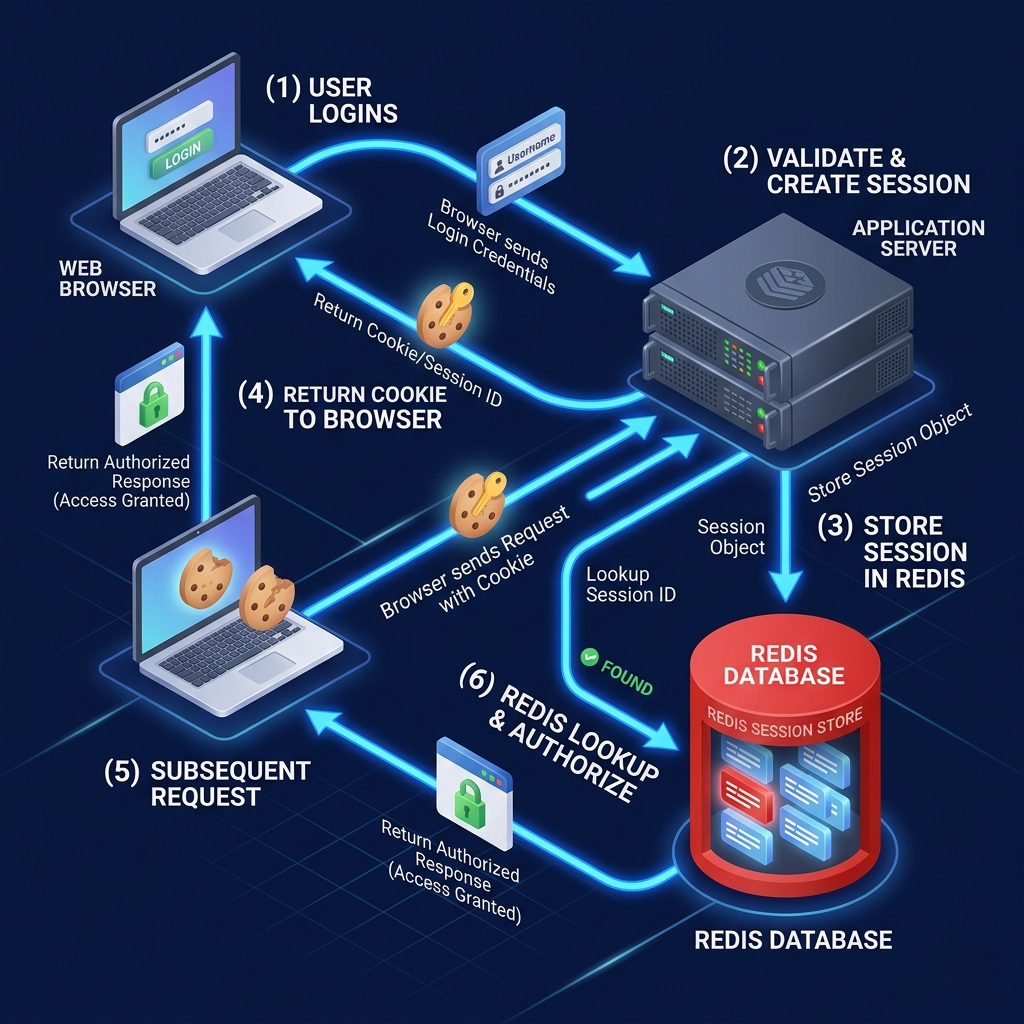
Think of session-based authentication like a coat check at an upscale restaurant. You walk in with your coat (your credentials), hand it to the attendant (the server), and they store it in the back room (the session store). They give you a small numbered ticket (the session ID). When you need your coat back — or in this case, when you make a new request — you present the ticket and they retrieve everything they need about you from the back room.
Here's the actual flow. The user sends their username and password to the server. The server verifies those credentials against the database. If everything checks out, the server creates a new session object — typically containing the user ID, session expiration time, roles, and any other relevant metadata — and stores it somewhere it can retrieve later. That somewhere is usually Redis (for speed) or a relational database (for durability). The server then generates a unique, random session ID, stores it as the key in the session store, and sends it back to the client in a Set-Cookie header.
From that point on, every request the browser makes automatically includes that cookie. The server reads the session ID from the incoming cookie, does a lookup in the session store, retrieves the session data, and uses it to authenticate the request. The client never sees the actual session data — only that opaque ticket.
Here's a simplified Express.js example of how this looks in practice:
// Install: npm install express express-session connect-redis redis

const express = require('express');
const session = require('express-session');
const RedisStore = require('connect-redis').default;
const { createClient } = require('redis');

const app = express();
const redisClient = createClient({ url: 'redis://localhost:6379' });
redisClient.connect();

app.use(express.json());
app.use(session({
  store: new RedisStore({ client: redisClient }),
  secret: process.env.SESSION_SECRET, // Strong, random secret
  resave: false,
  saveUninitialized: false,
  cookie: {
    httpOnly: true,       // Prevents JS access — critical for XSS protection
    secure: true,         // HTTPS only
    sameSite: 'strict',   // CSRF mitigation
    maxAge: 1000 * 60 * 60 * 24 // 24 hours
  }
}));

app.post('/login', async (req, res) => {
  const { username, password } = req.body;
  const user = await verifyCredentials(username, password); // Your auth logic

  if (!user) return res.status(401).json({ error: 'Invalid credentials' });

  req.session.userId = user.id;
  req.session.roles = user.roles;
  res.json({ message: 'Logged in successfully' });
});

app.get('/dashboard', (req, res) => {
  if (!req.session.userId) return res.status(401).json({ error: 'Unauthorized' });
  res.json({ userId: req.session.userId });
});

app.post('/logout', (req, res) => {
  req.session.destroy(); // Session is gone server-side — immediate revocation
  res.clearCookie('connect.sid');
  res.json({ message: 'Logged out' });
});
The power of this model is its clarity and control. Because the server owns the session data, it can revoke a session at any moment by deleting that record from the store. If a user reports a compromise, you delete the row in Redis. Done. That user is immediately locked out — no waiting, no expiration window.
The architectural challenge, however, surfaces when you scale. If your application runs on three servers behind a load balancer, any of those servers might receive a request from the same user. If server A created the session in its local memory, but the request lands on server B, server B has no idea who this user is. The classic (and correct) solution is a centralized session store — Redis being the most popular choice — that all servers read from. It works well, but it means every authenticated request involves a network round-trip to Redis. In high-traffic applications, that latency adds up, and the session store itself becomes a potential single point of failure you need to architect for.
💡 Pro Tips & Common Mistakes — Session Authentication
Pro Tip: Always use
httpOnly: trueon your session cookie. This single flag prevents client-side JavaScript from reading the cookie, which neutralizes an entire class of XSS-based session theft attacks. Use a dedicated Redis instance (or cluster) for sessions, separate from your application cache. If your cache gets flushed, you don't want every user to get logged out.
Common Mistake: Setting
saveUninitialized: truein Express-session. This creates a session for every visitor, including unauthenticated ones, which can flood your Redis store and dramatically increase infrastructure costs. Storing sensitive data (passwords, PII) in the session object. The session is meant to hold references — like a user ID and roles — not a copy of your user record. Keep it lean.
3. How JWT Authentication Really Works
Now let's flip the model entirely. Instead of giving the user a ticket that points to data stored on the server, what if we gave them a document that contains the data itself — and stamped it with a tamper-proof seal so the server can verify it's legitimate without looking anything up?
That's exactly what a JSON Web Token is.
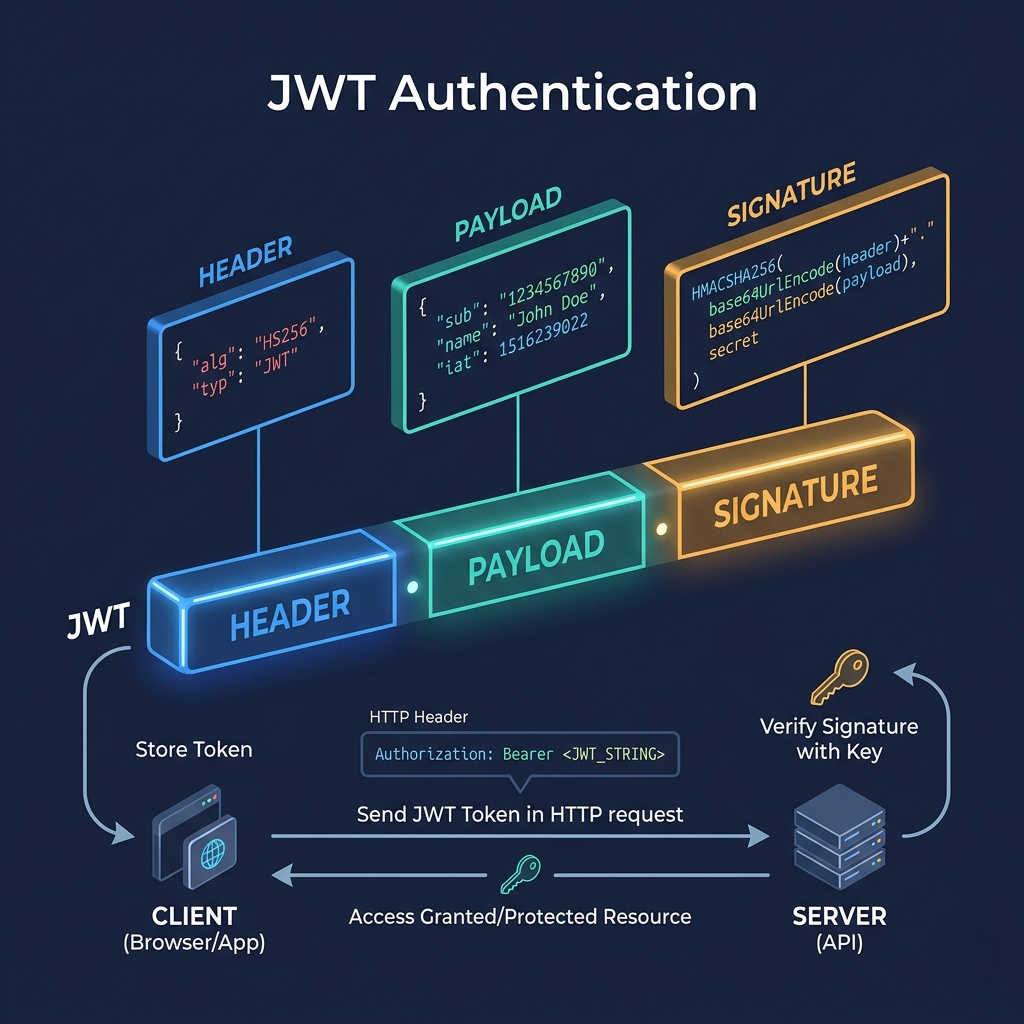
The flow starts similarly: the user sends credentials, the server verifies them. But instead of creating a session record, the server constructs a JWT — a compact, URL-safe string made of three Base64-encoded parts joined by dots. The first part is the header, which declares the token type and signing algorithm. The second is the payload, which contains the claims: user ID, roles, expiration time, and whatever else your application needs. The third is the signature, which is a cryptographic hash of the header and payload, generated using a secret or private key. That signature is what makes the token trustworthy — if anyone tampers with the payload, the signature no longer matches and the server rejects it.
The server sends the JWT back to the client (typically in the response body), and the client stores it — commonly in localStorage or a cookie. On every subsequent request, the client includes the JWT in the Authorization header using the Bearer scheme. The server receives the token, verifies the signature, checks the expiration, and if everything passes, trusts the claims inside it completely — without ever touching a database or cache for auth purposes.
Here's what that looks like in practice:
// Install: npm install express jsonwebtoken

const express = require('express');
const jwt = require('jsonwebtoken');

const app = express();
app.use(express.json());

const ACCESS_SECRET = process.env.JWT_SECRET; // Keep this long, random, and secret

app.post('/login', async (req, res) => {
  const { username, password } = req.body;
  const user = await verifyCredentials(username, password);

  if (!user) return res.status(401).json({ error: 'Invalid credentials' });

  const token = jwt.sign(
    { userId: user.id, roles: user.roles },  // Payload — keep it small
    ACCESS_SECRET,
    { expiresIn: '15m' }                      // Short-lived: 15 minutes
  );

  res.json({ accessToken: token });
});

// Middleware to verify JWT on protected routes
function authenticateToken(req, res, next) {
  const authHeader = req.headers['authorization'];
  const token = authHeader && authHeader.split(' ')[1]; // "Bearer <token>"

  if (!token) return res.status(401).json({ error: 'No token provided' });

  jwt.verify(token, ACCESS_SECRET, (err, decoded) => {
    if (err) return res.status(403).json({ error: 'Invalid or expired token' });
    req.user = decoded;
    next();
  });
}

app.get('/dashboard', authenticateToken, (req, res) => {
  res.json({ userId: req.user.userId });
});
Here's the thing most tutorials miss: JWTs don't inherently make your application more secure. They make your authentication stateless — and statelessness is a scalability tool, not a security upgrade. A JWT that's stolen is just as dangerous as a session ID that's stolen, possibly more so, because you can't revoke it until it expires.
The counterintuitive reality many developers discover too late is that the "stateless" nature of JWTs that everyone praises is actually a security regression compared to sessions when it comes to revocation. The moment you add a token blacklist to handle revocations, you've reintroduced state — and at that point, you've built a session system with extra steps and more complexity. Understanding this trade-off up front is what separates architects from copiers of Stack Overflow answers.
💡 Pro Tips & Common Mistakes — JWT Authentication
Pro Tip: Never store a JWT in
localStorageon a web app if you can avoid it. It's accessible to any JavaScript running on the page, making it vulnerable to XSS attacks. Storing it in anhttpOnlycookie gives you the best of both worlds — stateless on the server, XSS-safe on the client. Keep your JWT payload small. Every request includes the full token — if you stuff it with 50 fields of user data, you're adding unnecessary bytes to every single API call.
Common Mistake: Setting excessively long expiration times (24h, 7 days) on access tokens. If that token is ever stolen, you've given the attacker a long window. Use short-lived access tokens (15 minutes) and pair them with refresh tokens (covered below). Putting sensitive data like passwords, SSNs, or credit card numbers in the payload. The payload is Base64-encoded, not encrypted — anyone who intercepts the token can decode and read it. Encrypt if you must store sensitive claims.
4. JWT Signing Algorithms: HMAC, RSA, and ECDSA
The signature on a JWT is only as strong as the algorithm and key management behind it. This section is where a lot of engineers either gloss over (bad) or over-engineer (also bad). Let's find the pragmatic middle ground.
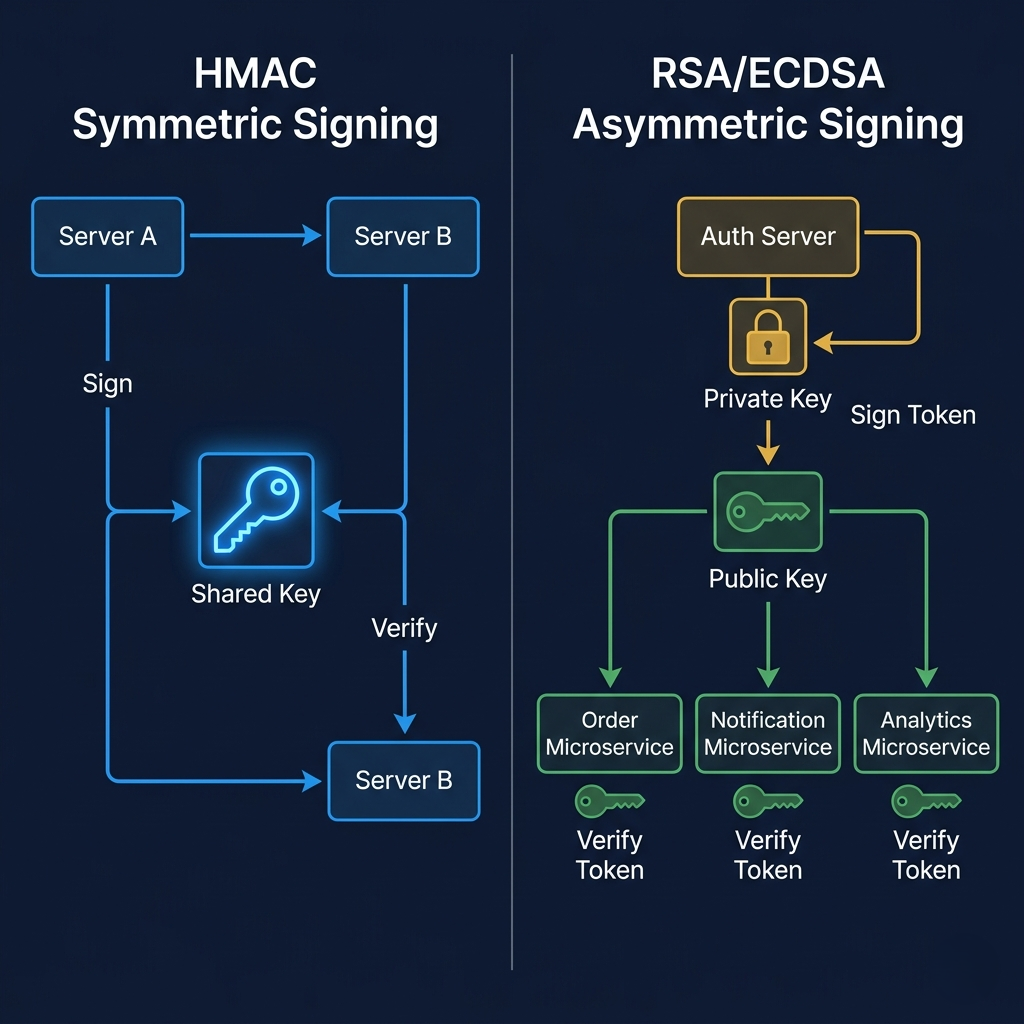
There are two fundamentally different approaches to signing: symmetric and asymmetric. With HMAC (typically HS256), the same secret key is used to both sign the token and verify it. It's fast, simple, and works great when a single trusted service — or a small set of fully trusted services — is doing both the signing and the verifying. The problem emerges in a microservices world. If your Order Service, Notification Service, and Analytics Service all need to verify JWTs, they all need a copy of the secret key. Now you've got the secret living in five places, any one of which could be a breach vector.
RSA (RS256) and ECDSA (ES256) solve this with asymmetric cryptography. Your authentication service holds a private key — it never leaves that service, full stop. But it publishes a corresponding public key that any service can use to verify tokens. The Order Service can verify that a JWT was genuinely issued by your Auth Service without ever having access to the Auth Service's signing key. You can even publish your public key as a JWKS (JSON Web Key Set) endpoint, allowing third-party services or client-side verification where appropriate.
The trade-off is computational cost and operational complexity. RSA keys are large, and RSA operations are measurably slower than HMAC. ECDSA (ES256) is a better modern choice than RSA — it offers equivalent security with much smaller key sizes and faster operations. If you're building a microservices architecture today and need asymmetric signing, reach for ES256 over RS256.
// Generating ES256 key pair (run once, store securely)
const { generateKeyPairSync } = require('crypto');

const { privateKey, publicKey } = generateKeyPairSync('ec', {
  namedCurve: 'P-256',
  publicKeyEncoding: { type: 'spki', format: 'pem' },
  privateKeyEncoding: { type: 'pkcs8', format: 'pem' }
});

// Sign with private key (in Auth Service only)
const token = jwt.sign({ userId: '123' }, privateKey, { algorithm: 'ES256', expiresIn: '15m' });

// Verify with public key (in any service)
const decoded = jwt.verify(token, publicKey, { algorithms: ['ES256'] });
The decision tree is simple: single service or fully trusted internal services? HMAC (HS256) is fine. Microservices, third-party integrations, or zero-trust architecture? Go asymmetric with ES256.
💡 Pro Tips & Common Mistakes — Signing Algorithms
Pro Tip: Explicitly specify the
algorithmsoption when callingjwt.verify(). If you don't, certain libraries accept thealg: "none"header in the JWT — which means no signature at all — as valid. This is one of the oldest JWT attack vectors and it's trivially exploitable.
Common Mistake: Hardcoding your HMAC secret as a short, guessable string. Your JWT secret should be at minimum 256 bits of cryptographically random data. Run
openssl rand -base64 32and use that output. Confusing signing with encryption. A signed JWT (JWS) is readable by anyone — the signature only proves it hasn't been tampered with. If you need the payload to be unreadable, you want a JSON Web Encryption (JWE) token, which is a different beast entirely.
5. Handling Token Expiration and Refresh Tokens
Here's the thing most tutorials miss when they introduce JWTs: they show you how to create a token with a 24-hour expiration and call it a day. That's not production-grade authentication. That's a security liability wearing a green "working" badge.
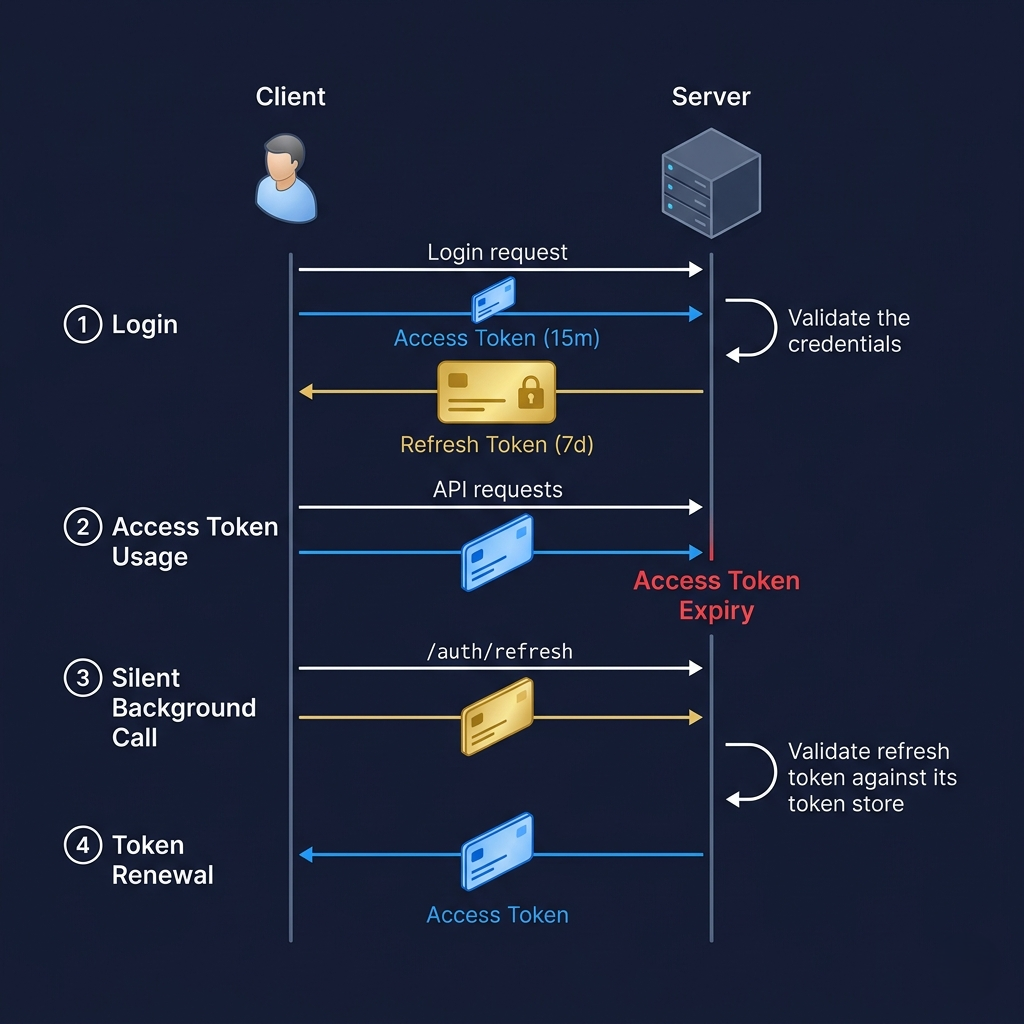
The real pattern — the one used by Google, GitHub, Stripe, and every mature auth implementation — is a two-token system: a short-lived access token paired with a longer-lived refresh token.
The access token is the JWT that gets sent on every API request. It carries the user's identity and permissions. It expires quickly — typically 15 minutes. If it gets stolen (via XSS, network interception, whatever), the attacker has a 15-minute window. That's a meaningful constraint.
The refresh token is different in nature. It's a long opaque string (not necessarily a JWT), stored server-side (yes, with state), and it lives for days or weeks. Its only purpose is to get a new access token when the old one expires. The client sends the refresh token to a dedicated /auth/refresh endpoint. The server checks it against its store, verifies it's valid and hasn't been revoked, and issues a fresh access token. The user never notices any of this. It happens silently in the background.
const REFRESH_SECRET = process.env.JWT_REFRESH_SECRET;

// On login: issue both tokens
app.post('/login', async (req, res) => {
  const user = await verifyCredentials(req.body.username, req.body.password);
  if (!user) return res.status(401).json({ error: 'Invalid credentials' });

  const accessToken = jwt.sign({ userId: user.id }, ACCESS_SECRET, { expiresIn: '15m' });
  const refreshToken = jwt.sign({ userId: user.id }, REFRESH_SECRET, { expiresIn: '7d' });

  // Store refresh token server-side (in DB or Redis) for revocation capability
  await storeRefreshToken(user.id, refreshToken);

  // Send refresh token as httpOnly cookie, access token in body
  res.cookie('refreshToken', refreshToken, { httpOnly: true, secure: true, sameSite: 'strict' });
  res.json({ accessToken });
});

// Token refresh endpoint
app.post('/auth/refresh', async (req, res) => {
  const refreshToken = req.cookies.refreshToken;
  if (!refreshToken) return res.status(401).json({ error: 'No refresh token' });

  // Check if this refresh token is still valid (not revoked)
  const isValid = await validateStoredRefreshToken(refreshToken);
  if (!isValid) return res.status(403).json({ error: 'Refresh token revoked or invalid' });

  jwt.verify(refreshToken, REFRESH_SECRET, (err, decoded) => {
    if (err) return res.status(403).json({ error: 'Invalid refresh token' });
    const newAccessToken = jwt.sign({ userId: decoded.userId }, ACCESS_SECRET, { expiresIn: '15m' });
    res.json({ accessToken: newAccessToken });
  });
});

// Logout: revoke the refresh token
app.post('/logout', async (req, res) => {
  const refreshToken = req.cookies.refreshToken;
  await revokeRefreshToken(refreshToken); // Remove from DB/Redis
  res.clearCookie('refreshToken');
  res.json({ message: 'Logged out' });
});
Notice something important in that code: the refresh token is stored server-side. This is the part that blurs the line between "stateless JWTs" and sessions. If you need immediate revocation capability — account compromise, admin force-logout, suspicious activity detection — you need server-side state for refresh tokens. Anyone who tells you JWTs are "completely stateless" is describing an idealized architecture that doesn't handle real-world security requirements.
The two-token pattern also enables a powerful security technique called refresh token rotation: every time a refresh token is used, it's invalidated and replaced with a new one. If an old refresh token is ever presented to the server, you know it was stolen, and you can immediately revoke all sessions for that user. This is how you get proper revocation semantics with JWTs.
💡 Pro Tips & Common Mistakes — Refresh Tokens
Pro Tip: Store the refresh token in an
httpOnlycookie, not inlocalStorage. Send the access token in the response body for use in memory. This way, the long-lived token is never accessible to JavaScript, and the short-lived token only lives in memory and disappears on page refresh. Implement refresh token rotation. Each use of a refresh token should invalidate the old one and issue a new one. If you ever see a reuse of an already-invalidated refresh token, that's a strong signal of token theft — respond by revoking all sessions for that user.
Common Mistake: Storing the refresh token in
localStorage. Unlike the short-lived access token, the refresh token is precious — it's the key to long-term access. Protect it accordingly. Not having a/logoutendpoint that actually revokes the refresh token. If logout only clears the client-side cookie, anyone who captured the refresh token value can still get new access tokens. Server-side revocation is non-negotiable.
6. Sessions vs JWTs: When to Use Each One
Let's stop dancing around and be direct about the decision. Neither approach is universally superior. The right choice depends on a handful of questions about your system — and answering them honestly will cut through all the dogma.
Choose session-based authentication when:
You need true, immediate revocation. The canonical example: a user contacts support, says their account was compromised, and you need to kick them out right now. With sessions, you delete the session record. They're out within the current request cycle. No waiting for an expiration window. This matters for banking apps, healthcare systems, anything where a breach of account access has real consequences. Security-first applications like admin panels, financial tools, and internal dashboards almost always belong in this category.
You already have a centralized data store running. If Redis is already in your stack serving as a cache, the marginal cost of also using it for sessions is nearly zero. You're not adding infrastructure — you're adding a use case to infrastructure you're paying for anyway.
You're building a server-rendered monolithic web application. Traditional web apps where the browser and server are tightly coupled are the historical home of session auth. Cookies are native to this model. The complexity of managing JWTs in server-rendered contexts is rarely worth it.
Choose JWT-based authentication when:
You're building a distributed or microservices architecture. This is where JWTs genuinely shine. A JWT issued by your Auth Service can be verified by your Order Service, your Inventory Service, and your Notification Service — without any of them calling back to a central session store on every request. That's a real scalability and decoupling win.
You need to share authentication across domains or organizations. Imagine a platform that issues JWTs that third-party developers can verify independently. They don't need to call your servers to validate the token — they verify the signature with your published public key. OAuth 2.0 and OpenID Connect are built on exactly this model.
You're building a stateless API consumed by mobile clients or SPAs. When your backend is a pure API and your clients are JavaScript apps or native mobile apps, the cookie-centric session model becomes awkward. JWTs, sent as Authorization: Bearer headers, fit the API contract cleanly.
Here's the honest synthesis: for most new web applications that are a single service with a standard database, sessions are perfectly fine and operationally simpler. The JWT default has become a kind of cargo cult — people use it because they've seen it, not because their architecture demands it. If you're not building microservices, if you don't need cross-domain auth sharing, and if you want simple, immediate revocation, sessions are the underrated professional choice.
💡 Pro Tips & Common Mistakes — Choosing the Right Approach
Pro Tip: You don't have to pick one globally. Many mature systems use sessions for the web frontend and JWTs for their public API. Use the right tool for each consumer of your auth system.
Common Mistake: Defaulting to JWTs because they feel more "modern." Architecture decisions should be driven by requirements, not aesthetics. Run through the decision criteria above honestly before committing. Assuming JWTs are always faster because they're stateless. The JWT signature verification involves cryptographic operations on every request. For most applications, the difference is negligible — but the assumption that "stateless = faster" isn't universally true.
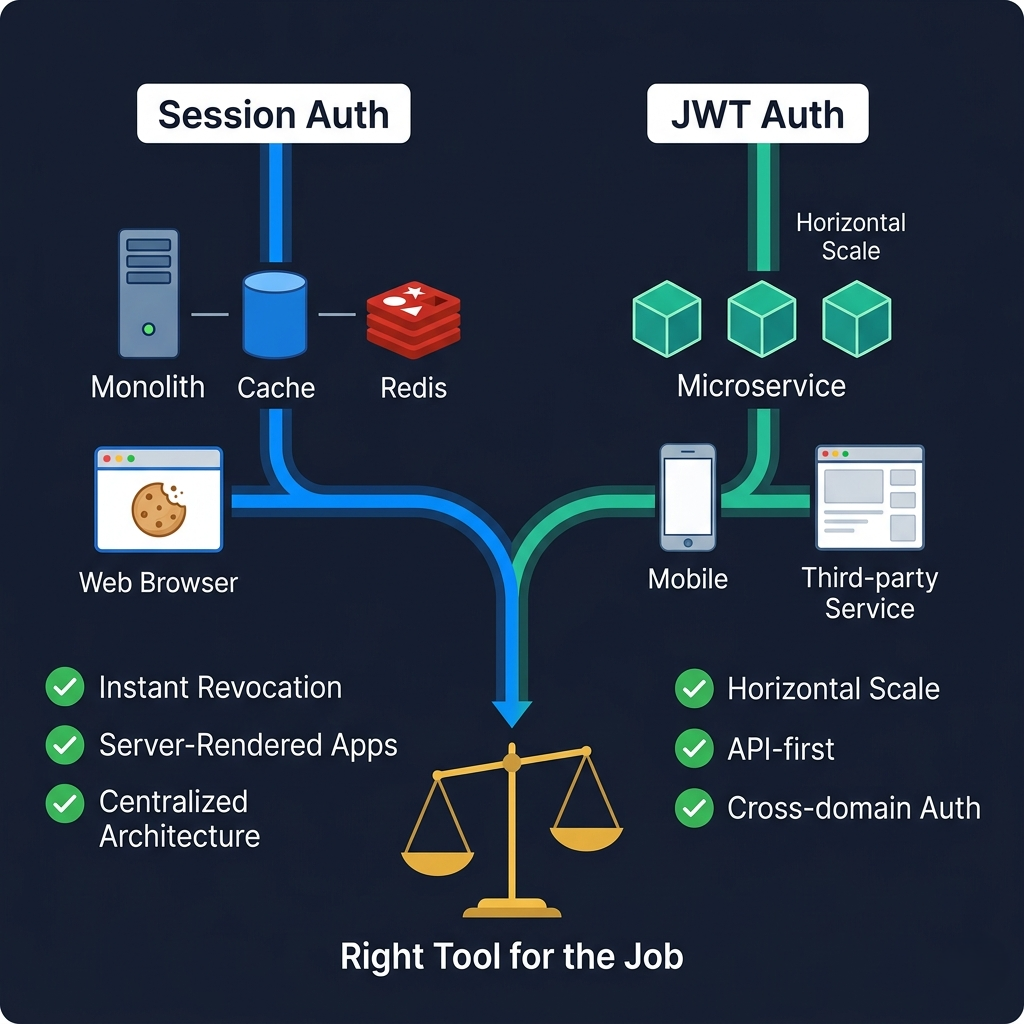
7. How It All Connects
Step back and look at the big picture. Session auth and JWT auth aren't competing philosophies — they're different solutions to the same fundamental problem: how does a server know, on a stateless HTTP request, who it's talking to?
Sessions solve this by keeping the state on the server and sending the client a reference (the session ID). JWTs solve this by encoding the state in the client-held token itself and using cryptography to ensure it hasn't been forged. Every single trade-off between them flows from this single architectural difference.
The server-side state of sessions makes revocation simple but introduces infrastructure coupling (you need a session store all servers can reach). The client-side state of JWTs removes that coupling but makes revocation hard (the server has no record to delete). The short-lived nature of access tokens partially mitigates the revocation problem, and storing refresh tokens server-side partially restores it — which is why a production JWT implementation with refresh tokens starts to look a lot like a session system in some ways, just with a different security model and better horizontal scaling characteristics.
The signing algorithms — HMAC for simplicity within a trusted boundary, ECDSA for zero-trust microservices — are a direct response to the question: who needs to verify this token, and how much do I trust them?
Everything connects. The architecture drives the auth choice, the auth choice drives the token lifetime strategy, the token lifetime strategy drives the revocation design. Start from your actual requirements — not the tech — and the right answer usually becomes obvious.
8. Getting Started: A Practical Tutorial
Let's put this into action. Here's a battle-tested starting point for both approaches, designed for a Node.js/Express backend. Pick the path that matches your architecture.
Option A: Session Auth with Redis (Recommended for Monoliths)
Step 1: Install dependencies
npm install express express-session connect-redis redis bcryptjs
Step 2: Configure Redis and session middleware
(See the code example in Section 2 above — it's production-ready as written.)
Step 3: Protect routes with a middleware function
function requireAuth(req, res, next) {
  if (!req.session.userId) {
    return res.status(401).json({ error: 'Authentication required' });
  }
  next();
}

app.get('/protected', requireAuth, (req, res) => {
  res.json({ userId: req.session.userId });
});
Step 4: Handle session cleanup
Set a reasonable maxAge on your cookie (24 hours for most apps). Configure Redis to automatically expire session keys at the same TTL.
Step 5: Test the full flow
# Login
curl -c cookies.txt -X POST http://localhost:3000/login \
  -H "Content-Type: application/json" \
  -d '{"username":"test","password":"password"}'

# Use the session
curl -b cookies.txt http://localhost:3000/dashboard

# Logout
curl -b cookies.txt -X POST http://localhost:3000/logout
Option B: JWT with Refresh Tokens (Recommended for APIs/Microservices)
Step 1: Install dependencies
npm install express jsonwebtoken cookie-parser bcryptjsStep 2: Set up environment variables
# .env
JWT_ACCESS_SECRET=<openssl rand -base64 32>
JWT_REFRESH_SECRET=<openssl rand -base64 32>
Step 3: Implement login, refresh, and logout endpoints (See the full code example in Section 5 above.)
Step 4: Add the auth middleware to protected routes
(See authenticateToken middleware in Section 3 above.)
Step 5: Test the full flow
# Login — get access + refresh tokens
curl -c cookies.txt -X POST http://localhost:3000/login \
  -H "Content-Type: application/json" \
  -d '{"username":"test","password":"password"}'
# Returns: { "accessToken": "eyJ..." }

# Access a protected route
curl -H "Authorization: Bearer eyJ..." http://localhost:3000/dashboard

# Refresh access token (refresh token sent via httpOnly cookie automatically)
curl -c cookies.txt -b cookies.txt -X POST http://localhost:3000/auth/refresh

# Logout (revokes refresh token server-side)
curl -b cookies.txt -X POST http://localhost:3000/logout
Step 6: Add token rotation
After issuing a new access token in the /auth/refresh endpoint, invalidate the old refresh token and issue a new one. Store the new one, clear the old record.
9. FAQ
Q: Are JWTs more secure than session cookies?
Neither is inherently more secure. Session cookies can be vulnerable to CSRF attacks (mitigated with SameSite: strict and CSRF tokens). JWTs can be vulnerable to XSS if stored in localStorage and are harder to revoke. The security of either depends entirely on how carefully you implement it. A well-implemented session system is more secure for most applications than a poorly-implemented JWT system.
Q: Can I use JWTs for session management? Technically yes, but you lose the main advantage of JWTs (statelessness) if you need revocation, since you'll end up maintaining a server-side store anyway. For traditional session management in a web app, stick with proper session cookies. Use JWTs where their stateless, cross-service properties actually benefit you.
Q: Where should I store a JWT — localStorage or a cookie?
For web applications, prefer httpOnly cookies for refresh tokens and in-memory (JavaScript variable) storage for access tokens. Never store a long-lived JWT in localStorage — it's exposed to every JavaScript snippet on your page, including third-party scripts. The in-memory approach means the access token disappears on page refresh, but your /auth/refresh endpoint will seamlessly issue a new one.
Q: What happens to JWT-authenticated users when I change my secret key? Every existing token becomes instantly invalid. All users are immediately logged out. This is why rotating your JWT signing secret is a big deal and needs to be done carefully — usually with a grace period where both old and new secrets are accepted. With RSA/ECDSA, key rotation is somewhat smoother because you can publish new public keys to your JWKS endpoint and phase out the old ones.
Q: How do I handle JWT revocation before the token expires? The two main approaches are: (1) maintain a server-side token blacklist (Redis with the token's JTI claim as the key, with a TTL matching the token expiry), or (2) use very short-lived access tokens (15 minutes) so the revocation window is small. For critical security events (password change, suspicious activity), you can rotate the user's token family, invalidating all refresh tokens.
Q: What's the difference between authentication and authorization in this context?
Authentication answers "who are you?" — verifying identity. Authorization answers "what are you allowed to do?" — verifying permissions. JWTs can carry both: the sub claim identifies the user (authentication), while custom claims like roles: ["admin", "editor"] define permissions (authorization). The advantage is that the authorization decision can be made without an additional database call. The disadvantage is that permission changes (like revoking admin access) don't take effect until the token expires.
Q: Should I use a library like Auth0, Clerk, or Supabase Auth instead of building my own? For most production applications, yes — especially if auth isn't your core product. Services like Auth0, Clerk, and Supabase Auth handle token rotation, key management, refresh token storage, session management, MFA, and a dozen other security concerns that are easy to get wrong. Building auth from scratch is a great learning exercise, but for production systems handling real users, the risk-to-reward ratio of rolling your own rarely makes sense.
Q: Is it possible to use both sessions and JWTs in the same application? Absolutely, and it's actually quite common. Many applications use session-based auth for their web frontend (where cookies work naturally and CSRF protection is manageable) and JWT-based auth for their REST or GraphQL API (where mobile clients and third-party integrations benefit from bearer token authentication). The key is having a clear boundary: one auth mechanism per interface type.
10. Conclusion
Web authentication is one of those topics that rewards depth. On the surface, it's just "login and token." But the decisions you make here — synchronous session lookup vs. cryptographic token verification, shared secret vs. key pair, 15-minute tokens vs. 7-day tokens — have real consequences for your application's security posture, operational complexity, and scalability ceiling.
Here's the bottom line: if you're building a traditional web app or anything where instant revocation matters, sessions are a solid, underappreciated choice. If you're building APIs consumed by multiple clients, a microservices system, or anything that needs to share auth across service boundaries, JWTs with a proper refresh token strategy are the way to go. And in both cases, the implementation details — cookie flags, signing algorithms, token storage location — matter as much as the high-level choice.
Authentication isn't a box to check. It's the foundation your users' trust is built on. Get the foundations right.