
In 2016, a major US bank discovered that its mobile banking app was losing 8% of users at the login screen. The UX was fine. The servers were fast. The problem, after weeks of investigation, turned out to be something most developers never think about: the app was using an older version of TLS with a cipher suite that required extra round trips to establish a connection. On a 4G network with even slight latency, that added 400ms to every login — just enough friction to push impatient users away.
The fix was a configuration change. Two lines in a server config file. But finding it required an engineer who actually understood what was happening at the protocol level, not just at the "it works in my browser" level.
Every day, over 5 billion people use the internet, generating exabytes of data through a stack of protocols most developers treat as invisible plumbing. HTTP, HTTPS, WebSocket, TCP, UDP — these aren't just terms to know for interviews. They're the actual machinery that determines whether your application is fast or slow, secure or vulnerable, real-time or laggy. Understanding them turns you from someone who ships code into someone who understands why it behaves the way it does under real-world conditions.
This post covers the 8 most important network protocols — how each one works, why it was designed the way it was, where it excels, and where it breaks down. By the end, you'll have the mental model that senior engineers use when they're debugging mysterious latency, choosing between architectural options, or reviewing a security configuration.
Table of Contents
- HTTP: The Backbone of Web Communication
- HTTPS and TLS: Encryption as Infrastructure
- HTTP/3 and QUIC: The Protocol That Rewrote the Rules
- WebSocket: Real-Time Communication Done Right
- TCP: Reliability as a Design Philosophy
- UDP: Speed Over Safety
- SMTP: How Email Actually Travels
- FTP: The File Transfer Protocol That Won't Die
- How It All Connects: The Protocol Stack in Action
- Getting Started: Diagnosing and Configuring Protocols
- FAQ
- Conclusion
HTTP: The Backbone of Web Communication
HTTP — HyperText Transfer Protocol — is the language of the web. Every time your browser loads a page, calls an API, or fetches an image, it's speaking HTTP. Despite being nearly 30 years old, it still underlies the vast majority of internet traffic and almost every modern web application. Understanding it isn't optional for backend developers — it's foundational.
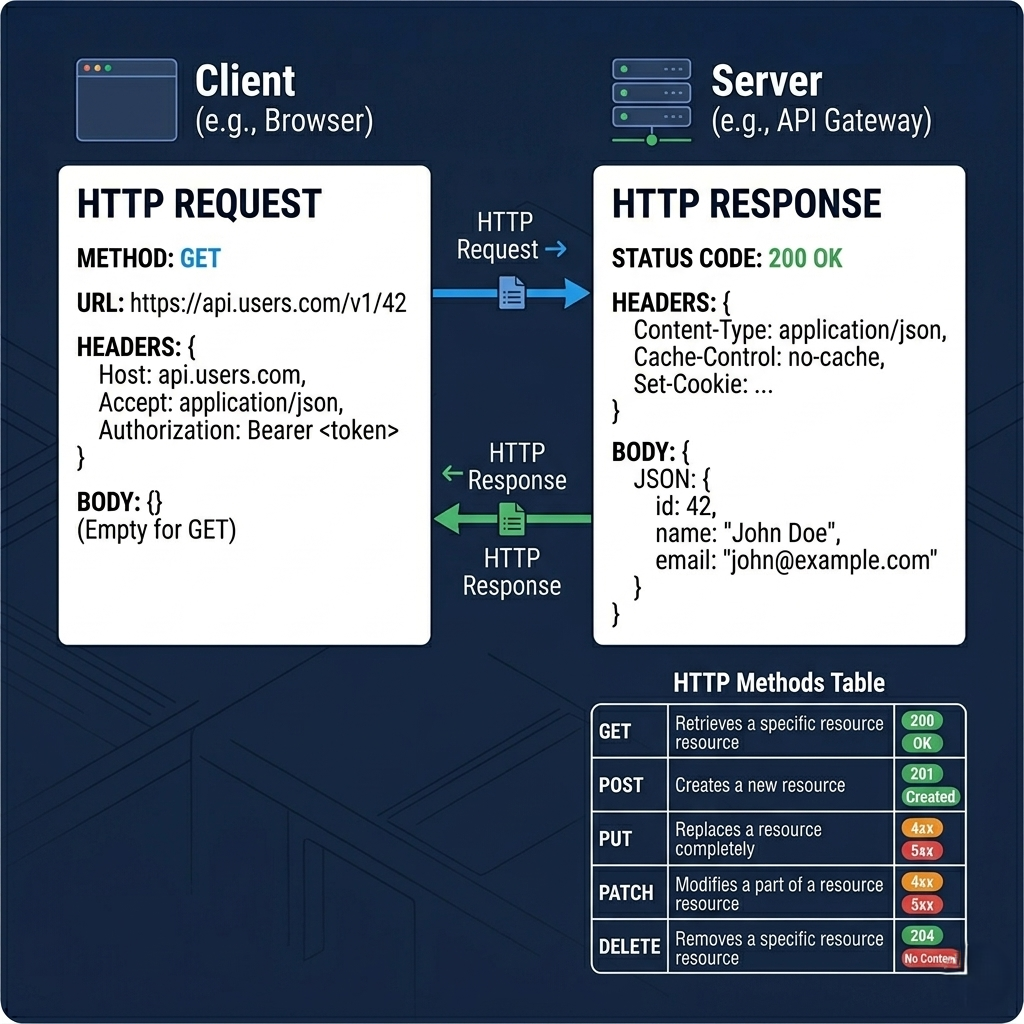
The model is elegantly simple: a client makes a request, a server sends back a response. The request contains a method (what action to perform), a URL (which resource to act on), headers (metadata about the request), and optionally a body (data to send). The response contains a status code (how it went), headers (metadata about the response), and a body (the requested data). That's the entire contract.
HTTP methods are the vocabulary of this contract. GET retrieves data without modifying anything — it should be safe to call multiple times with the same result (idempotent). POST submits data and typically creates a resource; it's not idempotent. PUT replaces a resource entirely. PATCH updates part of a resource. DELETE removes it. These aren't arbitrary conventions — they're a semantic contract that lets browsers, CDNs, load balancers, and caches all make intelligent decisions about how to handle requests. A CDN that knows GET requests are idempotent can safely cache and replay them; it can't make that assumption about POST.
Status codes are equally expressive. The 2xx range means success: 200 is a plain success, 201 means a resource was created, 204 means success with no response body. The 3xx range means redirection. The 4xx range means the client did something wrong: 400 is a malformed request, 401 is unauthenticated, 403 is forbidden (authenticated but not authorized), 404 is not found. The 5xx range means the server failed: 500 is a generic server error, 502 is a bad gateway (your server got an invalid response from upstream), 503 is service unavailable.
# Inspecting HTTP request and response in detail
curl -v https://api.github.com/users/torvalds

# Key parts of the output to understand:
# > GET /users/torvalds HTTP/2        — method, path, HTTP version
# > Host: api.github.com             — which server to route to
# > Accept: */*                      — what content types client accepts

# < HTTP/2 200                       — status: success
# < content-type: application/json  — response body format
# < x-ratelimit-remaining: 58       — custom rate limit header

# Test specific HTTP methods:
curl -X POST https://api.example.com/users \
  -H "Content-Type: application/json" \
  -d '{"name": "Alice", "email": "alice@example.com"}'

curl -X DELETE https://api.example.com/users/42

# See just the response headers (no body):
curl -I https://example.com
Imagine HTTP as a very formal postal service. You send a letter in a specific format — recipient address, your return address, a note saying whether you want a package back or just a receipt. The postal service routes it, the recipient responds in the same formal format, and the response finds its way back. The formality is what makes automation possible: every system along the route knows exactly what to expect.
Pro Tips & Common Mistakes — HTTP
Pro Tip: Use proper HTTP status codes — don't return 200 with an error message in the body. APIs that return
{"error": "not found"}with a 200 status code break every HTTP client, caching layer, and monitoring tool that relies on status codes to detect failures. Return 404 for not found, 422 for validation errors, 429 for rate limit exceeded. The protocol gave you a standardized error vocabulary — use it.
Common Mistake: Treating HTTP as stateless but building stateful behavior without understanding the implications. HTTP's statelessness means every request is independent — the server has no memory of previous requests. Session state, user authentication, and shopping carts all have to be explicitly managed (via cookies, tokens, or session stores). Engineers who don't internalize HTTP's stateless nature often build brittle session management that breaks under load balancing or horizontal scaling.
HTTPS and TLS: Encryption as Infrastructure
If HTTP is the postal service, HTTPS is the postal service with every letter inside a sealed, tamper-evident envelope that only the intended recipient can open — and comes with a verified ID card confirming you're talking to who you think you're talking to. That combination of confidentiality, integrity, and identity verification is what TLS (Transport Layer Security) provides.
Before TLS, sending a credit card number over the web was genuinely dangerous. Anyone with access to network infrastructure between you and the server — an ISP, a router at a coffee shop, a government surveillance system — could read every byte of your session. TLS solved this by establishing an encrypted channel before any sensitive data is exchanged. The channel negotiation itself (the TLS handshake) is one of the more elegant pieces of applied cryptography in everyday use.
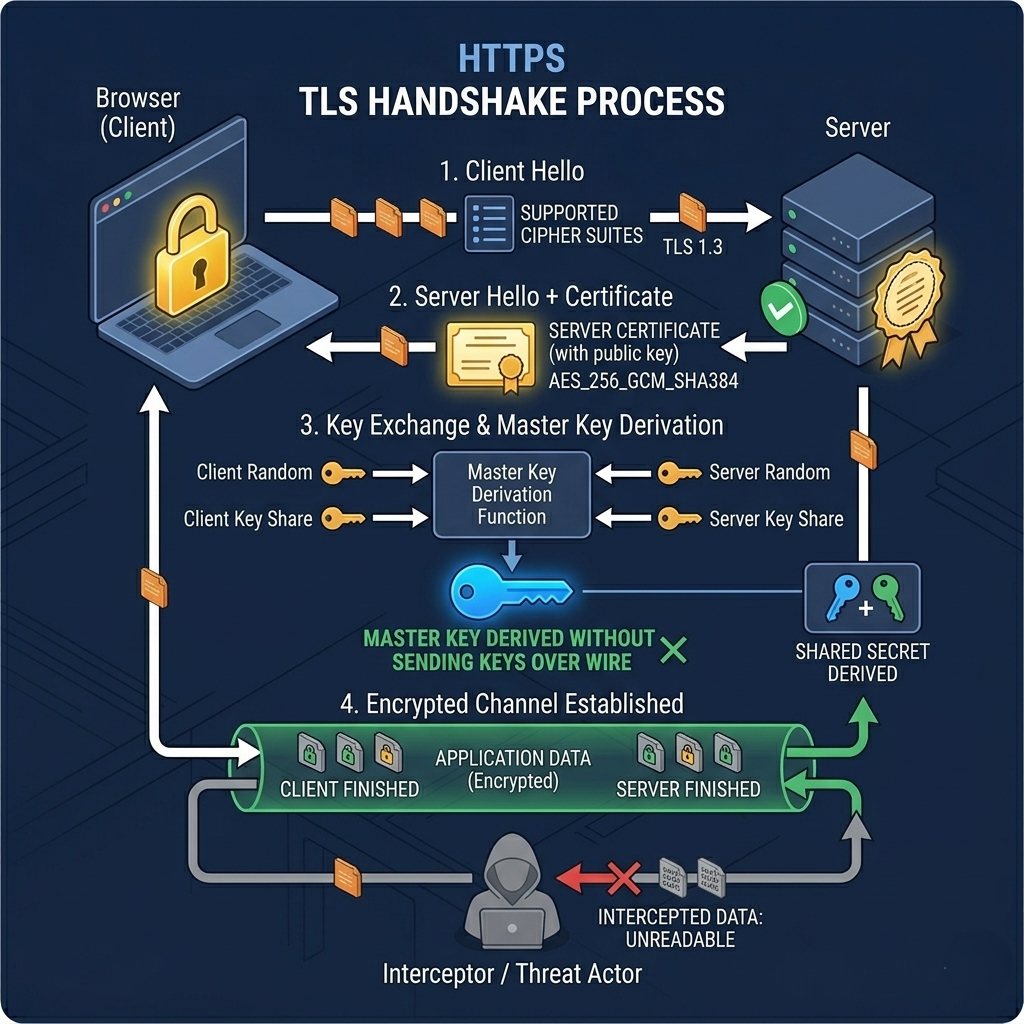
The TLS handshake works roughly like this: your browser connects to the server and says "here are the encryption methods I support." The server responds with its choice and presents its TLS certificate — a cryptographically signed document from a trusted Certificate Authority confirming "this server really is api.yourbank.com." Your browser verifies the certificate, uses it to establish a shared encryption key through a key exchange algorithm (typically ECDHE — Elliptic Curve Diffie-Hellman Ephemeral), and from that point forward, all data is encrypted with that key. No one without the key — not even the Certificate Authority that issued the certificate — can read the traffic.
Here's the thing most tutorials miss about TLS: the version and cipher suite you configure are as important as whether you use HTTPS at all. TLS 1.0 and 1.1 have known vulnerabilities (POODLE, BEAST, and others) and should be disabled on any server built after 2018. TLS 1.2 is the current minimum acceptable standard. TLS 1.3 is the modern choice — it eliminates several vulnerable cipher suites, requires forward secrecy by default, and reduces the handshake to a single round trip (saving 100–300ms on every new connection). That bank's mobile app problem from the intro? Exactly this category.
# Check what TLS versions and cipher suites a server supports
nmap --script ssl-enum-ciphers -p 443 your-domain.com

# Or use testssl.sh for a comprehensive TLS audit:
docker run --rm -ti drwetter/testssl.sh your-domain.com

# Nginx configuration for TLS 1.3 with strong cipher suites
# /etc/nginx/conf.d/ssl.conf
ssl_protocols TLSv1.2 TLSv1.3;
ssl_ciphers ECDHE-ECDSA-AES128-GCM-SHA256:ECDHE-RSA-AES128-GCM-SHA256:ECDHE-ECDSA-AES256-GCM-SHA384:ECDHE-RSA-AES256-GCM-SHA384:ECDHE-ECDSA-CHACHA20-POLY1305:ECDHE-RSA-CHACHA20-POLY1305;
ssl_prefer_server_ciphers off;  # TLS 1.3 handles this automatically

# HTTP Strict Transport Security — tell browsers to NEVER use plain HTTP
add_header Strict-Transport-Security "max-age=63072000; includeSubDomains; preload" always;

# Check your HTTPS configuration online:
# https://www.ssllabs.com/ssltest/ — grades A+ to F with specific issues
# Aim for A+ on any public-facing service
Pro Tips & Common Mistakes — HTTPS/TLS
Pro Tip: Use Let's Encrypt with auto-renewal (via Certbot or ACME clients) for TLS certificates on any infrastructure you manage. Free, trusted by all browsers, 90-day certificates that auto-renew. The operational cost of a manually-managed certificate that expires at 3 a.m. on a Friday is infinitely worse than spending 20 minutes setting up auto-renewal. Many cloud providers (Cloudflare, AWS ACM) handle this entirely for you.
Common Mistake: Assuming HTTPS encrypts everything. TLS encrypts the data in transit — it does not protect data at rest on the server, it does not prevent the server itself from logging your data, and it does not protect against a compromised server. HTTPS tells you "nobody intercepted this in transit." It says nothing about what happens to the data once it arrives. Security is defense in depth, not a single protocol.
HTTP/3 and QUIC: The Protocol That Rewrote the Rules
HTTP/3 is not just a version bump. It's a fundamental architectural change that required rewriting the transport layer from scratch — abandoning TCP, the protocol that has been the foundation of internet communication for over 40 years, in favor of a new protocol built on UDP.
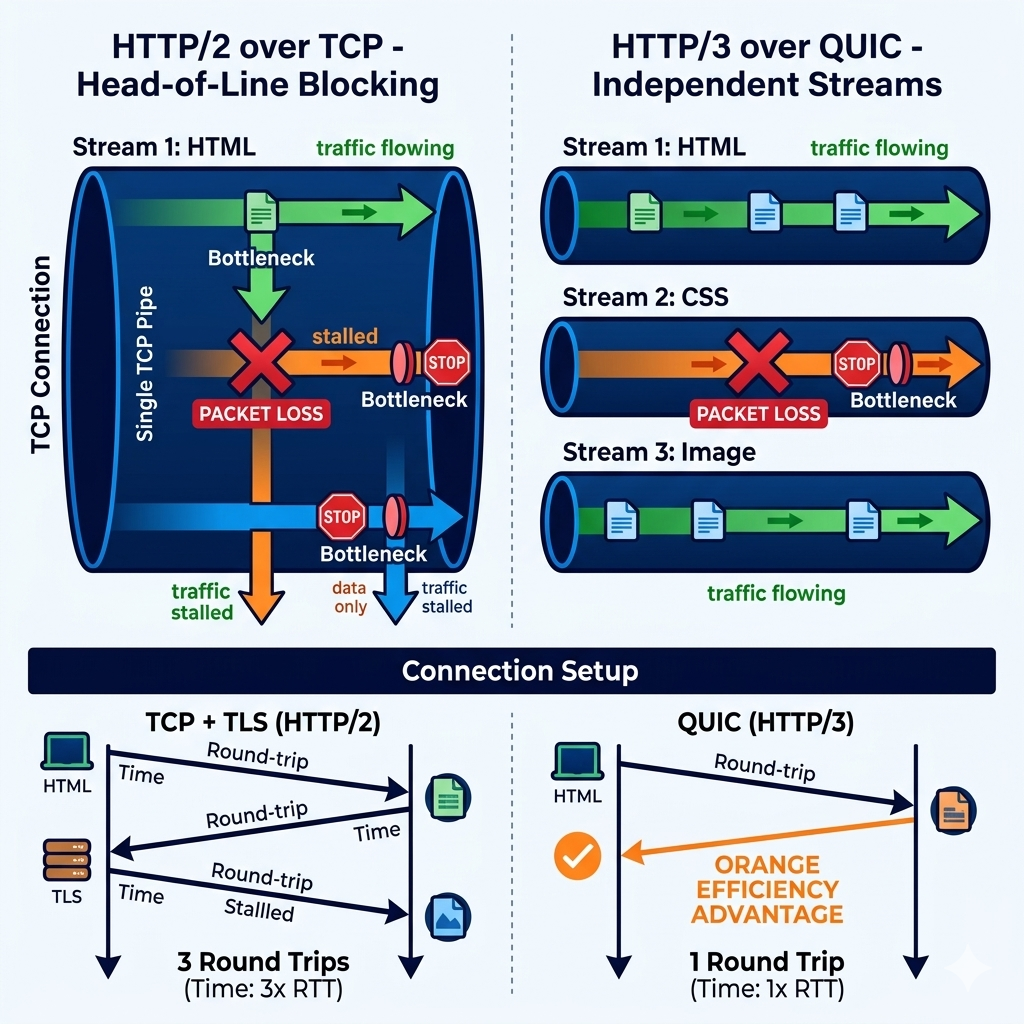
To understand why this was necessary, you need to understand one of TCP's most frustrating limitations: head-of-line blocking. TCP delivers data in order. If packet #5 gets lost, packets #6, #7, and #8 sit in a buffer waiting for #5 to be retransmitted — even if those packets belong to completely different streams (different images, different API responses, different parts of a web page). HTTP/2 tried to solve this by multiplexing multiple streams over a single TCP connection, but the fix was incomplete: the stream-level multiplexing happened above TCP, so TCP's head-of-line blocking still stalled all streams when a single packet was lost.
QUIC (Quick UDP Internet Connections, developed at Google and now standardized by the IETF) solves this by implementing stream multiplexing at the transport layer, with independent loss recovery per stream. If packet belonging to Stream 3 is lost, only Stream 3 stalls — Streams 1, 2, and 4 continue flowing normally. This is transformative for web performance on lossy networks (mobile connections, congested WiFi) where packet loss is common.
QUIC also dramatically reduces connection establishment latency. A TLS over TCP connection requires a TCP handshake (1.5 round trips) plus a TLS 1.3 handshake (1 round trip) before the first byte of actual data — minimum 2–3 round trips. QUIC combines the transport and cryptographic handshake into a single exchange (1 round trip for new connections). For servers you've connected to before, QUIC supports 0-RTT resumption — the client can include application data in its very first packet, before the handshake completes. On a 100ms-latency connection, these savings are genuinely meaningful: 200–300ms off every cold connection
# Testing HTTP/3 support and performance impact
# Using httpx (Python) which supports HTTP/3 via h3 library

import httpx
import time

# Check if a server supports HTTP/3 (look for Alt-Svc header)
with httpx.Client() as client:
    response = client.get('https://cloudflare.com')
    print("Alt-Svc header:", response.headers.get('alt-svc'))
    # Output: h3=":443"; ma=86400  ← server supports HTTP/3 on port 443

# Compare HTTP/1.1, HTTP/2, HTTP/3 connection times
# curl supports HTTP/3 with --http3 flag (requires curl 7.66+)
# time curl --http1.1 https://example.com -o /dev/null -s
# time curl --http2    https://example.com -o /dev/null -s
# time curl --http3    https://example.com -o /dev/null -s

# Check what HTTP version your nginx/server is using:
curl -v --http3 https://your-domain.com 2>&1 | grep "< HTTP"

# Enable HTTP/3 in Nginx (requires nginx 1.25+):
# server {
#     listen 443 quic reuseport;  # QUIC (UDP)
#     listen 443 ssl;             # TLS over TCP (fallback)
#     http3 on;
#     add_header Alt-Svc 'h3=":443"; ma=86400';  # advertise HTTP/3 support
# }
Pro Tips & Common Mistakes — HTTP/3
Pro Tip: HTTP/3 adoption is easiest through a CDN or proxy layer (Cloudflare, Fastly, or a modern load balancer) rather than configuring it directly on your application servers. Your origin servers continue using HTTP/1.1 or HTTP/2; the CDN layer speaks HTTP/3 to clients. This separates the complexity of HTTP/3 adoption from your application deployment and gives you the benefits without the operational risk of running QUIC directly.
Myth-busted: "HTTP/3 always delivers better performance." HTTP/3 shows the most benefit on high-latency, lossy networks (mobile, international connections). On a wired LAN or low-latency datacenter connection, the difference between HTTP/2 and HTTP/3 can be negligible or even slightly negative (UDP processing overhead). Always measure; don't assume protocol upgrades are universally positive in your specific environment.
WebSocket: Real-Time Communication Done Right
HTTP's request-response model is brilliant for most web interactions — you ask, the server answers. But some applications need something fundamentally different: a persistent, bidirectional connection where either the client or server can send data at any time without waiting for the other to ask first. Chat applications, multiplayer games, live trading dashboards, collaborative document editors — these all require a stream of events flowing in both directions continuously. HTTP makes this awkward and inefficient. WebSocket makes it natural.
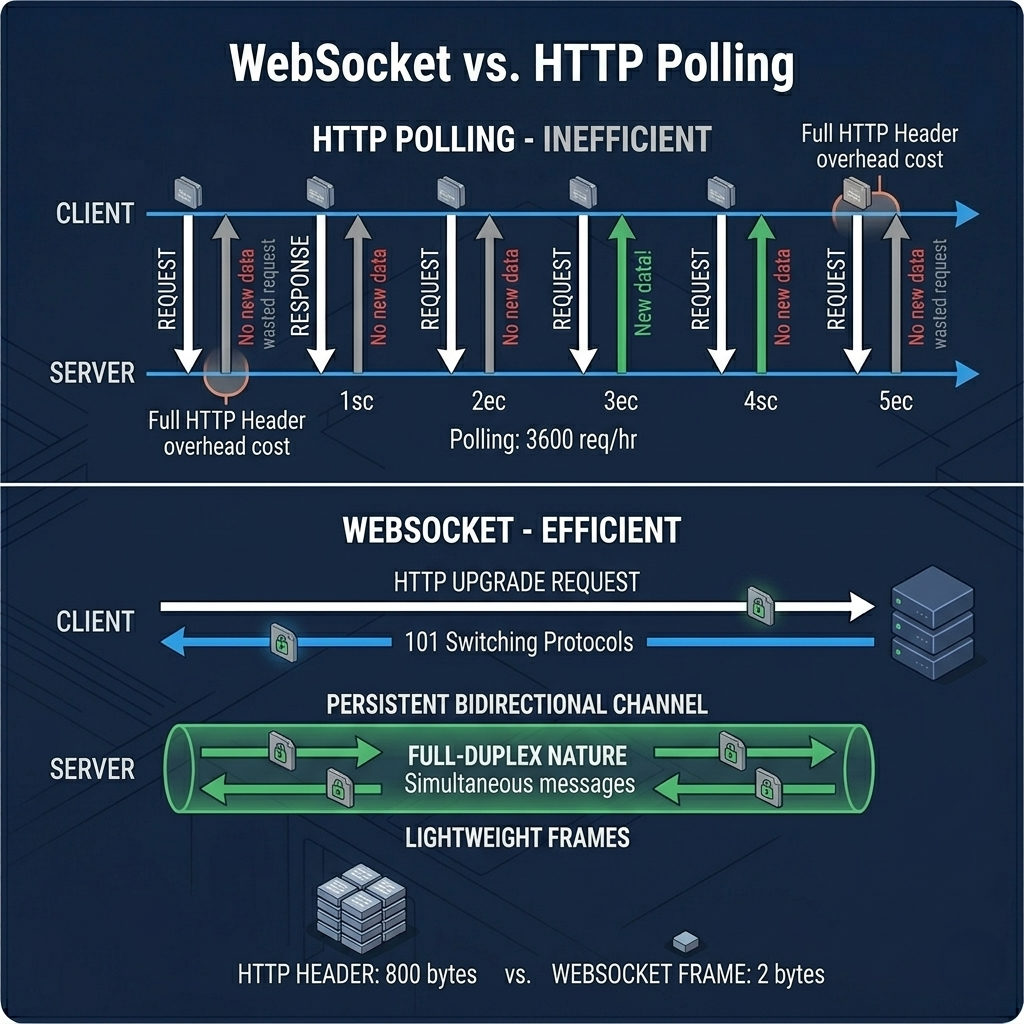
WebSocket starts with an HTTP request but immediately negotiates an upgrade. The client sends a GET request with an Upgrade: websocket header, the server responds with 101 Switching Protocols, and the connection transforms. What was an HTTP connection is now a WebSocket connection — a full-duplex TCP channel where either party can send a frame at any moment. The framing overhead for a WebSocket message is as small as 2 bytes, compared to the hundreds of bytes of HTTP headers on every request.
Picture two people talking on a phone call versus exchanging formal letters by post. HTTP is the letters — you compose, send, wait, receive, compose a reply, send again. WebSocket is the phone call — once connected, either party can speak at any moment, responses are immediate, and the cost of a short message is near zero. For a chess game, a live chat, or a dashboard showing stock prices updating every 100ms, the phone call model isn't just better — the letter model is so inefficient it would make the application unusable.
The real-world impact: a typical polling approach (client asks "anything new?" every second) makes 3,600 HTTP requests per hour, each with full header overhead, even when nothing has changed. A WebSocket connection makes one connection and then zero additional overhead for receiving 3,600 updates — or ten thousand, or none. For high-frequency updates, the performance difference is dramatic.
// WebSocket server (Node.js with ws library)
const WebSocket = require('ws');
const wss = new WebSocket.Server({ port: 8080 });

wss.on('connection', (ws, req) => {
  console.log('Client connected from:', req.socket.remoteAddress);

  // Server → Client: push a message at any time
  const interval = setInterval(() => {
    if (ws.readyState === WebSocket.OPEN) {
      ws.send(JSON.stringify({
        type: 'price_update',
        symbol: 'BTC',
        price: 65000 + Math.random() * 1000,
        timestamp: Date.now()
      }));
    }
  }, 100);  // push updates every 100ms — practical for live dashboard

  // Client → Server: receive messages at any time
  ws.on('message', (message) => {
    const data = JSON.parse(message);
    console.log('Received:', data);
    // Handle client actions (subscribe to symbol, place order, etc.)
  });

  ws.on('close', () => {
    clearInterval(interval);
    console.log('Client disconnected');
  });

  ws.on('error', (error) => {
    console.error('WebSocket error:', error);
    clearInterval(interval);
  });
});

// WebSocket client (browser JavaScript)
const ws = new WebSocket('wss://your-api.com/ws');  // wss = WebSocket over TLS

ws.onopen = () => {
  console.log('Connected to server');
  ws.send(JSON.stringify({ type: 'subscribe', symbol: 'BTC' }));
};

ws.onmessage = (event) => {
  const data = JSON.parse(event.data);
  document.getElementById('price').textContent = `$${data.price.toFixed(2)}`;
};

ws.onclose = () => {
  // Reconnect logic for production use
  setTimeout(() => { /* reconnect */ }, 3000);
};
Pro Tips & Common Mistakes — WebSocket
Pro Tip: Always implement reconnection logic in your WebSocket clients. Network hiccups, server restarts, and load balancer timeouts will close WebSocket connections. A client that doesn't reconnect leaves users staring at a stale interface with no indication that their live connection is gone. Use exponential backoff for reconnections and display a clear "Reconnecting..." state to users. Libraries like
reconnecting-websockethandle this pattern for you.
Common Mistake: Using WebSocket when Server-Sent Events (SSE) would be more appropriate. If you only need data flowing from server to client (live feeds, notifications, dashboards), SSE is simpler, works over standard HTTP/2, reconnects automatically, and doesn't require a special server setup. WebSocket is for genuine bidirectional communication. SSE is for server-push-only scenarios. Choose the right tool.
TCP: Reliability as a Design Philosophy
Every application protocol we've discussed — HTTP, HTTPS, WebSocket — is built on top of TCP. That dependency isn't an accident. TCP (Transmission Control Protocol) was designed with a single overriding goal: reliable, ordered data delivery between two endpoints, regardless of what chaos happens in the network between them.
TCP's reliability mechanisms are extensive and elegant. Before any data is exchanged, TCP performs a three-way handshake (SYN → SYN-ACK → ACK) to establish a connection. During data transfer, every segment is acknowledged — if the sender doesn't receive an ACK within a timeout window, it retransmits. Segments are numbered so the receiver can reassemble them in the correct order even if they arrive out of order. Flow control prevents a fast sender from overwhelming a slow receiver by having the receiver advertise how much buffer space it has available. Congestion control (algorithms like CUBIC and BBR) detects network congestion and backs off to avoid making it worse.
The result is a protocol where you can hand it a stream of bytes at one end and be confident the exact same stream of bytes will emerge at the other end, in the same order, with any lost segments automatically retransmitted. For HTTP, email, file transfers, and web applications, this guarantee is essential — you cannot display a web page with random bytes missing from the HTML.
# Observe TCP connections in action
# See all current TCP connections and their states
ss -tuln          # Linux: show all TCP/UDP listening sockets
netstat -an       # Cross-platform: show all connections

# Key TCP states to understand:
# LISTEN      — server waiting for connections
# SYN_SENT    — client sent SYN, waiting for SYN-ACK
# ESTABLISHED — three-way handshake complete, transferring data
# TIME_WAIT   — connection closing, waiting for late packets
# CLOSE_WAIT  — remote end closed, local end still open

# See TCP connection details for a specific process
ss -tnp | grep node      # show TCP connections for Node.js processes

# Measure TCP round-trip time (RTT) to a host
ping -c 10 google.com    # ICMP (uses same path as TCP)
traceroute google.com    # see the route your packets take

# Watch TCP retransmissions (high numbers indicate packet loss):
netstat -s | grep -i retransmit
# Output: 1234 segments retransmitted  ← if this is growing fast, there's packet loss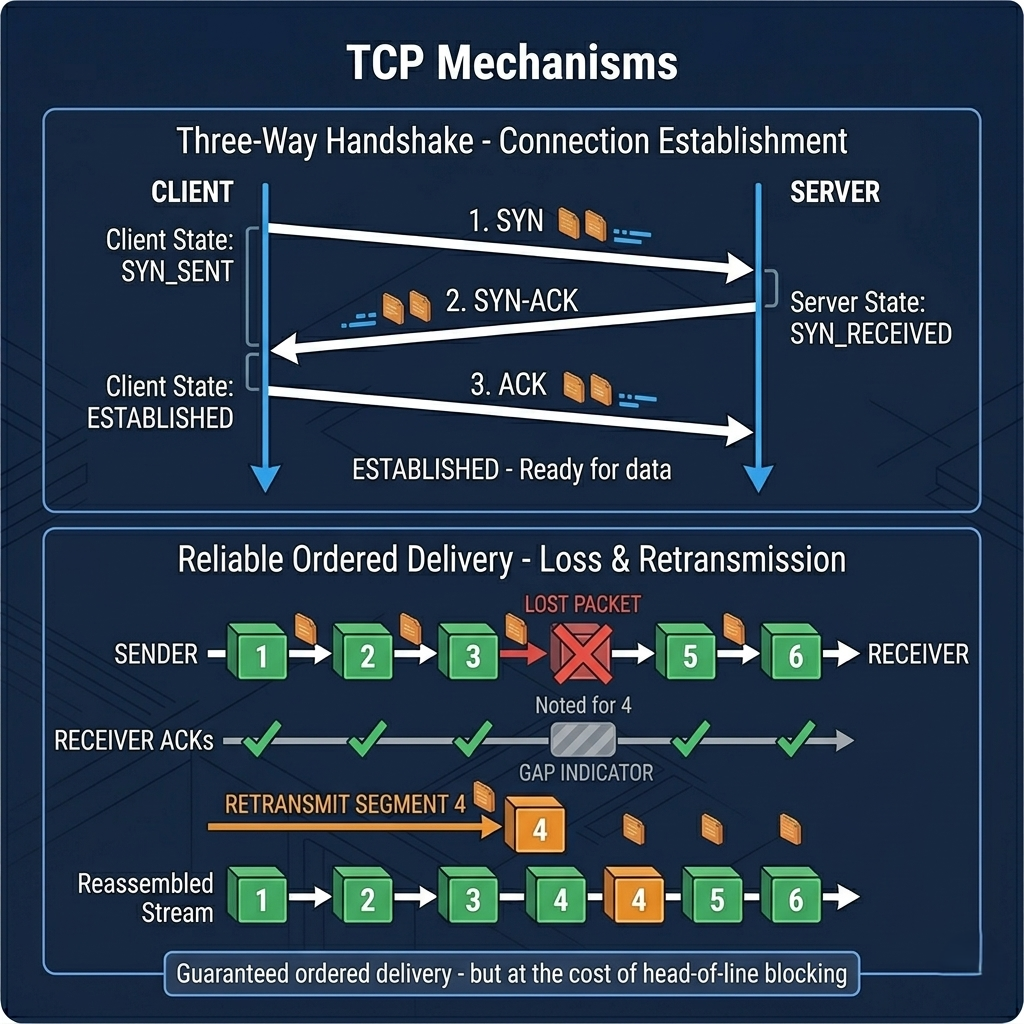
Pro Tips & Common Mistakes — TCP
Pro Tip: TCP's
TIME_WAITstate (a socket stays in TIME_WAIT for up to 4 minutes after closing) can exhaust port numbers on high-traffic servers handling many short-lived connections. Configurenet.ipv4.tcp_tw_reuse = 1on Linux servers to allow reuse of TIME_WAIT sockets for new connections. For APIs making many outgoing requests, this can prevent "connection refused" errors under load.
Common Mistake: Assuming TCP's ordered delivery means messages are received as discrete units. TCP is a byte stream protocol — it makes no guarantee about message boundaries. If you send two 100-byte messages back-to-back, the receiver might get them as one 200-byte chunk, two 100-byte chunks, or four 50-byte chunks. Application-layer protocols (HTTP, WebSocket) add their own framing to delimit messages. If you write raw TCP code, you're responsible for your own message framing.
UDP: Speed Over Safety
UDP (User Datagram Protocol) is TCP's philosophical opposite. Where TCP obsesses over reliability — acknowledgments, retransmissions, ordering, connection state — UDP sends data and hopes for the best. There are no handshakes, no acknowledgments, no guaranteed delivery, no ordering. You fire packets at a destination and move on. If they arrive, great. If they don't, UDP doesn't care.
This sounds like a bug. It's actually a feature for a specific set of use cases. Consider a live video call. If a packet containing 33ms of audio is lost, you don't want the audio stream to pause and wait for a retransmission — by the time the retransmitted packet arrived, the conversation has moved on by 200ms and replaying old audio would be worse than skipping it. For real-time audio and video, a small glitch is far better than a delay. UDP delivers the stream as fast as possible; the application layer handles the reality that some packets will be lost.
Online gaming uses UDP for the same reason. Position updates for other players need to arrive as quickly as possible. Delivering a position update from 200ms ago (after TCP retransmission) is often worse than simply skipping that update and using the next one. DNS uses UDP because queries are typically small enough to fit in a single packet, and if a response doesn't arrive in time, the client simply asks again — a simpler retry model than TCP's connection machinery. QUIC (the transport for HTTP/3) runs over UDP but adds its own reliability layer, getting UDP's lower overhead while implementing just enough reliability for web traffic.
# UDP server and client — raw socket programming example
import socket

# UDP Server
def udp_server():
    sock = socket.socket(socket.AF_INET, socket.SOCK_DGRAM)
    sock.bind(('0.0.0.0', 8080))
    print("UDP server listening on port 8080")

    while True:
        data, addr = sock.recvfrom(1024)  # no connection — just receive
        print(f"Received from {addr}: {data.decode()}")
        # Optional: send a response (but no guarantee it arrives)
        sock.sendto(b"ACK", addr)

# UDP Client — fire and forget (no connection setup)
def udp_client():
    sock = socket.socket(socket.AF_INET, socket.SOCK_DGRAM)

    # No connect() needed — just send directly
    # No guarantee the message arrives
    sock.sendto(b"Hello UDP server", ('server-ip', 8080))
    print("Message sent (fire and forget)")

    # Optional: try to receive response (with timeout)
    sock.settimeout(2.0)
    try:
        response, server = sock.recvfrom(1024)
        print(f"Response: {response.decode()}")
    except socket.timeout:
        print("No response (that's okay for UDP)")
    finally:
        sock.close()

# UDP characteristics visible in the code:
# - No handshake (no connect() call required)
# - No guaranteed delivery (no acknowledgments)
# - No connection state (any host can send to the server)
# - Low overhead — just send data and go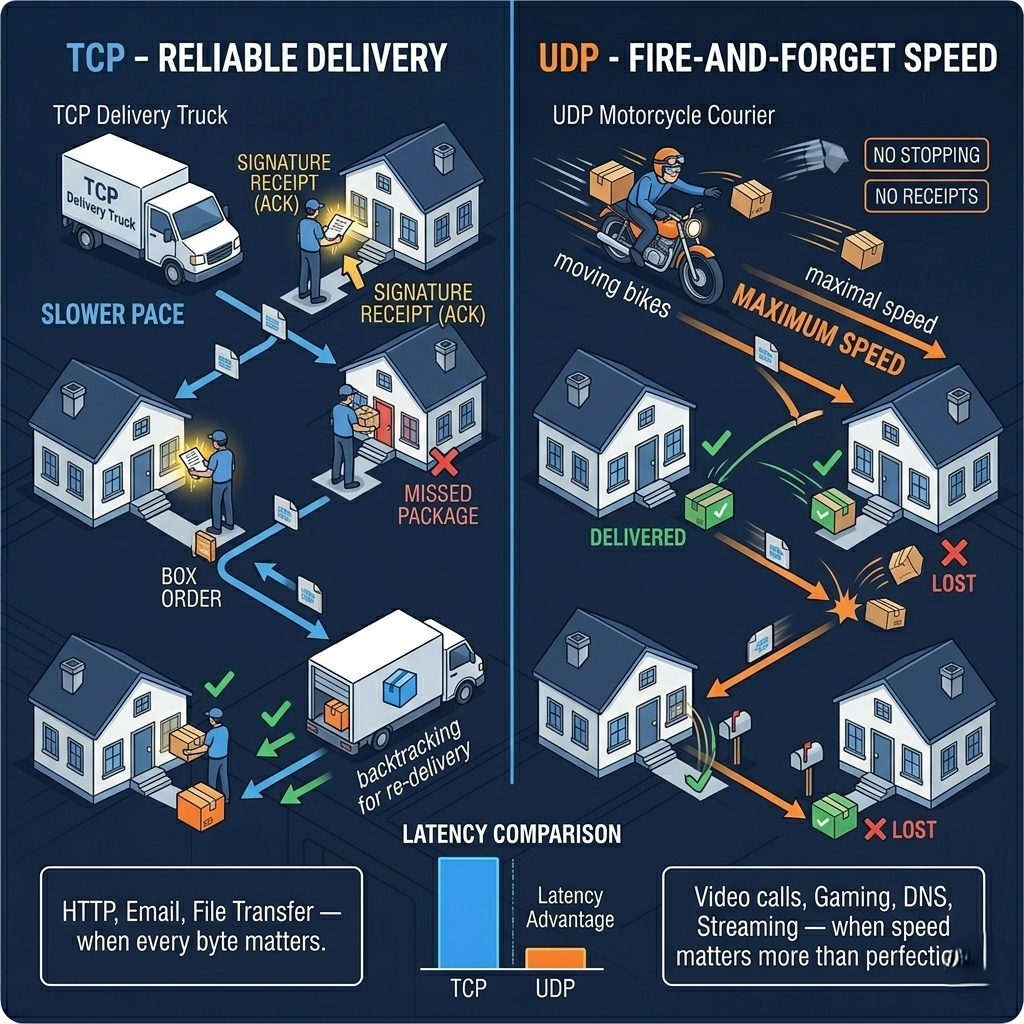
Pro Tips & Common Mistakes — UDP
Pro Tip: If you're building on UDP directly (game networking, custom real-time protocols, IoT telemetry), implement your own lightweight reliability layer for the messages that do need guaranteed delivery. A hybrid approach — UDP for high-frequency game state updates (accept loss), plus a separate TCP connection for critical events (player joins, purchases, achievements) — combines UDP's performance with TCP's reliability where it genuinely matters.
Common Mistake: Treating UDP as inherently less secure than TCP. UDP itself has no more or less security than TCP at the transport layer — both are equally susceptible to spoofing if not protected at the application layer. DTLS (Datagram TLS) provides the same encryption and authentication for UDP that TLS provides for TCP. WebRTC (used by video calling apps) uses UDP with DTLS-SRTP for precisely this reason.
SMTP: How Email Actually Travels
Every email you've ever sent has passed through SMTP — Simple Mail Transfer Protocol — a protocol so old it predates the web by a decade and so robust that despite its age, it still powers virtually every email system on the planet. Understanding SMTP isn't just academic: every developer who needs to send transactional emails, configure a mail server, or debug deliverability problems needs to know how the protocol works.
SMTP is a push protocol. It defines how a mail client (your Outlook, Gmail app, or mail() function in your code) transfers an email message to a mail server, and how that server relays the message to the recipient's mail server. The conversation is text-based and surprisingly readable: EHLO sender.com (greeting), MAIL FROM: <alice@sender.com> (envelope sender), RCPT TO: <bob@recipient.com> (envelope recipient), DATA (here comes the message content), and finally . on a line by itself (message complete). It's the postal service in protocol form — envelope on the outside, letter on the inside.
The critical thing most developers don't understand about email deliverability: SMTP is only the transport protocol. Whether your email actually reaches the inbox depends on a set of DNS-based authentication protocols that have been layered on top of SMTP over the years. SPF (Sender Policy Framework) publishes which mail servers are authorized to send email for your domain. DKIM (DomainKeys Identified Mail) cryptographically signs your outgoing email so recipients can verify it wasn't tampered with in transit. DMARC tells receiving mail servers what to do when SPF and DKIM checks fail (quarantine, reject, or report). Getting all three configured correctly is the difference between your transactional emails landing in inboxes versus spam folders.
# Test your SMTP configuration and deliverability

# Check your domain's SPF record (tells mail servers who can send as you)
dig TXT yourdomain.com | grep spf
# Good output: "v=spf1 include:sendgrid.net include:mailgun.org ~all"

# Check DKIM record (replace 'selector' with your actual DKIM selector)
dig TXT selector._domainkey.yourdomain.com
# Good output: "v=DKIM1; k=rsa; p=MIGfMA0GCSq..."

# Check DMARC record
dig TXT _dmarc.yourdomain.com
# Good output: "v=DMARC1; p=reject; rua=mailto:dmarc@yourdomain.com"

# Test SMTP manually with telnet (very illuminating — see the raw protocol)
telnet smtp.gmail.com 587
# Then type:
# EHLO yourdomain.com
# AUTH LOGIN
# (base64-encoded username, then base64-encoded password)
# MAIL FROM: <you@yourdomain.com>
# RCPT TO: <test@example.com>
# DATA
# Subject: SMTP Test
# (blank line)
# Hello, this is a manual SMTP test.
# .

# Test your email deliverability score:
# https://www.mail-tester.com — send an email, get a 1-10 score with specific issues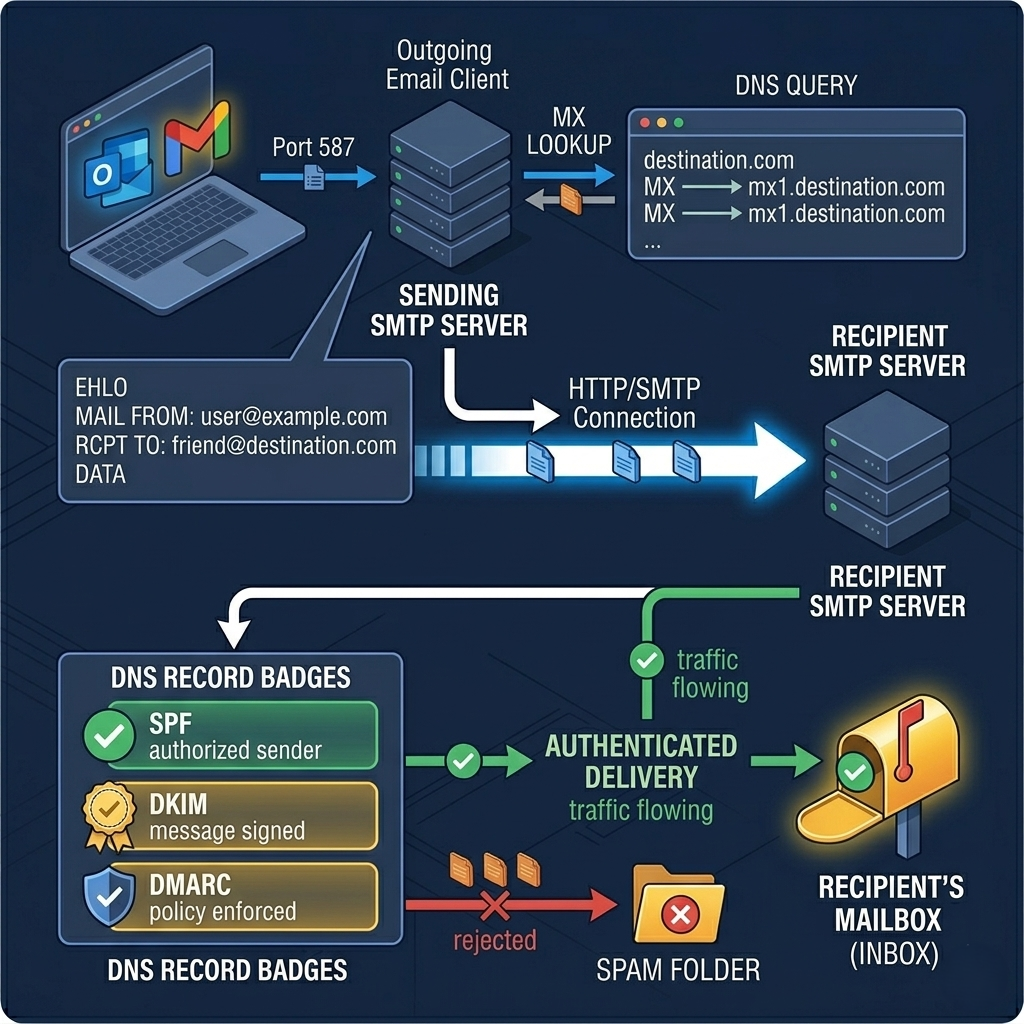
Pro Tips & Common Mistakes — SMTP
Pro Tip: Never build your own SMTP sending infrastructure for transactional email. Use a dedicated email delivery service (SendGrid, Postmark, Mailgun, AWS SES). They handle IP reputation management, bounce processing, unsubscribe handling, deliverability monitoring, and the constantly evolving anti-spam ecosystem. The economics are clear: Postmark sends 45,000 emails per month free; building equivalent deliverability infrastructure yourself would cost far more than any paid tier.
Common Mistake: Using the same domain and IP for both transactional email (password resets, receipts) and marketing email (newsletters, promotions). Marketing emails generate more spam complaints and unsubscribes, which damages domain and IP reputation. If your transactional emails share that reputation, password reset emails start landing in spam. Use separate subdomains (e.g.,
mail.yourdomain.comfor transactional,news.yourdomain.comfor marketing) and separate sending IPs for each category.
FTP: The File Transfer Protocol That Won't Die
FTP — File Transfer Protocol — is older than SMTP, older than the web, and has been declared dead by the security community for decades. It transmits everything, including passwords, in plaintext. It has a notoriously awkward active/passive connection model that confuses firewalls. It's been superseded by SFTP (SSH File Transfer Protocol), FTPS (FTP over TLS), SCP, rsync over SSH, and a dozen cloud storage alternatives. And yet FTP persists — in financial institutions, healthcare systems, manufacturing automation, legacy integrations, and anywhere large files need to move between organizations that standardized their tooling twenty years ago.
Understanding FTP's architecture explains both its persistence and its problems. FTP uses two separate TCP connections: a control channel (port 21) for sending commands and receiving responses, and a separate data channel for actual file transfers. In active mode, the server initiates the data connection back to the client — which means the server needs to be able to reach the client's IP, which is often blocked by firewalls and NAT. Passive mode (PASV) flips this: the server opens a high-numbered port and tells the client to connect to it. Modern FTP clients use passive mode by default, and most firewalls are configured to allow it.
FTPS (FTP over TLS, also called FTPS Explicit or FTPS Implicit) adds TLS encryption to both the control and data channels, addressing FTP's fundamental security problem. SFTP, despite the similar name, is completely different — it's a subsystem of SSH (not related to FTP at all) that provides secure file transfer with a single encrypted connection. For new implementations, SFTP is almost always the better choice. For integrations with existing systems that speak FTP, understanding the protocol helps you configure it correctly and debug the inevitable firewall issues.
# FTP from the command line
ftp ftp.example.com
# Enter username and password when prompted
# Commands:
# ls            — list directory
# get file.csv  — download a file
# put file.csv  — upload a file
# bye           — disconnect

# SFTP (much preferred — uses SSH encryption)
sftp user@server.com
# Same commands work: ls, get, put, bye

# Secure batch FTP with lftp (supports FTP, FTPS, SFTP, retry logic)
lftp -u username,password sftp://server.com << EOF
  set sftp:auto-confirm yes
  mirror --reverse /local/path /remote/path  # upload entire directory
  bye
EOF

# Test FTP connectivity (without full client):
curl -v ftp://ftp.example.com/pub/ --user username:password

# For FTPS (FTP over TLS):
curl -v ftps://ftp.example.com/pub/ --user username:password --ftp-ssl

# Verify FTP server is reachable and see server greeting:
telnet ftp.example.com 21
# Good response: 220 ProFTPD Server ready.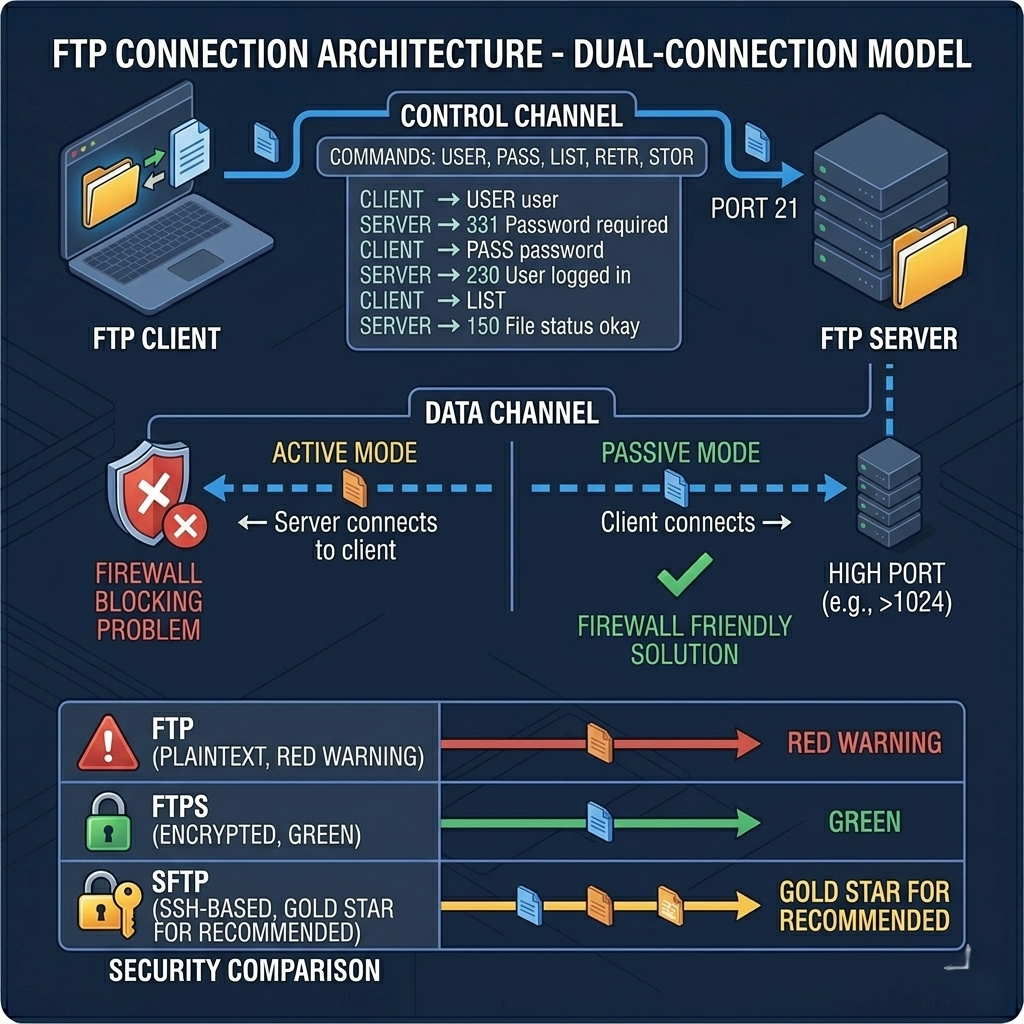
Pro Tips & Common Mistakes — FTP
Pro Tip: If you're maintaining an FTP integration for a financial or healthcare partner, advocate for migration to SFTP. Almost every serious FTP server software (ProFTPD, vsftpd, FileZilla Server) also supports SFTP. The operational overhead is minimal, and the security improvement is dramatic. Bring a list of specific FTP vulnerabilities to the conversation — partners are often unaware of the risks and open to upgrading once they understand them.
Common Mistake: Confusing SFTP and FTPS. SFTP runs over SSH on port 22 and has nothing to do with FTP at the protocol level — it just has a similar purpose. FTPS runs on port 21 (or 990 for implicit TLS) and is genuinely FTP with TLS added. They use completely different client software, server configurations, and firewall rules. Specifying "secure FTP" to a colleague or vendor without clarifying which one leads to misconfigured integrations that take days to debug.
How It All Connects: The Protocol Stack in Action
These eight protocols don't operate in isolation — they're layered. When you load a web page, you're using HTTP (application layer) over TLS (security layer) over TCP (transport layer) over IP (network layer). When you use a video calling app, it's WebRTC using DTLS-SRTP (security) over UDP (transport). When you connect to a server for file maintenance, it's SFTP (application) over SSH over TCP. The protocols we've discussed live at the application and transport layers of a stack, and each layer provides services to the layers above it.
Understanding which layer a problem exists in is the first step in debugging any network issue. HTTPS certificate errors are a TLS problem (application layer). Packet loss causing retransmissions and high latency is a TCP problem (transport layer — or actually a network layer congestion problem that TCP is responding to). WebSocket connections dying unexpectedly on a load balancer are often a TCP keepalive or proxy timeout issue. Emails landing in spam are an application-layer authentication problem (SPF/DKIM/DMARC). The mental model of the protocol stack gives you a systematic way to localize and diagnose network problems instead of guessing.
The protocols also have meaningful relationships that shape your architectural decisions. QUIC (HTTP/3's transport) implements reliability at the application layer on top of UDP because TCP's head-of-line blocking was a fundamental performance limit. SFTP reimplements file transfer as an SSH subsystem rather than extending FTP because FTP's dual-channel design was impossible to secure cleanly. WebSocket builds on HTTP's existing infrastructure rather than creating an entirely new protocol because HTTP infrastructure (load balancers, firewalls, CDNs) was already everywhere. Protocol design choices have long-term architectural consequences — understanding why they were made gives you better intuition for the architectural choices you make in your own systems.
Getting Started: Diagnosing and Configuring Protocols
Here's a practical toolkit for working with network protocols in production — the commands and tools that turn protocol theory into debugging superpowers.
Step 1: Inspect HTTP traffic with curl
# See full request and response headers
curl -v https://api.example.com/endpoint

# Measure timing breakdown for each phase
curl -w "\nDNS: %{time_namelookup}s\nTCP Connect: %{time_connect}s\nTLS Handshake: %{time_appconnect}s\nFirst Byte: %{time_starttransfer}s\nTotal: %{time_total}s\n" \
  -o /dev/null -s https://api.example.com

# Useful for identifying whether latency is in DNS, TCP, TLS, or server processing
Step 2: Audit your HTTPS/TLS configuration
# Quick check — what TLS version and cipher is being used?
openssl s_client -connect yourdomain.com:443 -brief

# Comprehensive TLS audit
docker run --rm drwetter/testssl.sh yourdomain.com

# Check HSTS, certificate validity, cipher grades:
# Online: https://www.ssllabs.com/ssltest/
Step 3: Debug WebSocket connections
# Test WebSocket connection from command line
npm install -g wscat
wscat -c wss://your-websocket-server.com/ws
# Then type messages and see responses in real time

# Check WebSocket upgrade headers in nginx logs
# /var/log/nginx/access.log — look for "101 Switching Protocols" responses
grep "101" /var/log/nginx/access.log | tail -20
Step 4: Monitor active TCP connections
# See all TCP connections with state and process
ss -tnp

# Watch for connection state issues
watch -n 1 'ss -tn | awk "{print \$1}" | sort | uniq -c | sort -rn'

# Check for TIME_WAIT accumulation (port exhaustion risk)
ss -tan state time-wait | wc -l
Step 5: Test email deliverability
# Full SPF/DKIM/DMARC check:
dig TXT yourdomain.com            # SPF record
dig TXT default._domainkey.yourdomain.com  # DKIM (replace 'default' with your selector)
dig TXT _dmarc.yourdomain.com     # DMARC record

# Send a test email and check deliverability score:
# https://www.mail-tester.com  — comprehensive deliverability report
# https://mxtoolbox.com        — DNS record debugging and email health checks
Step 6: Check HTTP/3 support
# Check if a server supports HTTP/3
curl -I --http3 https://cloudflare.com 2>/dev/null | grep HTTP
# Or look for Alt-Svc header indicating HTTP/3 availability:
curl -sI https://yourdomain.com | grep -i alt-svc

# Test HTTP/3 performance vs HTTP/2:
curl --http3 -o /dev/null -s -w "%{time_total}" https://yourdomain.com
curl --http2 -o /dev/null -s -w "%{time_total}" https://yourdomain.com
Step 7: Capture and analyze network traffic with Wireshark
# Capture traffic on a specific interface (Linux/macOS)
sudo tcpdump -i eth0 -w capture.pcap port 443 or port 80

# Open capture.pcap in Wireshark for visual analysis
# In Wireshark, use display filters:
# http.request.method == "POST"   — filter HTTP POST requests
# tcp.analysis.retransmission     — show all TCP retransmissions
# tls.handshake.type == 1         — show TLS ClientHello messages
# websocket                       — filter WebSocket frames
FAQ
Q: What's the difference between HTTP and HTTPS?
HTTP transmits data in plaintext — anyone intercepting traffic can read it. HTTPS is HTTP with TLS encryption added, which provides three guarantees: confidentiality (data is encrypted and unreadable to interceptors), integrity (data hasn't been tampered with in transit), and authentication (you're talking to the server you think you are, not an impersonator). All websites handling any sensitive data should use HTTPS, and since Google penalizes plain HTTP in search rankings, there's no practical reason not to use HTTPS everywhere today.
Q: What is the difference between TCP and UDP?
TCP prioritizes reliability: it establishes a connection through a handshake, acknowledges every packet, retransmits lost data, and delivers bytes in order. This guarantees that data arrives completely and correctly but adds overhead and latency. UDP prioritizes speed: it sends packets with no handshake, no acknowledgments, and no guaranteed ordering. Packets can be lost or arrive out of order without any protocol-level correction. Use TCP when every byte matters (HTTP, email, file transfer). Use UDP when speed matters more than perfection (video calls, gaming, DNS, QUIC/HTTP/3).
Q: What is WebSocket and when should I use it?
WebSocket is a protocol that starts as an HTTP connection, then upgrades to a persistent full-duplex channel where both client and server can send messages at any time without polling. Use WebSocket when you need real-time bidirectional communication: live chat, multiplayer gaming, collaborative editing, live dashboards, or any scenario where the server needs to push events to clients without clients asking first. Don't use WebSocket for standard request-response API calls — HTTP is simpler and more scalable for that use case.
Q: What is QUIC and how does it improve on TCP?
QUIC is a transport protocol developed by Google that runs over UDP instead of TCP. It solves three key TCP limitations: head-of-line blocking (one lost packet stalling all streams), slow connection setup (combining transport and TLS handshakes into one), and network switching latency (mobile devices switching between WiFi and cellular lose connections with TCP but maintain them with QUIC). HTTP/3 uses QUIC as its transport layer, making it faster than HTTP/2 particularly on mobile and lossy networks.
Q: Why do emails go to spam, and how do protocols help?
Emails go to spam primarily because receiving mail servers can't verify the sender's identity. Three DNS-based protocols address this: SPF (Sender Policy Framework) publishes which IP addresses are authorized to send email for your domain; DKIM (DomainKeys Identified Mail) adds a cryptographic signature to every outgoing email that recipients can verify; DMARC tells receiving servers what to do when SPF or DKIM checks fail. Without all three configured correctly, email from your domain looks suspicious to spam filters. With all three, you establish a verifiable identity that dramatically improves deliverability.
Q: What is the difference between FTP, FTPS, and SFTP?
FTP is the original file transfer protocol — effective but transmits credentials and data in plaintext, making it a security risk. FTPS (FTP Secure) adds TLS encryption to FTP, protecting data in transit while retaining FTP's architecture and both control/data channel model. SFTP (SSH File Transfer Protocol) is a completely different protocol — despite the similar name, it's a subsystem of SSH with no technical relationship to FTP — that provides secure file transfer over a single encrypted SSH connection. For new implementations, SFTP is almost always preferable. For legacy systems requiring FTP compatibility, FTPS is the secure option.
Q: How does TLS 1.3 improve on TLS 1.2?
TLS 1.3 makes three significant improvements. First, the handshake requires only 1 round trip instead of 2, saving 100–300ms on every new connection. Second, it eliminates all cipher suites that don't provide forward secrecy and removes several cryptographic algorithms that had known weaknesses (RSA key exchange, CBC-mode ciphers, SHA-1). Third, it adds 0-RTT resumption for known servers, allowing application data to be sent in the very first packet. The result is both faster and more secure than TLS 1.2. TLS 1.0 and 1.1 are now deprecated by major browsers and should be disabled on all servers.
Q: When should I use HTTP/3 versus HTTP/2?
HTTP/3 shows the most benefit for users on high-latency or lossy networks (mobile connections, international users, congested WiFi) where its elimination of head-of-line blocking and faster connection setup translate to measurable page load improvements. For users on low-latency wired connections (enterprise networks, local datacenter), the difference between HTTP/2 and HTTP/3 is often negligible. The easiest adoption path is enabling HTTP/3 at your CDN or load balancer layer while your origin servers continue using HTTP/1.1 or HTTP/2 — clients fall back gracefully if HTTP/3 is unavailable.
Conclusion
The 8 protocols covered here — HTTP, HTTPS, HTTP/3, WebSocket, TCP, UDP, SMTP, and FTP — are not equally important, not equally modern, and not equally well understood. What they share is that each one reflects a specific design philosophy born from a specific set of constraints. TCP chose reliability over speed because the early internet was unreliable and order mattered. UDP chose speed over reliability because some applications can tolerate loss. QUIC chose to reimplement reliability at the application layer because TCP's head-of-line blocking had become a genuine performance ceiling. SFTP chose to build on SSH rather than secure FTP because FTP's dual-channel architecture was fundamentally difficult to encrypt cleanly.
Understanding protocols isn't just trivia. It's the difference between debugging a latency problem in an hour versus three days. Between configuring your TLS correctly versus shipping a security vulnerability that affects every user. Between choosing WebSocket versus SSE for the right reasons versus picking whichever one appears first in a Stack Overflow answer.
The engineers who built the internet made these protocols because they understood the problem space deeply. The engineers who use these protocols most effectively are the ones who understand them the same way — not just what they do, but why they were built the way they were. That understanding is what turns a protocol from invisible plumbing into a tool you can reason about, configure confidently, and reach for deliberately.