
In 2014, Uber's engineering team hit a wall. The ride-hailing platform was growing at a rate that felt physically impossible to keep up with. When a rider requested a trip, the system had to locate nearby drivers, calculate ETAs, run surge pricing algorithms, notify the matched driver, track the vehicle, process payments, and update analytics — all in seconds, simultaneously, for hundreds of thousands of concurrent requests in dozens of cities. The synchronized database approach they'd started with was collapsing under the weight.
The core problem wasn't compute power or network bandwidth. It was coupling — the architectural pattern where one system directly calls another, creating a chain of synchronous dependencies. If the payment processor was slow, ride requests slowed. If the analytics pipeline backed up, everything behind it backed up too. The system was a house of cards: one slow service turned every service slow.
The solution was a message queue — a component that sits between services, accepts messages from producers at whatever rate they're generated, and delivers them to consumers at whatever rate they can process. Producers don't wait for consumers. Consumers don't overwhelm producers. The system becomes asynchronous, decoupled, and dramatically more resilient. That architectural shift, from synchronized calls to async messaging, is the difference between a system that falls over under load and one that absorbs spikes gracefully.
This post traces the full evolution of message queue technology — from IBM MQ's 1993 enterprise messaging revolution through RabbitMQ's flexible routing model, Apache Kafka's distributed log architecture, and Apache Pulsar's cloud-native multi-tenancy — with real code, production patterns, and clear guidance on which solution fits which problem.
Table of Contents
What Is a Message Queue and Why Does It Matter ?
A message queue is deceptively simple in concept: it's a buffer that sits between software components, accepting messages from one side (producers) and delivering them to the other side (consumers), with the two sides operating independently and asynchronously. The queue holds messages until the consumer is ready to process them. If the consumer goes down, messages accumulate safely in the queue and are delivered when it comes back. If the producer generates messages faster than the consumer can handle them, the queue absorbs the spike rather than propagating backpressure upstream.
That independence — the decoupling of producers from consumers — is what makes message queues transformative for distributed system design. Without them, services must communicate synchronously: Service A calls Service B, waits for a response, and is directly affected by Service B's performance, availability, and speed. With a queue between them, Service A publishes a message and moves on immediately. Service B reads from the queue when it's ready. The two services can be written in different languages, deployed on different infrastructure, scaled independently, updated without coordinating releases, and fail without cascading failures to each other.
Imagine you're managing a busy restaurant kitchen. Without a ticket system, waiters would walk directly to chefs, tell them the order verbally, and stand waiting while it was prepared. One slow chef means one stalled waiter means one unhappy table means cascading delays. With a ticket system, waiters write orders on tickets, clip them to a rail, and go back to the floor. Chefs take tickets from the rail at their own pace, in order, without anyone waiting for anyone else. The ticket rail is the message queue. The waiters are producers. The chefs are consumers. The rail decouples their work entirely.
Message queues solve several distinct problem categories beyond simple decoupling. They enable load leveling — absorbing traffic spikes so downstream systems see a smooth, manageable rate of messages rather than sudden floods. They enable guaranteed delivery — persisting messages so they survive producer or consumer failures. They enable fan-out — one producer publishing a single message that multiple consumers each process independently. And they enable stream processing — treating a continuous flow of messages as a real-time data stream that can be analyzed, transformed, and reacted to as it flows.
# Conceptual message queue — understanding the core abstraction
import queue
import threading
import time
from dataclasses import dataclass
from typing import Any, Callable

@dataclass
class Message:
    id: str
    payload: Any
    timestamp: float = None

    def __post_init__(self):
        if self.timestamp is None:
            self.timestamp = time.time()

class SimpleMessageQueue:
    """
    A minimal message queue illustrating the core concept.
    Real implementations add persistence, distribution, and acknowledgments.
    """
    def __init__(self, name: str, max_size: int = 1000):
        self.name = name
        self._queue = queue.Queue(maxsize=max_size)
        self._delivered_count = 0

    def publish(self, message: Message):
        """Producer publishes — doesn't wait for consumer to process."""
        self._queue.put(message)
        print(f"[Queue: {self.name}] Published message {message.id}")

    def consume(self, handler: Callable[[Message], None], timeout: float = 1.0):
        """Consumer processes messages independently at its own pace."""
        try:
            message = self._queue.get(timeout=timeout)
            handler(message)
            self._queue.task_done()
            self._delivered_count += 1
            return True
        except queue.Empty:
            return False

    @property
    def depth(self) -> int:
        """Queue depth — how many messages are waiting."""
        return self._queue.qsize()

# Demonstrating decoupling: producer runs at a different rate than consumer
def producer_task(mq: SimpleMessageQueue, rate_per_second: int, count: int):
    """Producer — generates messages at its own pace."""
    for i in range(count):
        msg = Message(id=f"msg-{i}", payload={"order_id": i, "amount": 29.99})
        mq.publish(msg)
        time.sleep(1.0 / rate_per_second)

def consumer_task(mq: SimpleMessageQueue, rate_per_second: int):
    """Consumer — processes at its own pace, independent of producer."""
    def handle(message: Message):
        time.sleep(1.0 / rate_per_second)  # simulate processing time
        print(f"[Consumer] Processed {message.id}: {message.payload}")

    while True:
        mq.consume(handle)

# Producer generates 10 msg/sec, consumer processes 5 msg/sec
# Queue depth grows — messages are buffered, neither side blocks the other
mq = SimpleMessageQueue("order-processing", max_size=10000)

producer = threading.Thread(target=producer_task, args=(mq, 10, 100), daemon=True)
consumer = threading.Thread(target=consumer_task, args=(mq, 5), daemon=True)

producer.start()
consumer.start()
producer.join()
# Queue depth gradually increases — the decoupling absorbs the rate mismatch
# Real systems add autoscaling based on queue depth

Pro Tips & Common Mistakes — Message Queue Fundamentals
Pro Tip: Monitor queue depth as your primary operational metric — not just producer/consumer throughput in isolation. Queue depth tells you the real story: if it's growing monotonically, your consumers are falling behind. If it spikes and recovers, you're handling traffic bursts correctly. If it stays at zero, you may be over-provisioned. Set alerts on sustained queue depth growth, not just on service availability, and wire queue depth to your autoscaling triggers.
Common Mistake: Using a message queue to fix a slow synchronous system without understanding why it's slow. A queue defers processing — it doesn't make processing faster. If your consumer takes 2 seconds to process a message, adding a queue doesn't change that; it just lets your producer not wait for it. If end-to-end latency matters (the user is waiting for a result), a queue may actually make things worse by adding queuing delay. Queues shine for workloads where the producer doesn't need the consumer's result immediately. For synchronous request-response patterns, queues are the wrong tool.
IBM MQ: Where Enterprise Messaging Began
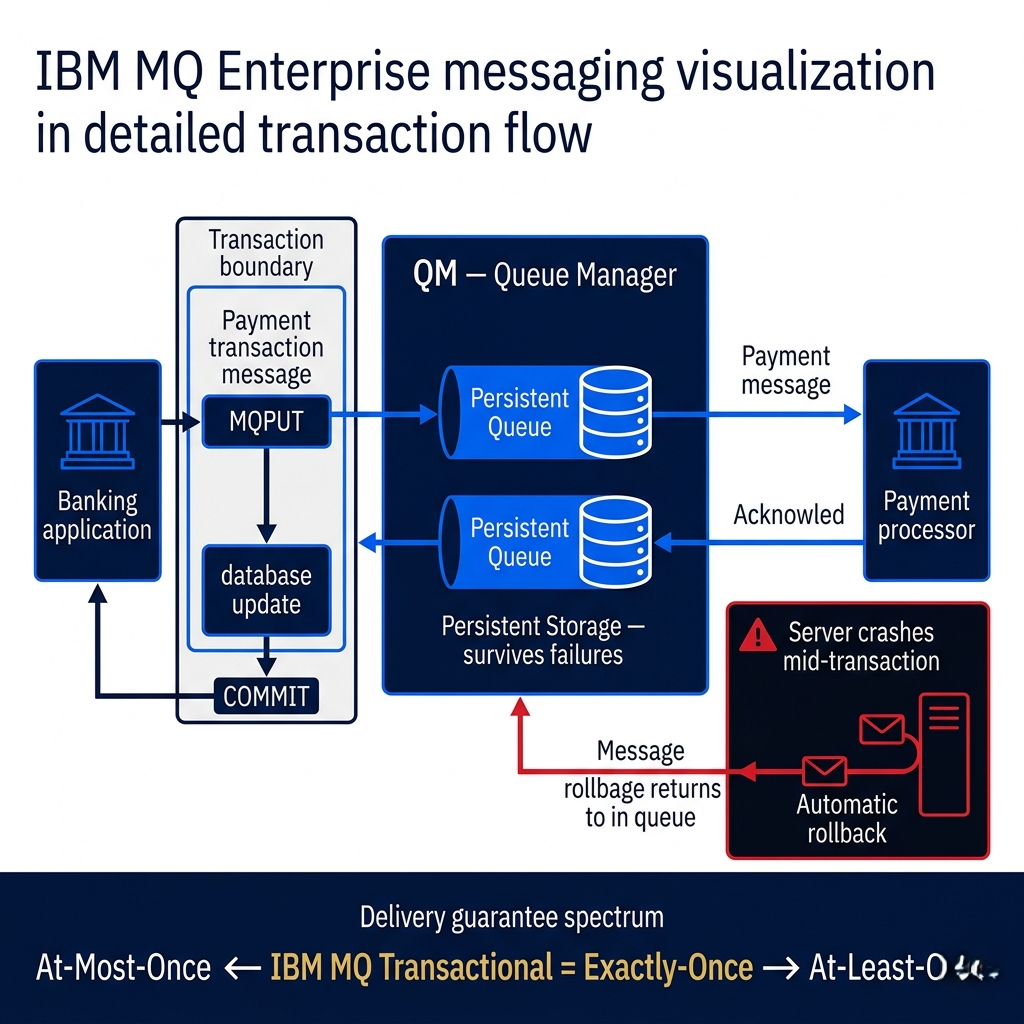
When IBM launched MQ Series in 1993 (now called IBM MQ), it solved a problem that had been plaguing enterprise computing for years: how do you ensure that a financial transaction — an instruction to move money, update a record, trigger a trade — reliably completes even when the machines involved crash, reboot, or lose connectivity? The answer IBM engineered was a messaging system designed from first principles around the idea that message delivery had to be guaranteed, transactional, and recoverable under any failure condition.
IBM MQ's design reflects the requirements of its target environment: mainframes and enterprise systems running financial and healthcare applications where a lost message isn't a minor inconvenience — it's a compliance violation, a regulatory failure, or a direct financial loss. The system supports persistent messaging, where messages are written to disk before acknowledgment, ensuring they survive power failures. It supports transactional messaging, where multiple message sends and receives can be grouped into a single atomic unit of work that either commits completely or rolls back entirely — the same guarantee provided by database transactions, applied to message exchanges.
Think of IBM MQ like a bonded courier service versus email. You wouldn't email a signed legal document and hope it arrives. You'd use a service that provides proof of delivery, guarantees the package won't be lost, and maintains a chain of custody record. IBM MQ is that bonded courier: every message has a delivery guarantee, the system maintains comprehensive logs, and the reliability is contractual rather than best-effort. That's exactly what a bank needs when processing wire transfers at 2 a.m. between systems that may not all be available simultaneously.
What IBM MQ pioneered — and what every subsequent message queue has had to grapple with — is the exactly-once delivery guarantee: ensuring a message is processed once and only once, even in the face of failures. This is deceptively hard. "At-most-once" delivery (send and forget, don't retry) is simple but loses messages. "At-least-once" delivery (retry until acknowledged) is more reliable but can process messages multiple times. IBM MQ's transactional support provides exactly-once semantics at the cost of significant overhead — the right tradeoff for financial transactions, but overkill for most modern high-throughput systems.
// IBM MQ basic connection and message sending (Java)
// This illustrates the API pattern and transactional semantics

import com.ibm.mq.*;
import com.ibm.mq.constants.*;

public class IBMMQExample {

    public static void sendTransactionalMessage() throws MQException {
        MQEnvironment.hostname = "mq-server.company.com";
        MQEnvironment.channel = "SYSTEM.DEF.SVRCONN";
        MQEnvironment.port = 1414;

        MQQueueManager qMgr = new MQQueueManager("PROD.QMGR");

        // Open queue for output (sending)
        int openOptions = CMQC.MQOO_OUTPUT | CMQC.MQOO_FAIL_IF_QUIESCING;
        MQQueue queue = qMgr.accessQueue("PAYMENT.PROCESSING.QUEUE", openOptions);

        // Create message with persistent delivery guarantee
        MQMessage message = new MQMessage();
        message.persistence = CMQC.MQPER_PERSISTENT;  // survive broker restart
        message.format = CMQC.MQFMT_STRING;
        message.writeString("{\"transactionId\":\"TX-1234\",\"amount\":50000.00,\"currency\":\"USD\"}");

        // Put options — part of a transaction (syncpoint)
        MQPutMessageOptions pmo = new MQPutMessageOptions();
        pmo.options = CMQC.MQPMO_SYNCPOINT;  // include in transaction

        // Publish within transaction
        queue.put(message, pmo);

        // Commit the transaction — message now guaranteed delivered
        // Or rollback if something went wrong: qMgr.backout()
        qMgr.commit();

        System.out.println("Message committed to queue — guaranteed delivery");

        queue.close();
        qMgr.disconnect();
    }
}

/* Key IBM MQ delivery semantics:
 * MQPER_PERSISTENT + MQPMO_SYNCPOINT = exactly-once guaranteed
 * MQPER_NOT_PERSISTENT = best-effort (faster, for non-critical messages)
 * Multiple puts/gets within one syncpoint = atomic transaction
 * qMgr.backout() = roll back all messages in current transaction
 *
 * This transactional model is what banks rely on for wire transfers
 * The overhead is significant — appropriate for financial transactions,
 * not for high-throughput event streaming
 */
Pro Tips & Common Mistakes — IBM MQ
Pro Tip: IBM MQ's transactional messaging uses a two-phase commit protocol that coordinates between the queue manager and external resource managers (databases, other MQ managers). If you're integrating IBM MQ with a database in a financial transaction — for example, "send a payment message AND update the account balance atomically" — use XA transactions to coordinate both resources in a single distributed transaction. Without XA coordination, you can get into states where the database is updated but the message wasn't sent (or vice versa), causing silent data inconsistency.
Common Mistake: Using IBM MQ's exactly-once transactional semantics for high-throughput workloads where they're unnecessary. Transactional messages carry significant overhead — disk writes, transaction log updates, distributed coordination. For workloads like telemetry collection, user activity tracking, or log aggregation, where occasional message loss is acceptable and throughput matters more than perfect delivery, the exactly-once overhead is pure waste. IBM MQ supports non-persistent messages explicitly for this reason. Choose delivery semantics based on your actual business requirements, not on what sounds safest.
RabbitMQ: Flexible Routing and the AMQP Revolution
When RabbitMQ launched in 2007, it brought something IBM MQ had never prioritized: flexibility in how messages are routed. IBM MQ was point-to-point — you sent to a named queue, a consumer read from that queue. RabbitMQ introduced the AMQP (Advanced Message Queuing Protocol) model with exchanges and bindings — an abstraction layer between producers and queues that enables sophisticated message routing without any coupling between the message sender and the eventual queue structure.
An exchange in RabbitMQ receives messages from producers and routes them to queues based on routing rules. A direct exchange routes messages to queues whose binding key exactly matches the message's routing key — send with routing key "payment.completed" and the message goes to the queue that subscribed to that exact key. A topic exchange supports wildcard patterns: payment.* matches any routing key starting with "payment." A fanout exchange broadcasts a message to every bound queue simultaneously, regardless of routing key. A headers exchange routes based on message header attributes rather than a routing key at all. This routing flexibility means you can implement complex message distribution patterns — multicast, selective filtering, content-based routing — entirely within RabbitMQ's configuration, without any application code changes.
Imagine you're running a logistics company. With IBM MQ's direct model, you'd have a separate queue for every type of shipment update and every consumer would need to subscribe to every queue it cared about. With RabbitMQ's exchange model, you publish one "shipment.updated" message with attributes like region, shipment type, and priority. Different exchanges route it to the right queues automatically — high-priority international shipments go to an expedited processing queue, routine domestic shipments go to standard processing, everything goes to the analytics queue. The routing logic lives in the message broker configuration, not scattered across application code.
RabbitMQ's acknowledgment model is more nuanced than IBM MQ's transactional approach and worth understanding in detail. When a consumer receives a message, it's "unacknowledged" — held in a limbo state. The consumer can explicitly acknowledge (ack) a message when processing succeeds, telling RabbitMQ it's safe to delete. Or it can negatively acknowledge (nack) with a requeue option if processing fails, putting the message back in the queue for retry. Or it can nack without requeue, sending the message to a dead-letter exchange for error handling. This explicit ack/nack flow gives consumers fine-grained control over message fate — a dead-letter queue (DLQ) pattern where failed messages are automatically routed to a separate queue for inspection and replay is one of RabbitMQ's most valuable production features.
# RabbitMQ with pika — demonstrating exchanges, routing, and dead-letter queues
import pika
import json
from datetime import datetime

# Connection setup
connection = pika.BlockingConnection(
    pika.ConnectionParameters(host='localhost', port=5672,
                              credentials=pika.PlainCredentials('guest', 'guest'))
)
channel = connection.channel()

# === SETUP: Declare exchanges and queues ===

# Topic exchange for flexible pattern-based routing
channel.exchange_declare(exchange='orders', exchange_type='topic', durable=True)

# Dead-letter exchange for failed messages
channel.exchange_declare(exchange='orders.dead-letter', exchange_type='fanout', durable=True)
channel.queue_declare(queue='orders.failed', durable=True)
channel.queue_bind(exchange='orders.dead-letter', queue='orders.failed')

# Main processing queues with dead-letter configuration
channel.queue_declare(
    queue='orders.high-priority',
    durable=True,
    arguments={
        'x-dead-letter-exchange': 'orders.dead-letter',  # failed messages go here
        'x-message-ttl': 300000,  # messages expire after 5 minutes
        'x-max-length': 10000,    # max queue depth
    }
)

channel.queue_declare(
    queue='orders.standard',
    durable=True,
    arguments={'x-dead-letter-exchange': 'orders.dead-letter'}
)

channel.queue_declare(queue='orders.analytics', durable=True)

# Routing bindings — the magic of topic exchanges
channel.queue_bind(
    exchange='orders', queue='orders.high-priority',
    routing_key='order.priority.#'  # matches order.priority.express, order.priority.vip
)
channel.queue_bind(
    exchange='orders', queue='orders.standard',
    routing_key='order.standard.*'  # matches order.standard.domestic, order.standard.intl
)
channel.queue_bind(
    exchange='orders', queue='orders.analytics',
    routing_key='order.#'  # matches ALL order.* messages — analytics sees everything
)

# === PRODUCER: Publish messages ===
def publish_order(order: dict, priority: bool = False):
    routing_key = f"order.priority.express" if priority else "order.standard.domestic"
    channel.basic_publish(
        exchange='orders',
        routing_key=routing_key,
        body=json.dumps(order),
        properties=pika.BasicProperties(
            delivery_mode=2,        # persistent — survives broker restart
            content_type='application/json',
            message_id=order['order_id'],
            timestamp=int(datetime.utcnow().timestamp())
        )
    )
    print(f"Published order {order['order_id']} with routing key: {routing_key}")

# This message routes to BOTH orders.high-priority AND orders.analytics
publish_order({'order_id': 'ORD-001', 'amount': 2500.00, 'items': 3}, priority=True)

# This message routes to BOTH orders.standard AND orders.analytics
publish_order({'order_id': 'ORD-002', 'amount': 49.99, 'items': 1}, priority=False)

# === CONSUMER: With acknowledgment and dead-letter handling ===
def process_order(ch, method, properties, body):
    order = json.loads(body)
    try:
        # Simulate processing
        if order['amount'] > 10000:
            raise ValueError(f"Order exceeds limit: {order['order_id']}")

        print(f"Processed order: {order['order_id']}")
        ch.basic_ack(delivery_tag=method.delivery_tag)  # success — remove from queue

    except ValueError as e:
        print(f"Processing failed: {e}")
        # nack WITHOUT requeue — sends to dead-letter queue for investigation
        ch.basic_nack(delivery_tag=method.delivery_tag, requeue=False)

channel.basic_qos(prefetch_count=10)  # process max 10 unacknowledged messages at once
channel.basic_consume(queue='orders.high-priority', on_message_callback=process_order)

connection.close()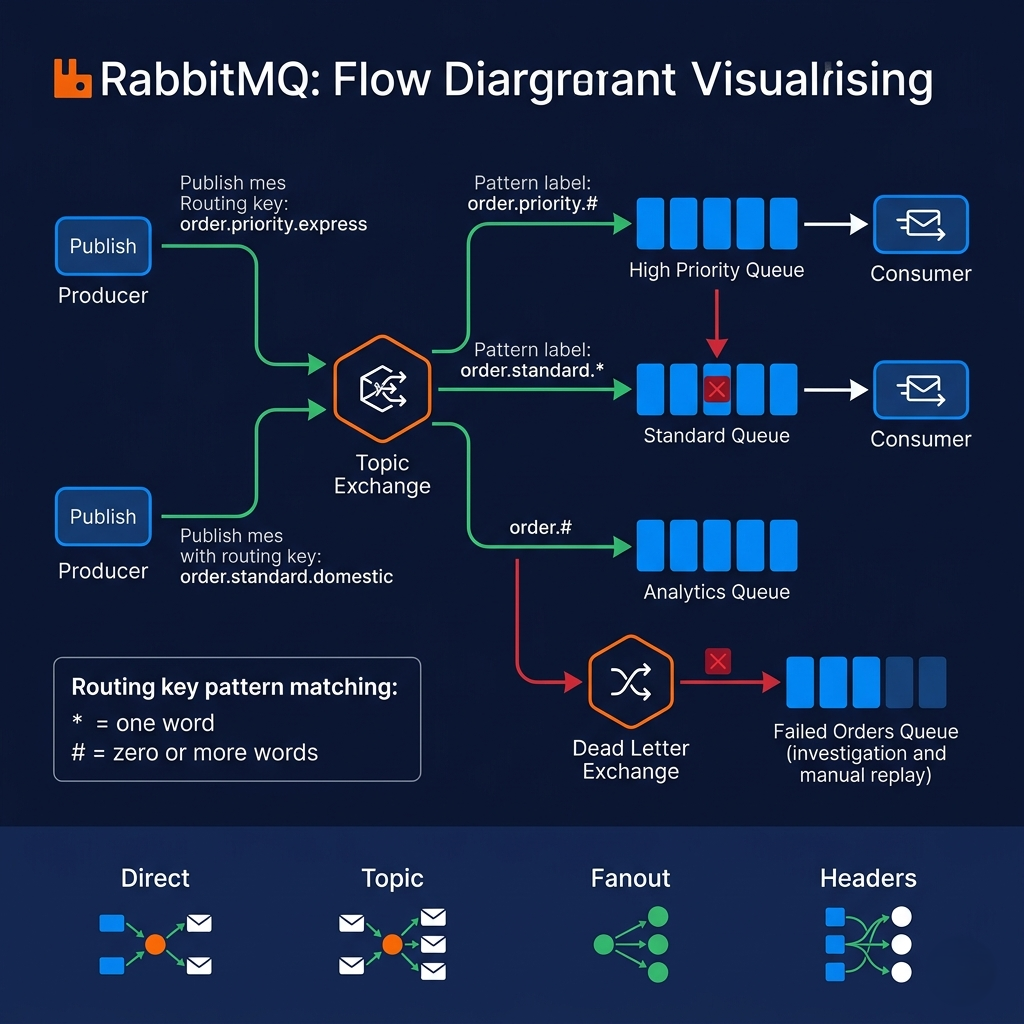
Pro Tips & Common Mistakes — RabbitMQ
Pro Tip: Always configure a dead-letter exchange (DLX) for every production queue. Messages that fail processing, expire due to TTL, or are rejected will silently disappear without a DLX — they're gone with no visibility into what failed or why. A DLX routes these messages to a "dead letter queue" where you can inspect them, alert on accumulation, and replay them after fixing the underlying issue. Production systems without dead-letter queues are flying blind on processing failures.
Common Mistake: Not setting
prefetch_counton consumers, leaving the default of unlimited. Without a prefetch limit, RabbitMQ pushes all available messages to a consumer immediately — which means a consumer that processes 10,000 messages gets all 10,000 messages in memory before processing any of them. If the consumer crashes, all 10,000 messages are unacknowledged and must be redelivered. Setbasic_qos(prefetch_count=N)where N is the number of messages a consumer should hold at once, typically 10–100 depending on message size and processing time. This limits in-flight messages and ensures fair distribution among multiple consumer instances.
Apache Kafka: The Distributed Commit Log That Changed Everything
In 2011, LinkedIn engineers Jay Kreps, Neha Narkhede, and Jun Rao published a paper describing a messaging system they'd built to handle LinkedIn's real-time data pipeline. The paper described Kafka — named somewhat cryptically after the author Franz Kafka — and the architecture it described was so different from existing message queues that many engineers initially struggled to understand what category it belonged to. It wasn't quite a message queue, wasn't quite a database, wasn't quite a stream processing system. It was something new: a distributed commit log.
Kafka's fundamental insight was this: treat your data stream as an append-only log, not a queue. Traditional message queues delete messages after delivery. Kafka retains them for a configurable retention period — days, weeks, or indefinitely. Consumers don't receive-and-acknowledge messages; they maintain a consumer offset — their current position in the log — and advance it as they process messages. Multiple consumer groups can independently read the same topic at different positions; one group might be at offset 10,000 while another is at offset 500. Replaying events is trivially simple: reset the offset to an earlier position and re-read. This retention and offset model is what makes Kafka suitable for use cases that traditional queues simply can't support.
The architecture built on this log model is striking. Kafka organizes messages into topics, each topic divided into partitions — ordered, append-only sequences distributed across multiple broker nodes. Each partition is replicated to a configurable number of brokers for fault tolerance. Producers write to specific partitions (using a partition key to ensure related messages go to the same partition — critical for ordered processing). Consumers in a consumer group each own a subset of partitions, reading from their assigned partitions in parallel. Adding partitions scales throughput linearly — more partitions means more parallelism, more consumers can be deployed, more data can be processed simultaneously.
Here's the thing most Kafka tutorials miss: Kafka is not primarily a message queue. It's an event log infrastructure platform. The implications are significant. Event sourcing (storing every state change as an event, reconstructing current state by replaying events) becomes natural. Stream processing (Kafka Streams, Apache Flink connecting to Kafka) processes events in real-time as they arrive. Data integration (Kafka Connect with hundreds of connectors) syncs data between systems continuously. Analytics (long retention means your analytics systems can reprocess historical data). LinkedIn uses Kafka to process billions of events daily — not just to deliver messages, but to serve as the central nervous system of their entire data infrastructure.
# Apache Kafka with kafka-python — producer, consumer, and consumer groups
# pip install kafka-python

from kafka import KafkaProducer, KafkaConsumer, KafkaAdminClient
from kafka.admin import NewTopic
import json
import time
from datetime import datetime

BOOTSTRAP_SERVERS = ['localhost:9092']
TOPIC_NAME = 'user-events'

# === ADMIN: Create topic with partitions for parallelism ===
admin_client = KafkaAdminClient(bootstrap_servers=BOOTSTRAP_SERVERS)
topic = NewTopic(
    name=TOPIC_NAME,
    num_partitions=6,       # 6 partitions = up to 6 parallel consumers
    replication_factor=3    # each partition copied to 3 brokers for fault tolerance
)
# admin_client.create_topics([topic])  # run once

# === PRODUCER: Event sourcing pattern ===
producer = KafkaProducer(
    bootstrap_servers=BOOTSTRAP_SERVERS,
    value_serializer=lambda v: json.dumps(v).encode('utf-8'),
    key_serializer=lambda k: k.encode('utf-8'),
    acks='all',             # wait for all replicas to acknowledge (strongest durability)
    enable_idempotence=True # exactly-once at producer level (dedup across retries)
)

def publish_user_event(user_id: str, event_type: str, data: dict):
    event = {
        'event_id': f"{user_id}-{time.time_ns()}",
        'user_id': user_id,
        'event_type': event_type,
        'timestamp': datetime.utcnow().isoformat(),
        'data': data
    }
    # Partition key = user_id ensures all events for same user go to same partition
    # This guarantees ordered processing of each user's events
    future = producer.send(TOPIC_NAME, key=user_id, value=event)
    record_metadata = future.get(timeout=10)
    print(f"Published to partition {record_metadata.partition} "
          f"at offset {record_metadata.offset}")

# These events are retained — analytics, ML training, audit logs can all read them
publish_user_event("user-123", "page_view", {"page": "/pricing", "duration_ms": 45000})
publish_user_event("user-123", "clicked_signup", {"button": "Get Started", "plan": "pro"})
publish_user_event("user-456", "purchase", {"plan": "enterprise", "amount": 999.00})

# === CONSUMER GROUP: Parallel processing with automatic partition assignment ===
consumer = KafkaConsumer(
    TOPIC_NAME,
    bootstrap_servers=BOOTSTRAP_SERVERS,
    group_id='notification-service',    # consumer group — Kafka assigns partitions
    auto_offset_reset='earliest',       # start from beginning if no committed offset
    enable_auto_commit=False,           # manual offset commit for exactly-once processing
    value_deserializer=lambda m: json.loads(m.decode('utf-8')),
    key_deserializer=lambda k: k.decode('utf-8') if k else None,
    max_poll_records=100                # process 100 messages per poll
)

# Consumer groups: each group sees ALL messages, independently
# "notification-service" group and "analytics-service" group both see every event
# Each partition is consumed by exactly one consumer in a group
# Rebalancing is automatic when consumers join/leave

def process_user_event(message):
    event = message.value
    if event['event_type'] == 'purchase':
        print(f"Send receipt to user {event['user_id']}: ${event['data']['amount']}")
    elif event['event_type'] == 'clicked_signup':
        print(f"Send welcome email to user {event['user_id']}")

for message in consumer:
    process_user_event(message)
    # Manual commit: offset only advances on successful processing
    consumer.commit()

# === REPLAY: Reset offset to reprocess historical data ===
# This is impossible with traditional message queues
# New consumer group = starts from beginning of retention window
replay_consumer = KafkaConsumer(
    TOPIC_NAME,
    bootstrap_servers=BOOTSTRAP_SERVERS,
    group_id='ml-training-pipeline',   # new group = new independent offset
    auto_offset_reset='earliest'        # reads ALL retained events from the beginning
)
# Can process historical data without affecting other consumers
Pro Tips & Common Mistakes — Apache Kafka
Pro Tip: Design your partition key carefully — it determines which partition a message lands in, and all messages in a partition are processed in order by a single consumer. Use an entity ID (user ID, order ID, account ID) as your partition key when you need ordered processing of events for the same entity. If you use a random or sequential key, you get great distribution but no ordering guarantees. If you use a key that concentrates messages (all messages with the same event type), some partitions will be hot (over-loaded) while others are cold. The partition key is a critical design decision, not a configuration detail.
Common Mistake: Treating Kafka like RabbitMQ and expecting the broker to manage retry logic for failed messages. Kafka doesn't have native dead-letter queue support in the same sense RabbitMQ does. When a consumer fails to process a message, it's the consumer's responsibility to handle the error — write the failed message to an error topic, implement retry logic, or use a library like Spring Kafka that provides DLQ semantics on top of Kafka's primitives. If you don't handle this explicitly, a poison message (one that always fails processing) will stall your consumer at that offset indefinitely.
Apache Pulsar: Cloud-Native Messaging for the Modern Era
Apache Pulsar, developed at Yahoo and open-sourced in 2016, emerged from a specific problem: Yahoo needed a messaging system that could serve multiple business units — News, Finance, Sports, Mail — on shared infrastructure while maintaining complete isolation between tenants. Kafka's architecture didn't support this natively; each Kafka cluster was essentially single-tenant. Building separate Kafka clusters for each business unit was operationally expensive and resource-inefficient. Pulsar was designed from the ground up to solve this.
Pulsar's most distinctive architectural decision is the separation of compute and storage. In Kafka, brokers handle both message routing (the compute function) and message storage (writing to disk). This tight coupling means that scaling one function scales both — if you need more storage, you scale brokers; if you need more processing power, you scale brokers. Pulsar separates these: brokers handle stateless message routing and serving, while BookKeeper (Apache BookKeeper, a distributed log store) handles all persistent storage. Brokers can scale independently of storage, and storage scales independently of compute. This separation also enables Pulsar's tiered storage feature: older data can be offloaded from BookKeeper to cheap object storage (Amazon S3, Google Cloud Storage, Azure Blob Storage) while remaining accessible to consumers — dramatically reducing storage costs for long-retention workloads.
Pulsar's multi-tenancy model is genuinely sophisticated. Tenants, namespaces, and topics form a hierarchy: a tenant (a business unit, a team, an external customer) contains namespaces (logical groupings of related topics), which contain topics. Each level of the hierarchy has independent configuration for authentication, authorization, quotas, policies, and replication. Multiple tenants share the same Pulsar cluster — the same brokers, the same BookKeeper nodes — while having complete isolation in terms of access control and resource allocation. This is the operational efficiency Yahoo needed: one cluster serving dozens of teams, each with appropriate isolation.
Pulsar Functions deserves special attention because it represents a genuinely different approach to stream processing. Rather than requiring a separate stream processing framework (Apache Flink, Apache Storm, Spark Streaming) to process Kafka topics, Pulsar provides a lightweight function execution environment built directly into the messaging layer. A Pulsar Function is a simple piece of code (Python, Java, Go) that reads from input topics, applies logic, and writes to output topics — deployed and managed by Pulsar itself without needing to set up a separate processing cluster. For simple stateless transformations, filtering, enrichment, and routing, Pulsar Functions eliminate significant operational complexity.
# Apache Pulsar with pulsar-client — producer, consumer, and Functions
# pip install pulsar-client

import pulsar
import json
from datetime import datetime

# Connect to Pulsar cluster
client = pulsar.Client('pulsar://localhost:6650')

# Pulsar topic hierarchy: persistent://tenant/namespace/topic
# persistent:// = stored durably (also: non-persistent://)
TOPIC = 'persistent://my-company/ecommerce/order-events'

# === PRODUCER ===
producer = client.create_producer(
    TOPIC,
    compression_type=pulsar.CompressionType.LZ4,
    batching_enabled=True,
    batching_max_publish_delay_ms=10,
    block_if_queue_full=True,
    # Schema support — Pulsar has built-in schema registry
    schema=pulsar.schema.JsonSchema(dict)
)

def publish_order_event(order_id: str, event_type: str, data: dict):
    event = {
        'order_id': order_id,
        'event_type': event_type,
        'timestamp': datetime.utcnow().isoformat(),
        'data': data
    }
    # Pulsar supports keys for ordering (like Kafka partition keys)
    producer.send(
        json.dumps(event).encode('utf-8'),
        partition_key=order_id,   # ensures order events are ordered per order_id
        properties={              # message-level metadata
            'event_type': event_type,
            'source': 'order-service'
        }
    )
    print(f"Published {event_type} for order {order_id}")

publish_order_event("ORD-001", "created", {"amount": 129.99, "items": 2})
publish_order_event("ORD-001", "payment_confirmed", {"payment_method": "card"})
publish_order_event("ORD-001", "shipped", {"tracking": "1Z999AA1012345678"})

# === CONSUMER: Exclusive, Shared, or Failover subscription types ===
# Pulsar's subscription types give more flexibility than Kafka's consumer groups

# Shared subscription: multiple consumers, messages distributed round-robin
# (like traditional queue — competing consumers)
consumer_shared = client.subscribe(
    TOPIC,
    subscription_name='order-processing',
    consumer_type=pulsar.ConsumerType.Shared,
    message_listener=None,
    receiver_queue_size=100,
    dead_letter_policy=pulsar.DeadLetterPolicy(
        max_redeliver_count=3,           # retry 3 times before dead-lettering
        dead_letter_topic=f"{TOPIC}-DLQ" # automatic dead letter queue
    )
)

# Key_Shared subscription: like Kafka, all messages with same key → same consumer
# Guarantees ordering per key across multiple consumer instances
consumer_keyed = client.subscribe(
    TOPIC,
    subscription_name='ordered-processor',
    consumer_type=pulsar.ConsumerType.Key_Shared
)

def process_messages():
    while True:
        msg = consumer_shared.receive(timeout_millis=1000)
        try:
            event = json.loads(msg.data())
            print(f"Processing {event['event_type']} for {event['order_id']}")
            consumer_shared.acknowledge(msg)
        except Exception as e:
            print(f"Processing failed: {e}")
            consumer_shared.negative_acknowledge(msg)  # triggers redelivery up to max_redeliver_count

# === PULSAR FUNCTIONS: Lightweight stream processing ===
# A Pulsar Function for filtering high-value orders (deployed via pulsar-admin CLI)
PULSAR_FUNCTION_CODE = """
import json

def process(input, context):
    \"\"\"Filter and route high-value orders — no separate Flink/Spark cluster needed.\"\"\"
    event = json.loads(input)
    if event.get('data', {}).get('amount', 0) > 1000:
        # Publish to high-value-orders topic
        context.publish('persistent://my-company/ecommerce/high-value-orders',
                       json.dumps(event).encode())
        context.get_logger().info(f"High-value order: {event['order_id']}")
    return input  # pass through to original consumer
"""

# Deploy with: pulsar-admin functions create \
#   --name order-filter \
#   --inputs persistent://my-company/ecommerce/order-events \
#   --output persistent://my-company/ecommerce/filtered-orders \
#   --py order_filter.py --classname process

client.close()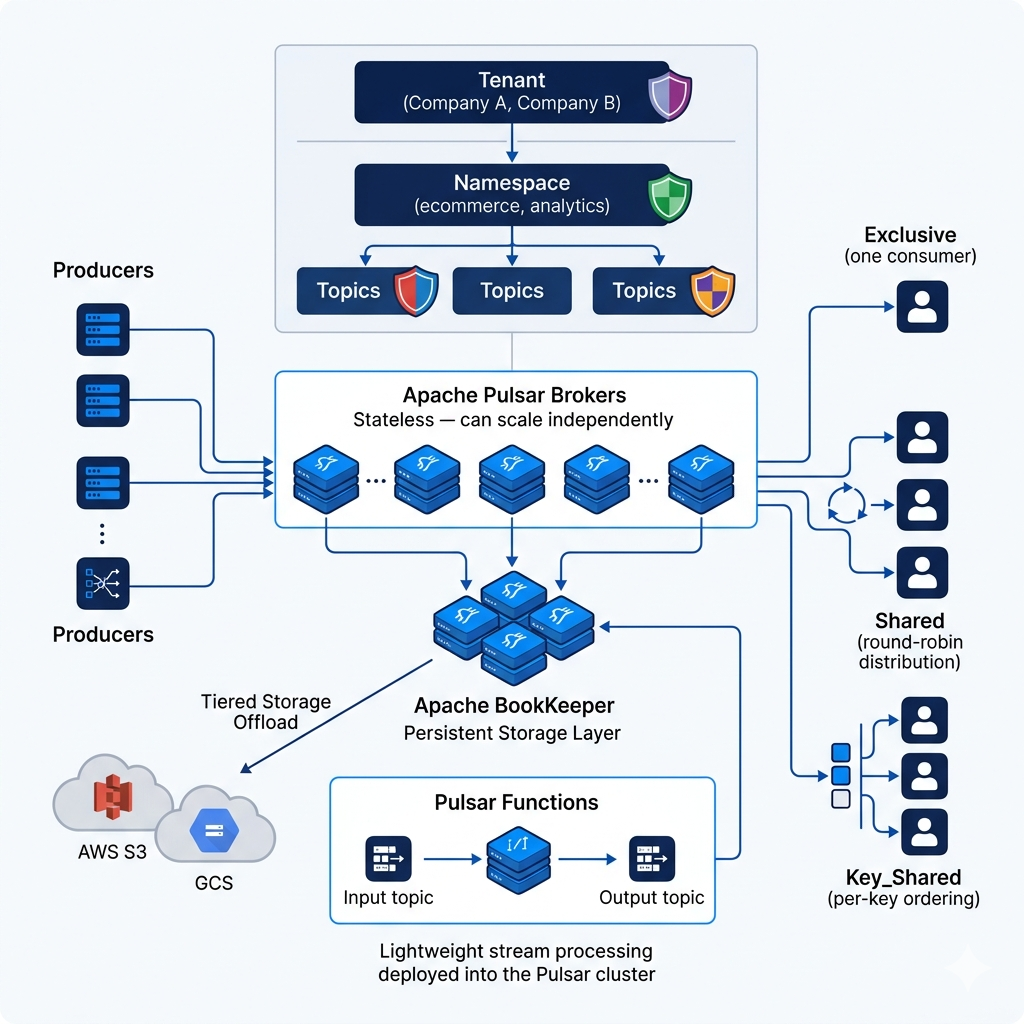
Pro Tips & Common Mistakes — Apache Pulsar
Pro Tip: Leverage Pulsar's geo-replication for multi-region active-active deployments. Unlike Kafka's MirrorMaker (which is complex to operate and introduces replication lag), Pulsar's built-in geo-replication is configured at the namespace level and handled automatically by the cluster. For applications requiring low-latency access from multiple geographic regions and disaster recovery, Pulsar's native geo-replication is significantly simpler to configure and operate than equivalent Kafka setups.
Common Mistake: Choosing Pulsar over Kafka for greenfield projects without considering ecosystem maturity. Kafka has a significantly larger ecosystem — more connectors (Kafka Connect), more stream processing integrations (Flink, Spark prefer Kafka), more SaaS managed offerings (Confluent Cloud, AWS MSK, Redpanda), more community resources, and more battle-tested production deployments at scale. Pulsar's advantages (multi-tenancy, tiered storage, compute/storage separation) are genuine, but they matter most in specific scenarios. If you don't have multi-tenancy requirements and Kafka's ecosystem fit your use case, defaulting to Kafka is a defensible choice.
How It All Connects: Choosing the Right Message Queue
The history of message queues is the history of distributed systems requirements evolving. IBM MQ solved the enterprise reliability problem — financial transactions needed guaranteed exactly-once delivery, and it solved that problem definitively. RabbitMQ solved the routing flexibility problem — applications needed complex message routing without tight coupling between producers and consumers, and the AMQP exchange model elegantly addressed that. Kafka solved the throughput and event log problem — LinkedIn needed to process billions of events daily as a unified data pipeline, not as a collection of separate queues. Pulsar solved the multi-tenancy and cloud economics problem — Yahoo needed multiple teams sharing infrastructure with complete isolation and cost-efficient tiered storage.
Choosing between them requires mapping your requirements honestly to each system's strengths. You want IBM MQ for regulated industries where exactly-once transactional delivery is a compliance requirement, not a preference — financial transactions, healthcare data exchange, anything where "the message might be processed twice" is legally or contractually unacceptable. You want RabbitMQ when you need sophisticated routing logic (content-based routing, fanout to multiple consumers, complex exchange topologies), when your throughput is moderate (sub-million messages per second), when you need native dead-letter queue semantics, or when you want a system that's easy to reason about and operate. You want Apache Kafka when you need high throughput (millions of messages per second), when event replay and audit trails matter, when you're building a data platform that multiple teams read from independently, or when you need stream processing integration. You want Apache Pulsar when you need native multi-tenancy, when tiered storage economics matter for long-retention use cases, or when you want compute-storage separation for independent scaling.
The counterintuitive insight: most teams don't need Kafka. Kafka's complexity — partition management, consumer group rebalancing, offset management, no native DLQ semantics, complex exactly-once configuration — is justified at LinkedIn and Netflix scale. For a startup processing 10,000 orders per day, RabbitMQ is simpler, better understood, and operationally lighter. Choose complexity when you have the problem it solves, not because it sounds more impressive.
# Decision framework — matching requirements to message queue choice

def choose_message_queue(requirements: dict) -> str:
    """
    A practical decision guide based on key requirements.
    This is a simplification — always prototype and benchmark for your specific workload.
    """
    reasons = []

    # IBM MQ indicators
    if requirements.get('regulated_industry') and requirements.get('exactly_once_compliance'):
        reasons.append(("IBM MQ", "Regulated industry requiring compliance-grade exactly-once delivery"))

    # RabbitMQ indicators
    if (requirements.get('complex_routing') and
        not requirements.get('throughput_millions_per_second') and
        not requirements.get('event_replay_required')):
        reasons.append(("RabbitMQ", "Complex routing needs, moderate throughput, simpler operations"))

    # Kafka indicators
    if any([
        requirements.get('throughput_millions_per_second'),
        requirements.get('event_replay_required'),
        requirements.get('multiple_independent_consumers'),
        requirements.get('event_sourcing_architecture'),
        requirements.get('stream_processing_at_scale')
    ]):
        reasons.append(("Apache Kafka", "High throughput, event log semantics, multi-consumer"))

    # Pulsar indicators
    if any([
        requirements.get('multi_tenant_isolation'),
        requirements.get('tiered_storage_needed'),
        requirements.get('geo_replication_required'),
        requirements.get('compute_storage_independent_scaling')
    ]):
        reasons.append(("Apache Pulsar", "Multi-tenancy, tiered storage, cloud-native architecture"))

    # Default recommendation
    if not reasons:
        reasons.append(("RabbitMQ", "Default choice for most use cases — simpler, battle-tested"))

    return reasons

# Examples
print(choose_message_queue({
    'throughput_millions_per_second': True,
    'event_replay_required': True,
    'multiple_independent_consumers': True
}))
# → [('Apache Kafka', 'High throughput, event log semantics, multi-consumer')]

print(choose_message_queue({
    'complex_routing': True,
    'throughput_millions_per_second': False,
    'event_replay_required': False
}))
# → [('RabbitMQ', 'Complex routing needs, moderate throughput, simpler operations')]

print(choose_message_queue({
    'regulated_industry': True,
    'exactly_once_compliance': True
}))
# → [('IBM MQ', 'Regulated industry requiring compliance-grade exactly-once delivery')]
Getting Started: Running RabbitMQ and Kafka Locally
Here's how to get both RabbitMQ and Kafka running locally for experimentation.
Step 1: RabbitMQ with Docker
# Start RabbitMQ with management UI
docker run -d \
  --name rabbitmq \
  -p 5672:5672 \
  -p 15672:15672 \
  -e RABBITMQ_DEFAULT_USER=admin \
  -e RABBITMQ_DEFAULT_PASS=password \
  rabbitmq:3-management

# Access management UI: http://localhost:15672 (admin/password)
# Management UI shows: queues, exchanges, bindings, message rates, consumer counts

# Verify RabbitMQ is running:
docker exec rabbitmq rabbitmq-diagnostics ping

# Install Python client:
pip install pika

# Quick test — publish and consume one message:
python3 << 'EOF'
import pika

connection = pika.BlockingConnection(
    pika.ConnectionParameters('localhost',
        credentials=pika.PlainCredentials('admin', 'password'))
)
channel = connection.channel()
channel.queue_declare(queue='test', durable=True)
channel.basic_publish(exchange='', routing_key='test', body=b'Hello RabbitMQ!')
print("Published!")

method, properties, body = channel.basic_get('test', auto_ack=True)
print(f"Consumed: {body}")
connection.close()
EOF
Step 2: Apache Kafka with Docker Compose
# docker-compose.yml — Kafka + Zookeeper (or use KRaft mode for Kafka 3.x+)
version: '3.8'
services:
  zookeeper:
    image: confluentinc/cp-zookeeper:7.5.0
    environment:
      ZOOKEEPER_CLIENT_PORT: 2181
    ports:
      - "2181:2181"

  kafka:
    image: confluentinc/cp-kafka:7.5.0
    depends_on: [zookeeper]
    ports:
      - "9092:9092"
    environment:
      KAFKA_BROKER_ID: 1
      KAFKA_ZOOKEEPER_CONNECT: zookeeper:2181
      KAFKA_ADVERTISED_LISTENERS: PLAINTEXT://localhost:9092
      KAFKA_OFFSETS_TOPIC_REPLICATION_FACTOR: 1
      KAFKA_AUTO_CREATE_TOPICS_ENABLE: "true"
      KAFKA_LOG_RETENTION_HOURS: 168  # 7 days retention

  kafka-ui:
    image: provectuslabs/kafka-ui:latest
    depends_on: [kafka]
    ports:
      - "8080:8080"
    environment:
      KAFKA_CLUSTERS_0_NAME: local
      KAFKA_CLUSTERS_0_BOOTSTRAPSERVERS: kafka:9092
# Start the stack:
docker-compose up -d

# Kafka UI at http://localhost:8080 — browse topics, messages, consumer groups

# Install Python client:
pip install kafka-python

# Create a topic:
docker exec kafka kafka-topics --create \
  --bootstrap-server localhost:9092 \
  --replication-factor 1 \
  --partitions 3 \
  --topic test-events

# List topics:
docker exec kafka kafka-topics --list --bootstrap-server localhost:9092

# Quick produce and consume from CLI:
# Producer (type messages, press Enter to send):
docker exec -it kafka kafka-console-producer \
  --bootstrap-server localhost:9092 \
  --topic test-events

# Consumer (in another terminal — see messages arrive):
docker exec kafka kafka-console-consumer \
  --bootstrap-server localhost:9092 \
  --topic test-events \
  --from-beginning
Step 3: Monitor queue health
# RabbitMQ: key metrics to watch
# Via management API:
curl -s -u admin:password http://localhost:15672/api/queues | \
  python3 -m json.tool | grep -E '"name"|"messages"|"consumers"'

# Key metrics:
# messages: current depth (growing = consumers falling behind)
# consumers: number of connected consumers (0 = nobody listening)
# message_stats.publish_details.rate: messages/second being published
# message_stats.deliver_details.rate: messages/second being consumed

# Kafka: consumer group lag (most important operational metric)
docker exec kafka kafka-consumer-groups \
  --bootstrap-server localhost:9092 \
  --group your-consumer-group \
  --describe
# LAG column shows how many messages behind each partition's consumer is
# Growing lag = consumer can't keep up with producer rate

# Alert thresholds to set:
# RabbitMQ: queue depth > 10,000 sustained for > 5 minutes
# Kafka: consumer lag > 100,000 per partition, sustained growth
FAQ
Q: What is a message queue and what is it used for?
A message queue is middleware that enables asynchronous communication between software components. Producers write messages to the queue without waiting for consumers to process them; consumers read and process messages at their own pace. Message queues are used for decoupling services (so each can scale and fail independently), load leveling (absorbing traffic spikes), guaranteed delivery (persisting messages until they're successfully processed), fan-out messaging (one message processed by multiple consumers), and stream processing (handling continuous flows of real-time data).
Q: What is the difference between RabbitMQ and Kafka?
RabbitMQ is a traditional message broker optimized for complex routing, flexible delivery semantics, and moderate throughput. Messages are deleted after successful delivery; routing is managed by exchanges and bindings; dead-letter queues handle failed messages natively. Kafka is a distributed commit log optimized for high throughput and event streaming. Messages are retained for a configurable period regardless of delivery; consumers manage their own offsets; multiple consumer groups can independently read the same data. RabbitMQ excels at task queues, complex routing, and request-reply patterns. Kafka excels at event streaming, audit logs, event sourcing, and data pipelines at scale.
Q: When should I use Kafka versus RabbitMQ?
Use Kafka when you need very high throughput (millions of messages per second), when multiple independent consumers need to read the same data, when event replay or audit trails are required, or when you're building event sourcing or stream processing architectures. Use RabbitMQ when your throughput is moderate, when you need complex routing logic (topic exchanges, fanout, content-based routing), when native dead-letter queue semantics are important, or when you want a simpler operational model. For most startups and mid-size applications, RabbitMQ is operationally simpler and sufficient.
Q: What is Apache Pulsar and how is it different from Kafka?
Apache Pulsar is a cloud-native messaging and streaming platform that separates compute (brokers) from storage (Apache BookKeeper). This separation enables independent scaling of processing and storage, and enables tiered storage (offloading older data to cheap object storage like S3). Pulsar also offers native multi-tenancy (multiple teams sharing a cluster with isolation), built-in geo-replication, and more flexible subscription types than Kafka's consumer groups. Kafka has a larger ecosystem and more production deployments at scale; Pulsar's architectural advantages matter most in multi-tenant or cloud-native environments.
Q: What is exactly-once delivery and why is it hard?
Exactly-once delivery guarantees that a message is processed exactly one time — not lost (at-least-once) and not duplicated (at-most-once). It's difficult because networks fail, machines crash, and messages can be delivered before a consumer crashes mid-processing. Achieving exactly-once requires coordinating between the message broker (which tracks delivery state) and the consumer's processing logic (which must be idempotent or participate in distributed transactions). IBM MQ achieves it via XA transactions. Kafka achieves it via idempotent producers and transactional consumers with exactly-once semantics (EOS) enabled. RabbitMQ's acknowledgment model provides at-least-once; true exactly-once in RabbitMQ requires idempotent consumers (processing the same message twice has no additional effect).
Q: What is a dead letter queue and why do I need one?
A dead-letter queue (DLQ) receives messages that couldn't be successfully processed — either because processing failed repeatedly, the message expired before processing, or it was explicitly rejected. Without a DLQ, failed messages are silently lost or cause consumers to get stuck retrying indefinitely. With a DLQ, failed messages are routed to a separate queue for investigation, alerting, and manual or automated replay after the underlying issue is fixed. In production systems, a DLQ is not optional — it's how you maintain visibility into processing failures and prevent message loss.
Q: How do I monitor the health of a message queue in production?
The most important metric is queue depth (messages waiting to be consumed) and its trend over time. A growing queue depth indicates consumers are falling behind producers — requiring either consumer scaling or producer throttling. For Kafka, monitor consumer group lag (how far behind each consumer group's offset is from the latest message). For RabbitMQ, monitor queue depth, consumer count (zero consumers is a critical alert), and message rates (publish rate vs. delivery rate). Set alerts on sustained queue depth growth — not just on broker availability — and wire queue depth to autoscaling triggers for your consumers.
Conclusion
The evolution from IBM MQ's 1993 transactional guarantees to Kafka's 2011 distributed commit log to Pulsar's cloud-native multi-tenancy reflects a broader pattern: each generation of messaging technology was built to solve a specific failure of the previous generation, and each solution created new capabilities that unlocked new use cases. IBM MQ showed that messaging could be as reliable as a database. RabbitMQ showed that routing logic could be a first-class messaging concern. Kafka showed that treating messages as an immutable log rather than a queue changed the entire event-driven architecture paradigm. Pulsar showed that cloud-native infrastructure economics required separating compute from storage.
For most engineers, the practical decision is between RabbitMQ and Kafka — and the honest answer is that Kafka is overused. Its operational complexity is real, its learning curve is steep, and the justification for that complexity (throughput at scale, event replay, multi-consumer fan-out) doesn't apply to most applications. RabbitMQ handles millions of messages per day for most real-world applications without breaking a sweat. Start simple, measure, and reach for Kafka when you have the specific problems it solves — not because it's what Netflix runs.
What doesn't change across all four systems: the fundamental value proposition of message queues. Decoupling producers from consumers is one of the highest-leverage architectural decisions in distributed systems design. It makes services independently deployable, independently scalable, and independently fallible — exactly the properties that separate systems that absorb load from systems that collapse under it.