
In 2010, a Google engineer named Mike Belshe published a study that should have been obvious in hindsight but shocked the web performance community: web pages had gotten dramatically more complex — dozens of resources, hundreds of kilobytes, scripts and stylesheets and images and fonts all requiring separate fetches — but the protocol delivering all of it was fundamentally designed for a world where fetching a single HTML document was the entire transaction.
HTTP/1.1, the version serving most of the web at the time, could technically reuse connections. But it couldn't actually send multiple things simultaneously. Requests queued up in a line, and if one was slow — say, a large JavaScript file — everything behind it waited. It was as if you'd rebuilt a superhighway but kept the single-lane toll booth at the entrance. All the road improvements downstream were throttled by that one bottleneck.
That study became part of the momentum that led to SPDY — Google's experimental protocol that eventually became HTTP/2. And the lessons from HTTP/2's deployment led to HTTP/3. The evolution of HTTP isn't a series of incremental improvements. It's a story of engineers identifying fundamental design constraints — constraints baked into the original protocol's architecture — and figuring out how to replace the foundations without tearing down the building.
This post traces that evolution completely: what each version changed, why the previous version's solution created new problems, and what it all means for developers building and deploying web applications today.
Table of Contents
- HTTP/1.0: One Request, One Connection, One Problem
- HTTP/1.1: Persistent Connections and the Head-of-Line Blocking Trap
- HTTP/2: Binary Framing, Multiplexing, and the HPACK Revolution
- HTTP/3 and QUIC: Abandoning TCP to Fix TCP's Problems
- How It All Connects: The Protocol Evolution at a Glance
- Getting Started: Detecting and Configuring HTTP Versions
- FAQ
- Conclusion
HTTP/1.0: One Request, One Connection, One Problem
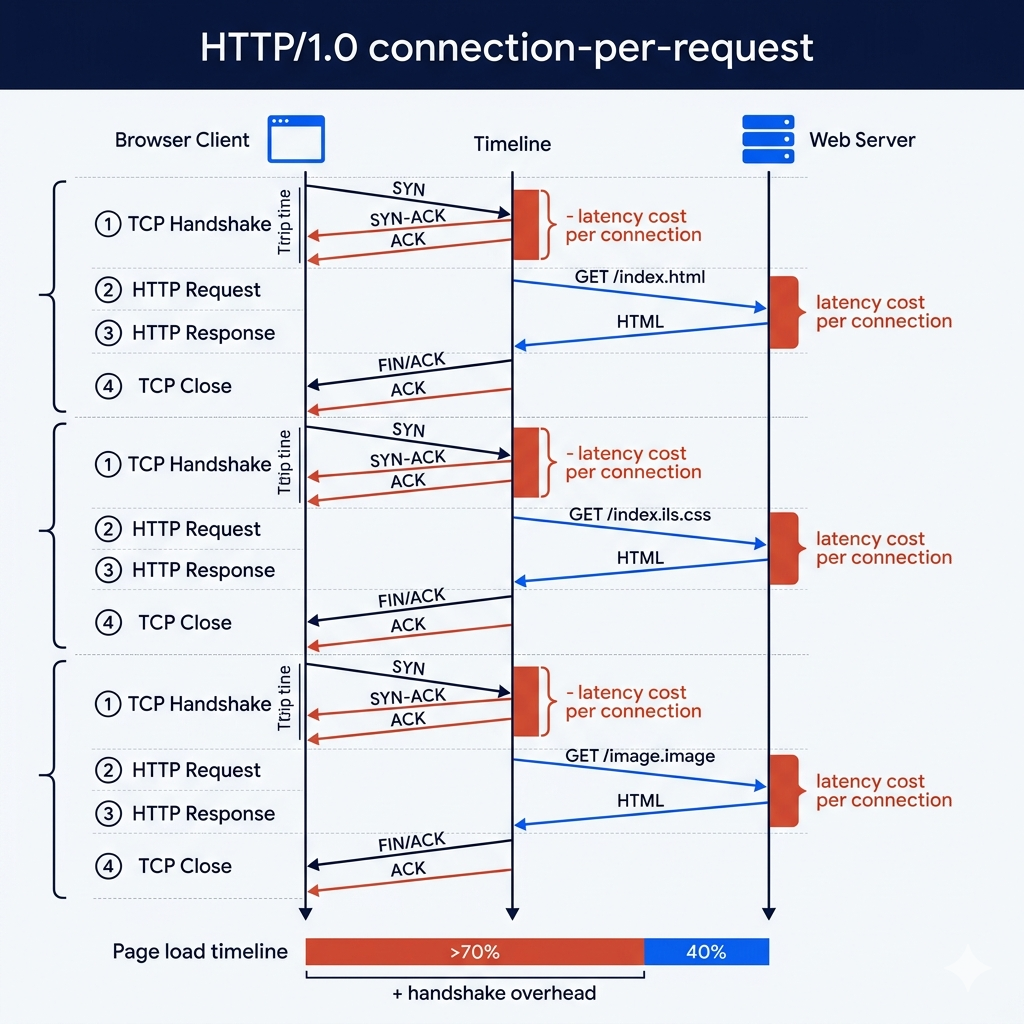
HTTP/1.0, formalized in 1996, was a protocol for a simpler web. A typical page was a single HTML document — maybe with a few images. The model it implemented matched that reality perfectly: to fetch a resource, open a TCP connection, send a request, receive a response, close the connection. Clean, stateless, simple. One resource per connection, beginning to end.
The inefficiency only becomes obvious when you understand what "open a TCP connection" actually costs. TCP's three-way handshake (SYN → SYN-ACK → ACK) takes a full round trip before a single byte of HTTP data can be exchanged. On a connection with 100ms of round-trip latency, that's 100ms of dead time before the request even starts. Then if you're using HTTPS, add another 1–2 round trips for the TLS handshake. For a single resource, this overhead is tolerable. For a modern web page requiring 80+ individual resources — HTML, CSS files, JavaScript bundles, images, fonts, API calls — the overhead is catastrophic.
Imagine you need to buy 20 items from a store where the checkout policy is: buy one item, leave the store completely, walk back to the entrance, wait in the entry queue again, then buy the next item. The store is perfectly capable of selling you all 20 items at once — the bottleneck isn't product availability, it's the checkout policy. HTTP/1.0 was that policy. Every resource required the full entry-to-exit cycle.
The scale of this problem only became apparent as web pages grew. In 1996, the average web page had a handful of resources. By 2012, the average page had over 100 resources. With HTTP/1.0 semantics, that meant 100 sequential connections — 100 TCP handshakes, 100 connection teardowns — for a single page load. On anything but a local network, the latency overhead would have made the web unusable at this scale.
# See HTTP/1.0's connection-per-request behavior
# Using curl to observe the raw protocol behavior

# HTTP/1.0: explicitly request old behavior to see the difference
curl -v --http1.0 https://example.com

# Key difference in response headers:
# HTTP/1.0 response: Connection: close (server will close after response)
# HTTP/1.1 response: Connection: keep-alive (connection stays open)

# Measure how much of page load time is just connection overhead:
curl -w "
DNS:        %{time_namelookup}s
TCP Connect: %{time_connect}s
TLS Handshake: %{time_appconnect}s
First Byte:  %{time_starttransfer}s
Total:       %{time_total}s
" -o /dev/null -s https://example.com

# On a typical connection, you'll see:
# DNS: ~0.020s
# TCP Connect: ~0.050s  ← TCP three-way handshake (SYN/SYN-ACK/ACK)
# TLS Handshake: ~0.150s ← TLS 1.3 in 1 round trip, older = 2 round trips
# First Byte: ~0.200s
# These are costs paid PER CONNECTION in HTTP/1.0
# HTTP/1.0 for 80 resources = paying this 80 times
Pro Tips & Common Mistakes — HTTP/1.0
Pro Tip: While HTTP/1.0 is obsolete as a primary protocol, understanding its connection model is still relevant when debugging certain proxy and caching layer behaviors. Some legacy corporate proxies and embedded device servers still speak HTTP/1.0. If you're seeing unexpected
Connection: closeheaders or responses that end the connection immediately after each response, you may be talking to an HTTP/1.0-only intermediary.
Common Mistake: Assuming TCP connection overhead is negligible because it "only happens once." In HTTP/1.0's model, it happens once per resource — and connection establishment overhead is often the dominant factor in perceived page load time, not bandwidth. Tools like WebPageTest make this visible: the connection setup waterfall often dwarfs the actual data transfer time for small files.
HTTP/1.1: Persistent Connections and the Head-of-Line Blocking Trap
HTTP/1.1 arrived in 1997, barely a year after HTTP/1.0, with a focused goal: eliminate the connection-per-request overhead. Its solution was persistent connections (also called keep-alive connections) — after a request-response cycle completes, the TCP connection stays open. The next request reuses the same connection, skipping the TCP handshake entirely. For pages with many resources, this was a dramatic improvement: instead of 80 handshakes, you pay one.
HTTP/1.1 also introduced pipelining — the ability to send multiple HTTP requests over a persistent connection before receiving responses. Without pipelining, the client sends request 1, waits for response 1, sends request 2, waits for response 2. With pipelining, the client sends requests 1, 2, and 3 back-to-back and waits for all three responses. Theoretically, this should have made HTTP/1.1 dramatically faster. In practice, pipelining failed and was disabled by default in almost every browser.
Here's why: HTTP/1.1 responses must be returned in the same order requests were sent. If Request 1 is for a 500KB JavaScript file and Requests 2 and 3 are for tiny 2KB CSS files, the responses to Requests 2 and 3 cannot be delivered until Request 1 completes — even though they're ready first. They sit in a queue behind the slow response. This is head-of-line (HOL) blocking at the HTTP layer — the fundamental problem that HTTP/1.1 couldn't escape from. Browsers responded by abandoning pipelining and instead opening multiple parallel connections (typically 6) to the same server, turning serial queuing into parallel queuing. Effective, but wasteful: 6 connections means 6 TCP handshakes, 6 congestion control processes, 6x the server-side connection overhead.
The counterintuitive reality of HTTP/1.1's era: the best web performance technique was to defeat the protocol rather than use it correctly. Domain sharding — splitting resources across multiple subdomains (e.g., static1.example.com, static2.example.com) — tricked browsers into opening more parallel connections, getting around the 6-connection-per-host limit. Sprite sheets combined dozens of icons into single images to reduce request counts. Script concatenation bundled all JavaScript into single massive files. All of these were workarounds for HTTP/1.1's inability to handle multiple requests efficiently on a single connection. Today, with HTTP/2, these techniques are not just unnecessary — they're often harmful.
# Observe HTTP/1.1 behavior and its limitations

# Check which HTTP version a server is using
curl -v --http1.1 https://example.com 2>&1 | head -20

# HTTP/1.1 connection reuse in action:
# Notice "Re-using existing connection" in verbose output:
curl -v https://example.com/resource1 https://example.com/resource2

# See the 6-connection-per-host limit behavior with browser DevTools
# Chrome: DevTools → Network tab → check the "Connection ID" column
# Resources from the same host share connection IDs in groups of 6

# Identify HTTP/1.1 performance patterns in your server access logs:
# High number of connections from single IPs = HTTP/1.1 clients
# Look at Apache/Nginx access log connection patterns:
awk '{print $1}' /var/log/nginx/access.log | sort | uniq -c | sort -rn | head -20

# Simulate pipelining (usually disabled in browsers):
# Using telnet to see raw HTTP/1.1 pipelining:
# (echo -e "GET /resource1 HTTP/1.1\r\nHost: example.com\r\n\r\nGET /resource2 HTTP/1.1\r\nHost: example.com\r\nConnection: close\r\n\r\n"; sleep 2) | telnet example.com 80
# Observe: responses must come back in request order

# HTTP/1.1 features still relevant today:
# Cache-Control headers (introduced with HTTP/1.1)
curl -I https://example.com | grep -i "cache-control\|etag\|last-modified\|expires"
# These caching mechanisms from HTTP/1.1 still work in HTTP/2 and HTTP/3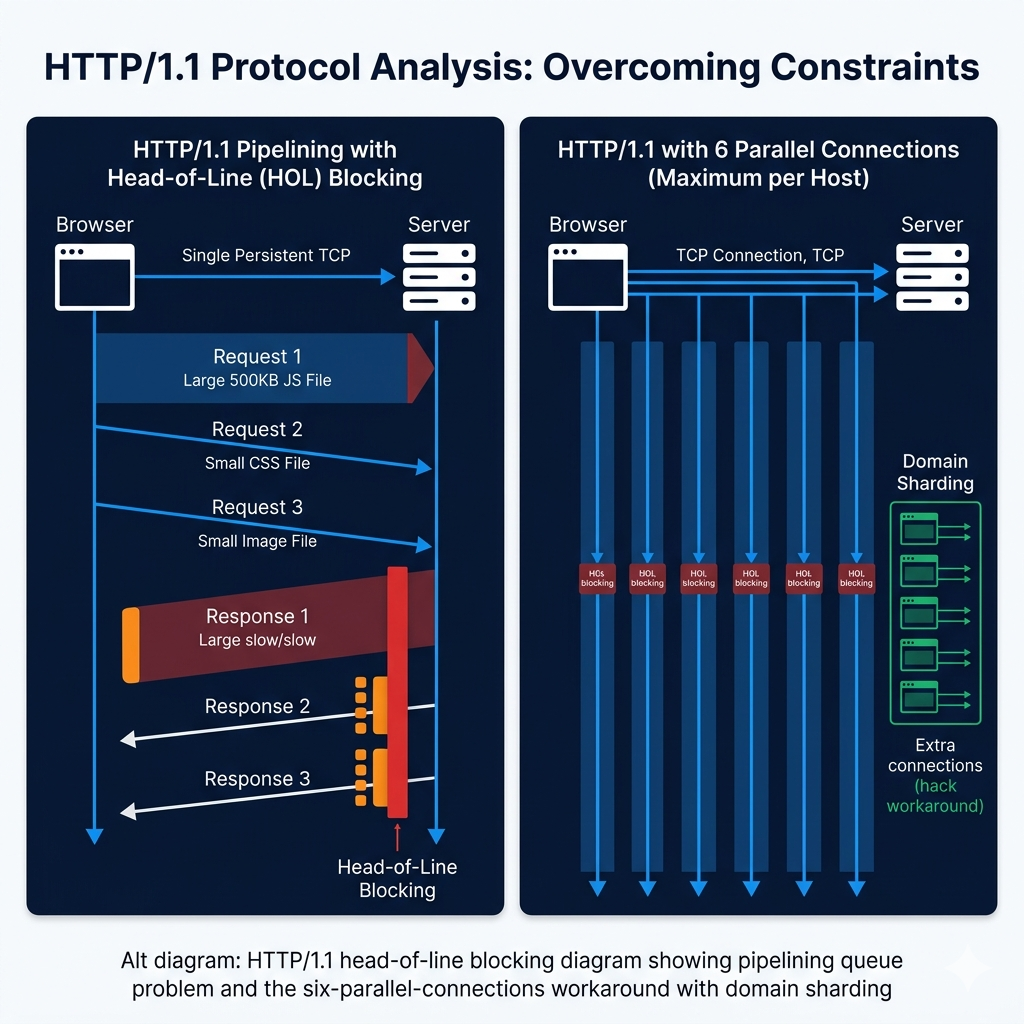
Pro Tips & Common Mistakes — HTTP/1.1
Pro Tip: HTTP/1.1's caching mechanisms —
Cache-Control,ETag,Last-Modified,Vary— are still the caching layer for HTTP/2 and HTTP/3. These headers didn't change with protocol upgrades. If your application has caching problems (stale responses, unexpected cache misses, over-aggressive caching), the issue is in these HTTP/1.1-era headers, not in the HTTP version. Understanding cache-control directives is protocol-version-independent knowledge that applies to every HTTP version in production today.
Common Mistake: Still implementing HTTP/1.1-era performance hacks (domain sharding, script concatenation, CSS sprite sheets) on a server that supports HTTP/2. With HTTP/2, domain sharding is actively harmful — it breaks connection coalescing and forces more TLS handshakes. Script concatenation prevents granular caching. These techniques solved HTTP/1.1 problems by working around the protocol; HTTP/2 solves those problems at the protocol level, so the workarounds become obstacles. Check your HTTP version before applying 2010-era performance advice.
HTTP/2: Binary Framing, Multiplexing, and the HPACK Revolution
HTTP/2, standardized in 2015 and based on Google's experimental SPDY protocol, attacked the head-of-line blocking problem from the protocol design level. Rather than sending text-format requests and responses that must be delivered complete and in order, HTTP/2 introduced a binary framing layer that breaks every HTTP message into small binary frames, each labeled with which stream it belongs to. Multiple streams can be interleaved on the same connection — frames from Response 1, Response 2, and Response 3 can be delivered simultaneously, in whatever order they're ready.
This is multiplexing — the feature that HTTP/1.1 tried to approximate with parallel connections but couldn't achieve. Imagine the difference between a highway with 6 lanes that can only carry one car from each lane at a time versus a system where the highway atomizes each "car" into 100 small "packets," all cars' packets can travel simultaneously, and the destination reassembles each car from its packets. The individual packets don't care about each other's ordering. HTTP/2's frames work exactly this way: a large JavaScript file's frames don't block a small CSS file's frames from arriving.
Stream prioritization extends this further. A browser rendering a page knows that the CSS needed for above-the-fold rendering is more important than JavaScript that powers interactive elements below the fold. HTTP/2 allows the client to assign priority weights to streams, letting the server optimize which frames to send first. A critical CSS response can be prioritized over a large but non-blocking script, reducing time-to-first-render even when total transfer time is the same.
HPACK header compression addressed a problem HTTP/1.1 left completely unaddressed: HTTP headers are enormous relative to most web resources. A modern browser sends 500–800 bytes of headers with every request — User-Agent, Accept, Accept-Encoding, Cookie, Authorization, and dozens more. For a page with 100 resources, that's 50,000–80,000 bytes of pure header overhead. HPACK solves this with two mechanisms: a static table of common header name-value pairs that can be referenced by index (sending 2 instead of "method: GET"), and a dynamic table that remembers headers sent in earlier requests on the same connection, allowing subsequent requests to reference them by index instead of repeating them. Headers that haven't changed — which is most of them — can be compressed to a few bytes.
# Comparing HTTP/1.1 and HTTP/2 in practice

# Check which HTTP version your server is using
curl -v --http2 https://yoursite.com 2>&1 | grep "< HTTP"
# HTTP/2 200  ← you're on HTTP/2
# HTTP/1.1 200 ← still on HTTP/1.1

# See multiplexing in action: measure connection count
# HTTP/1.1: many connections to same host
# HTTP/2: typically ONE connection per host with all resources multiplexed
curl --http2 -v https://example.com/resource1 https://example.com/resource2 2>&1 | grep "Re-using"
# HTTP/2: "Re-using existing connection" for both requests

# Check if your server supports HTTP/2
npx is-http2 https://yoursite.com
# Or:
curl -I --http2 https://yoursite.com | head -5

# HTTP/2 server push (server proactively sends resources):
# Apache config:
# H2PushResource /style.css critical
# H2PushResource /app.js

# Nginx HTTP/2 configuration:
cat << 'EOF'
# /etc/nginx/conf.d/https.conf
server {
    listen 443 ssl http2;  # Note: http2 parameter enables HTTP/2
    server_name yoursite.com;

    ssl_certificate /etc/ssl/certs/yoursite.crt;
    ssl_certificate_key /etc/ssl/private/yoursite.key;

    # HTTP/2 requires TLS — plain-text HTTP/2 (h2c) is rarely used
    ssl_protocols TLSv1.2 TLSv1.3;

    # HTTP/2 push (use carefully — can hurt performance if misconfigured)
    location / {
        # Only push critical resources
        add_header Link "</style.css>; rel=preload; as=style" always;
        add_header Link "</critical.js>; rel=preload; as=script" always;
    }
}
EOF

# Check HPACK compression effectiveness:
# HTTP/2 header frame sizes vs HTTP/1.1 raw header sizes
curl --http2 -v https://example.com 2>&1 | grep -i "header"

# Analyze HTTP/2 framing with Wireshark:
# Filter: http2
# Look for HEADERS frames (compressed headers), DATA frames (body),
# PRIORITY frames (stream prioritization), SETTINGS frames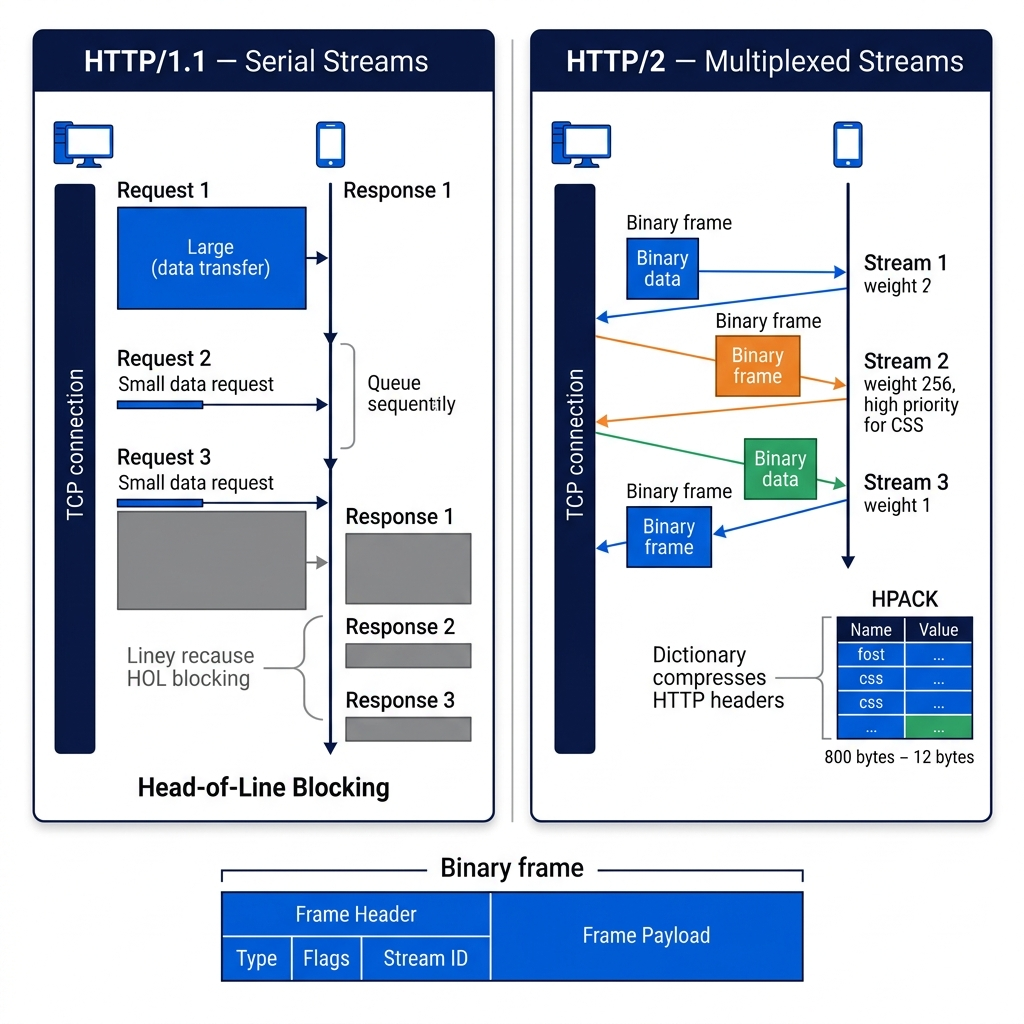
Pro Tips & Common Mistakes — HTTP/2
Pro Tip: HTTP/2 Server Push — the feature that lets servers proactively send resources the client hasn't requested yet — was theoretically compelling but largely deprecated in practice. Chrome removed support for Server Push in 2022 because it consistently hurt more than it helped: the server didn't know what the client had already cached, so it wasted bandwidth pushing resources the client already had. The
<link rel="preload">header achieves similar goals (telling the browser about critical resources early) without the bandwidth waste. Don't use Server Push in new implementations.
Common Mistake: Not enabling HTTP/2 because "our users are all on fast connections." HTTP/2's multiplexing benefits aren't primarily about raw bandwidth — they're about latency. Even on a fast connection, a mobile user with 50ms RTT pays significant head-of-line blocking costs under HTTP/1.1. HTTP/2 helps proportionally more on high-latency connections, which describes virtually all mobile users. Enable HTTP/2 at your load balancer or CDN regardless of your assumed user demographics.
HTTP/3 and QUIC: Abandoning TCP to Fix TCP's Problems
HTTP/2 solved HTTP-level head-of-line blocking. But there was another HOL blocking problem that HTTP/2 couldn't touch — and it was deeper, at the TCP level. Here's the problem HTTP/2 inadvertently made worse: by multiplexing everything over a single TCP connection, HTTP/2 created a situation where a single lost TCP packet would stall all HTTP streams simultaneously. With HTTP/1.1 and 6 parallel connections, a packet loss event on one connection affected only that connection. With HTTP/2 and one connection, the same packet loss stalled everything.
This isn't HTTP's fault — it's TCP's. TCP guarantees ordered delivery. If packet #42 is lost, packets #43 through #100 wait in a buffer until #42 is retransmitted and received. This is correct behavior for TCP's design goals (reliable byte-stream delivery). But it creates a hard constraint: no application-layer protocol built on TCP can fully escape head-of-line blocking at the transport layer, because TCP doesn't know about application-layer stream multiplexing. From TCP's perspective, it's delivering one byte stream; the fact that HTTP has divided that byte stream into 20 independent resources is invisible to TCP.
HTTP/3, standardized in 2022, solves this by replacing TCP with QUIC (Quick UDP Internet Connections) — a new transport protocol built on UDP. QUIC reimplements the reliability guarantees of TCP (acknowledgments, retransmission, congestion control, flow control) but does so at the stream level rather than the connection level. A packet loss affects only the QUIC stream it belongs to — other streams continue flowing without interruption. HTTP/3's HOL blocking is genuinely eliminated at the transport layer, not just at the HTTP layer.
QUIC also delivers two other significant improvements. Faster connection establishment: a new QUIC connection requires a single round trip (combining transport and TLS 1.3 handshakes), and for repeat connections to known servers, 0-RTT resumption allows data to be sent in the very first packet — zero round trips before data flows. Compare to TCP + TLS 1.3 which requires at least 2 round trips for a new connection. Connection migration: QUIC connections are identified by a connection ID rather than a (source IP, source port, destination IP, destination port) four-tuple. When a mobile user switches from WiFi to cellular, their IP address changes — which destroys a TCP connection, requiring a new handshake. A QUIC connection survives this transparently because the connection ID remains constant across address changes. For mobile users actively using an app while moving, this is transformative.
# Working with HTTP/3 in practice

# Check if a server supports HTTP/3 (look for Alt-Svc header)
curl -sI https://cloudflare.com | grep -i "alt-svc"
# Output: alt-svc: h3=":443"; ma=86400
# h3=":443" means: HTTP/3 available on port 443

# Test HTTP/3 directly (requires curl 7.66+ with HTTP/3 support)
curl --http3 -v https://cloudflare.com 2>&1 | head -20
# Look for: * Using HTTP/3

# Compare connection setup times across HTTP versions:
# HTTP/1.1 (TCP + TLS 1.3): DNS + TCP handshake + TLS handshake = ~3 round trips
# HTTP/2 (TCP + TLS 1.3): same as HTTP/1.1 for connection setup
# HTTP/3 (QUIC + TLS 1.3): DNS + QUIC+TLS combined = ~1 round trip
# HTTP/3 (QUIC 0-RTT): DNS only = ~0.5 round trips for known servers

time curl --http1.1 -o /dev/null -s https://www.cloudflare.com
time curl --http2   -o /dev/null -s https://www.cloudflare.com
time curl --http3   -o /dev/null -s https://www.cloudflare.com
# HTTP/3 shows the most improvement on high-latency or lossy connections

# Enable HTTP/3 in Nginx (requires nginx 1.25+ with QUIC support)
cat << 'EOF'
server {
    # Listen on both TCP (for HTTP/1.1 and HTTP/2 fallback)
    # and UDP (for HTTP/3 via QUIC)
    listen 443 ssl;           # TCP: HTTP/1.1 and HTTP/2
    listen 443 quic reuseport; # UDP: HTTP/3

    http3 on;
    http2 on;

    ssl_certificate /etc/ssl/certs/yoursite.crt;
    ssl_certificate_key /etc/ssl/private/yoursite.key;

    # Advertise HTTP/3 support to clients
    # Clients use this to upgrade on subsequent visits
    add_header Alt-Svc 'h3=":443"; ma=86400' always;

    # QUIC-specific settings
    ssl_early_data on;  # Enable 0-RTT for repeat connections
}
EOF

# Verify HTTP/3 is being used for your domain:
# Chrome DevTools → Network → Protocol column should show "h3"
# Or check: chrome://net-internals/#quic

# Test QUIC connectivity and performance:
curl -w "Protocol: %{http_version}\nTotal: %{time_total}s\n" \
  --http3 -o /dev/null -s https://yoursite.com

# For sites behind Cloudflare, HTTP/3 is enabled by default
# Dashboard → Speed → Optimization → HTTP/3 (QUIC) toggle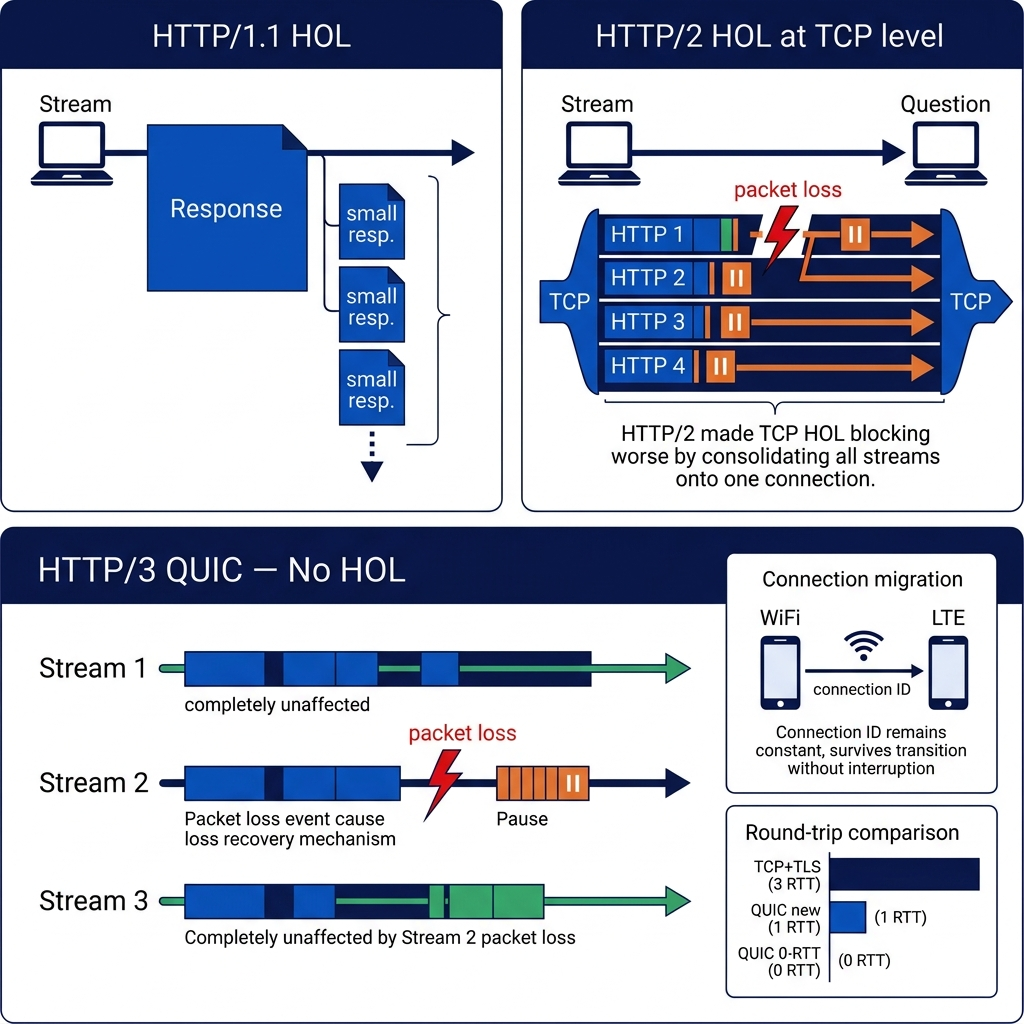
Pro Tips & Common Mistakes — HTTP/3
Pro Tip: HTTP/3 falls back gracefully to HTTP/2 or HTTP/1.1 when QUIC is unavailable. The
Alt-Svcheader tells clients where to find HTTP/3 support — clients that support it will upgrade on subsequent visits, while clients that don't support it continue using the TCP-based version they've always used. This means you can enable HTTP/3 at your CDN or load balancer with zero risk: unsupported clients are unaffected, and supported clients get the performance improvement automatically.
Myth-busted: "HTTP/3 is only useful for mobile users." While HTTP/3's connection migration feature is most visibly impactful for mobile users switching networks, its elimination of TCP-level HOL blocking benefits any connection with packet loss — which includes congested WiFi, intercontinental traffic, and any network experiencing high utilization. Studies on Cloudflare's network showed HTTP/3 improving performance at the 95th percentile (the slowest connections) by 12–15% even for desktop users. The users who benefit most are your worst-case users — exactly the ones you most need to help.
How It All Connects: The Protocol Evolution at a Glance
Each HTTP version was a targeted response to a specific failure mode in the previous version — and each solution revealed a new constraint at a deeper layer of the stack.
HTTP/1.0's connection-per-request model was simple and stateless, but the cost of TCP connection establishment made it unscalable as pages gained more resources. HTTP/1.1 solved connection overhead with persistent connections but exposed a more fundamental problem: sequential request-response ordering at the HTTP level meant one slow resource blocked everything behind it. The browser workaround (6 parallel connections) was effective but wasteful and set an artificial ceiling.
HTTP/2 solved HTTP-level head-of-line blocking with binary framing and stream multiplexing, dramatically reducing the need for browser-level parallel connections. But in consolidating traffic onto a single TCP connection, it inadvertently made TCP-level HOL blocking more damaging — now a single packet loss event could stall 20 streams instead of 1. HTTP/2 also couldn't fix the fundamental inefficiency of TCP's connection establishment overhead.
HTTP/3 stepped outside the problem space entirely. Instead of trying to fix TCP, it replaced TCP with QUIC — a new transport protocol that implements reliable delivery at the stream level rather than the connection level. The result eliminates TCP HOL blocking, reduces connection establishment to a single round trip, and makes connections resilient to IP address changes.
The through-line is a pattern familiar to any systems engineer: you optimize at one layer, the bottleneck moves to a deeper layer, and eventually you realize the constraint is architectural rather than configurable. The HTTP evolution is a masterclass in identifying which layer a problem actually lives in and solving it at the right depth.
What doesn't change across versions: the HTTP method semantics (GET, POST, PUT, DELETE), status codes (200, 404, 500), header fields (Content-Type, Cache-Control, Authorization), and the fundamental request-response model. HTTP/2 and HTTP/3 are transport optimizations for the same application protocol. Your REST APIs, your authentication headers, your caching strategies — all of these work identically across HTTP versions.
Getting Started: Detecting and Configuring HTTP Versions
Here's a practical toolkit for understanding which HTTP version your application is using and how to upgrade or verify your configuration.
Step 1: Detect which HTTP version you're running
# Method 1: curl verbose output
curl -v https://yoursite.com 2>&1 | grep "< HTTP"
# HTTP/1.1 200 ← on HTTP/1.1
# HTTP/2 200   ← on HTTP/2
# HTTP/3 200   ← on HTTP/3 (requires --http3 flag to force it)

# Method 2: Check server response headers
curl -sI https://yoursite.com | head -5

# Method 3: Check Alt-Svc header for HTTP/3 support
curl -sI https://yoursite.com | grep -i alt-svc

# Method 4: Browser DevTools
# Chrome: DevTools → Network → right-click column headers → Protocol
# Look for: h1 (HTTP/1.1), h2 (HTTP/2), h3 (HTTP/3)
Step 2: Enable HTTP/2 in Nginx
# /etc/nginx/sites-available/yoursite
server {
    listen 443 ssl http2;  # ← add "http2" here
    server_name yoursite.com;

    ssl_certificate /etc/letsencrypt/live/yoursite.com/fullchain.pem;
    ssl_certificate_key /etc/letsencrypt/live/yoursite.com/privkey.pem;

    # HTTP/2 REQUIRES TLS — no plain-text HTTP/2 support in browsers
    ssl_protocols TLSv1.2 TLSv1.3;
    ssl_ciphers ECDHE-ECDSA-AES128-GCM-SHA256:ECDHE-RSA-AES128-GCM-SHA256;

    location / {
        proxy_pass http://localhost:3000;
        proxy_http_version 1.1;  # backend uses HTTP/1.1; nginx handles HTTP/2 externally
        proxy_set_header Connection "";
    }
}

# Verify: nginx -t && nginx -s reload
# Test: curl -v --http2 https://yoursite.com 2>&1 | grep "< HTTP"
Step 3: Enable HTTP/3 in Nginx (nginx 1.25+)
server {
    listen 443 ssl;
    listen 443 quic reuseport;  # UDP port for QUIC
    http3 on;
    http2 on;

    server_name yoursite.com;

    ssl_certificate /etc/letsencrypt/live/yoursite.com/fullchain.pem;
    ssl_certificate_key /etc/letsencrypt/live/yoursite.com/privkey.pem;
    ssl_protocols TLSv1.3;  # HTTP/3/QUIC requires TLS 1.3

    add_header Alt-Svc 'h3=":443"; ma=86400' always;

    # Ensure UDP port 443 is open in your firewall
    # ufw allow 443/udp
    # iptables -A INPUT -p udp --dport 443 -j ACCEPT
}
Step 4: Enable HTTP/2 in Apache
# Enable HTTP/2 module
# sudo a2enmod http2
# sudo a2enmod ssl

# /etc/apache2/sites-available/yoursite-ssl.conf
<VirtualHost *:443>
    ServerName yoursite.com
    Protocols h2 http/1.1  # ← h2 enables HTTP/2; http/1.1 is the fallback

    SSLEngine on
    SSLCertificateFile /etc/letsencrypt/live/yoursite.com/fullchain.pem
    SSLCertificateKeyFile /etc/letsencrypt/live/yoursite.com/privkey.pem

    # HTTP/2 performance
    H2MaxSessionStreams 100
    H2MinWorkers 4
    H2MaxWorkers 25
</VirtualHost>
Step 5: Verify with a comprehensive test
# Full HTTP version audit for your site
# Install h2spec for HTTP/2 compliance testing:
go install github.com/summerwind/h2spec/cmd/h2spec@latest
h2spec -h yoursite.com -p 443 -t

# Or use online tools:
# https://tools.keycdn.com/http2-test — HTTP/2 detection
# https://http3check.net — HTTP/3 support check
# https://www.ssllabs.com/ssltest — TLS configuration (required for HTTP/2+)

# Check performance improvement with httpstat:
pip install httpstat
httpstat https://yoursite.com  # Shows timing breakdown per phase

# Browser-side verification:
# Open Chrome DevTools → Network tab → load your site
# Right-click column headers → enable "Protocol" column
# All resources should show "h2" (HTTP/2) or "h3" (HTTP/3)
# Any resources still showing "http/1.1" are from third-party domains
# that haven't upgraded, or from your origin if not configured correctly
Step 6: Cloudflare or CDN-level HTTP/3 (easiest path)
# If you're behind Cloudflare (or Fastly, AWS CloudFront):
# HTTP/2 is enabled by default
# HTTP/3 can be enabled in the dashboard:
# Cloudflare: Speed → Optimization → HTTP/3 (QUIC) → ON

# Verify Cloudflare is handling the protocol upgrade:
curl -sI https://yoursite.com | grep -i "server\|via\|cf-ray\|alt-svc"
# cf-ray header confirms Cloudflare
# alt-svc: h3=":443" confirms HTTP/3 is advertised

# Test that HTTP/3 is actually being used:
curl --http3 -o /dev/null -s -w "HTTP version: %{http_version}\n" https://yoursite.com
FAQ
Q: What is the main difference between HTTP/1.1 and HTTP/2?
HTTP/1.1 processes requests sequentially over persistent connections — one response must complete before the next can be delivered on the same connection, causing head-of-line blocking. HTTP/2 introduces a binary framing layer that breaks messages into frames and multiplexes multiple streams simultaneously over a single connection. A large response in HTTP/2 doesn't block smaller responses; their frames are interleaved. HTTP/2 also adds HPACK header compression (reducing redundant header overhead) and stream prioritization. The result is dramatically fewer connections and better utilization of each connection, particularly on pages with many resources.
Q: What is HTTP/3 and why does it use UDP instead of TCP?
HTTP/3 is the third major version of HTTP, standardized in 2022, which uses QUIC as its transport protocol instead of TCP. QUIC runs over UDP, which has no built-in ordered delivery or reliability guarantees — but QUIC reimplements these at the stream level rather than the connection level. This means a lost UDP packet affects only the QUIC stream it belongs to, not all streams on the connection. TCP's head-of-line blocking is architectural — it cannot be fixed while maintaining TCP's byte-stream ordering guarantee. Switching to UDP + QUIC was the only way to solve this at the transport layer.
Q: Does HTTP/2 or HTTP/3 break backward compatibility?
No — the HTTP application semantics are identical across all versions. The same methods (GET, POST, PUT, DELETE), status codes (200, 404, 500), and headers (Content-Type, Authorization, Cache-Control) work identically in HTTP/1.1, HTTP/2, and HTTP/3. The differences are entirely in how messages are encoded and transported. Your REST APIs, cookies, and web applications don't need any code changes to benefit from HTTP/2 or HTTP/3 — the protocol upgrade happens at the server and CDN configuration layer. Browsers negotiate the best available version automatically.
Q: Is HTTP/2 always faster than HTTP/1.1?
Almost always, but not unconditionally. HTTP/2's multiplexing benefit is most pronounced when pages have many small resources (common in modern web apps with many API calls, images, and scripts). For pages with very few resources (a simple HTML page with no external assets), the difference is minimal. HTTP/2 can actually perform marginally worse than HTTP/1.1 in certain edge cases, such as on very unreliable networks where TCP HOL blocking compounds the problem. For typical modern web applications, HTTP/2 is measurably faster, particularly at the 90th and 95th percentile of user experience (slowest connections).
Q: What is QUIC and how does it differ from TCP?
QUIC (Quick UDP Internet Connections) is a transport protocol developed by Google and standardized by the IETF. Like TCP, QUIC provides reliable, ordered delivery with congestion control and flow control. Unlike TCP, QUIC operates at the stream level: reliability is implemented per-stream rather than per-connection. QUIC also combines transport and TLS 1.3 handshakes into a single exchange (reducing new connection setup to 1 RTT vs TCP+TLS's 2–3 RTTs), supports 0-RTT for repeat connections, and maintains connections across IP address changes by using connection IDs rather than (IP, port) four-tuples. These improvements make QUIC significantly faster on mobile and lossy networks.
Q: Do I need to change my application code to support HTTP/2 or HTTP/3?
Generally no. HTTP/2 and HTTP/3 upgrades happen at the web server, reverse proxy, or CDN layer — not in your application code. The upgrade is a configuration change in Nginx, Apache, or your cloud provider's settings. Your application receives the same HTTP requests it always has; the server handles protocol negotiation with clients automatically. The exception: if you use HTTP/2 Server Push (pushing resources proactively), you may need application-level logic to determine what to push — but Server Push is largely deprecated and not recommended for new implementations.
Q: What is head-of-line blocking and which HTTP versions have it?
Head-of-line blocking is when one slow item in a queue prevents all items behind it from being processed, regardless of whether they're ready. In HTTP/1.1, it occurs at the HTTP level: requests on a single connection must be responded to in order, so a slow response blocks all subsequent responses. HTTP/2 solves HTTP-level HOL blocking with stream multiplexing, but introduces TCP-level HOL blocking: a lost TCP packet stalls all HTTP/2 streams simultaneously since TCP delivers a single ordered byte stream. HTTP/3 eliminates HOL blocking at both levels: QUIC's stream-level reliability means a lost packet affects only the stream it belongs to, not all streams on the connection.
Q: How do I know if my website is using HTTP/2 or HTTP/3?
The easiest method is Chrome DevTools: open the Network tab, right-click any column header, enable the "Protocol" column, and load your page. Resources will show "h1" (HTTP/1.1), "h2" (HTTP/2), or "h3" (HTTP/3). From the command line, curl -v https://yoursite.com 2>&1 | grep "< HTTP" shows the protocol version in the response. For HTTP/3 specifically, look for an Alt-Svc: h3=":443" response header, which indicates the server advertises HTTP/3 support. Online tools like http3check.net provide quick verification without needing local tooling.
Conclusion
The evolution from HTTP/1.0 to HTTP/3 is one of the most instructive stories in web infrastructure engineering — not because each version was a clean success, but because each version's solution revealed the next problem at a deeper layer. HTTP/1.1 solved connection overhead and revealed HOL blocking. HTTP/2 solved application-level HOL blocking and revealed transport-level HOL blocking. HTTP/3 solved transport-level HOL blocking by abandoning the foundational assumption that had constrained the previous two solutions: that reliable transport must be built on TCP.
The practical takeaway is straightforward: enable HTTP/2 at minimum on every server you control (it's a one-line nginx config change and TLS is required anyway), enable HTTP/3 at your CDN if you use one (Cloudflare makes it a toggle), and stop applying HTTP/1.1-era performance hacks (domain sharding, script concatenation) to servers that already support HTTP/2. These changes don't require application code modifications — they're infrastructure-level improvements with real, measurable latency and throughput improvements for your users, particularly at the long tail of slow connections where user experience is most at risk.
Understanding why these versions exist — not just what they do — is what lets you make informed architectural decisions rather than cargo-culting configuration from Stack Overflow answers written in 2014.