
In 2018, a large e-commerce company launched a complete website redesign. The new site was faster, more beautiful, and technically superior in almost every measurable way. Within three weeks, their organic search traffic had dropped by 60%. Millions of dollars in revenue, gone. Not because the site was bad. Because they had migrated from server-rendered HTML to a fully client-side JavaScript single-page application — and their crawlers couldn't render JavaScript quickly enough to index the dynamic content before the rankings collapsed.
The engineering team knew web development. They didn't know how search engines actually work — which pages get crawled, why JavaScript creates a two-phase crawling problem, how the inverted index relies on the actual rendered HTML, and why a crawl budget matters at scale. These aren't SEO secrets. They're foundational computer science concepts that most developers never encounter because the systems that implement them are opaque, massive, and distributed across infrastructure most engineers will never directly touch.
This post opens that black box. We're going to trace the complete technical journey from "a page exists on the internet" to "that page appears in search results" — covering web crawling strategies, inverted index construction, machine learning ranking systems, query processing at billion-query scale, and what all of it means for developers and architects building content that needs to be found. By the end, you'll understand search engines as the distributed systems engineering achievement they actually are.
Table of Contents
- Web Crawling: How Search Engines Discover the Internet
- Crawl Budget and Prioritization: Why Your Site May Not Get Fully Indexed
- JavaScript Crawling: The Two-Phase Problem
- Indexing: From Raw HTML to a Searchable Database
- The Inverted Index: The Data Structure That Makes Search Fast
- Ranking Algorithms: How Search Engines Decide What Matters
- Query Processing at Scale: Deciphering User Intent
- Distributed Infrastructure: Serving Billions of Searches
- How It All Connects: Following a Page from Publish to Results
- Getting Started: Making Your Site Search-Engine-Friendly
- FAQ
- Conclusion
Web Crawling: How Search Engines Discover the Internet
Imagine you've been tasked with cataloging every book in a library where the shelves rearrange themselves continuously, new books appear every second, some books reference other books across the building, and the library has no master catalog. Your job is to read as many books as possible, note their contents, and come back regularly for the ones that get updated. That's web crawling — and doing it at internet scale is one of the most complex distributed systems problems in computer science.
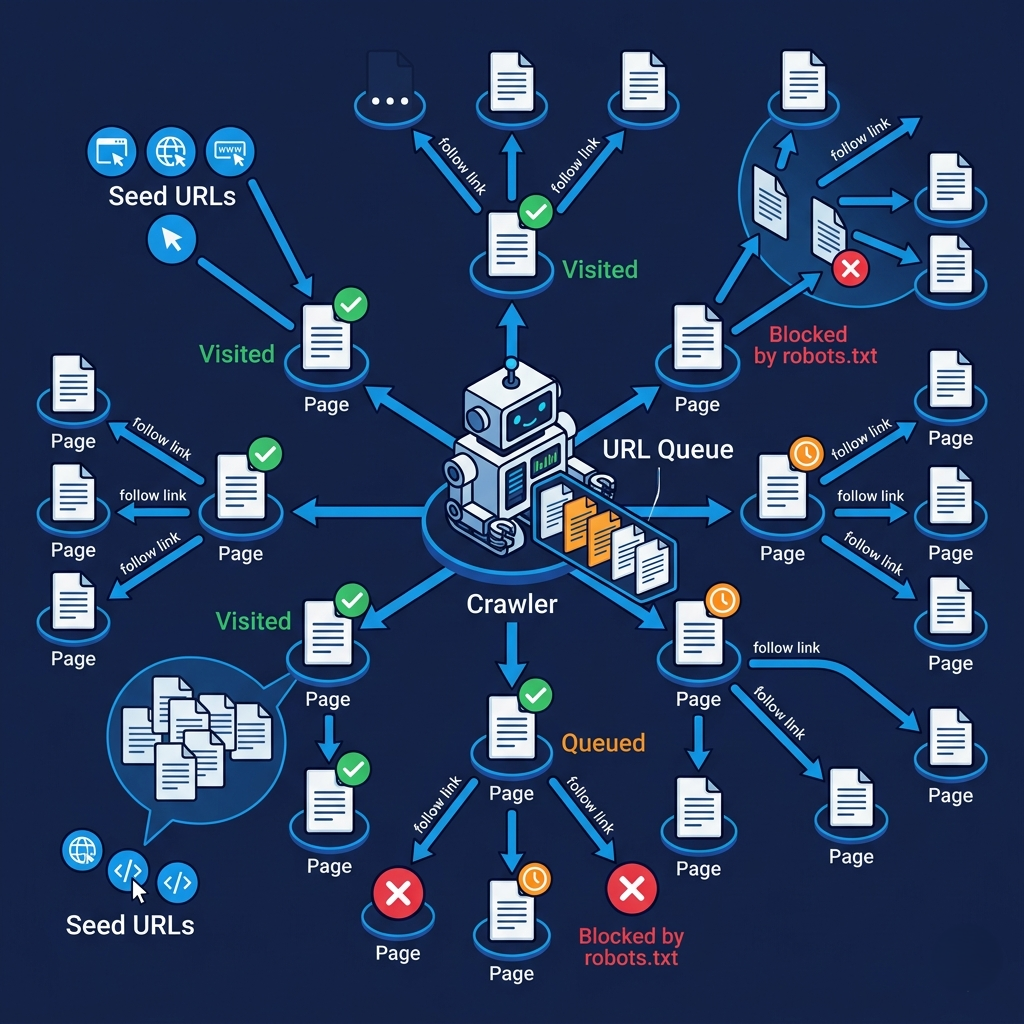
Web crawlers (also called spiders or bots) are automated programs that systematically browse the web, following links from page to page and collecting content. They begin with a set of seed URLs — a carefully curated starting list of highly-linked, authoritative pages. From each page, they extract all outgoing hyperlinks, add unvisited ones to a queue, fetch those pages, extract their links, and repeat. The result, over time, is a graph traversal of the web — breadth-first search (covering many sites shallowly) combined with depth-first strategies (following the link structure within important sites deeply).
The scale is almost incomprehensible. Google's crawl infrastructure fetches billions of pages per day across a network of geographically distributed crawling clusters. Each page fetch involves a DNS lookup, TCP connection, HTTP request, HTML parsing, and link extraction — in parallel, across millions of concurrent requests, with rate limiting to avoid overloading target servers. Googlebot identifies itself via a specific User-Agent header, and well-behaved crawlers respect robots.txt directives that tell them which parts of a site to avoid.
As crawlers visit pages, they collect a rich set of metadata beyond just the HTML content: response codes (200 OK, 301 redirect, 404 Not Found), response times, HTTP headers (content type, last modified, canonical URLs), and the complete link graph — which pages link to which other pages. This link graph is not just used for further crawling; it becomes the basis for PageRank-style authority calculations in the ranking phase.
# Simplified web crawler — illustrating the core concepts
import requests
from bs4 import BeautifulSoup
from urllib.parse import urljoin, urlparse
from collections import deque
import time

class SimpleCrawler:
    def __init__(self, seed_urls: list[str], max_pages: int = 100):
        self.queue = deque(seed_urls)
        self.visited = set()
        self.max_pages = max_pages
        self.crawl_results = {}

    def normalize_url(self, url: str) -> str:
        """URL normalization — remove fragments, normalize trailing slashes."""
        parsed = urlparse(url)
        # Remove fragments (#section) — same page, different position
        normalized = parsed._replace(fragment='').geturl()
        # Lowercase scheme and netloc
        return normalized.lower() if normalized else None

    def fetch_page(self, url: str) -> dict:
        """Fetch a page and extract its content and links."""
        try:
            headers = {'User-Agent': 'MyCrawler/1.0 (+https://example.com/bot)'}
            response = requests.get(url, headers=headers, timeout=10)

            soup = BeautifulSoup(response.content, 'html.parser')

            # Extract content signals
            title = soup.find('title')
            meta_desc = soup.find('meta', attrs={'name': 'description'})
            h1_tags = [h.get_text() for h in soup.find_all('h1')]
            body_text = soup.get_text()

            # Extract and normalize outgoing links
            links = []
            for a_tag in soup.find_all('a', href=True):
                absolute_url = urljoin(url, a_tag['href'])
                normalized = self.normalize_url(absolute_url)
                if normalized and urlparse(normalized).scheme in ('http', 'https'):
                    links.append(normalized)

            return {
                'url': url,
                'status_code': response.status_code,
                'title': title.get_text() if title else None,
                'meta_description': meta_desc.get('content') if meta_desc else None,
                'h1_tags': h1_tags,
                'outgoing_links': list(set(links)),  # deduplicate
                'content_length': len(body_text),
                'response_time_ms': response.elapsed.total_seconds() * 1000
            }

        except Exception as e:
            return {'url': url, 'error': str(e)}

    def crawl(self):
        """BFS crawling from seed URLs."""
        while self.queue and len(self.visited) < self.max_pages:
            url = self.queue.popleft()

            if url in self.visited:
                continue

            self.visited.add(url)
            result = self.fetch_page(url)
            self.crawl_results[url] = result

            # Add unvisited links to the queue
            for link in result.get('outgoing_links', []):
                if link not in self.visited:
                    self.queue.append(link)

            # Polite crawling: don't overwhelm servers
            time.sleep(1)  # real crawlers use per-domain rate limiting

        return self.crawl_results

# Usage
crawler = SimpleCrawler(seed_urls=["https://example.com"])
results = crawler.crawl()
print(f"Crawled {len(results)} pages")
Pro Tips & Common Mistakes — Web Crawling
Pro Tip: Your
robots.txtfile is not security — it's a courtesy signal to well-behaved crawlers. Malicious bots ignore it entirely. Never put sensitive URLs inrobots.txtas a "hide" strategy — the file is publicly readable and actually lists your sensitive paths for anyone looking. Use authentication to protect pages you don't want accessed.
Common Mistake: Blocking Googlebot via
robots.txtornoindexmeta tags on pages you actually want indexed. This happens most often with staging environments that never had theirrobots.txtupdated before launch, and with pagination or filtering parameters that developers thought were "duplicate" content but that users actually navigate to directly. Audit yourrobots.txtandnoindexdirectives before assuming indexing problems are caused by something else.
Crawl Budget and Prioritization: Why Your Site May Not Get Fully Indexed
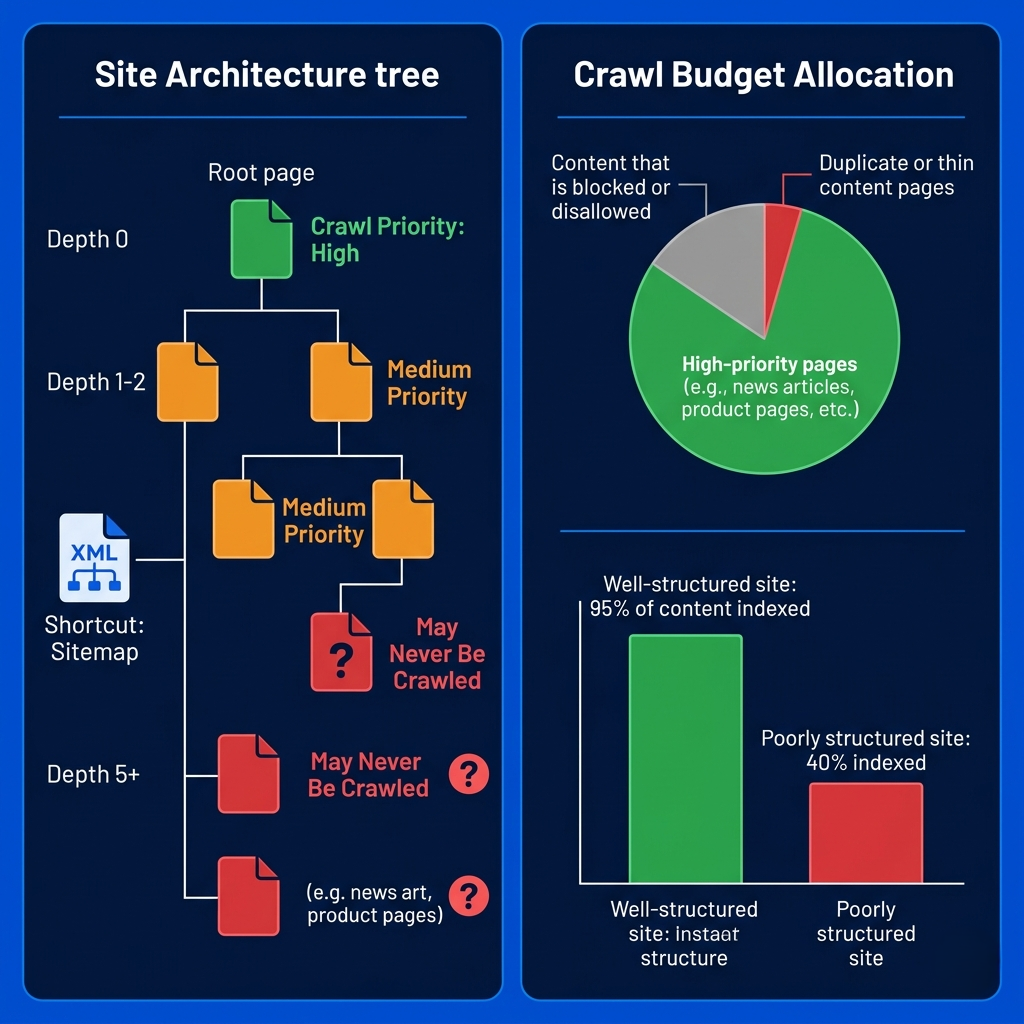
Here's a fact that surprises most developers: search engines don't crawl your entire site. They can't. Even with Google's infrastructure, crawling the entire internet completely — including all its dynamically generated URLs, pagination variants, and filter combinations — is impossible. Search engines allocate a crawl budget to each site: a limit on how many pages will be crawled in a given time period, determined by the site's size, authority, server capacity, and update frequency.
Crawl budget allocation is a function of two things: crawl rate limit (how fast Googlebot can crawl your site without overloading your server, determined by your server's response times) and crawl demand (how much Google wants to crawl your site, based on its popularity and how frequently the content changes). A news site with millions of inbound links and articles published every few minutes will receive a massive crawl budget — pages might be recrawled every few minutes. A small business site with 200 pages updated infrequently might have new pages take weeks to appear in the index.
Prioritization within the crawl budget is equally sophisticated. Crawlers favor pages with high external link counts (indicating importance), pages that have been recently updated, pages close to the site's root (shallow URL structures), and pages explicitly listed in XML sitemaps. They deprioritize — or may never crawl — pages with very long URL chains (deep site architecture), pages reachable only through JavaScript-driven navigation with no static links, URL parameters that generate near-infinite variations (like faceted search filters), and pages with thin or duplicate content that signals low quality.
The practical implication: how you structure your site's internal linking directly affects which pages get indexed. A page buried five clicks from the homepage with no internal links pointing to it may never be crawled, regardless of how good the content is. Your sitemap tells crawlers what exists; your internal link structure tells them what's important.
# Check your site's crawl status and identify crawl budget issues

# 1. Generate and submit an XML sitemap
# sitemap.xml — tells crawlers what pages exist and their priority
cat sitemap.xml
# Expected format:
# <?xml version="1.0" encoding="UTF-8"?>
# <urlset xmlns="http://www.sitemaps.org/schemas/sitemap/0.9">
#   <url>
#     <loc>https://example.com/important-page</loc>
#     <lastmod>2025-01-15</lastmod>
#     <changefreq>weekly</changefreq>
#     <priority>0.8</priority>
#   </url>
# </urlset>

# 2. Check your robots.txt for unintended blocks
curl https://yoursite.com/robots.txt

# 3. Find crawl waste — URLs consuming budget without value
# Common crawl budget wasters to block in robots.txt:
# /search?q=*          — site search results (infinite variations)
# /product?color=*     — filter parameters
# /session=*           — session ID parameters
# /print/*             — print versions of pages

# Example robots.txt to preserve crawl budget:
cat << 'EOF'
User-agent: *
Disallow: /search
Disallow: /filter
Disallow: /sort
Disallow: /session
Allow: /

Sitemap: https://yoursite.com/sitemap.xml
EOF

# 4. Use canonical tags to consolidate duplicate URLs
# In your HTML <head>:
# <link rel="canonical" href="https://yoursite.com/product/widget" />
# This tells crawlers: this URL is the preferred version, don't index the rest

# 5. Check crawl stats in Google Search Console
# Search Console → Settings → Crawl Stats
# Look for: crawl rate, pages crawled per day, response times
# Red flags: low pages/day relative to site size, high error rates
Pro Tips & Common Mistakes — Crawl Budget
Pro Tip: Use
rel="canonical"religiously for e-commerce sites with faceted navigation. If your site generates URLs like/shoes?color=red&size=10&sort=price, you might have thousands of URL variants for the same product set. Canonical tags consolidate the crawl signal to your preferred URL without blocking users from accessing the filtered views. This is the correct solution for filter-generated URLs — notrobots.txtdisallow (which prevents crawling but not indexing of already-known URLs).
Common Mistake: Setting
changefreqandpriorityin sitemaps without actually reflecting the truth. Search engines now treat these as weak signals, not instructions — they've been too often abused. What actually influences crawl frequency is demonstrated update frequency (changing your content actually triggers more frequent crawling) and site authority (inbound links drive crawl demand). Your sitemap's most important job is listing URLs, not the priority attributes.
JavaScript Crawling: The Two-Phase Problem
The e-commerce company from this post's opening story learned an expensive lesson about how search engines handle JavaScript. When they migrated to a single-page application, their product pages that once had fully-rendered HTML in the initial response now returned a nearly empty <div id="app"></div> — all the content was loaded later by JavaScript. Crawlers saw empty pages. Rankings collapsed.
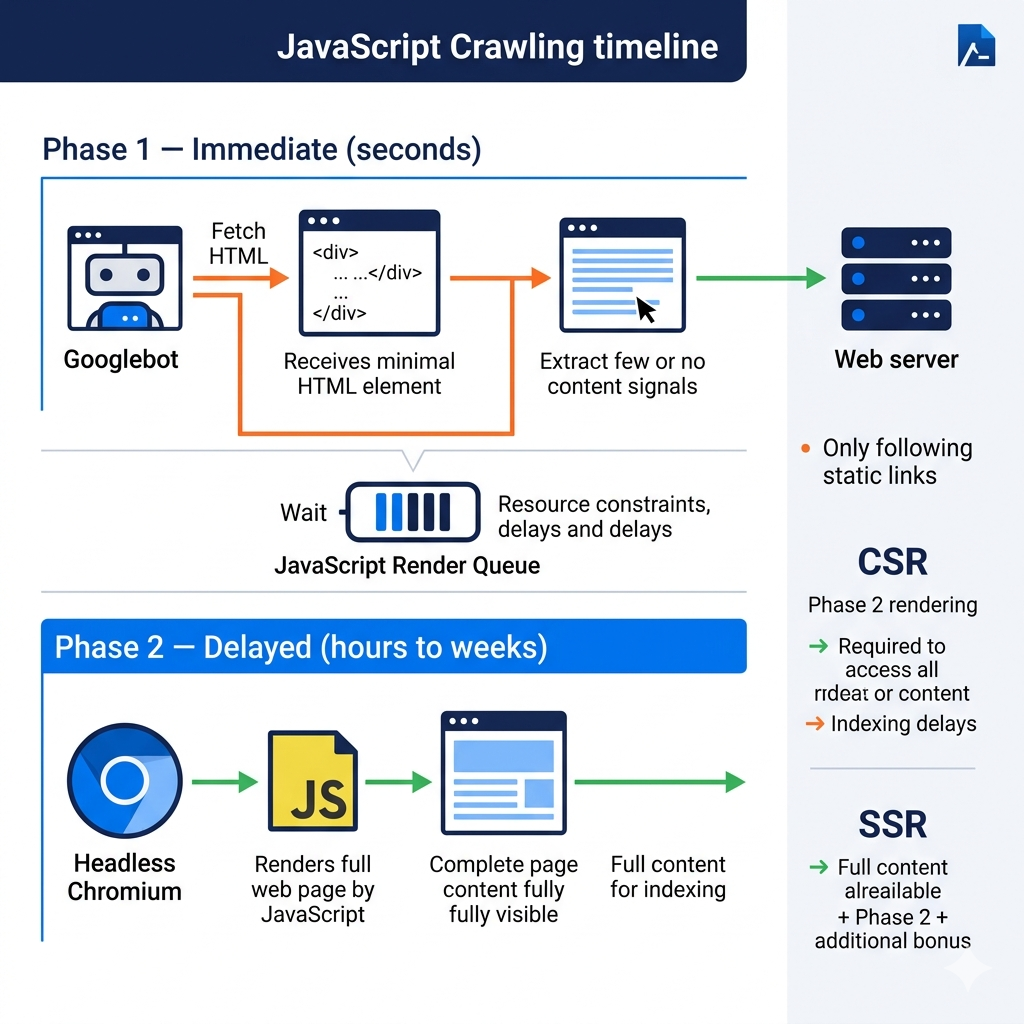
Modern crawlers use a two-phase approach to handle JavaScript-heavy sites. In Phase 1, the crawler fetches the raw HTML from the server and immediately extracts static content and links. This phase is fast and runs at massive scale. In Phase 2, the crawler queues a headless browser rendering of the page — Googlebot uses a version of Chromium to actually execute JavaScript and render the full page, just like a real browser. The rendered DOM is then processed for indexing.
The critical problem with Phase 2 is timing and resource intensity. JavaScript rendering is orders of magnitude more computationally expensive than parsing static HTML. Google has publicly acknowledged that rendered crawling is resource-constrained — pages may wait days to weeks between the initial fetch and the JavaScript render. This means if your content exists only in JavaScript, it may appear in the index significantly later than server-rendered content, or be deprioritized if your site's crawl budget is limited. For a new site or newly published content, this delay can mean weeks of reduced visibility.
Here's the thing most developers miss about JavaScript and SEO: it's not binary. The question isn't "does my site use JavaScript?" — it's "does critical content appear in the initial server response?" A site can use React or Vue extensively while still server-rendering the initial HTML with frameworks like Next.js or Nuxt.js. When the crawler fetches the initial response, it gets full HTML including all the content. JavaScript enhancement runs client-side after that — and the crawler already has what it needs.
// Server-Side Rendering (SSR) approach with Next.js
// This ensures crawlers see full content in Phase 1 (no JavaScript execution needed)

// pages/product/[id].js — Next.js page with SSR
export async function getServerSideProps({ params }) {
  // This runs on the server, not the browser
  const product = await fetchProduct(params.id);

  return {
    props: {
      product,
      // All data is embedded in the initial HTML response
      // Crawlers see the full content without needing JavaScript
    }
  };
}

export default function ProductPage({ product }) {
  return (
    <div>
      <h1>{product.name}</h1>
      <p>{product.description}</p>
      <span>${product.price}</span>
      {/* This content is in the initial HTML — crawlers see it in Phase 1 */}
    </div>
  );
}

// Compare to Client-Side Only (CSR) — PROBLEMATIC for crawlers
// pages/product-csr/[id].js — CSR approach (bad for SEO)
import { useEffect, useState } from 'react';

export default function ProductPageCSR({ id }) {
  const [product, setProduct] = useState(null);

  useEffect(() => {
    // This runs in the browser AFTER page load
    // Crawlers fetching Phase 1 HTML see: <div id="root"></div>
    // They must queue Phase 2 rendering to see the actual content
    fetch(`/api/product/${id}`)
      .then(r => r.json())
      .then(setProduct);
  }, [id]);

  // Initial render returns empty or skeleton — what crawlers see in Phase 1
  if (!product) return <div>Loading...</div>;

  return <div><h1>{product.name}</h1></div>;
}

// Testing what crawlers see from your site:
// curl -A "Googlebot/2.1 (+http://www.google.com/bot.html)" https://yoursite.com/page
// This shows the Phase 1 HTML — the static response before JavaScript execution
Pro Tips & Common Mistakes — JavaScript Crawling
Pro Tip: Test what crawlers see from your pages using two methods: (1)
curl -A "Googlebot/2.1 ..." https://yoursite.com/pageto simulate Phase 1 crawling and see raw HTML output, and (2) Google Search Console's URL Inspection tool, which shows the rendered page from Google's perspective including Phase 2 results. If these two views look significantly different, you have a JavaScript crawling gap.
Common Mistake: Assuming that since Google "can render JavaScript," your CSR-only site is fine for SEO. While technically true that Google renders JavaScript, the rendering queue introduces meaningful delays and the resource constraints mean less-authoritative sites have lower rendering priority. For content that needs to rank quickly — news, new products, time-sensitive pages — server-side rendering is not optional. It's the difference between indexing in hours versus weeks.
Indexing: From Raw HTML to a Searchable Database
Crawling collects pages. Indexing is what makes those pages searchable. The indexing pipeline takes raw page content and transforms it through a series of NLP and data processing stages into a structured representation optimized for retrieval. Understanding this pipeline explains many behaviors that otherwise seem mysterious — like why a page can be "crawled" but not show up in search results, or why keyword density matters less than it once did.
The first stage is text extraction and tokenization — breaking page content into individual units (tokens). For English, this is relatively straightforward: split on whitespace and punctuation, normalize case. For languages like Chinese, Japanese, or Thai that don't use spaces between words, tokenization requires sophisticated segmentation models that identify word boundaries using language-specific knowledge. A single mistake here propagates through the entire indexing and retrieval chain.
After tokenization, the indexer performs normalization and stemming: reducing words to their base or root form. "Running," "runs," "ran," and "runner" all reduce to "run." "Searches," "searched," and "searching" all reduce to "search." This normalization means a query for "ran" will find pages about "running" — dramatically improving recall. More sophisticated systems use lemmatization (grammatically correct root forms) rather than simple stemming (cutting off suffixes), and synonym expansion (expanding "sofa" to also include "couch," "settee," "divan").
Context analysis is where modern NLP really separates current search from historical keyword-matching. The word "jaguar" has completely different meanings in "jaguar attacks on livestock" versus "jaguar XF review" — the indexer must capture which meaning applies based on surrounding context. Entity recognition identifies proper nouns (people, places, organizations, products). Semantic analysis attempts to understand the topic of the page holistically, not just which keywords it contains. This is why modern SEO advice emphasizes topic coverage rather than keyword density — the indexer is looking for topical relevance, not just term frequency.
# Simplified indexing pipeline — text processing stages
import re
from collections import defaultdict
from typing import List, Dict

# Install: pip install nltk
import nltk
from nltk.stem import PorterStemmer
from nltk.tokenize import word_tokenize
from nltk.corpus import stopwords

nltk.download('punkt', quiet=True)
nltk.download('stopwords', quiet=True)

class IndexingPipeline:
    def __init__(self):
        self.stemmer = PorterStemmer()
        self.stop_words = set(stopwords.words('english'))
        self.index = {}  # url -> processed tokens and metadata

    def extract_text(self, html: str) -> dict:
        """Extract text components from HTML (simplified)."""
        from bs4 import BeautifulSoup
        soup = BeautifulSoup(html, 'html.parser')

        return {
            'title': soup.title.get_text() if soup.title else '',
            'h1': [h.get_text() for h in soup.find_all('h1')],
            'h2': [h.get_text() for h in soup.find_all('h2')],
            'body': soup.get_text(),
            'meta_description': (soup.find('meta', attrs={'name': 'description'}) or {}).get('content', ''),
            # Different page zones get different importance weights
        }

    def tokenize_and_normalize(self, text: str) -> List[str]:
        """Stage 1: Tokenize → lowercase → remove punctuation."""
        tokens = word_tokenize(text.lower())
        # Remove punctuation and non-alphabetic tokens
        tokens = [re.sub(r'[^a-z]', '', t) for t in tokens]
        tokens = [t for t in tokens if t]  # remove empty strings
        return tokens

    def remove_stopwords(self, tokens: List[str]) -> List[str]:
        """Stage 2: Remove common words that don't carry meaning."""
        # "the", "and", "is", "in" — high frequency, low signal
        return [t for t in tokens if t not in self.stop_words]

    def stem(self, tokens: List[str]) -> List[str]:
        """Stage 3: Reduce words to root form."""
        # "running" → "run", "searches" → "search", "faster" → "faster"
        return [self.stemmer.stem(t) for t in tokens]

    def calculate_term_frequency(self, tokens: List[str]) -> Dict[str, float]:
        """TF: how often each term appears, normalized by document length."""
        term_counts = defaultdict(int)
        for token in tokens:
            term_counts[token] += 1

        total_terms = len(tokens)
        return {term: count / total_terms for term, count in term_counts.items()}

    def process_page(self, url: str, html: str) -> dict:
        """Full indexing pipeline for a single page."""
        content = self.extract_text(html)

        # Weight by content zone: title and H1 matter more than body
        weighted_text = (
            (content['title'] + ' ') * 5 +   # title: 5x weight
            (' '.join(content['h1']) + ' ') * 3 +  # H1: 3x weight
            (' '.join(content['h2']) + ' ') * 2 +  # H2: 2x weight
            content['body']                    # body: 1x weight
        )

        tokens = self.tokenize_and_normalize(weighted_text)
        tokens = self.remove_stopwords(tokens)
        stemmed_tokens = self.stem(tokens)
        tf_scores = self.calculate_term_frequency(stemmed_tokens)

        self.index[url] = {
            'url': url,
            'title': content['title'],
            'description': content['meta_description'],
            'term_frequencies': tf_scores,
            'token_count': len(tokens)
        }

        return self.index[url]

pipeline = IndexingPipeline()
result = pipeline.process_page("https://example.com/page", "<html>...</html>")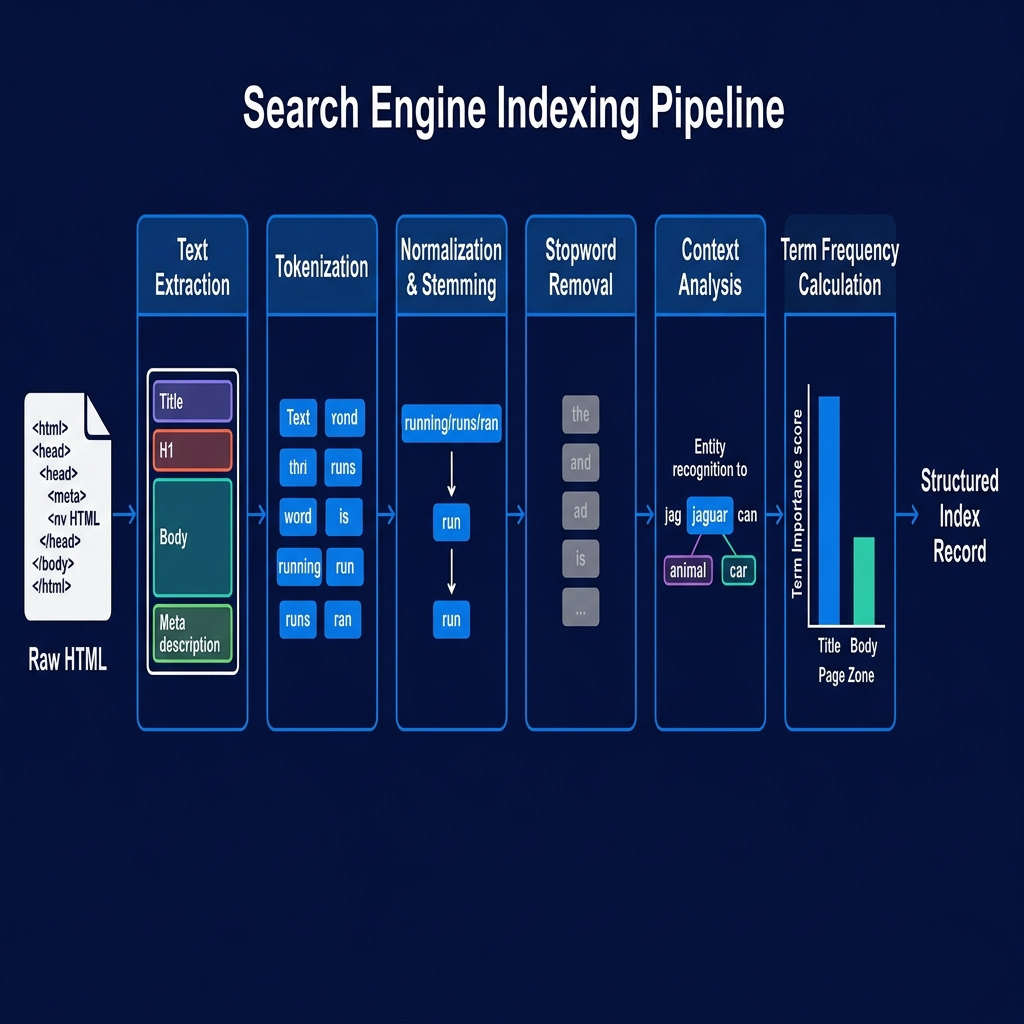
Pro Tips & Common Mistakes — Indexing
Pro Tip: Page content zones matter to indexers, not just total keyword presence. Words in your
<title>tag carry dramatically more weight than words in body text. Words in<h1>and<h2>carry more weight than paragraph text. This is why every page should have a unique, descriptive title tag (not "Home" or "Page 1"), a single H1 that clearly states the page's topic, and H2s that structure the content thematically. These aren't just UX best practices — they directly signal topic and relevance to the indexer.
Common Mistake: Blocking CSS and JavaScript files in
robots.txtthinking they're irrelevant to content indexing. Modern indexers render pages in Phase 2 and need to execute JavaScript and load CSS to see the full content. Blocking these resources means the rendered view is broken — which the indexer detects and may penalize. In Google Search Console, check for "Blocked resources" errors. Your CSS and JS files should be crawlable.
The Inverted Index: The Data Structure That Makes Search Fast
When you search for "python tutorial," Google searches an index spanning hundreds of billions of documents and returns results in under 100 milliseconds. How? The answer is a data structure called an inverted index — arguably the most important data structure in information retrieval, and the core of every search engine from Elasticsearch to Google itself.
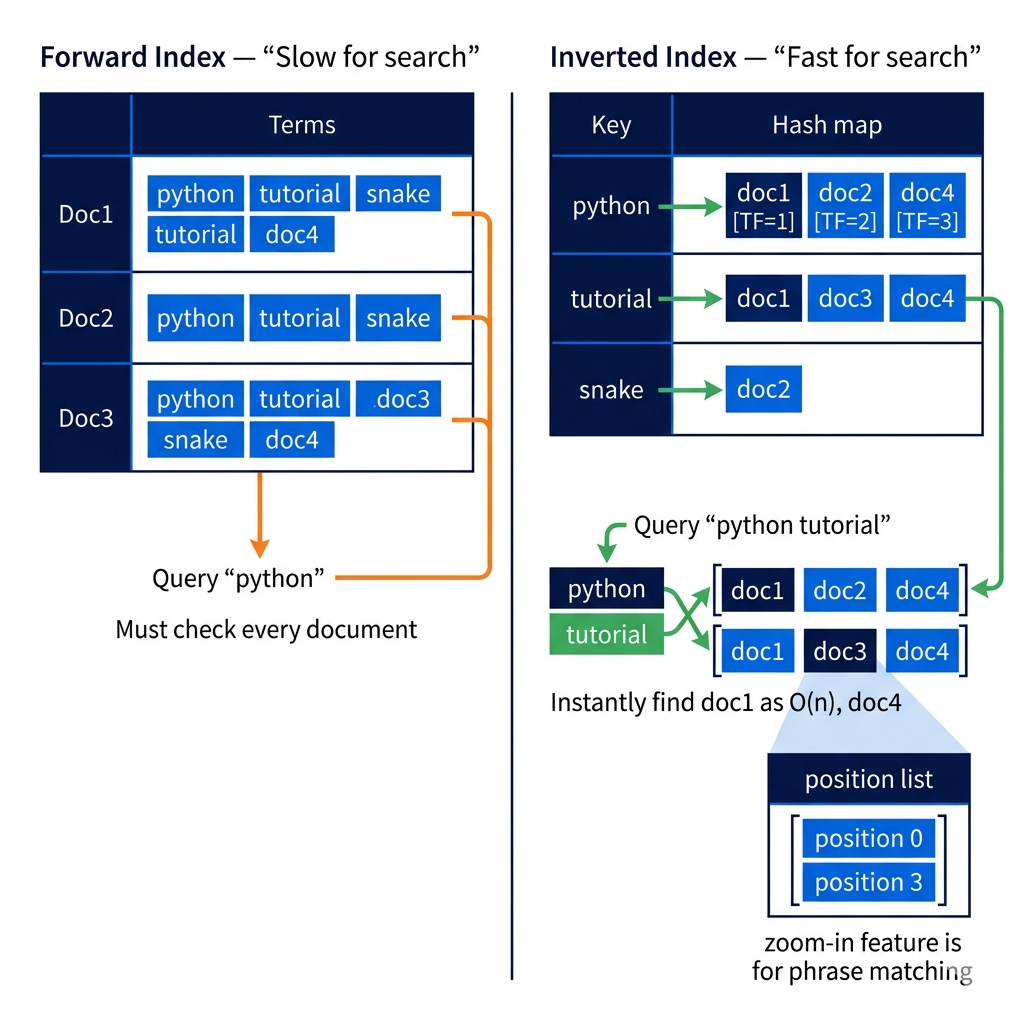
A forward index maps documents to their terms: Document 1 contains {python, tutorial, beginner, programming}. Document 2 contains {python, snake, reptile, habitat}. This is intuitive but useless for search — to find all documents containing "python," you'd scan every document and check its term list. At a billion documents, that's impossibly slow.
An inverted index flips the mapping: for each term, store the list of all documents containing that term. The term "python" maps to [doc1, doc2, doc5, doc8, doc15, ...]. The term "tutorial" maps to [doc1, doc6, doc12, ...]. To find documents about "python tutorial," you look up both posting lists and compute their intersection. The lookup is a hash map operation — O(1) — and the intersection of two sorted lists is O(n) where n is the smaller list's length. At billion-document scale, this runs in milliseconds.
Real inverted indexes store far more than just document IDs. Each entry in the posting list (called a "posting") includes: the document's unique ID, the term frequency within that document (how many times the term appears), the positions of the term within the document (enabling exact phrase matching — "python tutorial" must have these words adjacent), and relevance scores pre-computed to accelerate ranking. The entire structure is compressed using techniques like variable-byte encoding, delta encoding (storing differences between sequential document IDs rather than absolute values), and SIMD-optimized intersection algorithms.
# Inverted index implementation — from concept to working code
from collections import defaultdict
import json

class InvertedIndex:
    def __init__(self):
        # term -> {doc_id: {'tf': frequency, 'positions': [pos1, pos2, ...]}}
        self.index = defaultdict(lambda: defaultdict(lambda: {'tf': 0, 'positions': []}))
        self.doc_count = 0
        self.doc_store = {}  # Store document metadata

    def add_document(self, doc_id: str, text: str, metadata: dict = None):
        """Add a document to the inverted index."""
        tokens = text.lower().split()
        self.doc_count += 1
        self.doc_store[doc_id] = {'text': text, 'metadata': metadata or {}}

        # Build posting list for each term
        for position, token in enumerate(tokens):
            self.index[token][doc_id]['tf'] += 1
            self.index[token][doc_id]['positions'].append(position)

    def search(self, query: str) -> list:
        """Boolean AND search — find documents containing all query terms."""
        query_terms = query.lower().split()

        if not query_terms:
            return []

        # Get posting lists for all query terms
        posting_lists = []
        for term in query_terms:
            if term not in self.index:
                return []  # term not in any document
            posting_lists.append(set(self.index[term].keys()))

        # Intersect all posting lists — documents must contain ALL terms
        result_doc_ids = posting_lists[0]
        for posting_list in posting_lists[1:]:
            result_doc_ids = result_doc_ids.intersection(posting_list)

        # Score and sort results by term frequency (simplified TF scoring)
        scored_results = []
        for doc_id in result_doc_ids:
            score = sum(
                self.index[term][doc_id]['tf']
                for term in query_terms
            )
            scored_results.append((doc_id, score, self.doc_store[doc_id]))

        return sorted(scored_results, key=lambda x: x[1], reverse=True)

    def phrase_search(self, phrase: str) -> list:
        """Phrase search using position information."""
        terms = phrase.lower().split()
        if len(terms) < 2:
            return self.search(phrase)

        # Find documents containing all terms
        candidate_docs = set(self.index[terms[0]].keys())
        for term in terms[1:]:
            candidate_docs &= set(self.index.get(term, {}).keys())

        # Verify terms appear consecutively using position lists
        phrase_matches = []
        for doc_id in candidate_docs:
            first_term_positions = self.index[terms[0]][doc_id]['positions']
            for start_pos in first_term_positions:
                # Check if remaining terms appear at consecutive positions
                if all(
                    (start_pos + i) in self.index[terms[i]][doc_id]['positions']
                    for i in range(1, len(terms))
                ):
                    phrase_matches.append(doc_id)
                    break

        return [(doc_id, self.doc_store[doc_id]) for doc_id in phrase_matches]

# Example usage
idx = InvertedIndex()
idx.add_document("doc1", "python tutorial for beginners programming guide")
idx.add_document("doc2", "python snake reptile habitat care guide")
idx.add_document("doc3", "javascript tutorial web development programming")
idx.add_document("doc4", "python programming advanced patterns tutorial")

# AND search: "python tutorial" returns docs where BOTH words appear
results = idx.search("python tutorial")
for doc_id, score, doc in results:
    print(f"{doc_id} (score: {score}): {doc['text'][:50]}")
# Output: doc1 (score: 2), doc4 (score: 2), doc2 (score: 1)

# Phrase search: "python tutorial" must appear consecutively
phrase_results = idx.phrase_search("python tutorial")
# Only doc1 matches ("python tutorial for beginners...")
# doc4 has both words but not consecutively ("python programming advanced... tutorial")
Pro Tips & Common Mistakes — Inverted Index
Pro Tip: If you're building search functionality for your application (internal search, site search, document search), use Elasticsearch or its open-source alternative OpenSearch rather than building an inverted index from scratch. They implement all the compression, phrase matching, relevance scoring (BM25), distributed sharding, and real-time update mechanics that make a production inverted index actually work at scale. Understanding the inverted index concept makes you a better Elasticsearch user — understanding the mapping between concepts and Elasticsearch's API design choices.
Common Mistake: Treating search relevance as purely a keyword-matching problem. Modern search (including Elasticsearch with neural search or Google's ranking) goes well beyond TF-IDF. Semantic similarity (vector search, embedding-based retrieval), user engagement signals, content freshness, and link authority all contribute. If your site search returns poor results despite pages existing, the problem is often missing relevance tuning (field boosting, synonym handling, stopword configuration) rather than missing content.
Ranking Algorithms: How Search Engines Decide What Matters
Getting a page into the index is only half the battle. The index contains billions of documents. For any given query, thousands or millions of pages might be relevant. Ranking is the problem of ordering those candidates so the most useful result appears first — and it's been the central arms race of search engine development for three decades.
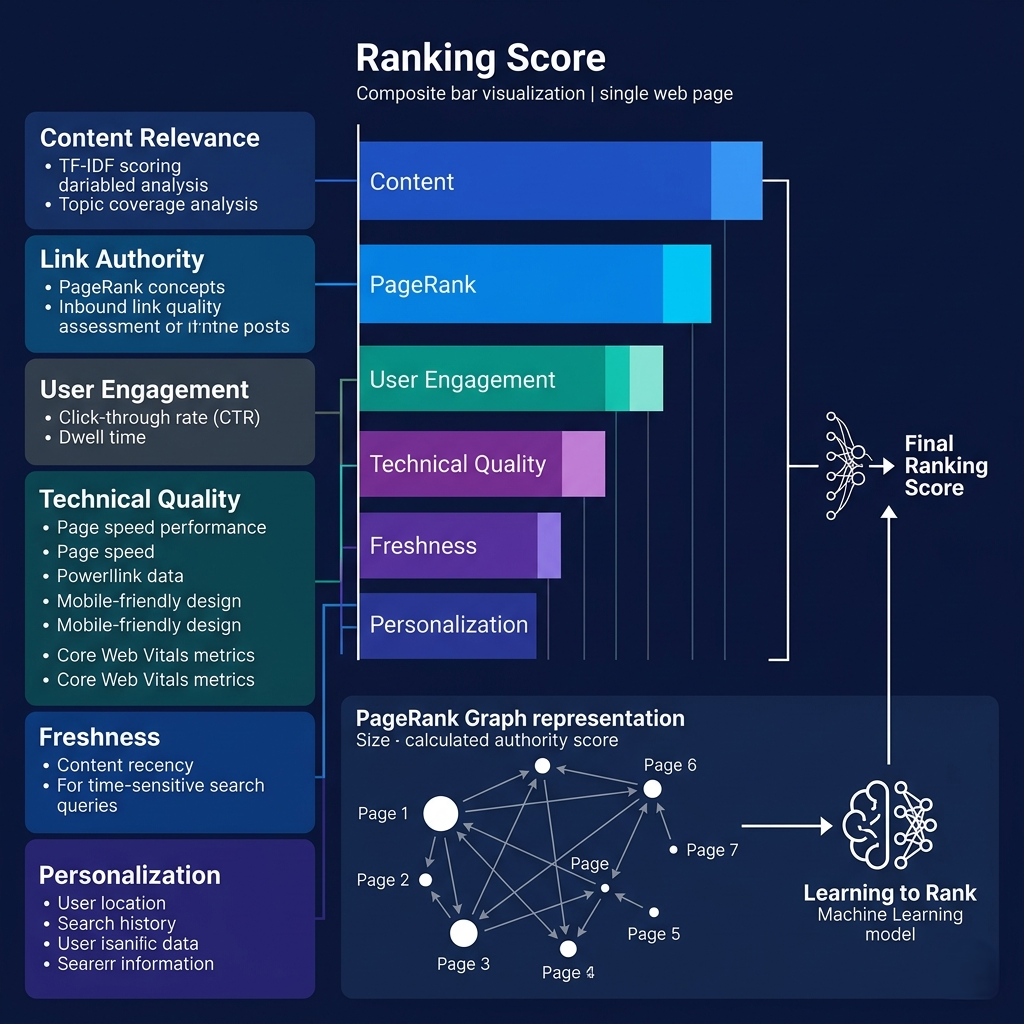
The foundational ranking concept is TF-IDF (Term Frequency-Inverse Document Frequency). TF measures how often a term appears in a specific document; IDF measures how rare a term is across all documents. A word that appears frequently in a document AND is rare across the corpus is a strong topical signal. A word that appears frequently everywhere ("the," "and") has low IDF and gets down-weighted. TF-IDF gives each document-term pair a score; summing scores across query terms gives a document's baseline relevance score.
PageRank, Google's foundational innovation, added link-based authority to relevance. The core insight: if many authoritative pages link to a page, that page is likely authoritative itself. PageRank models the web as a graph and simulates a random web surfer — the probability of landing on any given page after following random links from random starting points. Pages with many high-quality inbound links accumulate high PageRank, which boosts their rankings even when their TF-IDF scores are similar to competitors. This is why "link building" became the central strategy in SEO — you were building PageRank.
Modern ranking systems have layered machine learning on top of these foundations through learning to rank (LTR) — training models on human-rated search results to learn what makes a good result for a given query. The training data is massive: Google employs thousands of quality raters who evaluate search results on rubrics covering expertise, authoritativeness, trustworthiness (E-E-A-T), content quality, and user intent satisfaction. These ratings train models that capture subtle quality signals that can't be expressed as simple rules — the difference between a page that technically contains the right keywords but reads like keyword-stuffed spam and one that genuinely answers the question with depth and authority.
# TF-IDF scoring — the mathematical foundation of search relevance
import math
from collections import defaultdict, Counter
from typing import List, Dict

class TFIDFRanker:
    def __init__(self):
        self.documents = {}         # doc_id -> raw text
        self.term_doc_freq = defaultdict(int)  # term -> number of docs containing it
        self.tf_scores = {}         # doc_id -> {term: tf_score}

    def add_document(self, doc_id: str, text: str):
        """Index a document and compute TF scores."""
        tokens = text.lower().split()
        self.documents[doc_id] = text

        # Term Frequency: relative frequency of each term in this document
        token_counts = Counter(tokens)
        max_count = max(token_counts.values()) if token_counts else 1

        self.tf_scores[doc_id] = {
            term: count / max_count  # normalized TF
            for term, count in token_counts.items()
        }

        # Track how many documents contain each term (for IDF)
        for term in set(tokens):
            self.term_doc_freq[term] += 1

    def idf(self, term: str) -> float:
        """
        Inverse Document Frequency: log(N / df)
        - N = total documents
        - df = number of documents containing the term
        - Rare terms get high IDF (more discriminating)
        - Common terms get low IDF (less useful for ranking)
        """
        N = len(self.documents)
        df = self.term_doc_freq.get(term, 0)
        if df == 0:
            return 0
        return math.log(N / df)  # log(N/df) — higher for rarer terms

    def score_document(self, doc_id: str, query_terms: List[str]) -> float:
        """TF-IDF score for a document given query terms."""
        doc_tf = self.tf_scores.get(doc_id, {})
        score = 0.0
        for term in query_terms:
            tf = doc_tf.get(term, 0)
            idf_score = self.idf(term)
            score += tf * idf_score  # TF × IDF for each query term
        return score

    def search(self, query: str, top_k: int = 5) -> List[tuple]:
        """Rank all documents by TF-IDF relevance to query."""
        query_terms = query.lower().split()

        # Score all documents
        scores = {
            doc_id: self.score_document(doc_id, query_terms)
            for doc_id in self.documents
        }

        # Sort by score (descending) and return top k
        ranked = sorted(scores.items(), key=lambda x: x[1], reverse=True)
        return [(doc_id, score, self.documents[doc_id][:100])
                for doc_id, score in ranked[:top_k] if score > 0]

# Example
ranker = TFIDFRanker()
ranker.add_document("d1", "python tutorial beginners programming learn python basics")
ranker.add_document("d2", "python snake care feeding habitat reptile guide")
ranker.add_document("d3", "advanced python programming patterns decorators generators")
ranker.add_document("d4", "javascript tutorial web development frontend programming")

results = ranker.search("python programming tutorial")
for doc_id, score, preview in results:
    print(f"{doc_id} (TF-IDF: {score:.3f}): {preview}...")
# d1 and d3 rank highest — both have "python" AND "programming"
# d1 ranks above d3 because "tutorial" appears only in d1 among python docs (higher IDF)
Pro Tips & Common Mistakes — Ranking
Pro Tip: "E-E-A-T" (Experience, Expertise, Authoritativeness, Trustworthiness) is Google's quality rating framework, and it's most impactful for "Your Money or Your Life" (YMYL) content — health, finance, legal, safety topics where bad information causes real harm. For YMYL content, author credentials, citation of authoritative sources, clear publication/update dates, and transparent editorial policies are not optional — they're what separates pages that rank from pages that don't. For general content topics, E-E-A-T signals matter but less intensely.
Common Mistake: Optimizing for ranking factors in isolation rather than for user intent satisfaction holistically. The entire direction of modern search ranking is toward "does this page satisfy what the user actually wanted?" — a measure that's hard to game but easy to achieve by genuinely answering questions thoroughly. Pages that rank despite poor UX (slow loading, intrusive ads, thin content) do so despite those factors, not because of them. Building pages that users love is the most durable SEO strategy because it aligns with what the ranking algorithm is trying to measure.
Query Processing at Scale: Deciphering User Intent
A user types "jaguar" into a search box. What do they want? The animal? The car? The NFL team's mascot? The guitar brand? The operating system? The search engine has to make this determination in under 100 milliseconds, for billions of queries per day, with only a few words of context. Query processing is the stage where search engines attempt to read minds — and the sophistication of modern approaches is remarkable.
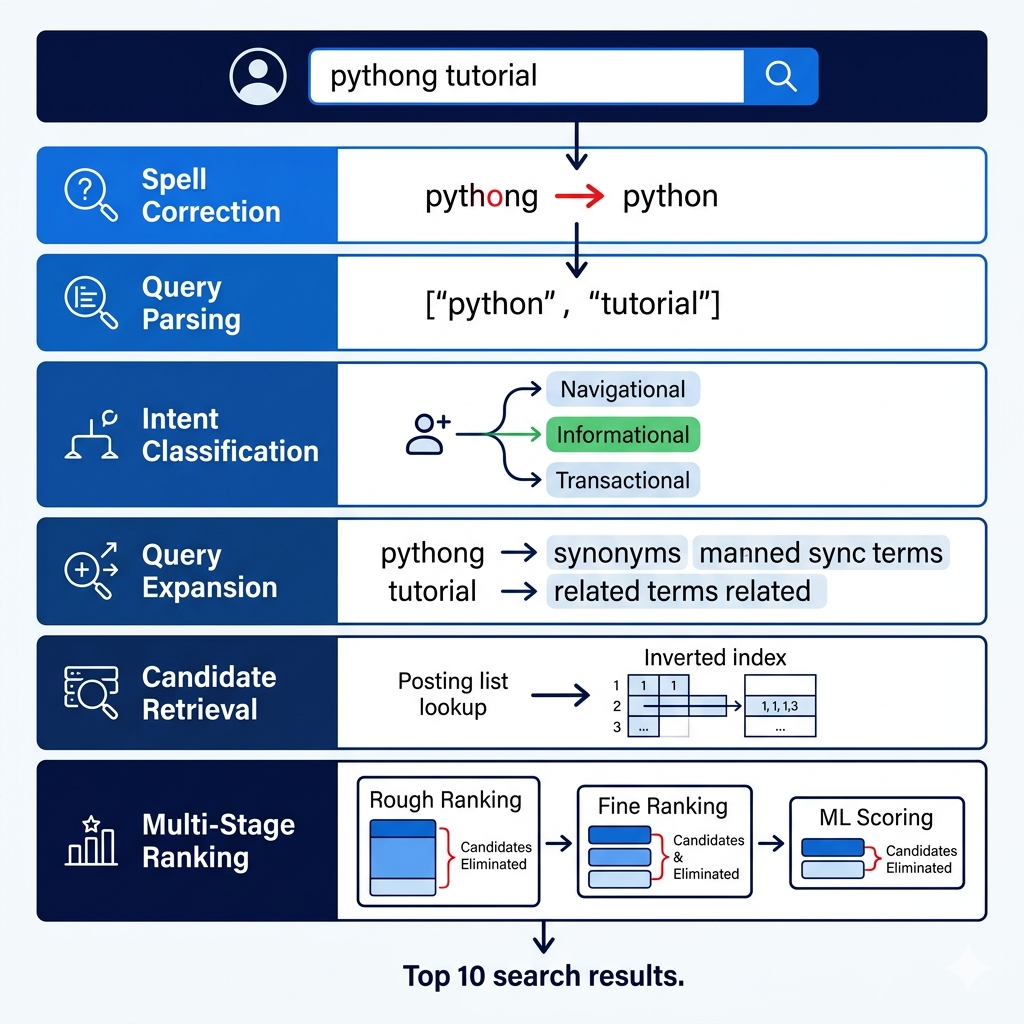
Query analysis begins with parsing: breaking the query into components, correcting spelling errors ("pythong tutorial" → "python tutorial"), and identifying the query type. Navigational queries seek a specific website ("facebook login," "youtube"). Informational queries seek general knowledge ("how does photosynthesis work"). Transactional queries signal intent to complete an action ("buy Nike Air Max," "python tutorial pdf download"). The same words can represent different types — "python" alone is ambiguous; "python download" is likely transactional (get the software); "what is python" is clearly informational.
Query expansion increases recall by broadening the search beyond exact terms. The system might expand "python programming" to also include results relevant to "Python programming language," "Python coding," "Python scripting," and "Python development" — terms the user might not have typed but clearly intends to find. Expansion must be controlled: over-expansion produces irrelevant results, while under-expansion misses relevant documents that use different but equivalent terminology.
At query time, ranking isn't computed from scratch for every document in the index. Pre-computed signals (PageRank, content quality scores) are stored in the index and retrieved alongside posting lists. The ranking system selects candidate documents, retrieves their pre-computed signals, applies real-time signals (query-specific relevance, user context, freshness), and scores candidates through a cascade of models ranging from cheap-but-approximate (to quickly eliminate irrelevant candidates) to expensive-but-precise (applied only to the final set of contenders). This multi-stage ranking pipeline is how a search engine can apply sophisticated ML models to billions of documents in milliseconds.
# Query processing pipeline — parsing, expansion, and intent classification
import re
from typing import List, Dict, Tuple

class QueryProcessor:
    def __init__(self):
        # Simple spelling correction dictionary (real systems use neural spell check)
        self.corrections = {
            'pythong': 'python', 'pythonn': 'python',
            'javascript': 'javascript', 'javascrip': 'javascript',
            'recieve': 'receive', 'occurence': 'occurrence'
        }

        # Synonym/expansion mappings
        self.synonyms = {
            'python': ['python programming', 'python language', 'python coding'],
            'tutorial': ['guide', 'how to', 'walkthrough', 'introduction'],
            'fast': ['quick', 'speed', 'performance', 'efficient']
        }

        # Query type classifiers (simplified — real systems use ML models)
        self.navigational_signals = ['site:', 'login', 'homepage', 'official']
        self.transactional_signals = ['buy', 'download', 'price', 'cheap', 'order', 'get']
        self.informational_signals = ['how', 'what', 'why', 'when', 'which', 'explain']

    def correct_spelling(self, query: str) -> Tuple[str, bool]:
        """Apply spelling corrections."""
        words = query.lower().split()
        corrected = [self.corrections.get(word, word) for word in words]
        corrected_query = ' '.join(corrected)
        was_corrected = corrected_query != query.lower()
        return corrected_query, was_corrected

    def classify_intent(self, query: str) -> str:
        """Classify query as navigational, transactional, or informational."""
        query_lower = query.lower()
        words = query_lower.split()

        if any(signal in query_lower for signal in self.navigational_signals):
            return 'navigational'
        if any(signal in words for signal in self.transactional_signals):
            return 'transactional'
        if any(signal in words for signal in self.informational_signals):
            return 'informational'
        return 'ambiguous'  # requires context or personalization to resolve

    def expand_query(self, query: str) -> List[str]:
        """Generate expanded query terms for recall improvement."""
        expanded = [query]
        words = query.lower().split()

        for word in words:
            if word in self.synonyms:
                for synonym in self.synonyms[word]:
                    expanded.append(query.lower().replace(word, synonym))

        return list(set(expanded))

    def process(self, raw_query: str, user_context: dict = None) -> dict:
        """Full query processing pipeline."""
        # Stage 1: Spelling correction
        corrected_query, was_corrected = self.correct_spelling(raw_query)

        # Stage 2: Intent classification
        intent = self.classify_intent(corrected_query)

        # Stage 3: Query expansion
        expanded_terms = self.expand_query(corrected_query)

        # Stage 4: Personalization context
        personalization = {}
        if user_context:
            personalization = {
                'location': user_context.get('location', 'unknown'),
                'preferred_language': user_context.get('language', 'en'),
                'recent_searches': user_context.get('history', [])[-5:]
            }

        return {
            'original_query': raw_query,
            'processed_query': corrected_query,
            'spelling_corrected': was_corrected,
            'intent': intent,
            'expanded_queries': expanded_terms,
            'personalization': personalization
        }

# Examples
processor = QueryProcessor()

result = processor.process("pythong tutorial", user_context={'location': 'US', 'language': 'en'})
print(f"Query: '{result['original_query']}' → '{result['processed_query']}' (corrected: {result['spelling_corrected']})")
print(f"Intent: {result['intent']}")
# Output: Query: 'pythong tutorial' → 'python tutorial' (corrected: True)
# Intent: informational

result2 = processor.process("buy python book online")
print(f"Intent: {result2['intent']}")
# Output: Intent: transactional
Pro Tips & Common Mistakes — Query Processing
Pro Tip: Understanding query intent classification should directly shape your content strategy. For informational queries, comprehensive, well-structured long-form content wins. For transactional queries, clear product/service pages with pricing, availability, and strong conversion signals win. For navigational queries, brand consistency and clear site structure win. A single page trying to satisfy all three intent types typically satisfies none of them well.
Common Mistake: Writing content for the exact query you want to rank for rather than for the underlying intent. If users searching "best laptops 2025" want a comparison with multiple options and objective criteria — not a sales page for a single laptop — a sales page will consistently underperform a genuine comparison guide, regardless of keyword density. The ranking system has become increasingly good at measuring intent satisfaction through user engagement signals.
Distributed Infrastructure: Serving Billions of Searches
The final piece of the search engine puzzle is the engineering challenge of actually serving results to billions of users daily with sub-second response times. No single server, or even a single data center, can hold a full search index or handle the query load. Search engines are among the largest distributed systems ever built.
The search index itself is sharded — split across thousands of machines, each holding a portion of the total index. A query must be broadcast to all shards, each shard returns its local top results, and a centralized aggregator merges and re-ranks the results from all shards into a final result set. This fan-out/fan-in architecture means response time is bounded by the slowest shard in the system — which is why index servers are replicated (multiple copies of each shard) and queries can be served by any replica.
Data center geography matters for latency. Search serving clusters are deployed in multiple continents, and user requests are routed to the nearest cluster to minimize round-trip time. A user in London shouldn't be hitting data centers in Oregon. This global distribution also provides redundancy — a data center outage doesn't take down search if other regions can absorb the load. The challenges of maintaining consistency across globally distributed index replicas — ensuring users everywhere see the same results for the same query, and that newly indexed content appears globally within acceptable time windows — are among the hardest distributed systems problems at scale.
New content doesn't go directly into the main index. It's processed into a freshness index (sometimes called a "delta index") — a smaller, frequently-updated index that captures recently crawled content. The main index is rebuilt periodically through massive batch processing. At query time, results from both the main index and the freshness index are merged, with appropriate freshness weighting for time-sensitive queries. This two-tier indexing architecture balances the need for up-to-date results against the prohibitive cost of continuously rebuilding a multi-billion-document index.
How It All Connects: Following a Page from Publish to Results
Let's trace a single page through the complete pipeline — from "published on the internet" to "appears in search results" — to see how every piece connects.
You publish a new article. Your sitemap is updated and pinged to search engines. Within hours (for a high-authority site) or days (for a new site), Googlebot adds your URL to its crawl queue. When the crawl slot opens, Googlebot fetches your page's HTML. If it's server-rendered, the full content is available immediately. If it's CSR JavaScript, a Phase 1 crawl captures static links and metadata; Phase 2 rendering is queued.
The crawled HTML enters the indexing pipeline: text extraction, tokenization, stemming, context analysis. Your page's term-document relationships are added to the inverted index. Pre-computed signals (topic category, content quality score, link authority inherited from pages linking to you) are stored alongside the posting lists. The page appears in the freshness index first, then migrates to the main index in the next full rebuild cycle.
When a user searches a query relevant to your page, query processing classifies intent and expands the query. The inverted index returns candidate documents including yours. Multi-stage ranking applies TF-IDF relevance, your page's link authority score, content quality signals, user engagement signals from previous appearances in results, and real-time personalization. Your final position in the results is the output of a model trained on human quality ratings, applied in milliseconds across thousands of candidate documents from shards across multiple data centers.
The entire journey — from publish to results — takes hours to weeks depending on site authority, crawl budget, and index update cycles. Every architectural decision you make about your site (server rendering vs CSR, site structure depth, internal linking, URL canonicalization, page speed) directly affects which step in this pipeline succeeds or fails for your content.
Getting Started: Making Your Site Search-Engine-Friendly
Here's a practical technical checklist — ordered by impact — for ensuring your site works with search engine crawling and indexing infrastructure.
Step 1: Ensure crawlability
# Check your robots.txt
curl https://yoursite.com/robots.txt
# Verify: no unintended blocks on important content
# Verify: sitemap URL is specified

# Test if Googlebot can see your pages as they see them
curl -A "Mozilla/5.0 (compatible; Googlebot/2.1; +http://www.google.com/bot.html)" \
  https://yoursite.com/important-page

# For JavaScript sites — compare what curl sees vs what users see
# If drastically different, you have a JavaScript crawling problem
Step 2: Submit and maintain your XML sitemap
<!-- sitemap.xml — submit via Google Search Console -->
<?xml version="1.0" encoding="UTF-8"?>
<urlset xmlns="http://www.sitemaps.org/schemas/sitemap/0.9">
  <url>
    <loc>https://yoursite.com/important-article</loc>
    <lastmod>2025-01-15</lastmod>
    <changefreq>monthly</changefreq>
    <priority>0.8</priority>
  </url>
</urlset>

<!-- For large sites: sitemap index -->
<!-- sitemapindex.xml -->
<sitemapindex>
  <sitemap>
    <loc>https://yoursite.com/sitemap-articles.xml</loc>
  </sitemap>
  <sitemap>
    <loc>https://yoursite.com/sitemap-products.xml</loc>
  </sitemap>
</sitemapindex>
Step 3: Fix common crawl budget wasters
# nginx: redirect www to non-www (or vice versa) — eliminate duplicate domains
server {
    listen 80;
    server_name www.yoursite.com;
    return 301 https://yoursite.com$request_uri;
}

# Block crawl budget wasters in robots.txt
# /etc/nginx/sites-available/yoursite
location ~* \?.*sort= { return 200 ""; }  # Block sort parameters
<!-- Canonical tags — consolidate duplicate URLs -->
<link rel="canonical" href="https://yoursite.com/product/widget" />
<!-- Add this to every page, pointing to the preferred URL -->
<!-- Especially important for paginated pages, filter variants -->
Step 4: Optimize for indexing signals
<!-- Every page needs these signals for proper indexing -->
<head>
  <!-- Unique, descriptive title — 50-60 chars -->
  <title>Python Tutorial for Beginners: Variables, Functions & More</title>

  <!-- Meta description — used for snippets, not ranking -->
  <meta name="description" content="Learn Python step-by-step with real examples. Covers variables, functions, loops, and OOP. Updated for Python 3.12.">

  <!-- OpenGraph for social/rich results -->
  <meta property="og:title" content="Python Tutorial for Beginners">
  <meta property="og:type" content="article">
  <meta property="article:published_time" content="2025-01-15T10:00:00Z">
  <meta property="article:modified_time" content="2025-01-20T10:00:00Z">

  <!-- Canonical -->
  <link rel="canonical" href="https://yoursite.com/python-tutorial-beginners">
</head>

<!-- Page structure — heading hierarchy signals topic structure -->
<article>
  <h1>Python Tutorial for Beginners</h1>  <!-- One per page, primary topic -->
  <h2>Installing Python</h2>              <!-- Major subtopics -->
  <h3>Installing on Windows</h3>          <!-- Sub-subtopics -->
</article>
Step 5: Core Web Vitals — technical ranking signals
# Measure Core Web Vitals (page experience signals)
# LCP (Largest Contentful Paint): < 2.5s
# FID (First Input Delay): < 100ms
# CLS (Cumulative Layout Shift): < 0.1

# Test with Lighthouse (Chrome DevTools or CLI)
npx lighthouse https://yoursite.com --output json --output-path report.json

# Or use PageSpeed Insights API:
curl "https://www.googleapis.com/pagespeedonline/v5/runPagespeed?url=https://yoursite.com&key=YOUR_API_KEY"

# Key optimizations for LCP:
# - Preload hero images: <link rel="preload" as="image" href="hero.webp">
# - Use next-gen image formats (WebP, AVIF)
# - Minimize render-blocking resources
Step 6: Structured data for rich results
<!-- Schema.org JSON-LD — helps search engines understand content type -->
<script type="application/ld+json">
{
  "@context": "https://schema.org",
  "@type": "TechArticle",
  "headline": "Python Tutorial for Beginners",
  "description": "Learn Python step-by-step with real examples",
  "author": {
    "@type": "Person",
    "name": "Jane Developer",
    "url": "https://yoursite.com/authors/jane"
  },
  "datePublished": "2025-01-15",
  "dateModified": "2025-01-20",
  "image": "https://yoursite.com/images/python-tutorial.jpg"
}
</script>
FAQ
Q: How long does it take for Google to index a new website or page?
For new sites with no existing authority, initial indexing typically takes days to weeks after submitting your sitemap in Google Search Console. For established sites with strong authority and frequent crawling, new pages can appear in search results within hours. The biggest factors are: whether you've submitted a sitemap, whether you have internal links pointing to the new page (links accelerate discovery), your site's existing crawl frequency (determined by authority and update history), and whether the content is server-rendered or requires JavaScript rendering.
Q: What is a crawl budget and how does it affect SEO?
Crawl budget is the number of URLs Googlebot will crawl on your site within a given time period. Sites with higher authority receive larger budgets; sites that waste budget on low-value URLs (search result pages, filter parameters, duplicate content) have less budget available for important pages. If your site has thousands of important pages but a small crawl budget, some pages may be infrequently crawled or not indexed. Improving crawl efficiency through URL canonicalization, blocking parameter-generated URLs in robots.txt, and improving internal linking to important pages all help.
Q: Does JavaScript hurt SEO?
JavaScript doesn't inherently hurt SEO, but client-side-only rendering (CSR) creates indexing delays because crawlers must wait for Phase 2 JavaScript rendering, which is resource-constrained and can take days to weeks for less-authoritative sites. Server-side rendering (SSR) or static generation (content available in the initial HTML response) eliminates this delay. For new pages that need to rank quickly, SSR frameworks (Next.js, Nuxt.js, SvelteKit with SSR mode) are the correct choice. Use the URL Inspection tool in Google Search Console to verify what Google actually sees when rendering your pages.
Q: How does the inverted index work in search engines?
An inverted index maps each word to the list of documents containing it — the reverse of the intuitive forward index (document → words). When you search "python tutorial," the engine looks up "python" in the index (getting a list of all documents containing "python") and "tutorial" (getting all documents containing "tutorial"), then finds the intersection — documents containing both terms. This approach makes search dramatically faster than scanning every document: instead of O(n) linear scan across billions of documents, it's O(1) hash lookup plus O(k) intersection where k is the size of the posting lists.
Q: What ranking factors does Google use?
Google uses hundreds of signals including: content relevance (TF-IDF, topic coverage, keyword presence in title/headings), link authority (PageRank — quality and quantity of inbound links), user engagement signals (click-through rate, dwell time, bounce rate), technical quality (Core Web Vitals: page speed, mobile-friendliness, visual stability), content quality (depth, originality, expertise indicators, authoritativeness, trustworthiness), freshness (for time-sensitive queries), and personalization (user location, search history, device type). The weights are determined by machine learning models trained on human-rated quality assessments. No single factor is dominant.
Q: What is the difference between indexing and ranking?
Indexing is the process of adding a page to the search engine's database — analyzing its content, extracting terms, and building the data structures needed to retrieve it. A page is either in the index or it isn't. Ranking is the process of ordering indexed pages for a specific query — determining which of the millions of indexed pages that contain relevant terms should appear first for this particular user with this particular intent. You can be indexed but rank poorly (if your content is low quality or your page lacks authority). You can rank well for some queries but not appear at all for others (if your content doesn't match the query's intent).
Q: How do search engines handle duplicate content?
Crawlers detect duplicate content through URL normalization (treating http:// and https:// versions as the same), content fingerprinting (computing hashes of page content and comparing them across URLs), and canonical tag analysis. When duplicates are detected, search engines typically choose one canonical version to index and rank, ignoring the others — which is usually the server's preferred canonical if specified, or the most-linked-to version if not. Duplicate content doesn't result in penalties but does waste crawl budget and dilute link authority across multiple URLs. The correct fix is rel="canonical" tags pointing duplicate URLs to the preferred canonical version.
Q: What is E-E-A-T and why does it matter for rankings?
E-E-A-T stands for Experience, Expertise, Authoritativeness, and Trustworthiness — Google's quality evaluator guidelines framework. It describes the characteristics of high-quality content, particularly for "Your Money or Your Life" (YMYL) topics where bad information could harm users (health, finance, legal, safety). Signals that contribute to E-E-A-T include: author credentials and bylines, citations of authoritative sources, accurate publication/update dates, transparent editorial policies, quality of inbound links, brand mentions across the web, and engagement patterns suggesting users found the content satisfying and trustworthy. While not a direct ranking signal itself, E-E-A-T describes what ranking systems are trained to reward.
Conclusion
The e-commerce company from this post's opening rebuilt their site with server-side rendering. Within eight weeks, rankings recovered — not because they did anything clever with keywords or link building, but because they fixed the fundamental crawling and indexing architecture problem. Once the crawler could see their content in Phase 1, the existing content quality and link authority were enough to restore their previous positions.
That outcome captures the central lesson here: search engine visibility is primarily an infrastructure problem, not a content tricks problem. Understanding how crawlers discover pages (and why JavaScript creates a two-phase problem), how the inverted index enables sub-100ms search across billions of documents, how multi-signal ranking systems evaluate content quality, and how distributed infrastructure serves billions of daily queries at global scale — this understanding doesn't just make you better at SEO. It makes you a better architect of web systems, because you're reasoning from first principles about how the internet's most critical discovery infrastructure actually works.
The systems that make web search possible are among the most sophisticated distributed systems ever built. Treating them as a black box that responds to keyword density and backlink counts is like treating TCP/IP as a box that "sends data" — technically accurate but missing everything important about how to use the system effectively and what happens when it doesn't work as expected.