
A product manager walked into a sprint planning meeting last year and said "we should add AI to the app." The lead engineer nodded and then spent three weeks in a state of productive paralysis — reading papers, watching demos, bouncing between OpenAI and Anthropic and Hugging Face, not entirely sure what the difference between a "model," a "foundation model," and a "fine-tuned model" actually was in practice, and definitely not sure whether to build a RAG pipeline or fine-tune something or just write very good system prompts.
Sound familiar? The Generative AI space has a unique problem: it moves so fast that the terminology itself shifts every six months, the tooling evolves faster than the documentation, and there's an enormous gap between "I called an API and got a response" and "I shipped something to production that actually works reliably." Most tutorials land you at the first place and leave you to figure out the second on your own.
This guide bridges that gap. We're going to cover every layer — from the foundational concepts that explain why these systems work the way they do, through the practical mechanics of calling model APIs correctly, all the way to the architectural decisions that determine whether your AI application is a demo or a product. By the end, you won't just be able to call an LLM — you'll understand when to use RAG versus fine-tuning, how to write prompts that actually work, and how to build AI-powered features that survive contact with real users.
Table of Contents
- The AI Terminology Stack: From AI to GenAI
- Transformers and LLMs: The Architecture Behind the Magic
- Prompt Engineering: The Skill That Changes Everything
- Using Model APIs: Authentication, Parameters, and Best Practices
- Building GenAI Applications: From Idea to Deployment
- RAG (Retrieval-Augmented Generation): Giving Your Model a Library
- Fine-Tuning: Making a Model Truly Yours
- RAG vs Fine-Tuning: How to Choose
- How It All Connects: The GenAI Application Stack
- Getting Started: Building Your First AI Application
- FAQ
- Conclusion
The AI Terminology Stack: From AI to GenAI
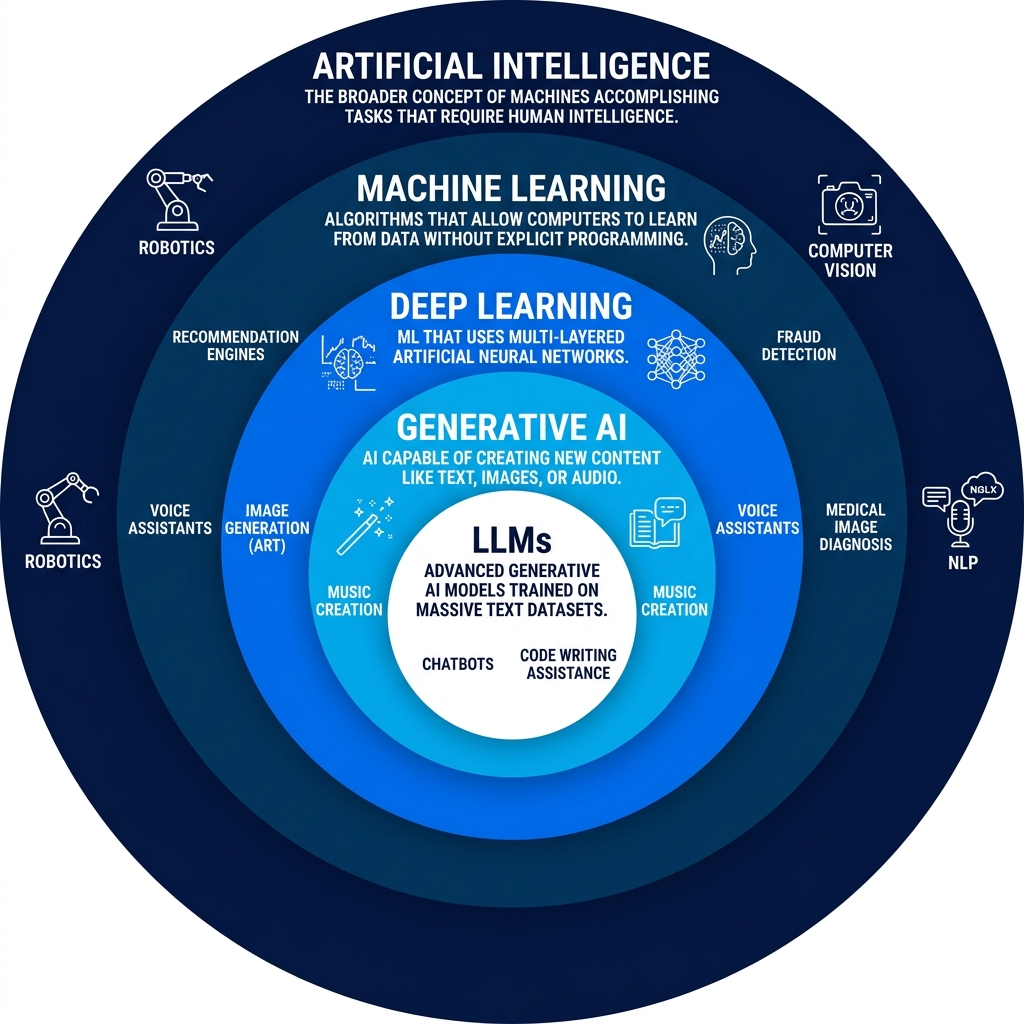
Before writing a single line of code, you need a mental model that doesn't collapse the moment someone uses a term differently than you expected. The AI field has a layered terminology structure — each term is a subset of the one above it — and getting that hierarchy straight transforms a bewildering landscape into a navigable map.
Artificial Intelligence is the broadest umbrella: any system that performs tasks typically requiring human intelligence. It's a discipline, not a technology — like saying "physics." Under AI, you have dozens of subfields: computer vision, robotics, natural language processing, expert systems, and more. What unites them is the goal of machine-performed cognition, not any specific approach to achieving it.
Machine Learning is a subfield of AI that specifically focuses on systems that learn from data rather than being explicitly programmed with rules. Classic rule-based AI said "if this, then that" — a human wrote every decision. Machine learning says "here's a million examples of input-output pairs; learn the mapping yourself." This shift from rules to pattern recognition from data is the fundamental insight that unlocked modern AI's capabilities.
Deep Learning is a subfield of Machine Learning that uses artificial neural networks — specifically networks with many layers (hence "deep"). These layered networks can learn hierarchical representations: the first layers learn simple patterns (edges in an image, word frequencies in text), and deeper layers learn increasingly abstract concepts built from those simpler ones. Deep learning is what made modern NLP, computer vision, and audio processing practical rather than theoretical.
Generative AI sits inside Deep Learning as the category of models that don't just classify or predict — they generate new content. A spam classifier tells you "this is spam." A generative model writes you an email. The distinction matters because generation requires the model to have learned not just patterns but a generative distribution — an internal model of how valid outputs are structured — well enough to produce novel examples.
# The AI terminology hierarchy in code form — a simple mental model
AI = {
    "definition": "Computer systems performing tasks requiring human intelligence",
    "subfields": {
        "Machine Learning": {
            "definition": "Systems that learn patterns from data",
            "subfields": {
                "Deep Learning": {
                    "definition": "Neural networks with many layers",
                    "subfields": {
                        "Generative AI": {
                            "definition": "Models that generate new content",
                            "includes": ["LLMs", "Image Generation", "Audio Generation"]
                        }
                    }
                }
            }
        },
        "Computer Vision": {"definition": "Processing and understanding visual data"},
        "NLP": {"definition": "Understanding and generating human language"},
        "Robotics": {"definition": "Autonomous physical systems"}
    }
}

# Key insight: LLMs are Generative AI models,
# which are Deep Learning models,
# which are Machine Learning models,
# which are AI systems.
# The hierarchy matters when someone says "AI" vs "ML" vs "LLM."
Pro Tips & Common Mistakes — AI Terminology
Pro Tip: When evaluating AI tools or reading vendor claims, always ask "which layer of the stack is this actually operating at?" A tool marketed as "AI-powered" might be running a basic classifier (ML) or a full generative LLM. Understanding the distinction helps you evaluate capabilities, costs, and limitations accurately instead of being swayed by marketing language.
Common Mistake: Using "AI" and "LLM" interchangeably. LLMs are a very specific type of AI — they're language models trained on text data for language tasks. Recommender systems, fraud detection models, computer vision classifiers — these are all AI but not LLMs. When you're building features, being precise about which type of AI you're using prevents architectural mistakes and manages stakeholder expectations correctly.
Transformers and LLMs: The Architecture Behind the Magic
In 2017, eight researchers at Google published a paper titled "Attention is All You Need." It introduced the Transformer architecture and, without exaggeration, changed the trajectory of AI. Every major language model you've used — GPT-4, Claude, Gemini, Llama, BERT — is built on this architecture. Understanding its core innovation explains why LLMs can do what they do and why they have the specific strengths and weaknesses they exhibit.
Before Transformers, sequence processing used recurrent neural networks (RNNs), which processed text one token at a time, left to right, maintaining a hidden state that theoretically captured all previous context. The problem: that hidden state compressed everything seen so far into a fixed-size vector, and long-range dependencies (connecting information from sentence 1 to sentence 50) were genuinely hard to maintain. Important context got "forgotten" as the model processed more tokens.
Transformers solved this with self-attention — a mechanism that allows every token in a sequence to attend to every other token simultaneously, with learnable weights determining how much each token should "pay attention" to each other token. To understand "The trophy didn't fit in the suitcase because it was too large" — specifically, resolving what "it" refers to — a self-attention mechanism can directly compare "it" against "trophy" and "suitcase" with appropriate learned weights, discovering that "it" refers to the trophy. No sequential processing bottleneck, no information compression over distance.
Large Language Models are Transformer models trained at scale — on hundreds of billions of tokens of text data, with billions of parameters. The "large" part isn't just about size for its own sake; it turns out that emergent capabilities appear at scale that simply aren't present in smaller models. The ability to follow complex instructions, reason through multi-step problems, and transfer learning across disparate domains are capabilities that emerge when model size and training data cross certain thresholds. This is why GPT-4 can do things GPT-2 couldn't — it's not just a quantitative difference in the same capability but qualitative differences in what the model can do at all.
# Calling an LLM via API — the simplest possible interaction
# This is what every GenAI application is built on at its core

import anthropic

client = anthropic.Anthropic()  # reads ANTHROPIC_API_KEY from environment

# The most basic LLM call: send messages, receive a response
response = client.messages.create(
    model="claude-sonnet-4-6",
    max_tokens=1024,
    messages=[
        {
            "role": "user",
            "content": "Explain the transformer architecture in 3 sentences."
        }
    ]
)

print(response.content[0].text)
# Output: A clear, coherent explanation — the LLM's strength

# What makes LLMs different from traditional ML models:
# - Trained on language, can reason about new tasks without task-specific training
# - Understand context across long passages (attention over full context window)
# - Can follow natural language instructions (no code needed to specify behavior)
# - Generate coherent, structured text rather than just classifying inputs
Pro Tips & Common Mistakes — Transformers and LLMs
Pro Tip: The context window — the maximum number of tokens an LLM can process in a single call — is one of the most practically important model characteristics. Larger context windows (128K tokens in Claude, GPT-4o) allow you to include more documents, longer conversations, and more examples in a single prompt. When choosing a model for your use case, match the context window size to your expected input length. Exceeding the context window silently truncates input in many implementations.
Common Mistake: Treating LLMs as databases. LLMs are not retrieval systems — they don't "look up" facts, they predict likely continuations based on patterns in training data. This is why they hallucinate: if the model doesn't have a reliable pattern for a fact, it generates a plausible-sounding answer rather than saying "I don't know." For factual accuracy, you need RAG (covered below) to give the model access to reliable sources at query time.
Prompt Engineering: The Skill That Changes Everything
Imagine you've hired the most capable assistant in history — one who has read virtually everything ever written, can write in any style, code in any language, and reason through complex problems. But they have one quirk: they respond to your requests very literally. Ask a vague question, get a vague answer. Give them no context, they'll make assumptions that may or may not match what you needed. The quality of their output is directly proportional to the quality of your instructions. Prompt engineering is the skill of writing those instructions well.
This isn't a soft skill — it's an engineering discipline with measurable, reproducible results. The difference between a prompt that produces a useful output 90% of the time and one that works 50% of the time is the difference between a product feature and a liability. Prompt engineering involves understanding the model's capabilities and limitations, structuring instructions clearly, providing relevant context and examples, and knowing which techniques to apply for which types of tasks.
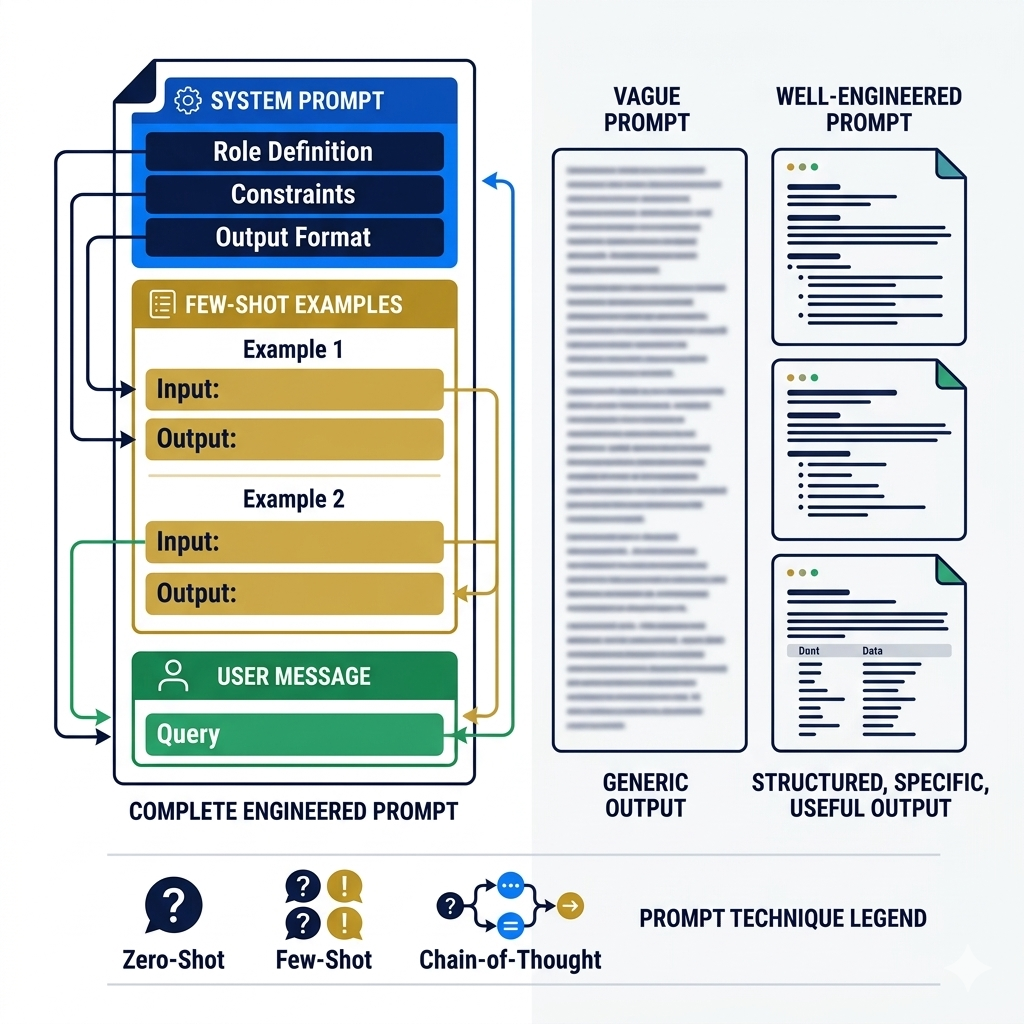
Several techniques have proven consistently effective across models. Zero-shot prompting gives the model a task description with no examples and relies on the model's training to figure out the desired output format. Few-shot prompting includes 2–5 examples of input-output pairs before the actual task, dramatically improving output quality for structured tasks. Chain-of-thought prompting asks the model to reason step by step before giving an answer — this simple addition significantly improves accuracy on math, logic, and multi-step reasoning tasks because it forces the model to "show its work" rather than jumping to an answer.
Here's the thing most prompt engineering tutorials miss: the system prompt is where the real engineering happens, not the user prompt. The system prompt (the instructions you set before any user interaction) defines the model's persona, constraints, output format, and behavioral guardrails. A well-engineered system prompt means your user-facing prompts can be simple and natural. A poorly designed system prompt means you're fighting the model's defaults on every interaction. For production applications, invest your prompt engineering effort in the system prompt first.
import anthropic

client = anthropic.Anthropic()

# Zero-shot: just describe the task, no examples
def zero_shot_sentiment(text):
    response = client.messages.create(
        model="claude-sonnet-4-6",
        max_tokens=50,
        messages=[{"role": "user", "content": f"What is the sentiment of this text? Respond with only: positive, negative, or neutral.\n\n{text}"}]
    )
    return response.content[0].text.strip()

# Few-shot: provide examples to establish the pattern
def few_shot_classifier(text):
    response = client.messages.create(
        model="claude-sonnet-4-6",
        max_tokens=100,
        messages=[{
            "role": "user",
            "content": """Classify the support ticket priority. Examples:

Text: "App crashes every time I try to checkout" → Priority: CRITICAL
Text: "Can you add a dark mode?" → Priority: LOW
Text: "My password reset email never arrived" → Priority: HIGH
Text: "The font looks slightly off on mobile" → Priority: LOW

Now classify:
Text: "I've been double-charged three times this month" → Priority:"""
        }]
    )
    return response.content[0].text.strip()

# Chain-of-thought: ask model to reason step by step
def chain_of_thought_analysis(problem):
    response = client.messages.create(
        model="claude-sonnet-4-6",
        max_tokens=500,
        system="You are a senior engineer. When analyzing problems, always reason step by step before giving your conclusion. Show your reasoning explicitly.",
        messages=[{"role": "user", "content": f"Analyze this system design problem and recommend a solution:\n\n{problem}"}]
    )
    return response.content[0].text

# System prompt engineering — the most important prompt engineering you'll do
PRODUCTION_SYSTEM_PROMPT = """You are a customer support agent for TechCorp software products.

ROLE: Friendly, knowledgeable, professional support agent.
CONSTRAINTS:
- Only discuss TechCorp products and related technical topics
- Never discuss competitor products by name
- Escalate billing issues to human agents (say: "I'll connect you with our billing team")
- If you don't know something, say so — never guess at product details

OUTPUT FORMAT:
- Use clear, simple language (assume non-technical users)
- Keep responses under 150 words unless the user asks for detailed explanation
- End every response with an offer to help further

TONE: Warm and helpful, not robotic."""
Pro Tips & Common Mistakes — Prompt Engineering
Pro Tip: Version control your prompts like code. In production AI applications, a prompt change can be as impactful as a code change — sometimes more. Store prompts in your repository, track changes with commit messages, and build a test suite of expected input-output pairs to run against prompt changes before deploying them. Tools like PromptLayer, LangSmith, and Anthropic's own testing utilities help make this systematic.
Common Mistake: Over-engineering prompts instead of using structured outputs. If you need an LLM to return structured data (JSON, specific fields, formatted lists), ask it explicitly to return a specific format and parse the output. Even better, use the model's function calling / tool use features (available in OpenAI, Anthropic, and Google APIs) which force structured JSON output by design. Fighting with string parsing of free-form text is a maintenance nightmare.
Using Model APIs: Authentication, Parameters, and Best Practices
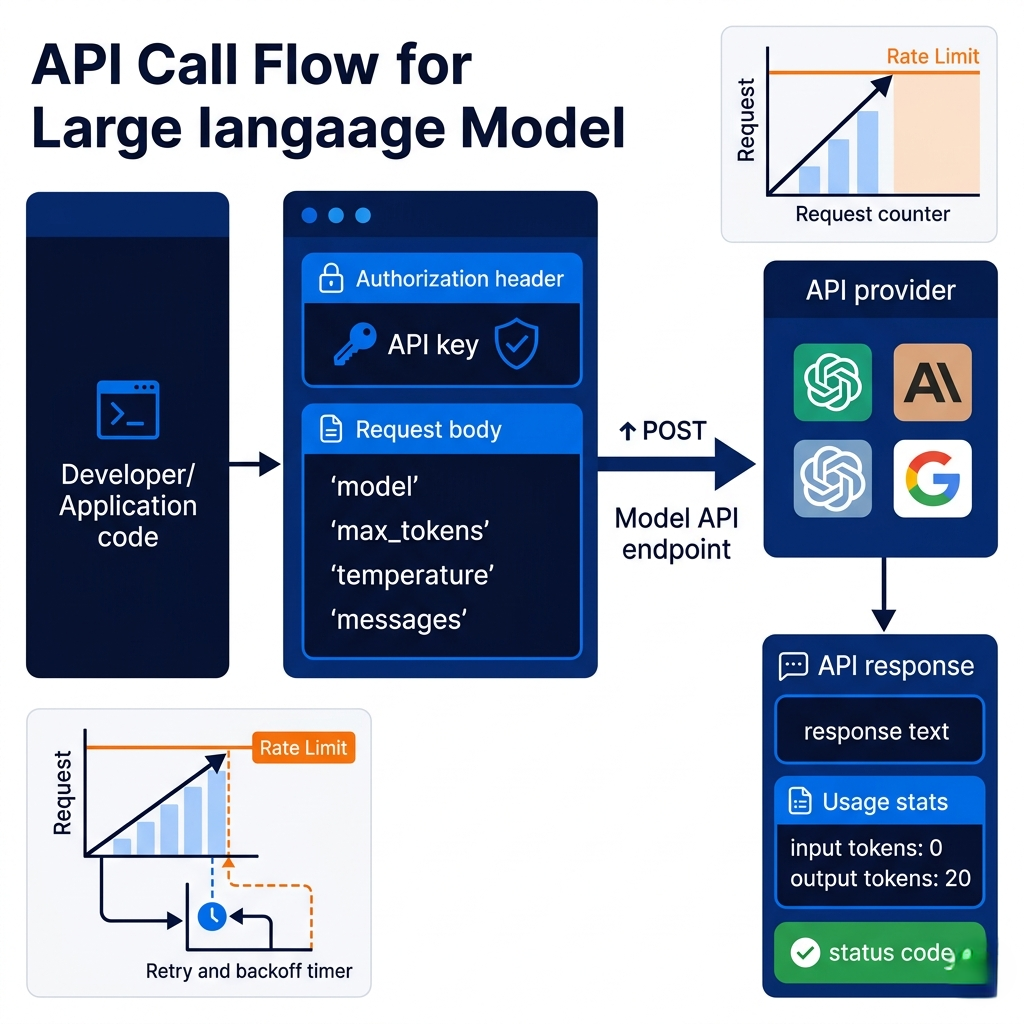
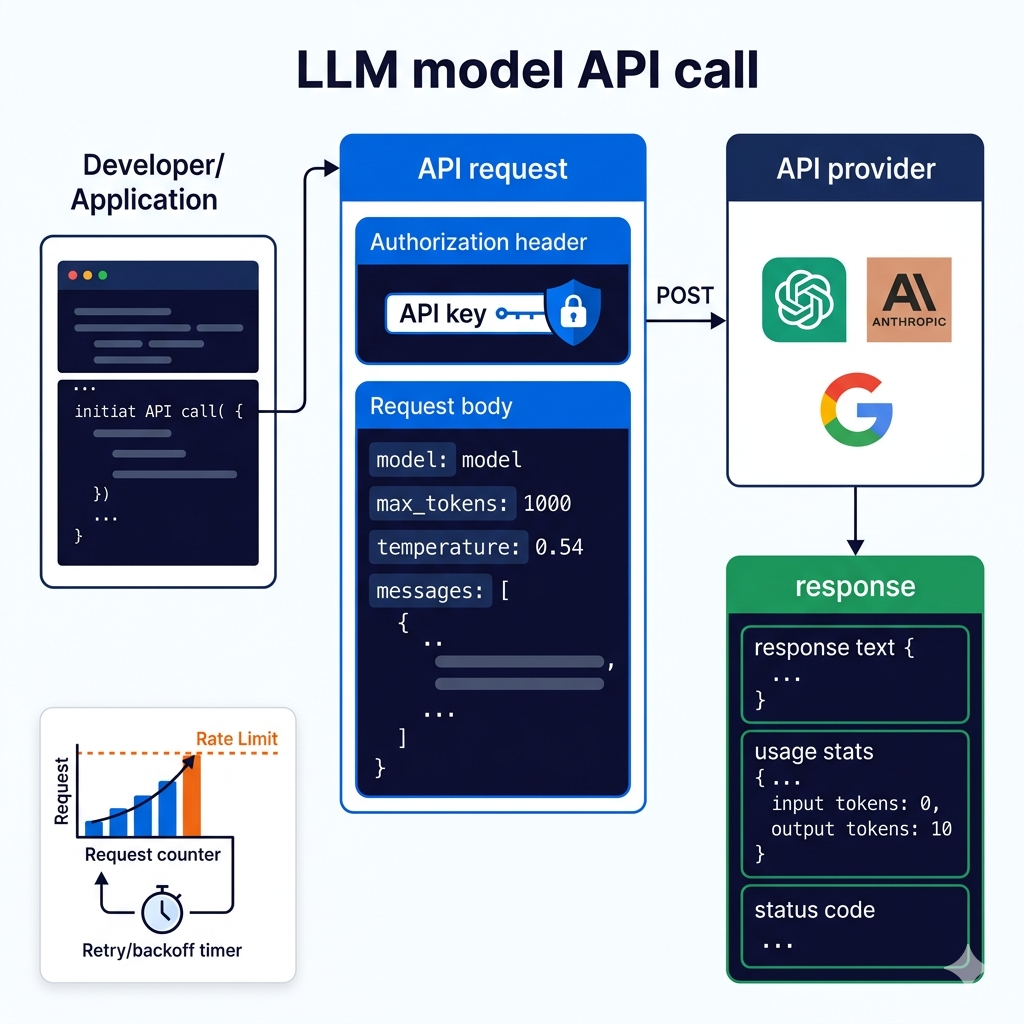
Every major Generative AI model is accessible through a REST API, which means the barrier to using state-of-the-art AI in your application is an HTTP request and an API key. OpenAI, Anthropic, Google (Gemini), Cohere, Mistral, and Hugging Face all follow similar patterns: authenticate with a key, send a request with your model choice and messages, receive a response. The details differ, but the mental model is the same.
Authentication is uniformly API-key-based: you include your key in an Authorization header with each request. The critical operational practice is storing this key securely — in environment variables or a secrets manager, never hardcoded in source code. A leaked API key means someone else using your compute quota at your expense, and with enterprise pricing this can get expensive very quickly. API keys should be rotated regularly and scoped to the minimum necessary permissions where the platform allows it.
The most impactful parameters to understand are max_tokens, temperature, and model selection. Max tokens caps the length of the generated response — setting it too low truncates responses, setting it too high costs more and can lead to unnecessarily verbose outputs. Temperature controls randomness: at 0.0, the model is deterministic and picks the highest-probability token at every step (good for factual extraction, code generation, structured data); at 1.0+, the model is creative and diverse (good for brainstorming, creative writing, generating varied options). Model selection is a cost-performance tradeoff — smaller, faster models like Claude Haiku or GPT-4o-mini cost dramatically less than frontier models and are perfectly adequate for many tasks.
Rate limits are the operational reality most developers hit at the wrong moment. Every API platform imposes limits on requests per minute, tokens per minute, and tokens per day — with tiers that increase with spend level. For production applications, build exponential backoff retry logic from day one, cache responses where appropriate, and design your architecture to handle graceful degradation when the API is unavailable or rate-limited. An AI feature that errors loudly when it hits a rate limit is worse than one that temporarily falls back to a non-AI experience.
import anthropic
import time
import os
from tenacity import retry, stop_after_attempt, wait_exponential

# Always load API key from environment — never hardcode
client = anthropic.Anthropic(api_key=os.environ.get("ANTHROPIC_API_KEY"))

# Production-grade API call with retry logic, error handling, and logging
@retry(
    stop=stop_after_attempt(3),
    wait=wait_exponential(multiplier=1, min=2, max=30)  # 2s, 4s, 8s delays
)
def call_llm(
    user_message: str,
    system_prompt: str = "",
    model: str = "claude-haiku-4-5-20251001",   # start with faster/cheaper model
    max_tokens: int = 512,
    temperature: float = 0.0              # 0.0 for deterministic tasks
) -> str:
    """
    Production-ready LLM call with:
    - Automatic retry with exponential backoff
    - Model parameter documentation
    - Error handling
    """
    try:
        response = client.messages.create(
            model=model,
            max_tokens=max_tokens,
            temperature=temperature,
            system=system_prompt if system_prompt else None,
            messages=[{"role": "user", "content": user_message}]
        )
        return response.content[0].text

    except anthropic.RateLimitError:
        print("Rate limit hit — retry logic will handle this")
        raise  # tenacity will retry

    except anthropic.APIStatusError as e:
        print(f"API error: {e.status_code} — {e.message}")
        raise

# Model selection guide — pick the right model for the task
MODEL_SELECTION = {
    "claude-haiku-4-5-20251001": {
        "use_for": "Simple classification, short generation, high-volume tasks",
        "cost": "Lowest",
        "speed": "Fastest"
    },
    "claude-sonnet-4-6": {
        "use_for": "Complex reasoning, long documents, production default",
        "cost": "Medium",
        "speed": "Balanced"
    },
    "claude-opus-4-6": {
        "use_for": "Most complex tasks, research, highest quality required",
        "cost": "Highest",
        "speed": "Slowest"
    }
}

# Cost-aware token tracking
response = client.messages.create(
    model="claude-sonnet-4-6",
    max_tokens=1024,
    messages=[{"role": "user", "content": "Summarize this article..."}]
)
print(f"Input tokens: {response.usage.input_tokens}")
print(f"Output tokens: {response.usage.output_tokens}")
# Track these in production to understand and control costs
Pro Tips & Common Mistakes — Model APIs
Pro Tip: Implement response caching for identical or semantically similar prompts. If your application frequently asks the same question (e.g., "summarize this product description" for a fixed set of products), caching the LLM response in Redis or a database eliminates redundant API calls, dramatically reduces costs, and improves response latency. Use an exact-match cache for identical prompts and consider semantic caching (embedding similarity) for near-duplicate queries.
Common Mistake: Not tracking token costs from day one. LLM API pricing is per-token, and costs scale with usage in ways that surprise teams who didn't instrument their applications early. A feature that costs $0.01 per user interaction becomes $10,000/month at 1M interactions. Build token usage logging into your API calls from your first deployment, set up cost alerting in your cloud provider or the AI platform's dashboard, and budget with realistic usage estimates before launch.
Building GenAI Applications: From Idea to Deployment
The gap between "I called the API successfully" and "I shipped a production AI feature" is a real engineering distance, and most tutorials leave you stranded in the middle. Building a GenAI application is like building any application — it requires UI design, backend architecture, error handling, state management, and monitoring — with the additional complexity that one component (the LLM) is non-deterministic, expensive per-call, and can produce unexpected outputs.
Let's walk through building a concrete example: an AI-powered book recommendation chatbot. The core loop is straightforward — user shares preferences, chatbot asks clarifying questions, LLM generates personalized recommendations. But the production version requires thinking through conversation state (how do you maintain context across turns?), streaming responses (users perceive streaming output as faster and more engaging), error states (what happens when the API times out mid-conversation?), and safety (what if users try to misuse the chatbot for unrelated purposes?).
Multi-turn conversations require passing the full conversation history with each API call. The LLM has no memory between calls — every time you call the API, you're giving it the entire conversation so far and asking it to respond to the latest message. This is why context windows matter for conversational applications: a long conversation might exceed the model's context window, requiring you to implement conversation summarization or sliding window strategies to stay within limits while preserving the most important context.
The counterintuitive insight about GenAI application architecture: the LLM is not your application's logic layer — it's your application's language layer. The business logic (what books to recommend, how to filter by genre, how to handle out-of-stock items) should live in your code. The LLM's job is to understand natural language input, extract the relevant intent and parameters, and generate natural language output. Mixing business logic into prompts creates systems that are hard to test, debug, and maintain.
from anthropic import Anthropic
from typing import List, Dict

client = Anthropic()

class BookRecommendationChatbot:
    def __init__(self):
        self.conversation_history: List[Dict] = []
        self.system_prompt = """You are a knowledgeable book recommendation assistant.

Your goal: understand the user's reading preferences and recommend 3-5 books.

PROCESS:
1. Ask about genres they enjoy (if not mentioned)
2. Ask about books they've loved recently (for taste calibration)
3. Ask about any topics or themes they're interested in
4. Once you have enough context (3+ data points), provide specific recommendations

RECOMMENDATIONS FORMAT:
For each book: Title by Author — 2 sentence description of why this matches their taste

CONSTRAINTS:
- Only recommend books that are genuinely well-regarded
- Acknowledge you might not have information about very recent releases
- If you're uncertain about a specific detail, say so"""

    def chat(self, user_message: str) -> str:
        """Process a user message and return the assistant's response."""
        # Add user message to conversation history
        self.conversation_history.append({
            "role": "user",
            "content": user_message
        })

        # Call LLM with full conversation history
        response = client.messages.create(
            model="claude-sonnet-4-6",
            max_tokens=1024,
            system=self.system_prompt,
            messages=self.conversation_history  # full history = multi-turn memory
        )

        assistant_message = response.content[0].text

        # Add assistant response to history for next turn
        self.conversation_history.append({
            "role": "assistant",
            "content": assistant_message
        })

        return assistant_message

    def stream_chat(self, user_message: str):
        """Streaming version — yields tokens as they're generated."""
        self.conversation_history.append({"role": "user", "content": user_message})

        full_response = ""
        with client.messages.stream(
            model="claude-sonnet-4-6",
            max_tokens=1024,
            system=self.system_prompt,
            messages=self.conversation_history
        ) as stream:
            for text in stream.text_stream:
                full_response += text
                yield text  # stream each token to the client as it arrives

        self.conversation_history.append({
            "role": "assistant",
            "content": full_response
        })

# Usage
chatbot = BookRecommendationChatbot()
print(chatbot.chat("I love science fiction, especially hard sci-fi"))
print(chatbot.chat("My favorite recent read was Project Hail Mary"))
print(chatbot.chat("I'm also interested in books about consciousness"))
# After 3 turns, the chatbot has enough context to make specific recommendations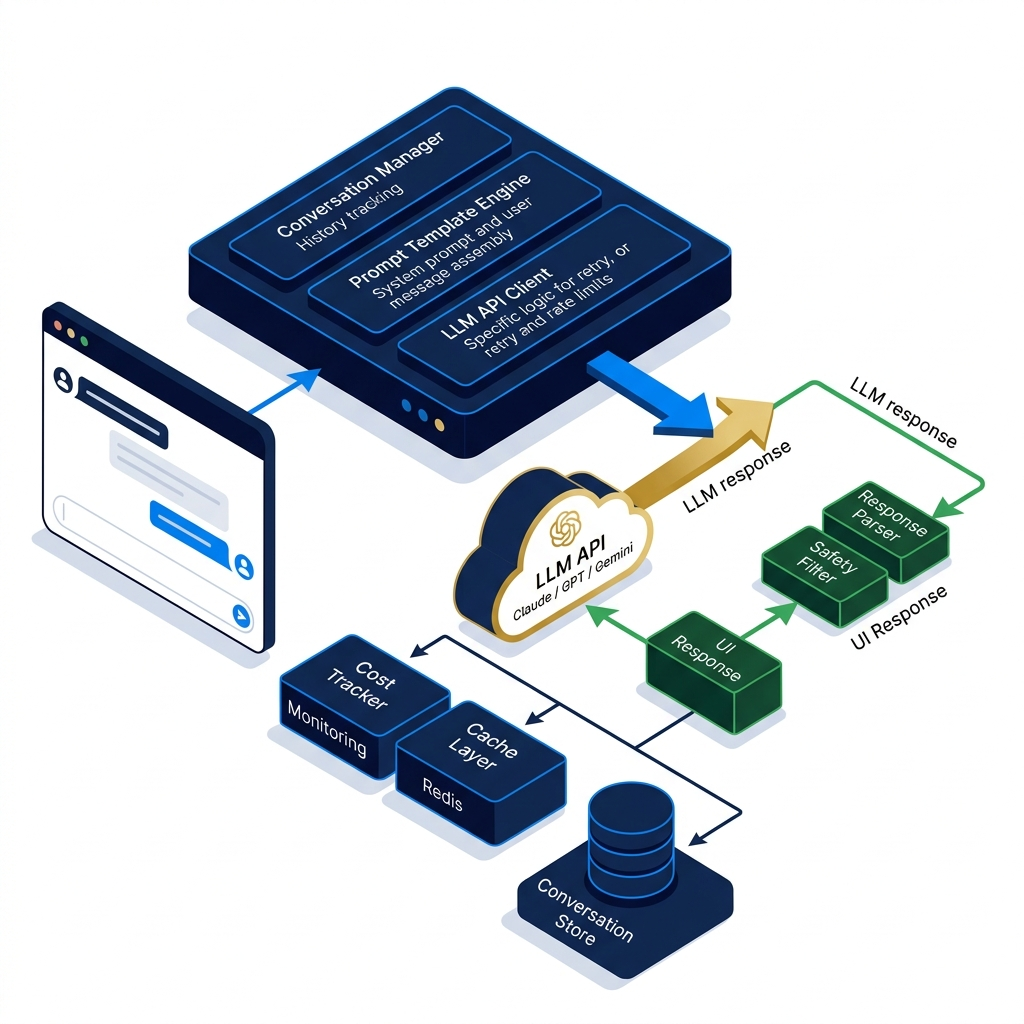
Pro Tips & Common Mistakes — Building Applications
Pro Tip: Add a "confidence gate" to your AI features: if the LLM's output doesn't match expected patterns (wrong format, unexpected content, very short response on a task that should be detailed), surface a fallback experience rather than showing malformed AI output to users. LLMs can and do produce unexpected outputs — your application should handle this gracefully rather than displaying a half-formed response as if it were intended.
Common Mistake: Launching without output evaluation. Before going live, build a small evaluation dataset: 20–50 representative user inputs with expected outputs. Run every prompt change against this dataset and measure pass rate. Without this, you're shipping blind — you won't know if a prompt tweak improved things for most users while breaking things for a subset. Evaluation is the unit testing of GenAI applications.
RAG (Retrieval-Augmented Generation): Giving Your Model a Library
LLMs have a fundamental knowledge problem: they know what was in their training data, frozen at a specific cutoff date, with no awareness of your company's internal documents, your product's current pricing, or anything that happened after training. For most production applications, this is a critical limitation. RAG (Retrieval-Augmented Generation) is the architectural pattern that solves it.
Imagine you've hired the world's most knowledgeable generalist consultant. They know everything — history, science, literature, engineering. But they don't know your company's internal processes, your specific product specs, or your customer data. RAG is like giving that consultant access to your company's entire document library before each meeting. When you ask a question, they first search the library for relevant documents, read the relevant sections, and then combine that specific knowledge with their general expertise to give you a grounded, accurate answer.
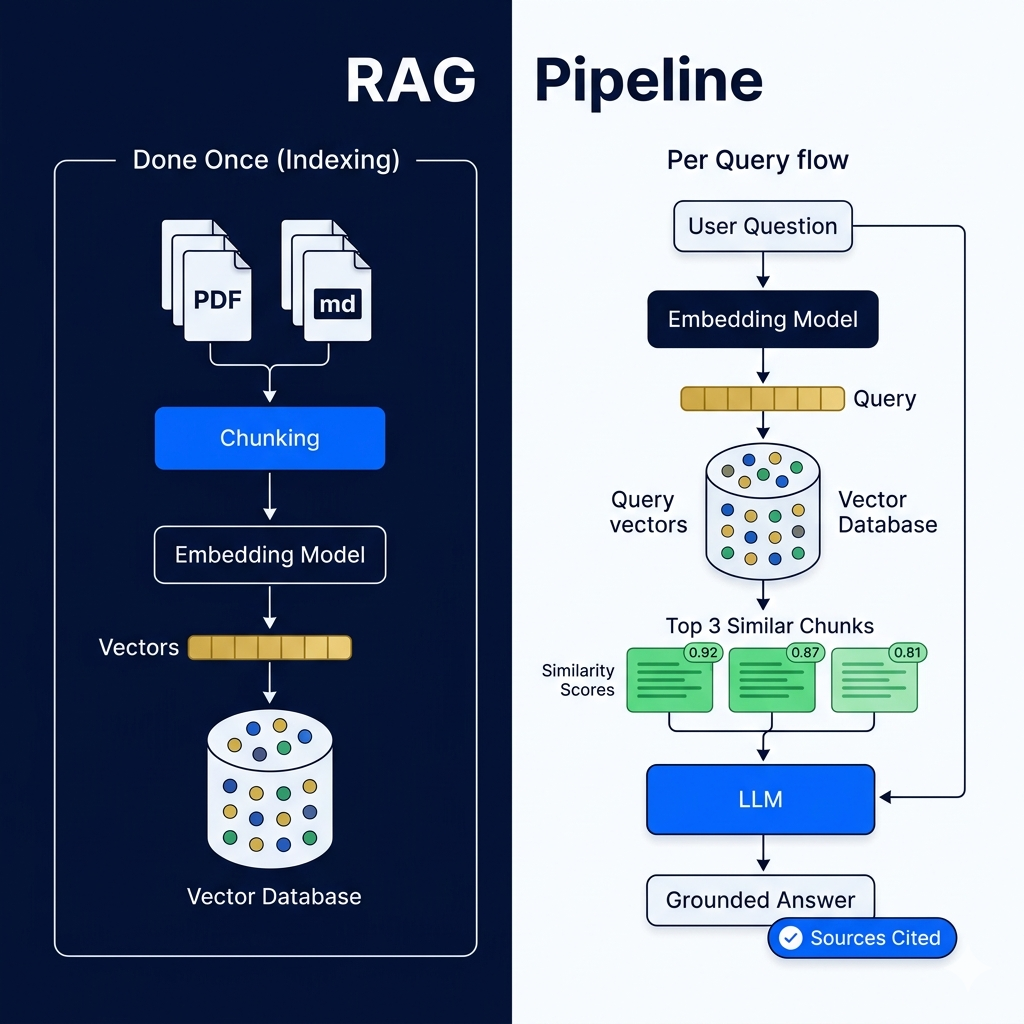
The mechanics of RAG have three phases. In the indexing phase (done once, not per query), your documents are broken into chunks, each chunk is converted into an embedding (a vector representation capturing the semantic meaning of the text), and these embeddings are stored in a vector database (Pinecone, Weaviate, Chroma, or Postgres with pgvector). In the retrieval phase (per query), the user's question is also converted to an embedding, and the vector database finds the chunks whose embeddings are most semantically similar to the question — the most relevant pieces of your documents. In the generation phase, the LLM receives both the user's question and the retrieved document chunks as context, and generates an answer that's grounded in your specific documents rather than in general training data.
RAG dramatically reduces hallucination for factual questions because the model is answering from specific sources rather than generating from patterns. You can also cite sources: since you know exactly which document chunks were retrieved, you can show users "this answer is based on [document]," which builds trust and enables verification.
# Complete RAG pipeline using Anthropic + Chroma vector database
import anthropic
from chromadb import Client as ChromaClient
from chromadb.utils import embedding_functions

anthropic_client = anthropic.Anthropic()
chroma_client = ChromaClient()

# Use Anthropic embeddings or any embedding model
ef = embedding_functions.SentenceTransformerEmbeddingFunction(
    model_name="all-MiniLM-L6-v2"
)

# Create or get the collection (vector store)
collection = chroma_client.get_or_create_collection(
    name="company_docs",
    embedding_function=ef
)

# PHASE 1: INDEX — add your documents (done once)
def index_documents(documents: list[dict]):
    """Add documents to the vector store."""
    collection.add(
        documents=[doc["text"] for doc in documents],
        metadatas=[{"source": doc["source"], "title": doc["title"]} for doc in documents],
        ids=[f"doc_{i}" for i, _ in enumerate(documents)]
    )

# Example: index your product documentation
documents = [
    {"text": "Our API rate limit is 1000 requests per minute for Pro tier...", "source": "api_docs.md", "title": "API Rate Limits"},
    {"text": "Refund policy: customers can request refunds within 30 days...", "source": "policies.md", "title": "Refund Policy"},
    {"text": "To integrate with Slack: install the app from the Slack marketplace...", "source": "integrations.md", "title": "Slack Integration"},
]
index_documents(documents)

# PHASE 2 + 3: RETRIEVE then GENERATE (per user query)
def rag_answer(user_question: str, n_results: int = 3) -> dict:
    """Answer a question using retrieved documents as context."""

    # Retrieve most relevant document chunks
    results = collection.query(
        query_texts=[user_question],
        n_results=n_results
    )

    retrieved_docs = results['documents'][0]
    sources = [m['source'] for m in results['metadatas'][0]]

    # Build context from retrieved documents
    context = "\n\n".join([
        f"[Source: {source}]\n{doc}"
        for doc, source in zip(retrieved_docs, sources)
    ])

    # Generate answer grounded in retrieved context
    response = anthropic_client.messages.create(
        model="claude-sonnet-4-6",
        max_tokens=512,
        system="""You are a helpful assistant. Answer the user's question using ONLY
the provided context documents. If the answer isn't in the context,
say "I don't have that information in my knowledge base."
Always cite which source you used.""",
        messages=[{
            "role": "user",
            "content": f"Context:\n{context}\n\nQuestion: {user_question}"
        }]
    )

    return {
        "answer": response.content[0].text,
        "sources": list(set(sources))  # deduplicated source list
    }

# Usage
result = rag_answer("What is the refund policy?")
print(result["answer"])
print(f"Sources: {result['sources']}")
# Output: Accurate answer citing the specific policy document
Pro Tips & Common Mistakes — RAG
Pro Tip: Chunk size matters enormously for RAG quality. Chunks that are too small lose context (a sentence fragment without its surrounding paragraph). Chunks that are too large dilute relevance (a long document section might contain your answer but also a lot of irrelevant text). Start with 500–1000 character chunks with 100-character overlaps between consecutive chunks, measure retrieval precision on your test queries, and tune from there.
Common Mistake: Evaluating RAG only on "does it return an answer?" instead of "is the answer correct and properly grounded?" Measure retrieval precision (are the right documents being retrieved?) and answer faithfulness (is the LLM answering from the context or making things up?) separately. A RAG system with poor retrieval produces hallucinated answers even when the right document is in your index — because the wrong chunks were retrieved and the model filled the gap.
Fine-Tuning: Making a Model Truly Yours
RAG gives a model access to new information. Fine-tuning changes how a model behaves. These are genuinely different interventions, and understanding the distinction is critical for choosing the right approach for your use case.
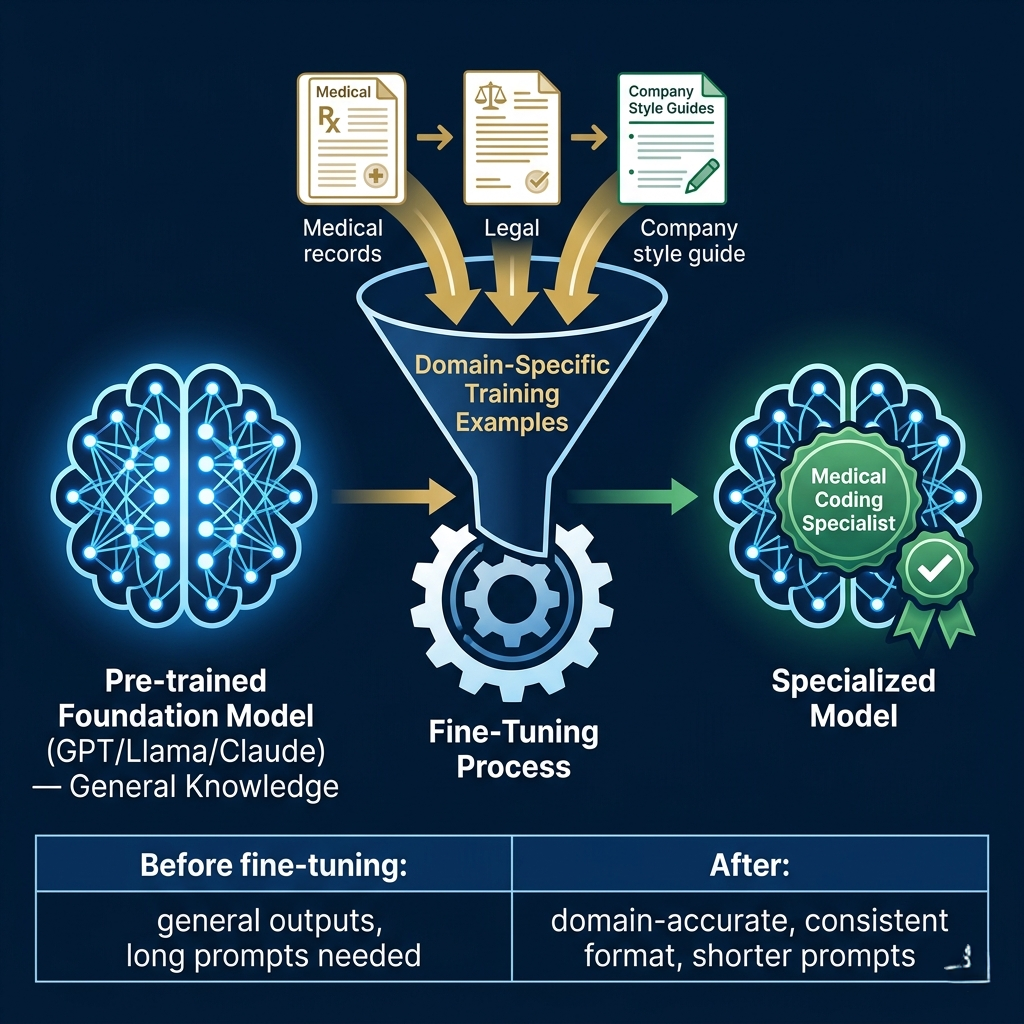
Fine-tuning takes a pre-trained foundation model (GPT-4, Llama 3, Mistral, Claude) — which already has vast general knowledge and language capability — and continues training it on your specific dataset. The process teaches the model your domain's vocabulary, your organization's writing style, your specific task format, or the nuanced expertise of your field. After fine-tuning, the model incorporates these new patterns into its weights permanently — not as retrieved context, but as learned behavior that affects every response.
Think of it this way: RAG is like giving an expert consultant a briefing document before a meeting. Fine-tuning is like sending that consultant to a six-month immersive training program in your industry. After the training, they don't need the briefing document anymore — the domain knowledge is part of how they think.
Fine-tuning excels at three things that prompting alone can't reliably achieve: adapting to highly specialized domain language and concepts (medical terminology, legal jargon, proprietary technical vocabulary), learning consistent output format or style preferences that would require very long few-shot examples in a prompt, and improving performance on narrow, high-volume tasks where the cost of calling a large model becomes prohibitive and a smaller, fine-tuned model can match its performance for less. The practical tradeoff: fine-tuning requires training data (typically hundreds to thousands of high-quality examples), compute cost, and ongoing maintenance as the base model updates.
# Fine-tuning workflow with OpenAI (Anthropic fine-tuning via partnership)
# Step 1: Prepare your training data in JSONL format
import json

training_data = [
    {
        "messages": [
            {"role": "system", "content": "You are a medical coding assistant specializing in ICD-10 codes."},
            {"role": "user", "content": "What is the ICD-10 code for Type 2 diabetes without complications?"},
            {"role": "assistant", "content": "The ICD-10 code for Type 2 diabetes mellitus without complications is E11.9. This falls under the E11 category for Type 2 diabetes mellitus, with the .9 suffix indicating no documented complications."}
        ]
    },
    # ... hundreds more high-quality examples
]

# Save as JSONL (each line is one training example)
with open("training_data.jsonl", "w") as f:
    for example in training_data:
        f.write(json.dumps(example) + "\n")

# Fine-tuning data quality checklist:
QUALITY_CRITERIA = {
    "minimum_examples": 50,       # Absolute minimum; 500+ recommended for good results
    "example_diversity": "Cover all the edge cases and variations your model will encounter",
    "output_quality": "Each example should represent exactly the output you want — no mediocre examples",
    "format_consistency": "Output format must be identical across all examples",
    "no_contradictions": "Don't include examples where similar inputs produce different style outputs"
}

# What fine-tuning improves vs what it doesn't:
FINE_TUNING_GOOD_FOR = [
    "Consistent output format (always return JSON with specific fields)",
    "Domain-specific terminology and accuracy",
    "Tone and writing style adaptation",
    "Reducing the need for lengthy system prompts",
    "Cost reduction: fine-tune a smaller model to match large model performance"
]

FINE_TUNING_NOT_GOOD_FOR = [
    "Adding new factual knowledge (use RAG instead)",
    "Keeping up with recent events (use RAG instead)",
    "Fixing fundamental reasoning limitations",
    "Replacing robust prompt engineering — always prompt engineer first"
]
Pro Tips & Common Mistakes — Fine-Tuning
Pro Tip: Always establish a strong baseline with prompt engineering before investing in fine-tuning. A well-crafted system prompt and few-shot examples often achieve 80% of what fine-tuning would — without the cost, time, and maintenance overhead. Fine-tuning makes the most sense when: you need 100+ examples in a prompt to achieve desired output quality (fine-tuning internalizes the examples), you're calling the API at extremely high volume (fine-tune a smaller model to cut costs), or the task requires domain knowledge so specialized that general models consistently fail.
Common Mistake: Fine-tuning on low-quality data. The model learns what you show it — if your training examples have inconsistent quality, formatting errors, or represent the wrong behavior, the fine-tuned model faithfully learns those flaws. "Garbage in, garbage out" is more literal with fine-tuning than almost anywhere else in engineering. Curate your training data rigorously, have domain experts review every example, and start with fewer high-quality examples rather than many mediocre ones.
RAG vs Fine-Tuning: How to Choose
This is the decision that trips up most teams building their first serious AI application. RAG and fine-tuning solve different problems, and choosing between them — or combining them — requires understanding what problem you actually have.
Use RAG when your problem is about knowledge access: your model needs to answer questions about your specific documents, your product, your policies, recent events, or any information that changes over time. RAG is fast to implement, easy to update (just re-index new documents), and lets you cite sources. It's the right choice for customer support bots, internal knowledge bases, document Q&A, and any application where accuracy on specific factual questions is paramount.
Use fine-tuning when your problem is about behavior: you need the model to respond in a specific style, format output in a precise structure, use your domain's specialized vocabulary naturally, or perform a narrow task with consistency that no amount of prompting achieves. Fine-tuning is the right choice for specialized classification tasks, consistent style matching, reducing inference costs at scale, and improving reliability on tasks where prompting produces inconsistent results.
The counterintuitive insight here: most teams reach for fine-tuning too quickly. Fine-tuning feels like the "advanced" option — it sounds more sophisticated, more customized, more "yours." But for the majority of production use cases, well-engineered RAG with good prompt design outperforms fine-tuning because RAG can access current, accurate information while fine-tuning bakes potentially-stale knowledge into weights. And fine-tuning doesn't eliminate hallucination — a fine-tuned model can still confidently state incorrect things. Start with RAG plus solid prompt engineering; graduate to fine-tuning only when you have a specific, demonstrated need.
# Decision framework: RAG vs Fine-Tuning

def choose_customization_approach(use_case):
    """
    Decision logic for RAG vs Fine-Tuning vs Both
    """
    questions = {
        "needs_current_info": "Does the model need access to information that changes?",
        "needs_specific_format": "Do you need a very specific, consistent output format?",
        "has_training_data": "Do you have 500+ high-quality labeled examples?",
        "volume_concern": "Will you make 1M+ API calls per month (cost optimization)?",
        "domain_vocabulary": "Is there specialized terminology the base model handles poorly?",
        "factual_accuracy": "Is factual accuracy on specific documents critical?"
    }

    # If the answer is yes to any of these → RAG
    rag_indicators = ["needs_current_info", "factual_accuracy"]

    # If the answer is yes to any of these → Fine-Tuning
    fine_tuning_indicators = ["needs_specific_format", "volume_concern", "domain_vocabulary"]

    # Both: when you need accurate facts AND specific behavior
    # Example: Medical coding assistant that cites official ICD-10 documents
    # AND outputs in a specific JSON structure

    approach_map = {
        "rag_only": "Information retrieval tasks: Q&A, document search, customer support",
        "fine_tuning_only": "Behavioral tasks: classification, style, format, specialized vocabulary",
        "both": "Complex tasks requiring specific behavior on specific knowledge",
        "neither_yet": "Start with prompt engineering — fine-tune/RAG when prompting isn't enough"
    }

    return approach_map
How It All Connects: The GenAI Application Stack
Let's zoom out and see how every piece fits together in a production GenAI application. The foundation is the Transformer architecture — the engine that makes language understanding and generation possible at scale. LLMs are Transformer models trained at scale, giving them the broad capability to understand instructions and generate coherent responses across domains. Prompt engineering is how you steer that capability toward your specific use case through carefully designed instructions and examples.
Model APIs are your gateway to these capabilities — REST endpoints with authentication, parameter control, and rate limiting that you call from your application backend. Your application architecture wraps these API calls with conversation state management, error handling, cost tracking, and the business logic that makes an AI feature actually useful rather than just technically functional.
RAG and fine-tuning are the customization layer on top of this foundation. RAG connects the LLM to your specific knowledge through real-time retrieval, solving the knowledge access problem. Fine-tuning adapts the model's behavior to your domain, solving the consistency and cost problem. For most production applications, the architecture is: core LLM capability + prompt engineering (always), plus RAG (when you have proprietary knowledge), plus fine-tuning (when you need consistent specialized behavior at scale).
The mental model that ties it together: the LLM is capable but uninformed and generic. RAG makes it informed. Fine-tuning makes it specialized. Prompt engineering makes it directed. Your application architecture makes it reliable, observable, and economically sustainable.
Getting Started: Building Your First AI Application
Here's a structured path from zero to a working AI feature — the practical progression that avoids the most common pitfalls.
Step 1: Set up your development environment
# Install dependencies
pip install anthropic python-dotenv chromadb sentence-transformers

# Create .env file (never commit this to git)
echo "ANTHROPIC_API_KEY=your_key_here" > .env

# Verify API access
python -c "
import anthropic, os
from dotenv import load_dotenv
load_dotenv()
client = anthropic.Anthropic()
r = client.messages.create(model='claude-haiku-4-5-20251001', max_tokens=50,
    messages=[{'role':'user','content':'Hello!'}])
print('API working:', r.content[0].text)
"
Step 2: Engineer your system prompt before writing application code
# Spend time here — this is your application's behavioral foundation
# Test with the Anthropic console or API playground before coding

SYSTEM_PROMPT_V1 = """You are [role].

Your purpose: [what the AI should accomplish for users]

CONSTRAINTS:
- [What the AI should never do]
- [Topics to avoid or escalate]

OUTPUT FORMAT:
- [Specific structure you need]

TONE: [How the AI should communicate]"""

# Test 20+ diverse prompts against this system prompt
# before integrating it into your application
Step 3: Build the core LLM integration
# Start simple — a single function that calls the API
# Add complexity (streaming, retry, caching) only as needed

def call_ai(user_message: str, conversation_history: list = None) -> str:
    messages = (conversation_history or []) + [
        {"role": "user", "content": user_message}
    ]
    response = client.messages.create(
        model="claude-sonnet-4-6",
        max_tokens=1024,
        system=SYSTEM_PROMPT_V1,
        messages=messages
    )
    return response.content[0].text
Step 4: Add RAG if you have proprietary knowledge
# Index your documents once
index_documents(your_company_docs)

# Modify your core function to retrieve context before calling LLM
def call_ai_with_rag(user_message: str, conversation_history: list = None) -> str:
    context = retrieve_relevant_context(user_message)  # vector DB query
    augmented_message = f"Context:\n{context}\n\nUser question: {user_message}"
    return call_ai(augmented_message, conversation_history)
Step 5: Add observability from day one
import logging
import time

def call_ai_instrumented(user_message: str) -> dict:
    start = time.time()
    response = client.messages.create(
        model="claude-sonnet-4-6",
        max_tokens=1024,
        messages=[{"role": "user", "content": user_message}]
    )
    duration = time.time() - start

    # Log everything — you'll need this for debugging and cost management
    logging.info({
        "event": "llm_call",
        "model": "claude-sonnet-4-6",
        "input_tokens": response.usage.input_tokens,
        "output_tokens": response.usage.output_tokens,
        "duration_seconds": duration,
        "user_message_preview": user_message[:100]
    })

    return {
        "response": response.content[0].text,
        "usage": response.usage,
        "duration": duration
    }
Step 6: Build your evaluation dataset and test it
# Minimum viable eval suite — 20 representative examples
eval_cases = [
    {
        "input": "What is your return policy?",
        "expected_contains": ["30 days", "refund"],  # must appear in output
        "expected_not_contains": ["competitor"]  # must not appear
    },
    # ... more cases covering edge cases, sensitive topics, format requirements
]

def run_eval():
    passed = 0
    for case in eval_cases:
        output = call_ai(case["input"])
        case_passed = (
            all(term in output.lower() for term in case["expected_contains"]) and
            all(term not in output.lower() for term in case["expected_not_contains"])
        )
        if case_passed:
            passed += 1
        else:
            print(f"FAILED: {case['input']}\nOutput: {output[:200]}")

    print(f"Eval result: {passed}/{len(eval_cases)} passed ({100*passed/len(eval_cases):.0f}%)")
FAQ
Q: What is the difference between AI, Machine Learning, and Generative AI?
AI is the broadest category — any system performing tasks requiring human intelligence. Machine Learning is a subset of AI where systems learn from data rather than explicit rules. Deep Learning is a subset of Machine Learning using multi-layer neural networks. Generative AI is a subset of Deep Learning specifically concerned with systems that generate new content (text, images, code, audio) rather than just classifying or predicting. LLMs are a specific type of Generative AI model trained on text data.
Q: What is an LLM and how does it work?
A Large Language Model is a Transformer-based neural network trained on massive amounts of text data to predict and generate human-like text. The "large" refers to both the scale of training data (hundreds of billions of tokens) and model size (billions of parameters). During training, the model learns statistical patterns about language — which words follow which, how concepts relate, how to structure arguments and code. At inference time, it uses these learned patterns to generate responses one token at a time, with each token predicted based on all preceding context.
Q: What is RAG and when should I use it?
RAG (Retrieval-Augmented Generation) is an architecture that enhances LLMs with access to external knowledge bases. When a user asks a question, the system first retrieves relevant documents from a vector database, then passes those documents as context to the LLM along with the question. Use RAG when your application needs to answer questions about proprietary documents, current information, or any knowledge not in the model's training data. It reduces hallucination, allows citing sources, and lets you update the knowledge base without retraining the model.
Q: What is fine-tuning and how is it different from RAG?
Fine-tuning continues training a pre-trained model on your specific dataset, changing the model's weights to incorporate domain knowledge, terminology, and behavioral patterns. RAG retrieves information at query time without changing the model. Fine-tuning is better for adapting model behavior (style, format, specialized vocabulary), while RAG is better for knowledge access (current information, proprietary documents). Fine-tuning requires training data and compute; RAG requires a vector database and embedding model. Most applications should start with RAG and add fine-tuning only when RAG plus prompt engineering isn't sufficient.
Q: How do I choose between OpenAI, Anthropic, and other LLM providers?
Evaluate on four factors: capability (run benchmarks on your specific tasks — general leaderboards may not reflect performance on your use case), cost (pricing varies by model and usage volume; calculate expected monthly costs at your projected usage), API features (context window size, function calling/tool use, streaming, fine-tuning availability), and reliability/latency (check status pages and latency benchmarks for your region). Most production applications use one primary provider with a fallback configured for reliability. Don't architect yourself into a single-provider dependency.
Q: What is prompt engineering and how important is it?
Prompt engineering is the practice of designing instructions and context that reliably guide LLM outputs toward desired results. It's more important than most tutorials suggest — a well-engineered system prompt is often the difference between an AI feature that works 50% of the time and one that works 95% of the time. Core techniques include: clear role and task definition, output format specification, few-shot examples for complex tasks, chain-of-thought instructions for reasoning tasks, and explicit constraints for safety and scope. Invest in prompt engineering before considering RAG or fine-tuning.
Q: How do I prevent LLMs from hallucinating in my application?
Hallucination (generating plausible-sounding but false information) is an inherent property of LLMs, not a bug that can be fully eliminated. Mitigation strategies: use RAG to ground answers in verified sources and instruct the model to cite them, explicitly instruct the model to say "I don't know" when information isn't available, use lower temperature for factual tasks, validate structured outputs against schemas, and build evaluation pipelines that specifically test for factual accuracy. For high-stakes domains (medical, legal, financial), always require human review of LLM outputs.
Q: What does token mean in the context of LLMs, and why does it matter?
A token is the basic unit of text that LLMs process — roughly 4 characters or ¾ of a word in English. "Hello world" is about 2–3 tokens; a typical 1,000-word article is about 1,300 tokens. Tokens matter for three reasons: pricing (API costs are per-token, for both input and output), context window (the maximum tokens the model can process in one call — your prompts plus documents plus conversation history must fit within this limit), and latency (more output tokens = slower responses). Understanding token counts helps you optimize costs, design conversations that fit within context windows, and predict response times.
Conclusion
The engineer who started this article in productive paralysis — unsure whether to fine-tune, prompt engineer, or reach for RAG — now has a framework for making that decision deliberately. Generative AI isn't magic; it's a layered stack of well-understood technologies, each with specific strengths and appropriate use cases. Transformers and attention mechanisms explain why LLMs understand context. Training at scale explains why emergent capabilities appear. Prompt engineering is how you direct that capability. RAG is how you ground it in facts. Fine-tuning is how you specialize it.
The practical decision order is almost always the same: start with a model API and good prompt engineering. Add RAG when you need proprietary knowledge or factual grounding. Add fine-tuning when you need consistent specialized behavior that prompting alone can't reliably deliver, or when you're optimizing costs at scale. Build evaluation from the start. Instrument everything. Treat prompts like code.
The developers building the most effective GenAI applications right now aren't the ones using the most sophisticated techniques — they're the ones who understand their specific problem clearly enough to choose the simplest approach that solves it. That clarity, combined with the technical depth to implement it well, is the actual skill the field rewards.