
Table of Contents
- The Interview Question That Exposes Everything
- What Concurrency Actually Means
- What Parallelism Actually Means
- The Relationship Between Concurrency and Parallelism
- Real-World Applications: Where Each Shines
- How It All Connects
- Getting Started: Practical Tutorial
- FAQ
- Conclusion
1. The Interview Question That Exposes Everything
A few years ago, a senior engineer friend of mine was interviewing candidates for a backend role at a high-traffic fintech company. His go-to question wasn't about algorithms or data structures. It was this: "What's the difference between concurrency and parallelism?"
He told me he could tell within the first sixty seconds whether a candidate truly understood systems — or had just memorized enough vocabulary to sound convincing. The candidates who confused the two, or worse, used them interchangeably and doubled down when challenged, almost never made it past that round. Not because the question is a gotcha, but because the distinction reveals how you think about systems under load. Do you understand what your program is actually doing when five thousand users hit it simultaneously? Do you know why your CPU-bound task is still slow even though you "made it async"? Do you know when throwing more cores at a problem helps, and when it doesn't?
These questions have real consequences. Pick the wrong concurrency model for a web server and you get thread exhaustion under load. Apply parallelism where concurrency was needed and you've added complexity for zero gain. Get them both right and you build systems that are genuinely fast and genuinely scalable.
This guide is going to give you the mental model, the vocabulary, and the practical intuition to use both — correctly, confidently, and in the right situations.
2. What Concurrency Actually Means
Here's the most important sentence in this entire article: concurrency is not about doing multiple things at the same time. It's about dealing with multiple things at the same time.
Rob Pike, one of the creators of the Go programming language, put it perfectly: "Concurrency is about dealing with lots of things at once. Parallelism is about doing lots of things at once." That one-word difference — dealing vs. doing — is everything.
Imagine you're a chef working in a small kitchen alone. You've got a pasta boiling on one burner, a sauce simmering on another, and bread in the oven. You're not physically doing all three things simultaneously — you only have two hands. But you're managing all three processes. You stir the pasta, set a timer, check the sauce, adjust the heat, peek at the bread. You are the single worker. The tasks are progressing. This is concurrency: one processor, multiple tasks in flight, rapid switching between them.
At the CPU level, this switching is called context switching. When a task hits a point where it has to wait — reading from disk, waiting for a network response, sleeping on a timer — the operating system saves that task's current state (registers, stack pointer, program counter) and switches the CPU's attention to another task that's ready to run. When the first task's wait is over, it gets scheduled back in. The tasks aren't making progress simultaneously, but no CPU cycle is wasted on idle waiting. That's the entire value proposition of concurrency: keep the CPU busy while tasks are waiting.
import asyncio
import time

# Without concurrency — sequential I/O (slow)
def fetch_data_sync(url):
    time.sleep(1)  # Simulates network I/O wait
    return f"Data from {url}"

def run_sequential():
    start = time.time()
    results = [fetch_data_sync(f"https://api.example.com/{i}") for i in range(5)]
    print(f"Sequential: {time.time() - start:.2f}s")  # ~5 seconds

# With concurrency — async I/O (fast)
async def fetch_data_async(url, session_id):
    await asyncio.sleep(1)  # Yields control while waiting — no blocking
    return f"Data from {url}"

async def run_concurrent():
    start = time.time()
    tasks = [fetch_data_async(f"https://api.example.com/{i}", i) for i in range(5)]
    results = await asyncio.gather(*tasks)  # All 5 run concurrently
    print(f"Concurrent: {time.time() - start:.2f}s")  # ~1 second

asyncio.run(run_concurrent())
The numbers tell the story. Five sequential I/O alls take five seconds. Five concurrent I/O calls — all waiting simultaneously — take one second. The CPU didn't get faster. No new cores were added. The gain comes entirely from not wasting time waiting.
Here's the thing most tutorials miss: context switching isn't free. Every switch requires saving and restoring task state. If you spawn ten thousand threads, each doing tiny amounts of CPU work with minimal waiting, you can end up spending more time switching between tasks than actually doing work. This is called context switching overhead, and it's the silent performance killer in systems that "do concurrency" without understanding the cost model. Concurrency is most valuable when your tasks spend significant time waiting — I/O-bound operations. When tasks are CPU-bound (constant computation, no waiting), concurrency via context switching helps very little.
💡 Pro Tips & Common Mistakes — Concurrency
Pro Tip: Async/await in Python (
asyncio), JavaScript (async/await), and Go (goroutines) are all concurrency mechanisms running on a single thread or a small thread pool. They excel at I/O-bound workloads. Don't reach for them expecting CPU-bound speedups — you'll be disappointed. The sweet spot for concurrency is "waiting-heavy" tasks: HTTP requests, database queries, file reads, message queue polling. If your task is waiting more than computing, concurrency is your lever.
Common Mistake: Spawning a new thread or goroutine for every incoming request without any limit. Under high load, you'll exhaust system resources — memory from stack allocation, OS limits on thread count — before your CPU even breaks a sweat. Always use a thread pool or connection pool with a capped concurrency limit. Calling
asyncio.run()inside a function that's already inside an async context. In Python, this causes a "This event loop is already running" error. Useawaitdirectly, or useasyncio.create_task()for spawning concurrent sub-tasks.

3. What Parallelism Actually Means
Now extend that kitchen analogy. You hire a second chef. One chef handles the pasta. The other handles the meat. Both are physically working at the same time, on separate burners, with independent hands. The meal gets done in half the time — not because anyone got faster, but because real simultaneous work is happening. This is parallelism.
Parallelism requires multiple execution units — multiple CPU cores, multiple machines, multiple GPUs. It's the hardware manifestation of "more workers, more work done." Each core takes an independent subtask and executes it with no coordination needed. When the subtasks are done, results are merged. There's no illusion here, no sleight of hand with context switching. Multiple things are genuinely happening at the same clock tick.
The key word in that last paragraph was independent. Parallelism works best when tasks don't need to talk to each other during execution. If Task A needs a result from Task B before it can proceed, you've introduced a dependency — and now one worker is waiting for the other. Synchronization mechanisms like mutexes, barriers, and semaphores exist to manage shared state between parallel workers, but they come with their own overhead. The more your parallel tasks need to coordinate, the more your gains erode.
import multiprocessing
import time

def cpu_intensive_task(n):
    """Simulate heavy computation — finding prime numbers"""
    primes = []
    for num in range(2, n):
        if all(num % i != 0 for i in range(2, int(num**0.5) + 1)):
            primes.append(num)
    return len(primes)

# Sequential — one core doing all the work
def run_sequential():
    start = time.time()
    results = [cpu_intensive_task(50000) for _ in range(4)]
    print(f"Sequential: {time.time() - start:.2f}s")  # ~8 seconds

# Parallel — four cores each handling one chunk
def run_parallel():
    start = time.time()
    with multiprocessing.Pool(processes=4) as pool:
        results = pool.map(cpu_intensive_task, [50000, 50000, 50000, 50000])
    print(f"Parallel: {time.time() - start:.2f}s")  # ~2 seconds

if __name__ == "__main__":
    run_sequential()
    run_parallel()
Notice what's different from the concurrency example: we're using multiprocessing (separate OS processes, each on its own core), not asyncio (cooperative multitasking on one thread). In Python, this distinction is not optional — it's mandated by the Global Interpreter Lock (GIL), which prevents true thread-level parallelism for CPU-bound code. More on that in a moment.
The counterintuitive insight that trips up a lot of developers: parallelism doesn't always scale linearly with cores. If you double the cores, you rarely double the performance. This is captured by Amdahl's Law: the speedup of a program is limited by the fraction of it that cannot be parallelized. If 20% of your program is inherently sequential (initialization, merging results, writing to a single output file), then no matter how many cores you throw at it, you can never exceed a 5× speedup. Before investing in parallelism, identify your sequential bottlenecks — they set your ceiling.
💡 Pro Tips & Common Mistakes — Parallelism
Pro Tip: In Python, use
multiprocessingfor CPU-bound parallelism, notthreading. Python's GIL prevents threads from running Python bytecode simultaneously, making threading useless for CPU-bound tasks but fine for I/O-bound ones. This is one of the most common and painful Python performance mistakes. Before parallelizing, profile first. Understand which parts of your code are CPU-bound and what percentage of total runtime they represent. If that percentage is low, parallelism will yield disappointing gains and add significant complexity.
Common Mistake: Using shared mutable state between parallel workers without proper synchronization. Race conditions are the most common bug in parallel code — two workers reading and writing the same memory location without coordination produces non-deterministic, unreproducible bugs that are extremely hard to debug. Parallelizing tasks that are too small. Spawning a process has non-trivial overhead (memory copying, OS scheduling). If each task takes 1 millisecond of work, the overhead of spawning a process may dwarf the work itself. Always benchmark before and after.

4. The Relationship Between Concurrency and Parallelism
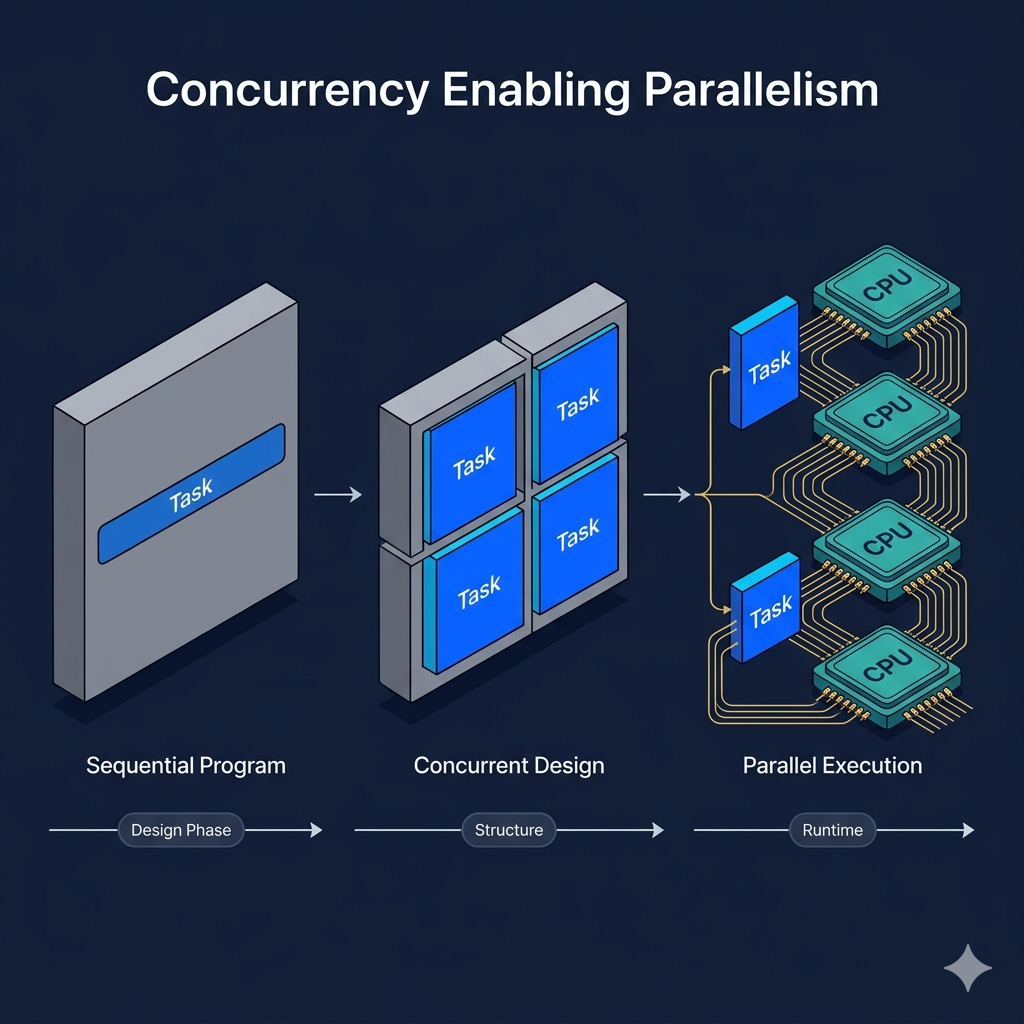
Here's where most explanations stop short, and where real understanding begins. Concurrency and parallelism aren't just "different" — they have a specific, directional relationship. Concurrency is a program design strategy. Parallelism is an execution property. Concurrency creates the structure that makes parallelism possible.
Think about what a concurrent program looks like: it's decomposed into independent tasks, each with a clear start, potential wait points, and a defined result. Those tasks don't depend on each other's internal state at every moment. This decomposition is, at its core, what makes the program eligible for parallel execution. If you can express your program as a collection of independent, composable units — that's concurrent design. Whether those units run on one core (context-switched) or ten cores (truly parallel) is a runtime decision, not a design decision.
Go's concurrency model illustrates this beautifully. In Go, you write concurrent code using goroutines and channels — lightweight, independently executing functions that communicate by passing messages. By default, on a single-core machine, goroutines run concurrently via cooperative scheduling. But set GOMAXPROCS to the number of available cores and the Go runtime distributes those same goroutines across all cores, achieving true parallelism with zero changes to your code
package main

import (
    "fmt"
    "sync"
    "runtime"
)

func processChunk(id int, data []int, results chan<- int, wg *sync.WaitGroup) {
    defer wg.Done()
    sum := 0
    for _, v := range data {
        sum += v
    }
    results <- sum
    fmt.Printf("Goroutine %d processed chunk, sum: %d\n", id, sum)
}

func main() {
    // Use all available cores — concurrent design, parallel execution
    runtime.GOMAXPROCS(runtime.NumCPU())
    fmt.Printf("Running on %d cores\n", runtime.NumCPU())

    data := make([]int, 1000000)
    for i := range data {
        data[i] = i + 1
    }

    chunkSize := len(data) / 4
    results := make(chan int, 4)
    var wg sync.WaitGroup

    // Launch 4 goroutines — each handles a chunk independently
    for i := 0; i < 4; i++ {
        wg.Add(1)
        chunk := data[i*chunkSize : (i+1)*chunkSize]
        go processChunk(i, chunk, results, &wg)
    }

    // Close channel when all goroutines finish
    go func() {
        wg.Wait()
        close(results)
    }()

    // Collect results
    total := 0
    for partial := range results {
        total += partial
    }
    fmt.Printf("Total sum: %d\n", total)
}
The crucial insight in this code: the concurrent structure (independent goroutines, channel communication) is what makes the parallel execution possible. The design enables the performance. Remove the concurrency structure and you can't parallelize it. This is the directional arrow between the two concepts — concurrency first, parallelism as the reward.
It's also worth noting the inverse: you can have parallelism without well-structured concurrency, but it's painful and brittle. Shared memory parallelism with manual mutex locking is the classic example — it works, but it's a source of endless subtle bugs. Well-designed concurrent primitives (channels, actors, futures) make parallel programs dramatically safer and more maintainable.
💡 Pro Tips & Common Mistakes — The Relationship
Pro Tip: When designing a system for scale, think concurrently first. Ask: "Can I decompose this into independent tasks?" If yes, concurrent design gives you a path to parallelism for free when you need it. Don't think about cores first — think about independence. In distributed systems, concurrency and parallelism operate at the service level too. Multiple instances of a service handling requests concurrently is concurrency. A map-reduce job distributing computation across a hundred worker nodes is parallelism. The same mental model applies — just at a larger scale.
Common Mistake: Conflating Python's
asynciowith parallelism. Asyncio is single-threaded concurrency. If your async tasks are CPU-bound (not waiting on I/O), they will not benefit from asyncio and may actually be slower due to event loop overhead. Profile before assuming.
5. Real-World Applications: Where Each Shines
Theory is useful. But the test of understanding is knowing which tool to reach for when you're staring at a real engineering problem. Let's walk through the domains where each concept delivers its maximum value — and why.
Web servers and API backends are the canonical home of concurrency. Imagine you're running a Node.js API handling a thousand requests per second. Each request involves: parsing the request body, running a database query (20–50ms wait), maybe calling an external payment API (100–300ms wait), then composing a response. The vast majority of each request's lifetime is waiting, not computing. Node.js's event loop handles this with a single thread and async I/O — thousands of requests in flight simultaneously, all waiting on I/O in parallel from the OS's perspective, with the event loop dispatching results as they arrive. This is concurrency doing exactly what it was designed for.
Machine learning training, in contrast, is the flagship use case for parallelism. Training a neural network involves enormous matrix multiplications — the same mathematical operation applied to millions of parameters, thousands of times. These operations are embarrassingly parallel: each neuron's gradient computation is independent of every other neuron's. GPUs are essentially massively parallel processors — modern ones have thousands of small cores, each executing the same instruction on different data simultaneously (SIMD: Single Instruction, Multiple Data). PyTorch and TensorFlow automatically distribute these computations across available GPU cores and, with libraries like torch.distributed, across multiple machines.
Video rendering is another parallelism showcase. A 60fps video at 4K resolution is roughly 250 million pixels per second needing color transformation, filtering, and compositing. Each frame is largely independent of every other frame. Render farms at visual effects studios split frames across hundreds of machines, each rendering a subset of the timeline in parallel. The total render time shrinks in near-linear proportion to the number of machines — because the workload is almost perfectly parallelizable.
Big data processing frameworks like Apache Spark operate at the intersection of both. Spark uses concurrency to manage the orchestration of tasks — coordinating drivers, shuffling data, handling failures — and parallelism to execute the actual data transformations. A Spark job reading a 10TB dataset splits it into thousands of partitions, distributes them across a cluster of machines (parallelism), and each machine processes its partitions concurrently across multiple cores. The result is a system that processes 10 terabytes in minutes instead of hours.
# Spark — parallelism + concurrency at scale
# Each transformation runs in parallel across the cluster

from pyspark.sql import SparkSession

spark = SparkSession.builder \
    .appName("BigDataParallelism") \
    .config("spark.executor.cores", "4") \  # 4 cores per executor
    .config("spark.executor.instances", "10") \  # 10 executors = 40 parallel workers
    .getOrCreate()

# This runs across 40 parallel workers automatically
df = spark.read.parquet("s3://your-bucket/events/")
result = df.groupBy("user_id") \
           .agg({"event_count": "sum", "session_duration": "avg"}) \
           .filter("sum(event_count) > 100")

result.write.parquet("s3://your-bucket/results/")
# Spark handles all the parallel distribution transparently
Scientific simulations — weather modeling, molecular dynamics, computational fluid dynamics — are parallelism's oldest and most demanding users. Climate models divide the atmosphere into a three-dimensional grid of cells, each evolving according to physics equations. Each cell's state depends on its neighbors, which introduces the coordination overhead mentioned earlier. Supercomputers with tens of thousands of cores use techniques like domain decomposition — assigning spatial regions to specific cores — to minimize cross-core communication while maximizing parallel computation.
💡 Pro Tips & Common Mistakes — Real-World Applications
Pro Tip: For web application backends, async I/O concurrency (Node.js, Python asyncio, Go goroutines) almost always outperforms thread-per-request models under high load because of lower memory overhead per concurrent task. A goroutine uses ~2KB of stack vs. a thread's ~1–8MB. At 10,000 concurrent requests, that's the difference between 20MB and 80GB of memory. If you're hitting database performance limits, look at connection pooling before adding parallelism. Databases have limited concurrent connection capacity. A pool of 20 connections handling thousands of concurrent requests is almost always more efficient than 1,000 individual connections.
Common Mistake: Using Python threads for CPU-intensive ML preprocessing. Python's GIL makes this counterproductive. Use
multiprocessing.Poolorconcurrent.futures.ProcessPoolExecutorfor CPU-bound preprocessing, and let your ML framework handle GPU parallelism for training.

6. How It All Connects
Pull back and look at the full picture. Concurrency and parallelism are not rivals, not synonyms, and not interchangeable tools you can swap casually. They're a hierarchy — a design strategy and its execution reward.
Concurrency is how you structure a program to handle multiple concerns without blocking. It's a software-level idea: decompose into independent tasks, use non-blocking I/O, communicate through channels rather than shared state. It's what makes your program responsive — able to keep doing useful work even when some tasks are waiting.
Parallelism is what happens when you take that concurrent structure and run it on hardware with multiple execution units. It's what makes your program fast — able to complete more work in less wall-clock time by doing multiple things genuinely simultaneously.
The question isn't "which one do I use?" It's "what is my bottleneck?" If your program is slow because it's waiting on I/O — network, disk, database — concurrency is your fix. Better concurrency means fewer idle CPU cycles, higher throughput with the same hardware. If your program is slow because it's doing intense computation — matrix math, sorting huge arrays, encoding video — parallelism is your fix. More cores mean faster completion time.
Most real applications need both, layered thoughtfully. A well-designed web service uses async concurrency to handle thousands of simultaneous connections on a small thread pool, and spawns parallel worker processes for CPU-intensive background jobs like report generation, image resizing, or data export. The concurrency model makes the web layer responsive. The parallelism model makes the heavy lifting fast. Neither one alone solves both problems.
The engineers who understand this framework stop asking "should I use threads or async?" and start asking "is my bottleneck I/O wait or CPU compute?" That question has a measurable answer — you can profile for it. And once you know the answer, the right tool becomes obvious.
7. Getting Started: Practical Tutorial
Let's put the theory to work with a realistic example: a service that fetches data from multiple APIs, processes it, and generates a report. This hits both I/O-bound and CPU-bound workloads — perfect for demonstrating both tools.
Step 1: Identify your bottleneck type
import time
import cProfile

def your_function():
    # Profile your code to find where time is actually spent
    pass

# Run: python -m cProfile -s cumulative your_script.py
# Look for: time in sleep/wait (I/O-bound) vs. pure computation (CPU-bound)
Step 2: For I/O-bound work — use async concurrency
import asyncio
import aiohttp
import time

async def fetch_user_data(session, user_id):
    """Async HTTP request — yields control while waiting"""
    async with session.get(f"https://api.example.com/users/{user_id}") as response:
        return await response.json()

async def fetch_all_users(user_ids):
    async with aiohttp.ClientSession() as session:
        tasks = [fetch_user_data(session, uid) for uid in user_ids]
        # All requests fire simultaneously, results collected as they arrive
        results = await asyncio.gather(*tasks, return_exceptions=True)
    return [r for r in results if not isinstance(r, Exception)]

# Usage
user_ids = list(range(1, 101))  # 100 users

start = time.time()
users = asyncio.run(fetch_all_users(user_ids))
print(f"Fetched {len(users)} users in {time.time() - start:.2f}s")
# ~1-2 seconds instead of 100+ seconds sequential
Step 3: For CPU-bound work — use multiprocessing parallelism
from concurrent.futures import ProcessPoolExecutor
import json

def process_user_report(user_data):
    """CPU-intensive: parse, transform, calculate aggregates"""
    # Simulate heavy computation
    metrics = {
        "user_id": user_data["id"],
        "activity_score": sum(range(user_data.get("events", 100))),
        "segments": [i * user_data["id"] for i in range(1000)]
    }
    return metrics

def generate_reports_parallel(all_users):
    # Use ProcessPoolExecutor for CPU-bound tasks
    # max_workers defaults to number of CPU cores
    with ProcessPoolExecutor() as executor:
        reports = list(executor.map(process_user_report, all_users))
    return reports

# Usage — process 100 user reports across all CPU cores
start = time.time()
reports = generate_reports_parallel(users)
print(f"Generated {len(reports)} reports in {time.time() - start:.2f}s")
Step 4: Chain them together
import asyncio
from concurrent.futures import ProcessPoolExecutor

async def full_pipeline(user_ids):
    # Phase 1: Concurrent I/O — fetch all data asynchronously
    print("Phase 1: Fetching data concurrently...")
    users = await fetch_all_users(user_ids)

    # Phase 2: Parallel CPU work — process in parallel across cores
    print("Phase 2: Processing reports in parallel...")
    loop = asyncio.get_event_loop()
    with ProcessPoolExecutor() as executor:
        # Run CPU-bound work in process pool from async context
        reports = await loop.run_in_executor(
            executor,
            lambda: generate_reports_parallel(users)
        )

    return reports

# The full pipeline: concurrent I/O → parallel computation
reports = asyncio.run(full_pipeline(list(range(1, 101))))
print(f"Pipeline complete: {len(reports)} reports generated")
Step 5: Benchmark and validate
Always measure before and after. Use cProfile for CPU profiling, asyncio debug mode for async bottlenecks (PYTHONASYNCIODEBUG=1), and time.perf_counter() for wall-clock benchmarking. Don't assume your optimization helped — verify it.
8. FAQ
Q: Is concurrency the same as multithreading? No, and this conflation causes a lot of confusion. Multithreading is one implementation of concurrency — using OS threads to switch between tasks. But concurrency can also be achieved with a single thread via event loops and async/await (as in Node.js or Python asyncio), with green threads (as in Go goroutines or Java virtual threads), or with coroutines. Concurrency is the concept; multithreading is one tool for achieving it.
Q: Can you have parallelism without concurrency? Technically yes — you could write four separate, independent programs and run them on four cores simultaneously without any concurrent structure inside any single program. But in practice, the programs that benefit most from parallelism are ones written with concurrent design — decomposed into independent tasks that can be distributed. The two almost always go together in real systems.
Q: Why doesn't Python's threading give me true parallelism for CPU-bound tasks?
Python's Global Interpreter Lock (GIL) is a mutex that protects access to Python objects, preventing multiple threads from executing Python bytecode simultaneously. This means Python threads can only run concurrently (interleaved), not truly in parallel for CPU-bound code. The workaround is multiprocessing (separate processes, each with their own GIL), or using libraries like NumPy that release the GIL during C-level computations.
Q: What's the difference between concurrency and asynchronous programming? Asynchronous programming is a style of writing concurrent code. "Async" typically refers to non-blocking operations where a task can yield control while waiting and resume later — this is one form of implementing concurrency. All async programs exhibit concurrency, but not all concurrent programs use the async style (threading and process-based concurrency are also concurrent without being "async").
Q: When does parallelism hurt performance instead of helping? Several situations: when tasks are too small (overhead of spawning/managing workers exceeds work done), when tasks share significant state requiring heavy synchronization, when the sequential portion of your code is large (Amdahl's Law limits your ceiling), or when your bottleneck is actually I/O rather than CPU (in which case adding cores does nothing because the CPU was already idle). Always profile before parallelizing.
Q: How do Go's goroutines differ from OS threads?
Goroutines are managed by the Go runtime, not the operating system. They're extremely lightweight (~2KB initial stack vs. ~1–8MB for OS threads), can be created in the millions without exhausting memory, and the Go scheduler multiplexes them onto a small pool of OS threads. The Go runtime also automatically distributes goroutines across available CPU cores when GOMAXPROCS > 1, meaning the same goroutine code achieves concurrency on one core and parallelism on multiple cores — transparently.
Q: What is "data parallelism" vs. "task parallelism"? Task parallelism means running different tasks (different code) simultaneously on different cores — e.g., one core handles authentication while another handles payment processing. Data parallelism means running the same task on different subsets of data simultaneously — e.g., four cores each process one quarter of a dataset. GPUs are architecturally optimized for data parallelism, making them ideal for ML workloads where the same matrix operations apply to millions of values.
Q: Is async/await in JavaScript truly concurrent or just the illusion of it? JavaScript's event loop achieves concurrency on a single thread — so it's "real" concurrency in the sense that multiple tasks genuinely make progress without blocking each other, but it's not parallel execution. The browser or Node.js uses OS-level asynchronous I/O under the hood, so the waiting actually happens in the OS while the event loop is free to process other callbacks. For CPU-bound work, JavaScript offers Web Workers (browsers) or Worker Threads (Node.js), which achieve true parallelism on separate threads.
9. Conclusion
You've just absorbed the mental model that separates engineers who feel like their systems "work, somehow" from engineers who know exactly why their systems perform the way they do.
The summary is elegant in its simplicity: concurrency is about structure — how you design a program to handle multiple tasks without blocking. Parallelism is about execution — how you use multiple hardware resources to do genuine simultaneous work. One is a software design strategy. The other is a hardware performance property. And concurrency is the foundation that makes parallelism achievable.
When your app is slow and a user is waiting, the first question is always: "What are we waiting for?" If the answer is "the network" or "the database" — you need better concurrency, better async design, smarter I/O management. If the answer is "the CPU is maxed out" — you need parallelism, more workers, distributed computation. Profile first. Diagnose correctly. Then apply the right tool with precision.
That diagnosis — not the coding, but the thinking — is what makes the difference.