
Picture this: you're three weeks into building a new mobile app. The UI is crisp, your backend is humming along, and then your PM drops a Slack message — "Can we add Google Maps, Stripe payments, and Instagram sharing by Friday?"
You stare at the screen. You've heard the terms API and SDK thrown around in every standup, every tech article, and every YouTube tutorial. But here's the uncomfortable truth most developers won't admit: even after years of coding, there's a fuzzy gray zone between what an API does and what an SDK is, and picking the wrong approach wastes days of your life.
This post exists to permanently fix that confusion. We're going to break down both concepts with real code, sharp analogies, and the kind of nuanced decision-making framework that turns good developers into great architects. By the end, you'll know not just what they are, but why and when to reach for each — and how to use them together to build fast.
Table of Contents
- What Is an API? (The Universal Translator)
- How REST APIs Actually Work
- API Security: Keys, Tokens, and Rate Limits
- What Is an SDK? (The Pre-Built Toolbox)
- APIs Inside SDKs: How They Relate
- API vs SDK: How to Choose
- How It All Connects: The Real-World App Architecture
- Getting Started: A Practical Tutorial
- FAQ
- Conclusion
What Is an API?
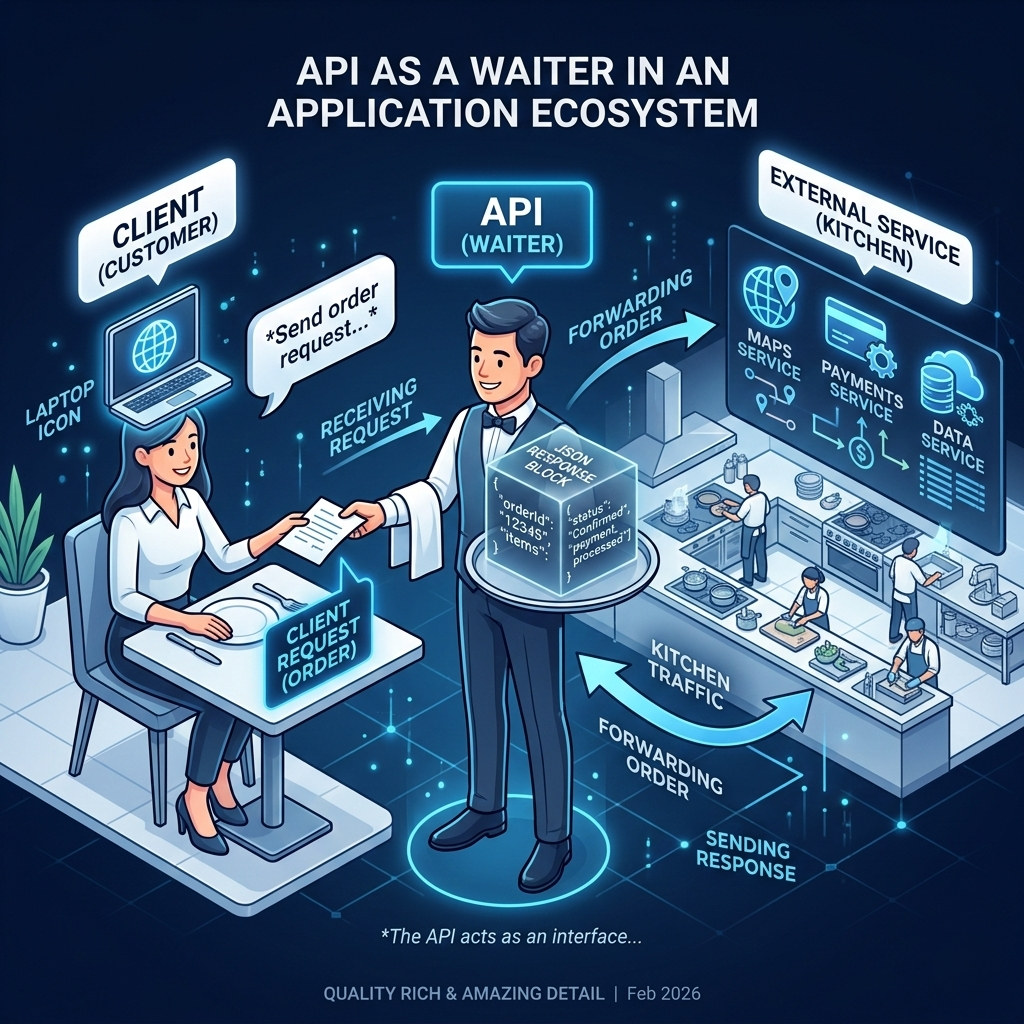
Imagine you're at a restaurant. You don't walk into the kitchen, grab ingredients, and cook your own meal. You sit down, look at the menu, and tell the waiter what you want. The waiter goes to the kitchen, the kitchen does its thing, and your food arrives. You never need to know how the grill works, who's doing the dishes, or which farm supplied the tomatoes.
That waiter is an API — an Application Programming Interface. It's the layer between your application and some other piece of software (or hardware, or service) that defines exactly how requests and responses should happen. You follow the rules on the menu (the API's documentation), you place your order (send a request), and you get your result (the response). What happens in the kitchen is none of your business.
This metaphor isn't just cute — it captures something fundamental. APIs allow completely unrelated software systems to communicate without exposing their internal complexity. A mapping service doesn't give you access to its databases; it gives you an API that lets you ask "what's the route from A to B?" and get back coordinates. A payment processor doesn't let you touch its transaction engine; it gives you an API where you send card details and receive a success or failure response.
Here's what most tutorials miss when explaining APIs: the real power isn't just communication — it's specialization at scale. Without APIs, every developer building a ride-sharing app would have to build their own mapping system, their own payment processor, their own SMS service. APIs let you plug into the world's best specialized tools and stitch them together into something new. That's why modern software moves so fast.
Pro Tips & Common Mistakes — APIs
Pro Tip: Always check an API's versioning strategy before integrating. APIs that don't version their endpoints (e.g.,
/v1/,/v2/) can break your app silently when they update their response structure.
Common Mistake: Treating an API as always-on infrastructure. External APIs have rate limits, outages, and deprecation cycles. Always build with retries, fallbacks, and circuit breakers — especially for APIs in your critical path.
Counterintuitive Insight: More API calls ≠ better architecture. Every external API call is a network hop with latency, failure risk, and cost implications. Sometimes caching an API response for 60 seconds is more reliable and cheaper than hitting it fresh every time.
How REST APIs Actually Work
When developers say "API," they almost always mean a REST API — Representational State Transfer. It's the dominant architectural style for web-based APIs, and understanding it is non-negotiable in modern development.
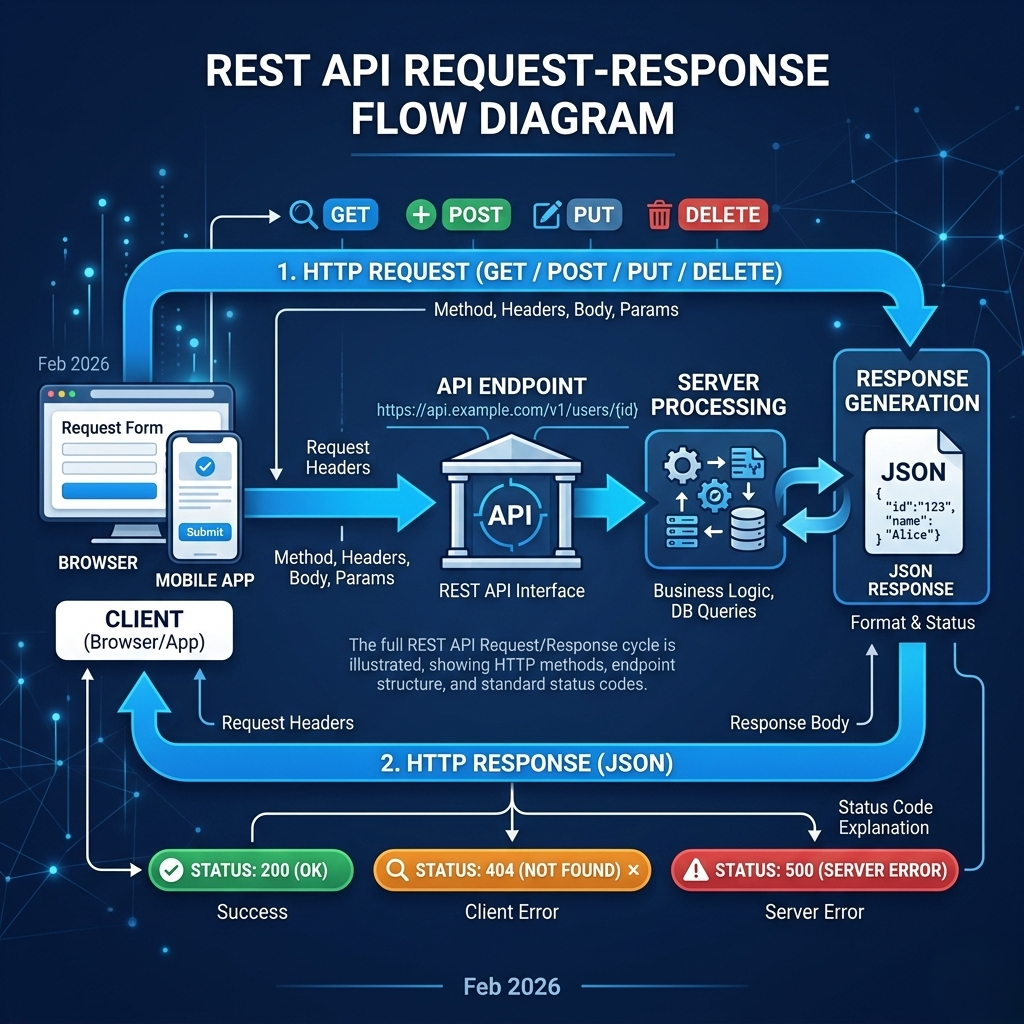
REST APIs communicate over HTTP, the same protocol your browser uses to load web pages. You send a request to a specific URL called an endpoint, and you get back a response — usually formatted as JSON. The endpoint's structure tells you a lot about what it does. GET /users/42 almost certainly fetches the user with ID 42. DELETE /posts/17 almost certainly removes post 17. This convention-over-configuration approach makes REST APIs intuitive once you know the vocabulary.
The four most important HTTP methods — often called CRUD operations — are the verbs of the REST world. GET reads data (fetch a user's profile, list available products). POST creates new data (submit a form, create a new account). PUT/PATCH updates existing data (change a password, update an order). DELETE removes data (cancel a subscription, remove a post). Learning to think in these verbs changes how you design software, not just how you consume APIs.
Alongside those verbs, every API response comes with a status code — a three-digit number that tells you what happened. The 200s mean success (200 OK, 201 Created). The 400s mean you messed up the request (400 Bad Request, 401 Unauthorized, 404 Not Found). The 500s mean the server is having a bad day (500 Internal Server Error). Getting comfortable reading status codes is one of those skills that makes debugging go from an hour to a minute.
Here's a real example: fetching a GitHub user's profile via their public REST API. No SDK, no library — just a raw HTTP request.
# Using curl to make a direct GET request to GitHub's REST API
curl -H "Accept: application/vnd.github+json" \
     https://api.github.com/users/torvalds

# Response (truncated):
# {
#   "login": "torvalds",
#   "id": 1024025,
#   "name": "Linus Torvalds",
#   "public_repos": 8,
#   "followers": 231000
# }
That's it. No special software. No installation. A URL, an HTTP verb, and a response. That simplicity is REST's greatest strength.
Pro Tips & Common Mistakes — REST APIs
Pro Tip: Use a tool like Postman or Insomnia to explore and test APIs before writing a single line of integration code. Understanding the API's behavior manually first makes your implementation dramatically cleaner.
Common Mistake: Ignoring pagination. Most APIs that return lists of items (users, products, posts) paginate their results. If you only handle the first page, your app will silently show incomplete data at scale. Always check for
next_page,cursor, orLinkheaders.
Myth-busting: REST is the only option is a myth. GraphQL, gRPC, and WebSockets are legitimate API paradigms that solve problems REST doesn't handle well (over-fetching, real-time streaming, strongly-typed contracts). REST is the default, not the only answer.
API Security: Keys, Tokens, and Rate Limits
Here's something that trips up a lot of developers new to API integrations: authentication isn't just a technicality — it's the single most common source of production incidents in API-heavy systems.
APIs you call from your own app are almost always protected. The two most common mechanisms are API keys and OAuth tokens. API keys are simple strings — you include them in your request headers or query parameters, and the server uses them to identify who's asking and whether they're allowed. Think of an API key as a password for your application. OAuth tokens are more sophisticated: they represent a specific user's permission to let your app act on their behalf — without your app ever knowing their actual password. This is how "Login with Google" works under the hood.
// Using an API key in a request header (correct pattern)
const response = await fetch('https://api.openweathermap.org/data/2.5/weather?q=London', {
  headers: {
    'Authorization': `Bearer ${process.env.WEATHER_API_KEY}`
  }
});

// NEVER do this — hardcoding secrets in source code is a career-limiting move
// const response = await fetch('...?apikey=sk_live_abc123def456'); // BAD: hardcoded key
Rate limiting is the other side of API security. Most APIs cap how many requests you can make in a given time window — sometimes per second, sometimes per day. Exceed that limit and you'll start getting 429 Too Many Requests responses. This isn't just bureaucracy — it protects the API provider's infrastructure and ensures fair access. Designing your application to respect rate limits, use exponential backoff on retries, and cache responses where possible is what separates amateur API integrations from production-grade ones.

Pro Tips & Common Mistakes — API Security
Pro Tip: Store API keys in environment variables or a secrets manager (like AWS Secrets Manager or HashiCorp Vault), never in your source code or version control. A single leaked key pushed to a public GitHub repo can result in thousands of dollars in fraudulent API usage within hours.
Common Mistake: Building without rate limit handling. Add retry logic with exponential backoff from day one. Libraries like
axios-retryfor JavaScript ortenacityfor Python make this almost effortless.
What Is an SDK?
Now we get to the concept that trips people up most — because it sounds like it should be fundamentally different from an API, but actually includes one.
An SDK — Software Development Kit — is a complete package of tools designed to help you build on a specific platform or service. Think of it less like a single tool and more like a fully equipped workshop. Where an API is a single connection point (the waiter from our earlier analogy), an SDK is everything you need to interact with a service on your specific platform: pre-written code, helper functions, documentation, sample projects, debugging utilities, and yes — an API client underneath it all.
The platform-specific nature of SDKs is what makes them genuinely different from just "an API wrapper." When Google ships an Android SDK, it includes tools for accessing the camera, handling notifications, working with sensors, managing the UI lifecycle — all pre-built for Android's specific runtime environment. When Stripe ships its iOS SDK, it handles the quirks of UIKit, manages PCI-compliant form fields natively, and integrates with Apple Pay. You couldn't replicate that with a raw HTTP API call even if you wanted to — it requires deep platform knowledge baked into the SDK itself.
Here's the thing most tutorials miss about SDKs: they're opinionated by design, and that's actually their superpower. A good SDK encodes the best practices of the service provider directly into the tools you use. When you call stripe.paymentIntents.create(), you're not just making an API call — you're following Stripe's recommended payment flow, with the right error handling patterns, the right idempotency key structure, and the right retry logic, all handled automatically. That accumulated wisdom would take you days to implement from scratch.

Pro Tips & Common Mistakes — SDKs
Pro Tip: Before adopting an SDK, check its GitHub repository. Look at the last commit date, the number of open issues, and whether major version releases break backward compatibility. A stale SDK for a critical service is a trap — you'll be stuck on an old API version when the provider stops supporting it.
Common Mistake: Using an SDK for everything automatically. SDKs come with dependencies — sometimes big ones. If you only need to make two API calls to a service, pulling in a full SDK adds unnecessary weight, potential security surface area, and upgrade overhead to your project. For minimal integrations, direct API calls are cleaner.
APIs Inside SDKs: How They Relate
This is where the confusion usually lives, so let's be precise: an SDK almost always contains an API client, but an API does not contain an SDK. They're not competing alternatives — one wraps the other.
When you install the Instagram SDK and call instagramShare.sharePhoto(image), under the hood the SDK is constructing a properly-authenticated HTTP request, sending it to Instagram's REST API endpoint, handling the response, and giving you back a clean result or a typed error. The API is the raw interface; the SDK is the abstraction layer that makes it pleasant to use.
Consider the difference between using Stripe's REST API directly versus their JavaScript SDK:
// Direct API approach — more control, more boilerplate
const response = await fetch('https://api.stripe.com/v1/payment_intents', {
  method: 'POST',
  headers: {
    'Authorization': `Bearer ${process.env.STRIPE_SECRET_KEY}`,
    'Content-Type': 'application/x-www-form-urlencoded',
  },
  body: new URLSearchParams({
    amount: '2000',
    currency: 'usd',
    'payment_method_types[]': 'card',
  })
});
const paymentIntent = await response.json();

// SDK approach — cleaner, with built-in error handling and type safety
import Stripe from 'stripe';
const stripe = new Stripe(process.env.STRIPE_SECRET_KEY);

const paymentIntent = await stripe.paymentIntents.create({
  amount: 2000,
  currency: 'usd',
  payment_method_types: ['card'],
});
Both accomplish the same thing. The SDK version is shorter, easier to read, and harder to get wrong — but it's doing the same network call underneath. Understanding this relationship is crucial, because it means choosing an SDK isn't about choosing something fundamentally different — it's about choosing a level of abstraction.

Pro Tips & Common Mistakes — API + SDK Relationship
Pro Tip: Read the SDK's source code, at least once. Most popular SDKs are open source. Understanding exactly what
sdk.doThing()actually sends over the wire gives you dramatically better debugging skills when things go wrong in production.
Common Mistake: Assuming the SDK is always up to date with the API. Service providers frequently release new API features before updating their SDKs. If you need a cutting-edge API feature right now, you may need to fall back to direct API calls even when an SDK exists.
API vs SDK: How to Choose
Let's get practical. There's no universal right answer here — the correct choice depends on what you're building, how fast you need to move, and how much control you need. Here's the framework experienced engineers use.
Choose direct API integration when you need complete control over the request lifecycle — custom retry strategies, specific headers, complex batching logic. Also choose the direct approach when you want to minimize dependencies in a microservice or library you're publishing, when the available SDK is outdated or poorly maintained, or when you're building a thin integration (one or two API calls) where the overhead of adding a full SDK isn't worth it.
Choose an SDK when you're building on a specific platform (iOS, Android, a particular cloud provider's ecosystem) where the SDK handles platform-specific complexities you'd otherwise have to research and implement yourself. SDKs shine when you want to move quickly and trust the provider's implementation of authentication, rate limiting, and error handling, or when the SDK actively handles things the API alone can't — like Stripe's pre-built, PCI-compliant UI components that never expose card data to your server.
Use both when you're building a production application of meaningful complexity. Most serious apps end up here. You might use the Twilio SDK for SMS and voice (because the SDK's helper libraries simplify webhook handling significantly), while calling the Twilio REST API directly for specific reporting endpoints that the SDK doesn't surface cleanly. The architecture isn't SDK-versus-API — it's "right tool for each job."
# A real-world hybrid approach — SDK for complex features, direct API for edge cases
import anthropic
import requests
import os

# Use the official SDK for primary AI interactions (handles streaming, retries, auth)
client = anthropic.Anthropic(api_key=os.environ.get("ANTHROPIC_API_KEY"))
message = client.messages.create(
    model="claude-sonnet-4-20250514",
    max_tokens=1024,
    messages=[{"role": "user", "content": "Explain APIs vs SDKs"}]
)

# Use direct REST call for a specific endpoint not fully covered by SDK
headers = {"x-api-key": os.environ.get("ANTHROPIC_API_KEY")}
usage_response = requests.get("https://api.anthropic.com/v1/usage", headers=headers)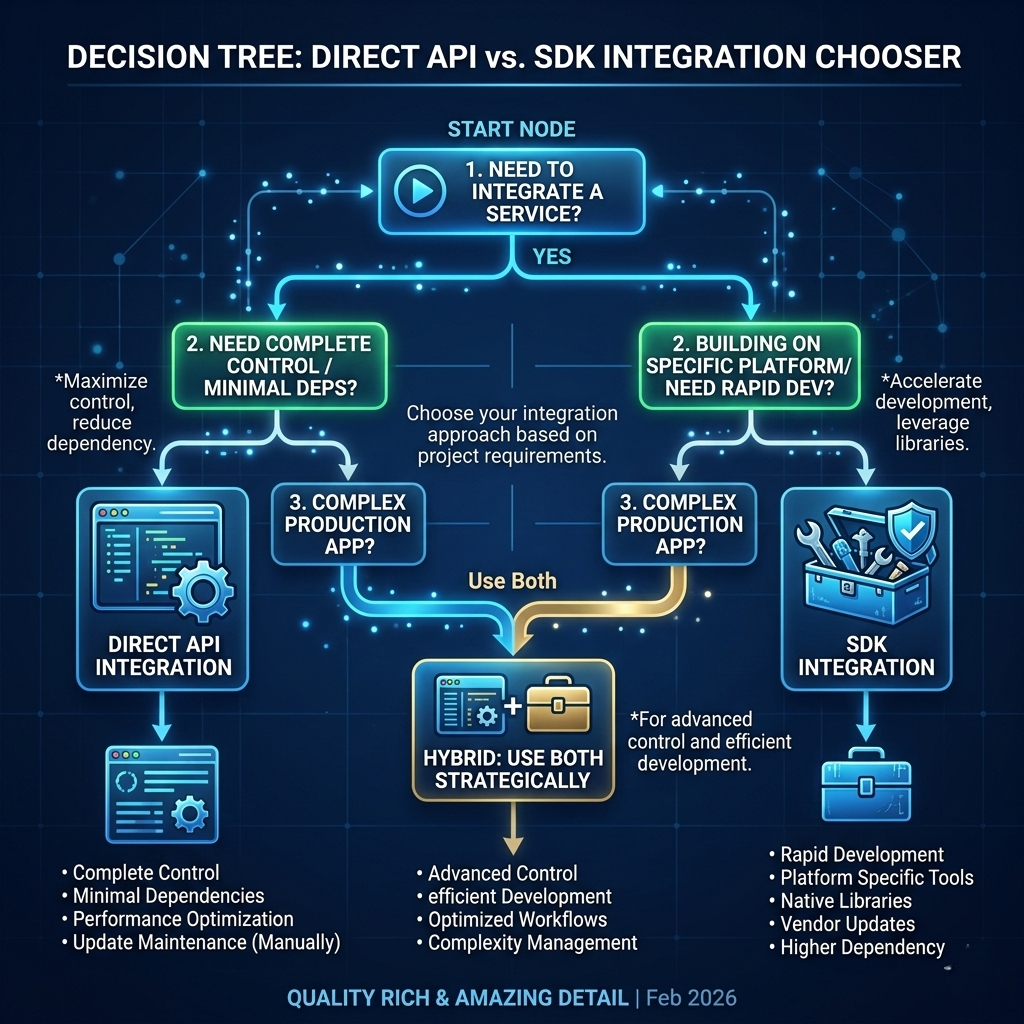
Pro Tips & Common Mistakes — Decision Making
Pro Tip: When evaluating SDKs, look for TypeScript definitions (for JS projects) or type hints (for Python). Typed SDKs provide autocomplete, catch errors at compile time, and self-document how to use the interface correctly. An untyped SDK often means the SDK wasn't built with serious developer experience in mind.
Common Mistake: Defaulting to the SDK just because it exists. Senior engineers frequently write thin direct API integrations for simplicity, then migrate to an SDK when the integration grows complex enough to justify it. Start simple, add abstraction when it earns its place.
How It All Connects: The Real-World App Architecture
Let's bring this home with a concrete scenario. Imagine you're building a food delivery app. It needs maps to show delivery routes, restaurant data to display menus, payments to process orders, and messaging to update customers in real time.
Here's how APIs and SDKs play together in this architecture. For Google Maps, you use the Maps JavaScript SDK in your web app to render the interactive map with real-time driver tracking. The SDK handles map rendering, marker management, and route animation. Under the hood, the SDK calls the Maps REST API for route data and geocoding. For restaurant data, you build your own REST API that your frontend calls to fetch menu items, prices, and availability — this is an API you provide, not one you consume. For Stripe payments, you use the Stripe.js SDK on the frontend to render a secure payment form (because Stripe's SDK ensures card data never touches your servers), and the Stripe Node SDK on your backend to create and confirm payment intents. For Twilio messaging, you call Twilio's REST API directly (without SDK) from a serverless function to send a single SMS confirmation on order placement — two API calls, no SDK overhead needed.
This is the architecture of virtually every modern app at scale: a mix of SDKs where their platform integration earns their weight, and direct API calls where simplicity wins. Understanding when each is appropriate — not as competing camps, but as complementary layers — is what mature software architecture looks like.
Getting Started: A Practical Tutorial
Here's a step-by-step walkthrough to go from zero to a working integration using both approaches. We'll use the OpenWeatherMap API (free tier) to illustrate.
Step 1: Get your API key
Sign up at openweathermap.org, navigate to your profile → API keys, and copy your key. Store it as an environment variable:
# In your terminal or .env file
export WEATHER_API_KEY="your_key_here"
Step 2: Make a direct REST API call
No SDK, no libraries — just a fetch call. This is the raw experience:
// Direct API call — fetch current weather for any city
async function getWeatherDirect(city) {
  const apiKey = process.env.WEATHER_API_KEY;
  const url = `https://api.openweathermap.org/data/2.5/weather?q=${city}&appid=${apiKey}&units=metric`;

  const response = await fetch(url);

  if (!response.ok) {
    throw new Error(`API error: ${response.status} ${response.statusText}`);
  }

  const data = await response.json();
  return {
    city: data.name,
    temp: data.main.temp,
    description: data.weather[0].description
  };
}

// Usage
const weather = await getWeatherDirect('London');
console.log(`${weather.city}: ${weather.temp}°C, ${weather.description}`);
// Output: London: 12.3°C, light rain
Step 3: Install and use an SDK wrapper
Now try an SDK wrapper. Notice what changes — and what doesn't:
npm install openweathermap-ts// SDK approach — same result, cleaner interface with TypeScript types
import OpenWeatherMap from 'openweathermap-ts';
const openWeather = new OpenWeatherMap({
apiKey: process.env.WEATHER_API_KEY!
});
async function getWeatherSDK(city: string) {
const weather = await openWeather.getCurrentWeatherByCityName({ cityName: city });
return {
city: weather.name,
temp: weather.main.temp,
description: weather.weather[0].description
};
}
// Same output — but with TypeScript types, autocomplete, and cleaner error surfacesStep 4: Add error handling and rate limit protection
Real production code handles failure gracefully:javascript
async function getWeatherWithRetry(city, maxRetries = 3) {
  for (let attempt = 1; attempt <= maxRetries; attempt++) {
    try {
      const apiKey = process.env.WEATHER_API_KEY;
      const response = await fetch(
        `https://api.openweathermap.org/data/2.5/weather?q=${city}&appid=${apiKey}&units=metric`
      );

      if (response.status === 429) {
        // Rate limited — exponential backoff before retrying
        const waitMs = Math.pow(2, attempt) * 1000;
        console.log(`Rate limited. Retrying in ${waitMs}ms...`);
        await new Promise(resolve => setTimeout(resolve, waitMs));
        continue;
      }

      if (!response.ok) throw new Error(`HTTP ${response.status}`);
      return await response.json();

    } catch (error) {
      if (attempt === maxRetries) throw error;
    }
  }
}
Step 5: Cache your responses
Make your integration production-quality with simple in-memory caching:
const cache = new Map();
const CACHE_TTL = 60 * 1000; // 60 seconds

async function getWeatherCached(city) {
  const cacheKey = city.toLowerCase();
  const cached = cache.get(cacheKey);

  if (cached && Date.now() - cached.timestamp < CACHE_TTL) {
    return cached.data; // Return cached result, no API call needed
  }

  const data = await getWeatherDirect(city);
  cache.set(cacheKey, { data, timestamp: Date.now() });
  return data;
}
This five-step progression — from raw API call to production-grade integration with caching and retry logic — is the journey every serious API integration takes. Start simple, add resilience as you go.
FAQ
Q: Is an SDK just a wrapper around an API?
Not exactly — though many SDKs do wrap an API. An SDK can include tools, UI components, debugging utilities, sample code, build tools, and emulators that have nothing to do with making API calls. The Android SDK, for example, includes the entire Android development ecosystem. But for third-party service SDKs (Stripe, Twilio, etc.), yes — the core is a well-designed API client.
Q: Can I use an API without an SDK?
Absolutely, and many developers prefer this for simple integrations. Any HTTP client — curl, fetch, axios, requests in Python — can call a REST API. You just need the endpoint URL, your authentication credentials, and knowledge of the expected request/response format.
Q: What's the difference between an API key and an OAuth token?
An API key identifies your application. An OAuth token identifies a specific user's permission for your app to act on their behalf. API keys are simpler and appropriate for server-to-server communication. OAuth is necessary when you need to access user-specific data (their photos, files, contacts) without them sharing their password with you.
Q: Why do some SDKs cost money?
The SDK itself is usually free — what you pay for is access to the underlying API (requests, data, compute). Some companies charge for SDK support tiers, advanced features, or enterprise licensing for compliance reasons. Always check the pricing page of the service, not just the SDK download page.
Q: When should I build my own API?
When you have data or functionality that another application (your mobile app, a partner's service, your own microservices) needs to access. If you're building any backend service that other software will talk to, you're building an API — whether you call it that or not.
Q: Are GraphQL APIs different from REST APIs in ways that matter?
Yes, significantly. REST APIs return fixed data shapes per endpoint. GraphQL lets clients specify exactly what data they want in a single request, eliminating over-fetching (getting more data than you need) and under-fetching (needing multiple calls for one screen's data). GraphQL is particularly valuable for mobile apps where bandwidth efficiency matters.
Q: Do I need to understand APIs to use an SDK?
You don't need to for basic usage — that's partly the point. But understanding the underlying API makes you dramatically better at debugging, handling edge cases, and using features the SDK doesn't surface. Treat the SDK as the fast path, and the API documentation as your reference when the SDK doesn't do what you need.
Q: What happens when an API or SDK gets deprecated?
Providers typically announce deprecations with a sunset date — sometimes months, sometimes years away. You'll need to migrate to the newer version. This is why your dependency on external APIs should be wrapped behind your own abstraction layer in larger applications, so you can swap implementations without rewriting every call site.
Conclusion
Here's the one-sentence version: an API is a defined interface for communication between software systems; an SDK is a toolkit that makes building on a specific platform or service easier, and usually includes an API client inside.
But the real insight isn't in the definitions — it's in the decision-making. Direct API calls give you control, simplicity, and minimal dependencies. SDKs give you speed, platform-specific power, and encoded best practices. Most serious applications use both, in different places, for different purposes.
The developers who get tripped up by this aren't confused about definitions — they're skipping the step of asking why before asking how. Start every integration by asking: what do I actually need here? Two API calls? Go direct. A complex, platform-native feature set? Grab the SDK. A mix of both? Build accordingly.
The ability to make that judgment call confidently — and to switch between levels of abstraction fluidly — is one of the underrated hallmarks of a senior engineer.