
It was 2 a.m. on a Tuesday. An engineer at a fast-growing fintech startup was staring at a graph that looked like a cliff. Their transaction history endpoint — which had been humming along for months — had just started timing out for users with more than 10,000 records. The database wasn't down. The server wasn't overloaded. The problem was simpler and more embarrassing: they'd been loading everything in one API response, and now "everything" had become a lot.
You've probably hit some version of this. Maybe it's a dashboard that takes four seconds to load. Maybe it's a feed that shows the same posts twice when you refresh. Maybe it's an admin panel that works fine in staging (with 200 rows of test data) and collapses in production (with 2 million). The root cause is almost always the same: the API isn't paginating, or it's paginating wrong.
Pagination is one of those things that seems boring until it's the reason your app is unusable. This post is the guide I wish existed when I first hit these walls — covering offset-based and cursor-based pagination with real code, real tradeoffs, and the decision framework that separates apps that scale from apps that don't.
Table of Contents
- Why Pagination Exists (And What Happens Without It)
- Offset-Based Pagination: The Easy Way That Breaks at Scale
- Cursor-Based Pagination: The Right Way for Real-World Data
- Key-Set vs Time-Based Pagination: Choosing Your Cursor
- Offset vs Cursor: The Decision Framework
- How It All Connects: Pagination in a Full System
- Getting Started: Building Pagination Step by Step
- FAQ
- Conclusion
Why Pagination Exists (And What Happens Without It)
Imagine you're building a library catalog system. Your database has 3 million books. A user searches for "science fiction" and your API dutifully fetches every matching record, serializes them into JSON, and fires them across the network. That single response might be hundreds of megabytes. The server spends seconds just building it. The client spends more seconds parsing it. And every user who searches at the same time is competing for the same database resources.
This isn't hypothetical. It's the exact scenario that brought down the 2 a.m. fintech endpoint from the intro. When your data is small, loading everything works — and it works so well that it's easy to forget the trap you're setting for yourself. But as any dataset grows beyond a few thousand records, the "just give me everything" approach creates a cascade of compounding problems.
The first problem is server load. Database queries that scan hundreds of thousands of rows are expensive. They hold locks, consume memory, and compete with every other query running at the same time. Pagination breaks that single massive scan into small, bounded queries — each of which is fast, cheap, and easy for the database to optimize.
The second problem is network efficiency. Transferring 50MB of JSON when a user only needs to see 20 rows on their screen is wasteful by any measure. Mobile users on slow connections feel this acutely. Pagination means sending only what's needed right now, keeping your API responses lean and your users happy.
The third problem — and this is the one that bites you in production in ways you don't see coming — is client responsiveness. Your frontend can't render a table while it's waiting for a 10-second API response. Paginated responses arrive fast and can be streamed, lazy-loaded, or progressively enhanced. The difference between a 200ms paginated response and a 10-second unpaginated one isn't just speed — it's whether your app feels alive or frozen.

Pro Tips & Common Mistakes — The Basics
Pro Tip: Establish a maximum page size on the server side, not the client side. If you let clients request
limit=999999, you've defeated the purpose of pagination entirely. A hard cap (typically 100–1000 records depending on your payload size) keeps things sane regardless of what clients request.
Common Mistake: Thinking pagination is only a frontend concern. The real work — and the real performance gains — happen in your database queries. A well-paginated API backed by a poorly indexed table is still slow. Pagination and indexing go hand in hand.
Offset-Based Pagination: The Easy Way That Breaks at Scale
Offset-based pagination is how most developers learn pagination. It's intuitive, it's easy to implement, and it's the approach that seems completely fine until your dataset gets large enough to expose its fundamental flaw.
The mechanism is simple. You add two parameters to your API: offset (how many records to skip) and limit (how many records to return). Page 1 is offset=0&limit=20. Page 2 is offset=20&limit=20. Page 3 is offset=40&limit=20. Your database query uses these values directly:
-- Offset-based pagination — simple and intuitive
SELECT * FROM posts
ORDER BY created_at DESC
LIMIT 20 OFFSET 200;
// Express.js endpoint — offset-based pagination
app.get('/api/posts', async (req, res) => {
  const limit = Math.min(parseInt(req.query.limit) || 20, 100); // cap at 100
  const offset = parseInt(req.query.offset) || 0;

  const posts = await db.query(
    'SELECT * FROM posts ORDER BY created_at DESC LIMIT $1 OFFSET $2',
    [limit, offset]
  );

  const total = await db.query('SELECT COUNT(*) FROM posts');

  res.json({
    data: posts.rows,
    pagination: {
      limit,
      offset,
      total: parseInt(total.rows[0].count),
      has_more: offset + limit < parseInt(total.rows[0].count)
    }
  });
});
Clean, right? You can calculate total pages, build "Go to page 5" navigation, and the implementation is maybe 15 lines of code. For internal dashboards, admin panels, and datasets that grow slowly, this approach works completely fine.
Here's the thing most tutorials miss: the database doesn't actually skip those records. When you say OFFSET 200, PostgreSQL (and most other databases) has to read and discard the first 200 rows before returning your results. At offset 200, that's fine. At offset 200,000, your database is scanning 200,000 rows just to throw them away. This is why offset pagination gets measurably slower as users page deeper — it's not your network, it's not your server, it's the database doing work that scales linearly with the offset value.
The second problem is even more subtle and harder to debug: data consistency during pagination. Picture a news feed. A user loads page 1 (posts 1–20, sorted newest first). While they read, 5 new posts get published. They click "Next" — now their page 2 request has offset=20, but the 5 new posts have shifted everything down. They see posts 16–35 instead of 21–40. Posts 16–20 appear twice. And the 5 new posts? The user never sees them at all unless they go back to page 1. For slowly-changing data, this is annoying. For a real-time feed, it's completely broken.

Pro Tips & Common Mistakes — Offset Pagination
Pro Tip: If you're committed to offset pagination, add a database index on your sort column.
ORDER BY created_at DESCwith acreated_atindex is far faster than without one, even if the fundamental offset problem remains.
Common Mistake: Using
SELECT COUNT(*)on every paginated request to calculate total pages. On large tables, that count query can be as slow as the data query itself. For very large datasets, useEXPLAINestimates or maintain a separate counter table. Approximate counts are often good enough for "page X of ~500" UI displays.
When offset is actually fine: Small, slow-changing datasets (under ~50k rows), admin UIs with explicit page navigation, scenarios where the user explicitly expects "go to page 47." Not everything needs cursor-based pagination — reach for it when you genuinely need it.
Cursor-Based Pagination: The Right Way for Real-World Data
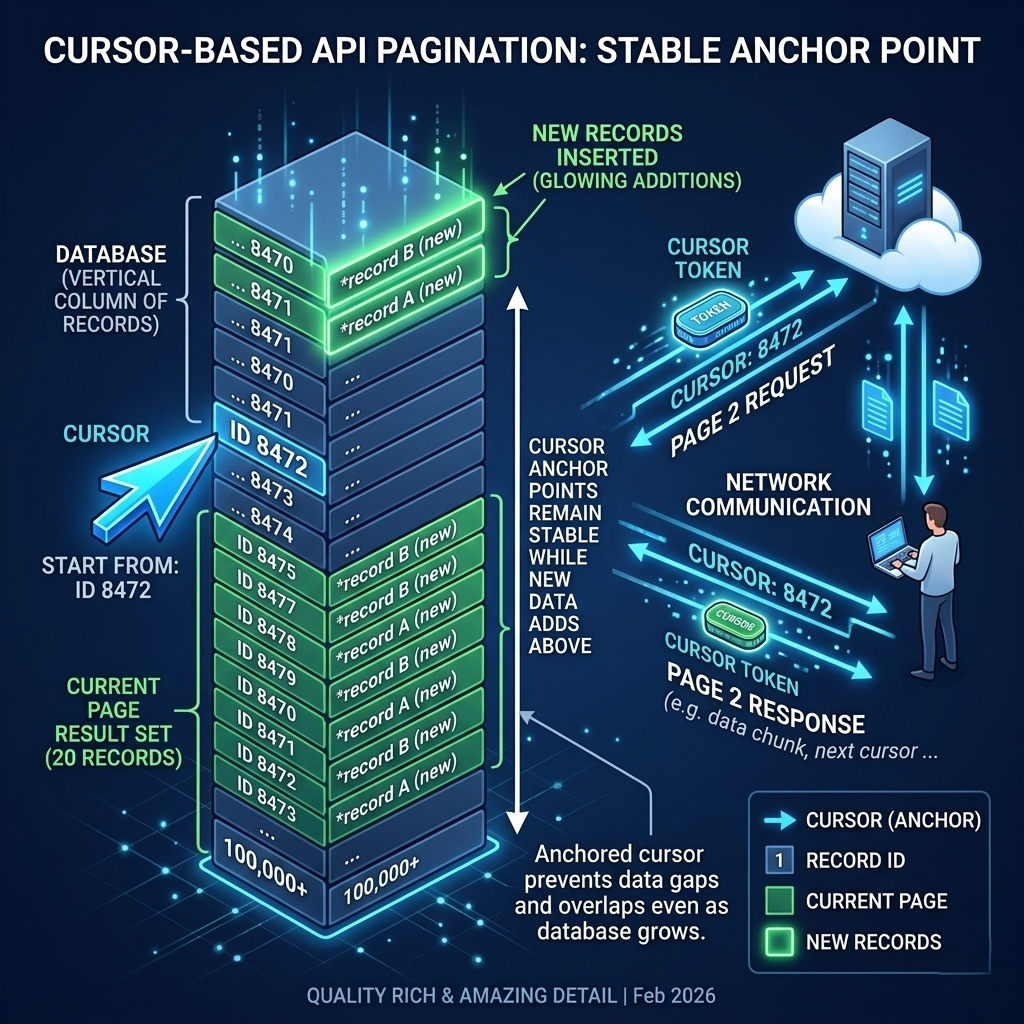
Cursor-based pagination solves both problems of offset pagination by fundamentally changing the question being asked. Instead of "give me rows 200–220," it asks "give me the 20 rows that come after row ID 8472." The database doesn't need to count or skip anything — it just filters by a condition, which indexes handle instantly.
The "cursor" is a reference point in your dataset — typically an ID, a timestamp, or another indexed value that uniquely identifies a position. The client receives this cursor with each page of results and sends it back with the next request. The server uses it as a WHERE clause filter, not an offset.
-- Cursor-based pagination — consistent and fast at any scale
SELECT * FROM posts
WHERE id < $1  -- cursor: last seen ID from previous page
ORDER BY id DESC
LIMIT 20;
// Express.js endpoint — cursor-based pagination
app.get('/api/posts', async (req, res) => {
  const limit = Math.min(parseInt(req.query.limit) || 20, 100);
  const cursor = req.query.cursor; // last seen post ID from client

  let query, params;

  if (cursor) {
    // Filter: only rows "before" the cursor (for DESC order)
    query = 'SELECT * FROM posts WHERE id < $1 ORDER BY id DESC LIMIT $2';
    params = [cursor, limit];
  } else {
    // First page: no cursor yet
    query = 'SELECT * FROM posts ORDER BY id DESC LIMIT $1';
    params = [limit];
  }

  const posts = await db.query(query, params);
  const lastPost = posts.rows[posts.rows.length - 1];

  res.json({
    data: posts.rows,
    pagination: {
      next_cursor: lastPost ? lastPost.id : null,
      has_more: posts.rows.length === limit
    }
  });
});
Notice what's different. There's no OFFSET. There's no COUNT(*). There's no total page calculation. There's just a fast, index-driven WHERE id < $1 filter. On a properly indexed table with 10 million rows, this query runs in milliseconds whether you're on "page 1" or "page 500,000" — because the database always knows exactly where to start.
The consistency problem also disappears. The cursor is anchored to a specific record in the database. If new posts are inserted at the top of the feed, they don't shift your cursor. When the user asks for "what comes after ID 8472," the answer is always the same regardless of what was inserted elsewhere. No duplicates. No gaps. The user sees a stable, coherent view of data even as it changes rapidly around them.
The trade-off, and it's worth being honest about it: cursor-based pagination is harder to implement and more restrictive to use. You can't jump to "page 47." You can't easily calculate how many total pages exist. Navigation is forward-only (though bi-directional cursors are possible with extra engineering effort). For UIs that need explicit page numbers or "skip to end" functionality, cursor pagination is a worse user experience — even if it's a better technical solution. Know your use case before you choose.
Pro Tips & Common Mistakes — Cursor Pagination
Pro Tip: Encode your cursor values before sending them to clients. Base64-encoding
{"id": 8472, "created_at": "2025-01-15T10:30:00Z"}as an opaque string prevents clients from trying to construct or manipulate cursor values. It also gives you the flexibility to change your cursor structure internally without breaking the client API contract.
Common Mistake: Using a non-unique cursor column. If your cursor is
created_atand two records share the same timestamp (common in bulk imports or high-throughput systems), your pagination will skip or duplicate records. Always use a unique column (likeid) as your cursor, or compose a cursor from a timestamp + a tiebreaker ID.
Edge case to handle: What happens when the cursor record gets deleted? Your
WHERE id < $1query still works correctly — the database just finds the next valid records after that point. But if you're using the cursor to fetch the item itself, you need to handle the 404 case gracefully.
Key-Set vs Time-Based Pagination: Choosing Your Cursor
Once you've committed to cursor-based pagination, you face a second decision: what should the cursor actually be? The two most common approaches are key-set pagination (using a primary key) and time-based pagination (using a timestamp), and the right choice depends on the nature of your data.
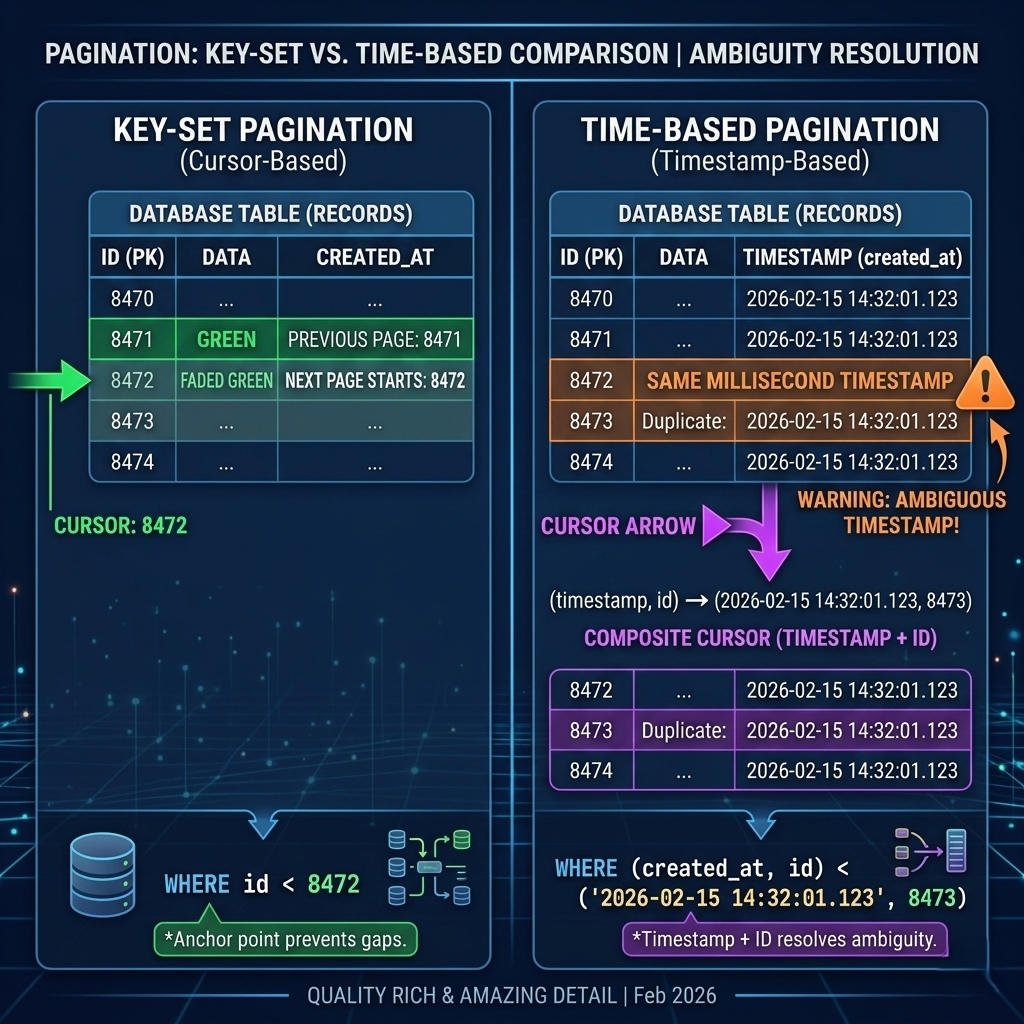
Key-set pagination uses the primary key — usually an auto-incrementing integer or a UUID — as the cursor. It's the most reliable approach because primary keys are guaranteed to be unique, they're always indexed, and they have a natural order. The query pattern is clean: WHERE id > :cursor ORDER BY id ASC or WHERE id < :cursor ORDER BY id DESC. For most standard data APIs — user records, product catalogs, transaction histories — key-set is the default choice.
-- Key-set pagination with composite cursor (stable, duplicate-safe)
SELECT id, title, created_at
FROM articles
WHERE (created_at, id) < ($1, $2)  -- cursor = (timestamp, id) composite
ORDER BY created_at DESC, id DESC
LIMIT 20;
Time-based pagination uses a timestamp as the cursor, making it natural for time-series data: logs, events, messages, analytics. The intuitive query is WHERE created_at < :cursor ORDER BY created_at DESC. This approach has a subtle problem though — timestamps aren't guaranteed unique. Two events logged at the same millisecond share the same created_at, which breaks your cursor uniqueness assumption.
The solution is a composite cursor: a cursor composed of both a timestamp and an ID. WHERE (created_at, id) < ($1, $2) gives you the temporal ordering of time-based pagination with the uniqueness guarantee of key-set pagination. Most production systems that paginate time-series data use this composite approach, even if many tutorials don't mention it.
// Encoding a composite cursor for time-based pagination
function encodeCursor(post) {
  const cursorData = {
    created_at: post.created_at.toISOString(),
    id: post.id
  };
  return Buffer.from(JSON.stringify(cursorData)).toString('base64');
}

function decodeCursor(cursorString) {
  const decoded = Buffer.from(cursorString, 'base64').toString('utf-8');
  return JSON.parse(decoded);
}

// Usage in your API handler
const cursor = req.query.cursor ? decodeCursor(req.query.cursor) : null;
const query = cursor
  ? `SELECT * FROM posts WHERE (created_at, id) < ($1, $2) ORDER BY created_at DESC, id DESC LIMIT $3`
  : `SELECT * FROM posts ORDER BY created_at DESC LIMIT $1`;
Pro Tips & Common Mistakes — Cursor Types
Pro Tip: For UUIDs as primary keys, cursor-based pagination still works — but UUIDs aren't sequentially ordered by default. Use
UUID v7(time-ordered UUIDs) or add a separatecreated_atindex as your sort column. Random UUIDs (v4) as cursors require careful index design to avoid full table scans.
Common Mistake: Sending raw database IDs as cursors in your public API. This exposes your internal database structure and lets clients enumerate or guess record IDs. Encode your cursors. Make them opaque. Your future self will thank you when you need to change the underlying cursor strategy.
Offset vs Cursor: The Decision Framework
Here's the counterintuitive truth: cursor-based pagination isn't always better. It's almost always more technically correct, but "technically correct" isn't the only thing that matters when you're designing a product.
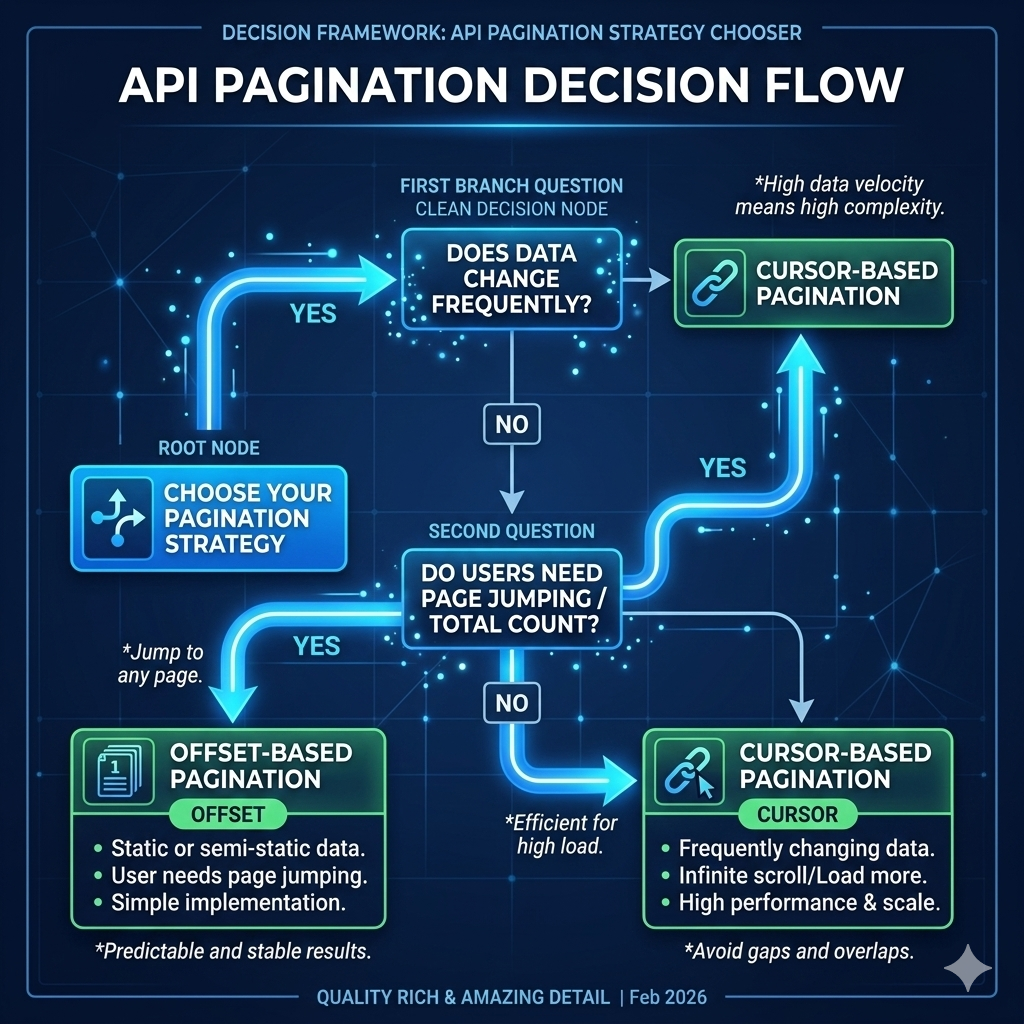
The right mental model is to match your pagination strategy to your data's characteristics and your users' navigation patterns. Two questions cut through most of the ambiguity. First: does your data change frequently while users are paginating? If yes, the data consistency guarantees of cursor pagination are critical. If no, offset pagination's inconsistency may never actually surface as a bug. Second: do users need to jump to a specific page or total count? If yes, offset is the only practical choice. If users will always navigate forward (infinite scroll, "load more," next/previous), cursor pagination fits naturally.
The decision matrix looks like this. Use offset pagination for admin dashboards with explicit page navigation, reports on static or slowly-changing datasets, small datasets (under ~50k rows) where performance isn't a concern, and anywhere a total record count is a meaningful UX element. Use cursor pagination for social feeds, notification streams, and real-time data, large or fast-growing datasets where deep offset queries would be slow, infinite scroll or "load more" UX patterns, and any API that external clients will paginate programmatically at high volume.
Many mature systems use both simultaneously. A product catalog might use offset pagination for its search results page (users expect page numbers, data changes slowly) and cursor pagination for its recently-viewed items feed (real-time, no page jumping needed). The two approaches aren't mutually exclusive.
Pro Tips & Common Mistakes — Choosing Approaches
Pro Tip: If you're building a public API that external developers will consume, lean heavily toward cursor pagination. External developers often paginate your entire dataset programmatically — and offset pagination at scale will throttle their ingestion pipelines or hit your database hard.
Common Mistake: Switching pagination strategies mid-product without a migration plan. Clients that cache page URLs (bookmarks, deep links) break silently when you change from offset to cursor. If you need to migrate, version your API endpoints and run both strategies in parallel during the transition period.
Myth-busted: "Cursor pagination is too complex for small teams." The implementation above is ~30 lines of code. The complexity is in understanding the concept, not in writing the code. Once your team has built it once, it becomes the default — and you never have to debug a duplicate-record bug caused by a fast-moving dataset again.
How It All Connects: Pagination in a Full System
Let's zoom out and see how pagination fits into a real production system, because in isolation, pagination is an API design pattern. In context, it's the difference between an app that scales and one that collapses under its own weight.
Picture a social media platform. The home feed uses cursor-based time-ordered pagination — new posts appear at the top, users scroll infinitely, and the cursor ensures no post is missed or duplicated even as the feed updates in real time. The user search page uses offset pagination — search results for "John" don't change while you're browsing, you want total result counts ("showing 1–20 of 847 results"), and page-jump navigation makes sense. The admin activity log uses cursor-based key-set pagination — it's queried programmatically for compliance audits, the dataset grows constantly, and the audit scripts need to reliably ingest every event without gaps.
Three different pagination strategies in the same application. Each one chosen because it fits the data and the user's interaction pattern. That's mature API design — not picking a winner and applying it everywhere, but understanding your tools well enough to deploy them where they add genuine value.
The database layer is where pagination decisions live or die. Cursor-based pagination is fast because it uses index range scans — but only if your cursor column is actually indexed. A WHERE id < 8472 ORDER BY id DESC LIMIT 20 without an index on id is just as slow as an offset query. Before you ship any paginated endpoint, run EXPLAIN ANALYZE on your query and verify you're seeing an Index Scan, not a Sequential Scan. That one check will save you from discovering the problem six months later when your table has grown too large to fix quickly.
Getting Started: Building Pagination Step by Step
Let's build a complete, production-ready paginated endpoint from scratch. We'll implement both approaches so you can see them side-by-side in a real codebase.
Step 1: Set up your database schema with proper indexes
-- Posts table with indexes for both pagination strategies
CREATE TABLE posts (
  id          BIGSERIAL PRIMARY KEY,          -- key-set cursor
  user_id     BIGINT NOT NULL,
  content     TEXT NOT NULL,
  created_at  TIMESTAMPTZ NOT NULL DEFAULT NOW()  -- time-based cursor
);

-- Critical: index on your sort/cursor columns
CREATE INDEX idx_posts_id_desc ON posts (id DESC);
CREATE INDEX idx_posts_created_at_id ON posts (created_at DESC, id DESC);
Step 2: Implement offset-based pagination
// routes/posts-offset.js
async function getPostsOffset(req, res) {
  const limit = Math.min(parseInt(req.query.limit) || 20, 100);
  const offset = Math.max(parseInt(req.query.offset) || 0, 0);

  const [posts, countResult] = await Promise.all([
    db.query(
      'SELECT id, content, created_at FROM posts ORDER BY created_at DESC LIMIT $1 OFFSET $2',
      [limit, offset]
    ),
    db.query('SELECT COUNT(*)::int AS total FROM posts')
  ]);

  const total = countResult.rows[0].total;

  res.json({
    data: posts.rows,
    pagination: {
      limit,
      offset,
      total,
      total_pages: Math.ceil(total / limit),
      current_page: Math.floor(offset / limit) + 1,
      has_next: offset + limit < total,
      has_prev: offset > 0
    }
  });
}
Step 3: Implement cursor-based pagination
// routes/posts-cursor.js
function encodeCursor(post) {
  return Buffer.from(JSON.stringify({
    created_at: post.created_at,
    id: post.id
  })).toString('base64url'); // base64url is URL-safe, no encoding needed
}

function decodeCursor(str) {
  try {
    return JSON.parse(Buffer.from(str, 'base64url').toString());
  } catch {
    throw new Error('Invalid cursor');
  }
}

async function getPostsCursor(req, res) {
  const limit = Math.min(parseInt(req.query.limit) || 20, 100);
  const cursorStr = req.query.cursor;

  let posts;

  if (cursorStr) {
    const cursor = decodeCursor(cursorStr);
    posts = await db.query(
      `SELECT id, content, created_at FROM posts
       WHERE (created_at, id) < ($1, $2)
       ORDER BY created_at DESC, id DESC
       LIMIT $3`,
      [cursor.created_at, cursor.id, limit]
    );
  } else {
    posts = await db.query(
      'SELECT id, content, created_at FROM posts ORDER BY created_at DESC LIMIT $1',
      [limit]
    );
  }

  const rows = posts.rows;
  const lastItem = rows[rows.length - 1];
  const hasMore = rows.length === limit;

  res.json({
    data: rows,
    pagination: {
      next_cursor: hasMore && lastItem ? encodeCursor(lastItem) : null,
      has_more: hasMore
    }
  });
}
Step 4: Verify your indexes are being used
-- Run this before going to production — confirm Index Scan, not Seq Scan
EXPLAIN ANALYZE
SELECT id, content, created_at FROM posts
WHERE (created_at, id) < ('2025-01-15 10:30:00+00', 8472)
ORDER BY created_at DESC, id DESC
LIMIT 20;

-- You want to see: "Index Scan using idx_posts_created_at_id on posts"
-- Red flag: "Seq Scan on posts" — add/fix your index
Step 5: Add pagination metadata to your API response consistently
Consistency in your response envelope makes your API a pleasure to consume. Establish a standard format and use it everywhere:
// Consistent pagination response envelope
{
  "data": [...],          // always an array
  "pagination": {
    // For offset:
    "total": 8472,
    "offset": 40,
    "limit": 20,
    "has_next": true,
    "has_prev": true,

    // For cursor:
    "next_cursor": "eyJpZCI6ODQ3MiwiY3JlYXRlZF9hdCI6Ii4uLiJ9",
    "has_more": true
  }
}
FAQ
Q: What's the difference between pagination and infinite scroll?
Infinite scroll is a UI pattern; pagination is a data-fetching strategy. Infinite scroll requires pagination underneath — specifically cursor-based pagination, because the user never specifies a page number. When they scroll to the bottom, your frontend requests the next cursor, fetches the next batch, and appends it to the list. Offset pagination can work for infinite scroll, but you'll hit the consistency and performance problems at scale.
Q: How do I handle pagination in GraphQL APIs?
GraphQL has a well-established pagination spec called the Relay Cursor Connection spec. It defines edges, nodes, pageInfo, and cursor fields in a standardized way. If you're building a GraphQL API, follow this spec — it's what most GraphQL clients expect. The underlying database strategy (cursor-based) is the same; only the response shape differs.
Q: Can cursor-based pagination go backwards (previous page)?
Yes, but it requires extra engineering. You need to store the cursor of the first item on the current page alongside the last item's cursor. A "previous" request sends the first-item cursor with a direction=prev parameter, which flips your comparison operator: WHERE id > :cursor ORDER BY id ASC LIMIT 20 (then reverse the results on return). Many production APIs simply don't support backward cursor navigation — "load more" and infinite scroll only need forward movement.
Q: What's the maximum number of records I should return per page?
It depends on your payload size, not just row count. A page of 100 lightweight records (a few fields each) might be 10KB — fine. A page of 100 records with large text fields or nested objects might be 5MB — too large. A practical starting point: cap at 100 records per page, measure your median response size, and tune from there. Monitor your 95th and 99th percentile response times as your guide.
Q: Should my pagination be page-number-based or limit/offset in the URL?
Both expose offset pagination. Page numbers (?page=3&per_page=20) are just sugar over limit/offset — page=3 with per_page=20 is offset=40&limit=20 under the hood. Page numbers feel more natural for UIs with visible page navigation. Limit/offset is more flexible for programmatic consumers. For cursor-based APIs, neither applies — you use a cursor token parameter instead.
Q: How should I handle the case where a cursor becomes invalid?
Cursors can become invalid if the underlying record is deleted. The correct behavior is to return a 400 Bad Request or 422 Unprocessable Entity with a clear error message: {"error": "Invalid or expired cursor"}. Don't try to "guess" what the user wanted. Clients should handle invalid cursors by restarting pagination from the first page — and they should expect this possibility when building against your API.
Q: Does cursor-based pagination work with search and filtering?
Yes, but the cursor must be composed in the context of the same filter. If a user searches for "javascript" and paginates through results, the cursor must be valid only within that search context. The cursor encodes the position within the filtered result set, not the global table. This is why opaque, encoded cursors are better than raw IDs — a raw ID cursor from a filtered result set makes no sense when applied to a different filter.
Q: Is there a performance difference between cursor and offset pagination at small scale?
At small scale (under ~10k rows), the difference is negligible. Both approaches will respond in milliseconds with proper indexing. The gap opens up significantly at 100k+ rows and becomes severe at millions of rows. This is why pagination strategy feels unimportant early and critical later — it's a problem that grows with your success. Choosing cursor-based pagination early costs you almost nothing; migrating to it later is painful.
Conclusion
Pagination is one of those engineering decisions that feels small at the start and enormous in production. You can spend months building features on top of offset pagination, only to discover that your API can't handle the load of your own success — because the design decision you made in week two is now holding you back in week two hundred.
The core mental model, simplified: offset pagination is easy to understand and easy to break; cursor pagination is harder to understand and harder to break. For prototypes, internal tools, and small datasets, offset is fine. For anything that needs to scale, handle real-time data, or serve external clients programmatically, cursor-based pagination is the foundation worth building on.
The code in this post is production-ready. The index strategy is the same one that powers feeds at scale. The composite cursor pattern — timestamp plus ID — is the approach that handles the edge cases most tutorials skip. You now have the full picture, not just the happy path.